


- Posts: 265
- Thank you received: 7
3 Post Moderation Rule for New Boarders (25 Jan 2021)
New boarders will have their posts moderated - Don't worry if you cannot see your post immediately.
Event Library Panel
- bradywurtz
-
 Topic Author
- Offline
- Elite Member
-

Less
More
31 Dec 2011 04:53 #2883
by bradywurtz
Event Library Panel was created by bradywurtz
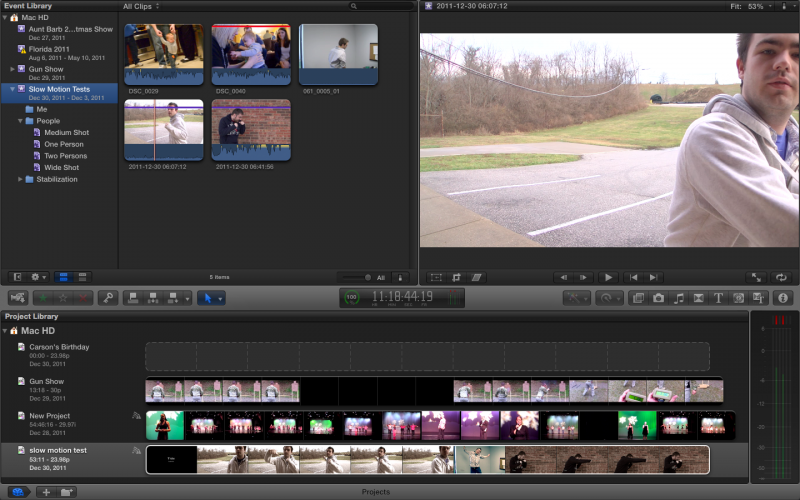
Can someone help point me in the right direction?
I've got my Event made up in my event library, and i have 5 videos in it. i have two of me, two of a child, and one of my friend. i've made a folder in that event labeled 'Me' where i want to put the two video clips of me in, and then i'll do the same for the child and my friend.
but it won't let me drag and drop the clips into the folders.
i'm completely confused on how to make any kind of organization in this
also, it tried making smart folders for me. one is labeled 'Two Persons' and there is only one person in my video. so that's not working out very well.
I've got my Event made up in my event library, and i have 5 videos in it. i have two of me, two of a child, and one of my friend. i've made a folder in that event labeled 'Me' where i want to put the two video clips of me in, and then i'll do the same for the child and my friend.
but it won't let me drag and drop the clips into the folders.
i'm completely confused on how to make any kind of organization in this
also, it tried making smart folders for me. one is labeled 'Two Persons' and there is only one person in my video. so that's not working out very well.
Please Log in to join the conversation.
- Tom Wolsky
-

- Offline
- Moderator
-

31 Dec 2011 05:25 #2885
by Tom Wolsky
Replied by Tom Wolsky on topic Re: Event Library Panel
Only collections can be put in a folder. Select the clip of you. Press Cmd-K. Type "me". A keyword collection is created. You can keyword a whole clip or a selected portion of a clip.
Please Log in to join the conversation.
- bradywurtz
-
Topic Author
- Offline
- Elite Member
-
Less
More
- Posts: 265
- Thank you received: 7
31 Dec 2011 05:32 #2888
by bradywurtz
Replied by bradywurtz on topic Re: Event Library Panel
so instead of selecting like 12 clips from my project and just dragging and dropping them in a random folder and naming it later, i now have to click on each clip individually, then type in the name of that 'keyword', and do that for every clip?
these seems like it might take more time than just putting things in a folder like computers have done since we got folders and files to move around
these seems like it might take more time than just putting things in a folder like computers have done since we got folders and files to move around
Please Log in to join the conversation.
- Tom Wolsky
-
- Offline
- Moderator
-
31 Dec 2011 05:56 #2889
by Tom Wolsky
Replied by Tom Wolsky on topic Re: Event Library Panel
Once you've created the collection you can drag as many clips as you want into the collection to keyword then. Or you can select the clips and use a designated keyboard shortcut to assign the keyword and add it to the collection.
Please Log in to join the conversation.
- simonpwood
-
- Offline
- Platinum Member
-

Less
More
- Posts: 654
- Thank you received: 42
31 Dec 2011 20:43 #2895
by simonpwood
For simple videos its easier to just drag them in to the folders.
You only really see the benefit of the key word collections in larger projects. Right now I am assembling a 'database' of footage for a big documentary. We have hundreds of clips, and will be into the thousands before it is finished; all on different subjects, styles, shot on different cameras, different locations and different times.
In this case we are able to assign multiple keywords to individual clips (subjects, locations, time, camera etc etc), so that then when we come back to edit we will be able to cross reference all the clips and bring them up when needed according to keyword searches. It is much better than just having them in a simple bin for that type of project.
Replied by simonpwood on topic Re: Event Library Panel
bradywurtz wrote: so instead of selecting like 12 clips from my project and just dragging and dropping them in a random folder and naming it later, i now have to click on each clip individually, then type in the name of that 'keyword', and do that for every clip?
these seems like it might take more time than just putting things in a folder like computers have done since we got folders and files to move around
For simple videos its easier to just drag them in to the folders.
You only really see the benefit of the key word collections in larger projects. Right now I am assembling a 'database' of footage for a big documentary. We have hundreds of clips, and will be into the thousands before it is finished; all on different subjects, styles, shot on different cameras, different locations and different times.
In this case we are able to assign multiple keywords to individual clips (subjects, locations, time, camera etc etc), so that then when we come back to edit we will be able to cross reference all the clips and bring them up when needed according to keyword searches. It is much better than just having them in a simple bin for that type of project.
Please Log in to join the conversation.
- bradywurtz
-
Topic Author
- Offline
- Elite Member
-
Less
More
- Posts: 265
- Thank you received: 7
31 Dec 2011 21:23 #2897
by bradywurtz
Replied by bradywurtz on topic Re: Event Library Panel
wow, ok i just found out that when i make a keyword folder i can just drag and drop anything, so that's basically a bin for me, or a keyword folder; two in one, nice
and you just blew my mind on the documentary thing. i'm also doing a documentary, we just started it and decided to work on it in FCP6 instead of jumping into FCPX since it's new, but now you've got me thinking of reorganizing everything in FCPX now
Thanks for the feedback!!
and you just blew my mind on the documentary thing. i'm also doing a documentary, we just started it and decided to work on it in FCP6 instead of jumping into FCPX since it's new, but now you've got me thinking of reorganizing everything in FCPX now
Thanks for the feedback!!
Please Log in to join the conversation.

31 Dec 2011 22:26 #2901
by BenB
Replied by BenB on topic Re: Event Library Panel
Also remember when you make keywords, you can assign them Control+(1-9) shortcuts for when you're organizing lots of assets at one sitting. As well as drag and drop multiple clips at once.
Not to mention the automated renaming functions.
www.kenstone.net/fcp_homepa/fcp_x_batch_rename_clips_young.html
Not to mention the automated renaming functions.
www.kenstone.net/fcp_homepa/fcp_x_batch_rename_clips_young.html
Please Log in to join the conversation.
