


- Posts: 568
- Thank you received: 74
3 Post Moderation Rule for New Boarders (25 Jan 2021)
New boarders will have their posts moderated - Don't worry if you cannot see your post immediately.
Edit Metadata View
14 Apr 2018 07:50 - 14 Apr 2018 07:51 #95144
by Axel
Edit Metadata View was created by Axel
The free Sony Catalyst Browse used to display quite some metadata from my (Sony) cameras that didn't appear in FCP's info inspector, such as focal length, aperture, exposure time/shutter speed, ISO and WB (if not all, then at least some of them).
Yesterday, I thought, this can't be. I realized that none of these categories were even listed in the default metadata views. So I went >edit metadata view and checked all the EXIF entries I am interested in. Then I saved that as Axels EXIF.
But Axels EXIF is a very short list. It contains categories I clearly had unchecked (Device make, Device model, Orientation, Bit depth) and none of the ones I chose.
What went wrong?
Yesterday, I thought, this can't be. I realized that none of these categories were even listed in the default metadata views. So I went >edit metadata view and checked all the EXIF entries I am interested in. Then I saved that as Axels EXIF.
But Axels EXIF is a very short list. It contains categories I clearly had unchecked (Device make, Device model, Orientation, Bit depth) and none of the ones I chose.
What went wrong?
Last edit: 14 Apr 2018 07:51 by Axel.
Please Log in to join the conversation.

14 Apr 2018 15:09 #95147
by JoeEditor
Replied by JoeEditor on topic Edit Metadata View
Thinking out loud; It could be Sony is embedding info in a proprietary manner, that their own app can read, not the standard EXIF format.
Please Log in to join the conversation.
14 Apr 2018 15:37 - 14 Apr 2018 15:48 #95148
by Axel
Replied by Axel on topic Edit Metadata View
Possible. Probable.
But still, why does my custom metadata view not fill with my own choices but with weird random stuff that stays empty nonetheless? I'd appreciate the idea that, say, a vertical image triggers "Orientation", but that's not the case. So what is all this good for?
Maybe I had made notes on a slate about the lenses used, about aperture, ISO and other things, and now I wanted to manually write that to the metadata - how? I have to use tags instead.
But still, why does my custom metadata view not fill with my own choices but with weird random stuff that stays empty nonetheless? I'd appreciate the idea that, say, a vertical image triggers "Orientation", but that's not the case. So what is all this good for?
Maybe I had made notes on a slate about the lenses used, about aperture, ISO and other things, and now I wanted to manually write that to the metadata - how? I have to use tags instead.
Last edit: 14 Apr 2018 15:48 by Axel.
Please Log in to join the conversation.
14 Apr 2018 16:35 #95149
by Axel
Okay, I can Add Custom Metadata Field. That works for the time being.
What brings me to all this is Atomos' Jeremy Young saying about ProRes Raw:
Meanwhile, there are two boring Aladins lantern PRR clips from Panasonics EVA-1 available for download, but no metadata appear. Must be my fault. I am doing this the wrong way. All the time. The information sucked from imported clips is ridiculously thin. This just can't be normal!
Replied by Axel on topic Edit Metadata View
Axel wrote: Maybe I had made notes on a slate about the lenses used, about aperture, ISO and other things, and now I wanted to manually write that to the metadata - how? I have to use tags instead.
Okay, I can Add Custom Metadata Field. That works for the time being.
What brings me to all this is Atomos' Jeremy Young saying about ProRes Raw:
And one of the most important things is the metadata from the camera. We record all of the metadata. We know what the white balance was, we know what the ISO setting was, we know what the shutter speed was. And it means we can do all this realtime decoding and re-encoding to make everything work in the timeline.
Meanwhile, there are two boring Aladins lantern PRR clips from Panasonics EVA-1 available for download, but no metadata appear. Must be my fault. I am doing this the wrong way. All the time. The information sucked from imported clips is ridiculously thin. This just can't be normal!
Please Log in to join the conversation.
14 Apr 2018 17:16 #95150
by JoeEditor
Replied by JoeEditor on topic Edit Metadata View
Very few “video” cameras record this type of metadata.
Please Log in to join the conversation.

15 Apr 2018 02:16 #95156
by dgwvideo
Creating history....one edit at a time !
Replied by dgwvideo on topic Edit Metadata View
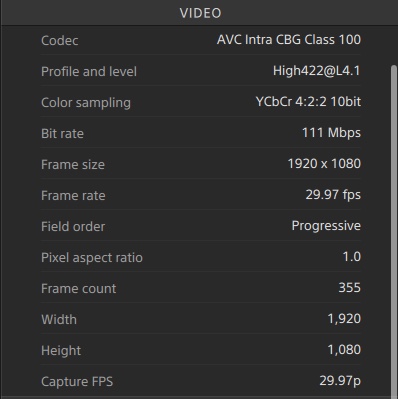
Most of our Sony cameras record all this metadata and more, but FCPX doesn't display the majority of them. Here are two panes of several from a typical XAVC-I clip that provide that detail in Catalyst but not FCPX:

Creating history....one edit at a time !
Please Log in to join the conversation.
