




- Posts: 170
- Thank you received: 2
3 Post Moderation Rule for New Boarders (25 Jan 2021)
New boarders will have their posts moderated - Don't worry if you cannot see your post immediately.
Smart Collection "120p"
28 Mar 2018 16:12 #94877
by PhilCF
Smart Collection "120p" was created by PhilCF
Could someone please talk me through the process of setting up a Smart Collection that identifies all the 120p footage in an event?
Create New Smart Collection - Click it. Select Format Info - Video Frame Rate - Is - ...?
Then what? No matter what I put in the box, Nothing comes up in the Smart collection.
Thanks in advance x
x
Create New Smart Collection - Click it. Select Format Info - Video Frame Rate - Is - ...?
Then what? No matter what I put in the box, Nothing comes up in the Smart collection.
Thanks in advance
x Please Log in to join the conversation.
- Tom Wolsky
-

- Offline
- Moderator
-

28 Mar 2018 16:22 - 28 Mar 2018 16:22 #94878
by Tom Wolsky
Replied by Tom Wolsky on topic Smart Collection "120p"
Did you click under Video Frame Rate to add 120? It's very hard to see, but it's there.
Also, does FCP define the video frame rate as 120. Sometimes that's the shooting frame rate.
Also, does FCP define the video frame rate as 120. Sometimes that's the shooting frame rate.
Last edit: 28 Mar 2018 16:22 by Tom Wolsky.
Please Log in to join the conversation.
28 Mar 2018 16:38 #94879
by PhilCF
Replied by PhilCF on topic Smart Collection "120p"
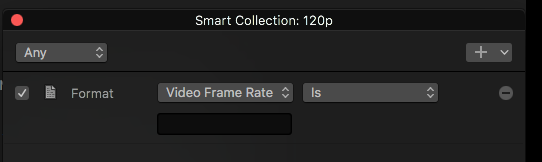
I've attached a screenshot.. I don't get any drop down options when I click the "Video Frame Rate" and "Is"
Only the option to write something in the box?
Only the option to write something in the box?
Please Log in to join the conversation.
- Tom Wolsky
-
- Offline
- Moderator
-
28 Mar 2018 16:42 #94880
by Tom Wolsky
Replied by Tom Wolsky on topic Smart Collection "120p"
If you type in 120 and get no response either the application is not recognizing the files as a video frame rate of 120 or the smart collection is limited to an event that doesn’t include that criteria.
Please Log in to join the conversation.
- brian.seegmiller
-

- Offline
- New Member
-

Less
More
- Posts: 17
- Thank you received: 1
28 Mar 2018 19:10 #94882
by brian.seegmiller
Replied by brian.seegmiller on topic Smart Collection "120p"
This may sound strange but move your Smart Collection window in front of a lighter background to see the field to enter your frame rate. Mine was in front of a black background and I could not see it.
Please Log in to join the conversation.
29 Mar 2018 03:32 #94887
by PhilCF
Replied by PhilCF on topic Smart Collection "120p"
Hi Tom,
Is the Smart Collection limited to a specific event? I thought it referenced files across all events? How do you point the Smart Collection to work on one specific event?
Thank you !
Phil
Is the Smart Collection limited to a specific event? I thought it referenced files across all events? How do you point the Smart Collection to work on one specific event?
Thank you !
Phil
Please Log in to join the conversation.
- Tom Wolsky
-
- Offline
- Moderator
-
29 Mar 2018 03:41 #94888
by Tom Wolsky
Replied by Tom Wolsky on topic Smart Collection "120p"
If you select an event and create a smart collection it’s for that event. If you select the library you can create a library smart collection that goes into the library’s smart collection folder.
Please Log in to join the conversation.
29 Mar 2018 15:11 #94892
by PhilCF
Replied by PhilCF on topic Smart Collection "120p"
Hi Tom,
I've now created a Smart Collection within the event (thanks for that).
The smart collection works for all options - e.g. Media type - stills (pulls up all the stills), used media etc... But when I try to select frame rate at 120p or 60p or 23.98p, nothing happens.
Do you have any more tricks up your sleeve?
Thanks,
Phil
I've now created a Smart Collection within the event (thanks for that).
The smart collection works for all options - e.g. Media type - stills (pulls up all the stills), used media etc... But when I try to select frame rate at 120p or 60p or 23.98p, nothing happens.
Do you have any more tricks up your sleeve?
Thanks,
Phil
Please Log in to join the conversation.
- Tom Wolsky
-
- Offline
- Moderator
-
29 Mar 2018 15:15 #94893
by Tom Wolsky
Replied by Tom Wolsky on topic Smart Collection "120p"
Are you typing “120p?” Don’t. The frame rate is just a number. 120. 59.94. 29.97.
Please Log in to join the conversation.
29 Mar 2018 15:21 - 29 Mar 2018 15:22 #94894
by PhilCF
I realise that the frame rate I was shooting in wasn't 24p or 60p, rather 24p was 23.98p and 60p was 59.94 - So when I put these numbers into a smart collection, I get all the 24p and 60p footage.
BUT... whatever I shot on 120p on the Sony A7S2, FCPX recognises as "60p" footage. So I still can't use a smart collection to grab all the super slow mo stuff. It has got a little icon on the top left, but I still want to figure this out.
24 is 23.98
60 is 59.94
120 is....?
Does anyone know what 120p footage is actually shot at on the Sony A7s2??
Thanks !
Replied by PhilCF on topic Smart Collection "120p"
I have made a "mini" breakthrough.Tom Wolsky wrote: If you select an event and create a smart collection it’s for that event. If you select the library you can create a library smart collection that goes into the library’s smart collection folder.
I realise that the frame rate I was shooting in wasn't 24p or 60p, rather 24p was 23.98p and 60p was 59.94 - So when I put these numbers into a smart collection, I get all the 24p and 60p footage.
BUT... whatever I shot on 120p on the Sony A7S2, FCPX recognises as "60p" footage. So I still can't use a smart collection to grab all the super slow mo stuff. It has got a little icon on the top left, but I still want to figure this out.
24 is 23.98
60 is 59.94
120 is....?
Does anyone know what 120p footage is actually shot at on the Sony A7s2??
Thanks !
Last edit: 29 Mar 2018 15:22 by PhilCF.
Please Log in to join the conversation.
- Tom Wolsky
-
- Offline
- Moderator
-
29 Mar 2018 15:24 - 29 Mar 2018 15:26 #94895
by Tom Wolsky
Replied by Tom Wolsky on topic Smart Collection "120p"
120. The display at the top of the inspector only seems capable of standard frame rates. Check the frame rate in the Extended inspector.
Last edit: 29 Mar 2018 15:26 by Tom Wolsky.
Please Log in to join the conversation.

29 Mar 2018 17:19 #94896
by Axel
Replied by Axel on topic Smart Collection "120p"
With the said Sonys, FCP hasn't any information / metadata about the shooting frame rate of slomos, as discussed
here
. Therefore, you can only guess the right rate. Or, as I would suggest, make notes while recording and later tag the clips "120". Because you CAN'T edit the shooting frame rate either (which in my case is "24" for 23,98 or "25" for 25).
Please Log in to join the conversation.
- Karsten Schlüter
-

- Offline
- Moderator
-
Less
More
- Posts: 3790
- Thank you received: 718
30 Mar 2018 05:19 - 30 Mar 2018 05:22 #94903
by Karsten Schlüter
<cough> guess? you SEE wether it's slowmo or not, don't you?
And one should know how he set the cams video fps …
trouble with 100/120fps in a 25/30fps 'wrapper', there's indeed no meta telling that (no meta FCPX does read…)
What I wrote in the post, Alex links to: lucky me, my standard-recs (AVCHD) are named 'clip123', whereas my cam names slowmo/mp4 'P123' = easy to filter that.
Plus, what about - tag (paper, pencil? whoo, oldschool!!) on shooting the slowmos, and on import re-name slowmos … for those few shots of a day no real issue, isn't it? … I LOVE automatisms, and a 'shot/playback meta' would be helpful … but some 'problems' are … not THAT problematic. my 5¢ …
… what happened to the goo' ol' script-girl?? replaced by that beardy DITguy… << that's not p.c. these days anymore, hmm? :lol:
Replied by Karsten Schlüter on topic Smart Collection "120p"
Axel wrote: …. Therefore, you can only guess the right rate. ….
<cough> guess? you SEE wether it's slowmo or not, don't you?
And one should know how he set the cams video fps …
trouble with 100/120fps in a 25/30fps 'wrapper', there's indeed no meta telling that (no meta FCPX does read…)
What I wrote in the post, Alex links to: lucky me, my standard-recs (AVCHD) are named 'clip123', whereas my cam names slowmo/mp4 'P123' = easy to filter that.
Plus, what about - tag (paper, pencil? whoo, oldschool!!) on shooting the slowmos, and on import re-name slowmos … for those few shots of a day no real issue, isn't it? … I LOVE automatisms, and a 'shot/playback meta' would be helpful … but some 'problems' are … not THAT problematic. my 5¢ …
… what happened to the goo' ol' script-girl?? replaced by that beardy DITguy… << that's not p.c. these days anymore, hmm? :lol:
Last edit: 30 Mar 2018 05:22 by Karsten Schlüter.
Please Log in to join the conversation.
