


- Posts: 80
- Thank you received: 0
3 Post Moderation Rule for New Boarders (25 Jan 2021)
New boarders will have their posts moderated - Don't worry if you cannot see your post immediately.
Adjusting scene contrast using FCP-X 10.3.4
28 Mar 2018 00:26 #94859
by Nemo
Adjusting scene contrast using FCP-X 10.3.4 was created by Nemo
I have searched FCP-X Apple manual but cannot find a method for adjusting contrast of a particular scene.
Your guidance would be most appreciated.
Thank you.
Your guidance would be most appreciated.
Thank you.
Please Log in to join the conversation.
- Karsten Schlüter
-

- Offline
- Moderator
-

Less
More
- Posts: 3790
- Thank you received: 718
28 Mar 2018 04:40 #94861
by Karsten Schlüter
Replied by Karsten Schlüter on topic Adjusting scene contrast using FCP-X 10.3.4
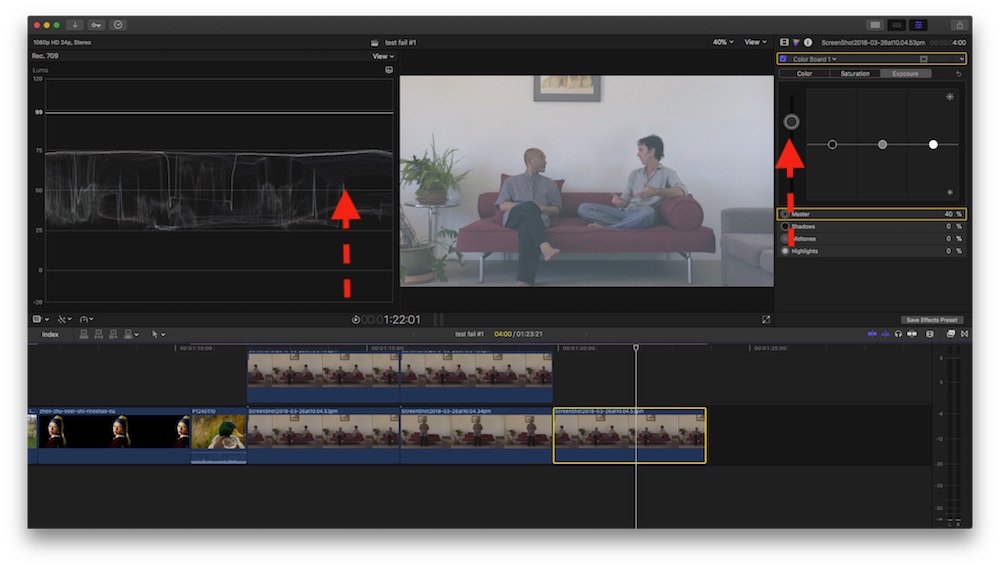
switch to the color board (cmd-6) 'Exposure', and best-practice switch-on the Waveform Monitor (cmd-7)
(borrowed the scene from some other topic )
)

scene is a bit under-exposure and low contrasts … so, first step is, to get the Midtones In place, in the <cough> middle …:
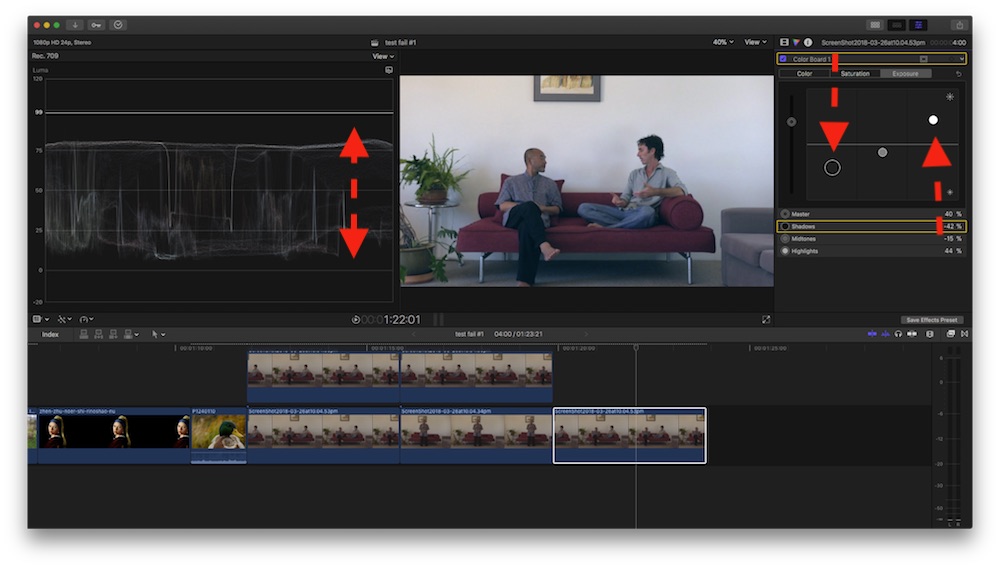
next, making blacks black, whites white, use the full dynamic range IRE 0-100: just drag the corresponding pucks… don't overdo, keep the scope in eye:
(borrowed the scene from some other topic
)
scene is a bit under-exposure and low contrasts … so, first step is, to get the Midtones In place, in the <cough> middle …:
next, making blacks black, whites white, use the full dynamic range IRE 0-100: just drag the corresponding pucks… don't overdo, keep the scope in eye:
Please Log in to join the conversation.
28 Mar 2018 04:54 #94863
by Nemo
Replied by Nemo on topic Adjusting scene contrast using FCP-X 10.3.4
Thank you for your assistance. I will print this information out and put it to use in the morning.
Thanks again.
Thanks again.
Please Log in to join the conversation.
