


- Posts: 2609
- Thank you received: 696
3 Post Moderation Rule for New Boarders (25 Jan 2021)
New boarders will have their posts moderated - Don't worry if you cannot see your post immediately.
Fewest steps to color balance skin tone?
26 Mar 2018 21:27 #94831
by joema
Fewest steps to color balance skin tone? was created by joema
There's a well-known procedure involving cropping to a patch of skin and setting the skin tone line using the vector scope. If color correcting many interview shots, the UI steps become quite tedious. This is mainly because the crop adjustment is up under the video inspector but the color commands are in the color inspector, and the crop must be readjusted on each clip.
Is there any suggested method to reduce the UI steps for this, or an alternate method setting skin tone which achieves similar results without those repetitive steps?
10.4 has a nice enhancement to select the next clip with CMD+right arrow and there's a command to copy color corrections from 1, 2 or 3 clips back, which I programmed to be CTRL+OPT+CMD+1, 2 and 3.
The presence of these shortcuts shows Apple is thinking about streamlining UI steps for color correction.
I programmed my keyboard commands to select the color inspector with CMD+6, go to video inspector with OPT+CMD+4, enable crop mode with SHFT+C, go to next/prev color correction in stack with OPT+CMD+right arrow and left arrow. So I can hop around fairly quickly but it's still a lot of keystrokes to crop and set skin tone on a bunch of clips using the crop method.
Obviously you can correct the base or parent clip in the browser, which reduces the number of color corrections if several ranges are used in the timeline from a parent clip. But is there either (1) a faster method to set skin tone via vector scope and crop method or (2) a different method of setting skin tone which has fewer UI steps?
For anyone unfamiliar with this method Larry Jordan discusses it at about 25:00 into this video:
Is there any suggested method to reduce the UI steps for this, or an alternate method setting skin tone which achieves similar results without those repetitive steps?
10.4 has a nice enhancement to select the next clip with CMD+right arrow and there's a command to copy color corrections from 1, 2 or 3 clips back, which I programmed to be CTRL+OPT+CMD+1, 2 and 3.
The presence of these shortcuts shows Apple is thinking about streamlining UI steps for color correction.
I programmed my keyboard commands to select the color inspector with CMD+6, go to video inspector with OPT+CMD+4, enable crop mode with SHFT+C, go to next/prev color correction in stack with OPT+CMD+right arrow and left arrow. So I can hop around fairly quickly but it's still a lot of keystrokes to crop and set skin tone on a bunch of clips using the crop method.
Obviously you can correct the base or parent clip in the browser, which reduces the number of color corrections if several ranges are used in the timeline from a parent clip. But is there either (1) a faster method to set skin tone via vector scope and crop method or (2) a different method of setting skin tone which has fewer UI steps?
For anyone unfamiliar with this method Larry Jordan discusses it at about 25:00 into this video:
Please Log in to join the conversation.

27 Mar 2018 01:11 - 27 Mar 2018 01:12 #94835
by cseeman
Replied by cseeman on topic Fewest steps to color balance skin tone?
IF FCPX implemented Groups as Color Finale or, I believe Chromatic does now, that would make it simple. Otherwise you can correct your "hero" shot and select all the other shots based on that and do one big paste. Selecting each is going to take a bit of command clicking though. I think implementing Grouping would be the feature request to make though.
Last edit: 27 Mar 2018 01:12 by cseeman.
Please Log in to join the conversation.
27 Mar 2018 01:15 #94836
by cseeman
Replied by cseeman on topic Fewest steps to color balance skin tone?
I haven't tried it but I wonder if a Role based selection would be possible. That way one could select the Role "Interviewee 1" and Paste after making the first correction.
Please Log in to join the conversation.

27 Mar 2018 06:17 - 27 Mar 2018 07:07 #94837
by Axel
But at the same time, the sky looks dramatically different in Crete (almost royal blue, due to lack of humidity), Berlin (a cyan cast, due to smog,) and over the Amazonas (light blue, lot of humidity in the air). Not to talk about dawn or sunset - ever seen a dawn in Malaysia? Looks like a giant 360° Color Board with quite some illegal values (in reality, light doesn't clip above 100 "%", when this was recorded, HDR was not known yet).
The same with grass. And the same with skintone. The skin tone line shows blood (physiologically saturated arterial blood, to be exact), not skin. Jordan cites Alexis van Hurkman, who claims to have first used the term skintone line, yet van Hurkman says (i.e. in his blogpost Thinking Aloud), that while it IS a reference, it should be something to know about, but not used to color balance a shot.
What in Resolve is a storable "grade" - with individual nodes that you can rename to "contrast" "color balance" "secondary skin CC" or whatever - would be a saved effect preset in FCP X. Or a freeze frame of the reference shot or reference *frame* of your sequence with the CC effect on it. The latter would allow you to directly compare it to the other shots using the crop tool (a shortcut in Resolve), but with less ease and efficiency. Then there is also the stillstore . And the grouping. And the fact that you have every tool at your fingertip, whereas in FCP X we try to avoid navigating in tiny windows by assigning custom shortcuts that we just shouldn't need. BTW: cudos to your method, joema.
I am all for the 10.4 CC tools. But with Resolve, CC is much more precise and a lot faster.
Replied by Axel on topic Fewest steps to color balance skin tone?
Larry Jordan wrote: Our brains are programmed to know three colors: blue sky, green grass and skin tones.
But at the same time, the sky looks dramatically different in Crete (almost royal blue, due to lack of humidity), Berlin (a cyan cast, due to smog,) and over the Amazonas (light blue, lot of humidity in the air). Not to talk about dawn or sunset - ever seen a dawn in Malaysia? Looks like a giant 360° Color Board with quite some illegal values
(in reality, light doesn't clip above 100 "%", when this was recorded, HDR was not known yet).The same with grass. And the same with skintone. The skin tone line shows blood (physiologically saturated arterial blood, to be exact), not skin. Jordan cites Alexis van Hurkman, who claims to have first used the term skintone line, yet van Hurkman says (i.e. in his blogpost Thinking Aloud), that while it IS a reference, it should be something to know about, but not used to color balance a shot.
What in Resolve is a storable "grade" - with individual nodes that you can rename to "contrast" "color balance" "secondary skin CC" or whatever - would be a saved effect preset in FCP X. Or a freeze frame of the reference shot or reference *frame* of your sequence with the CC effect on it. The latter would allow you to directly compare it to the other shots using the crop tool (a shortcut in Resolve), but with less ease and efficiency. Then there is also the stillstore . And the grouping. And the fact that you have every tool at your fingertip, whereas in FCP X we try to avoid navigating in tiny windows by assigning custom shortcuts that we just shouldn't need. BTW: cudos to your method, joema.
I am all for the 10.4 CC tools. But with Resolve, CC is much more precise and a lot faster.
Last edit: 27 Mar 2018 07:07 by Axel.
Please Log in to join the conversation.
- Karsten Schlüter
-

- Offline
- Moderator
-

Less
More
- Posts: 3790
- Thank you received: 718
27 Mar 2018 06:51 #94838
by Karsten Schlüter
a) no, b) I get envy , c) illegal beautiful … nice phrase!
Here adds the blind to the colors discussions:
listen to Larry in the 24th min of this excellent presentation: "… to balance white when no white is in the shot…" … so, this is a 'crook'.
I did - on my amateur level - some dozen interviews lately, the kids didn't WB in camera = colors were terrible. But the WB-feature with the eye-dropper gave superb results… incl. skin-tones.
speaking of having no clue…:
Maybe one or the other remembers this nice experiment:
put a red light onto a banana - what color does the banana have? (spoiler: 'yellow')
now, roll a paper to some roll, and watch just the 'skin' of the banana -what color? (spoiler: black)
technically, a banana under red light can not be yellow! And, due to be complementary, it 'sucks' all light = luminance 0 = black.
That roll prevents our brain the infos, to 'autoWB' the scene… we don't 'see' yellow, we just know yellow…
long story short:
skin-tones to balance a shot is a workaround; WB is best done on recording; give FCPX v10.4s WBfeature a chance…
(a pro photog told me the trick: if you don't have a 80%-grey-card at hand <pun intended>, just point camera to the inside of your hand)
And I'm pretty sure, skin tones don't match the scopes line, when recorded on sunset at a beach in Malaysia… :whistle:
Replied by Karsten Schlüter on topic Fewest steps to color balance skin tone?
Axel wrote: … ever seen a dawn in Malaysia? Looks like a giant 360° Color Board with quite some illegal values
a) no, b) I get envy
, c) illegal beautiful … nice phrase!Here adds the blind to the colors discussions:
listen to Larry in the 24th min of this excellent presentation: "… to balance white when no white is in the shot…" … so, this is a 'crook'.
I did - on my amateur level - some dozen interviews lately, the kids didn't WB in camera = colors were terrible. But the WB-feature with the eye-dropper gave superb results… incl. skin-tones.
speaking of having no clue…:
Maybe one or the other remembers this nice experiment:
put a red light onto a banana - what color does the banana have? (spoiler: 'yellow')
now, roll a paper to some roll, and watch just the 'skin' of the banana -what color? (spoiler: black)
technically, a banana under red light can not be yellow! And, due to be complementary, it 'sucks' all light = luminance 0 = black.
That roll prevents our brain the infos, to 'autoWB' the scene… we don't 'see' yellow, we just know yellow…
long story short:
skin-tones to balance a shot is a workaround; WB is best done on recording; give FCPX v10.4s WBfeature a chance…
(a pro photog told me the trick: if you don't have a 80%-grey-card at hand <pun intended>, just point camera to the inside of your hand)
And I'm pretty sure, skin tones don't match the scopes line, when recorded on sunset at a beach in Malaysia… :whistle:
Please Log in to join the conversation.
27 Mar 2018 07:41 - 27 Mar 2018 07:41 #94839
by Axel
I do know that the "memory colors" work. My older brother (best score in the Pantone color vision accuracy test = zero, spontaneously, also accurately guesses the original colors of B&W images) used to work as a colorist / retoucher for print advertising. Many years ago, he showed me an ad for a famous chocolate brand with purple wrapping paper. He said, that's difficult, because the paper is the same color as the chocolate. I said, clearly not, the chocolate is brown. He said, this brown can't be reproduced with the printing colors, the chocolate is purple too, here, I put a real chocolate on the image for you to see. He was right. Now the colors are much improved, but for many years I saw lilac chocolate in candy ads ever since.
But doesn't this prove that we rather see what we expect? We see a sky with the sun. We expect it to be blue, and that's what we see.
We are quite good at judging a known person's health by shade and hue of his/her skin. But just go outside and take notice of peoples' skin, and you will find no "line". Maybe Trump is the closest match, but we find him to look weird and make remarks about his complexion.
Replied by Axel on topic Fewest steps to color balance skin tone?
Karsten Schlüter wrote: technically, a banana under red light can not be yellow! And, due to be complementary, it 'sucks' all light = luminance 0 = black.
That roll prevents our brain the infos, to 'autoWB' the scene… we don't 'see' yellow, we just know yellow…
I do know that the "memory colors" work. My older brother (best score in the Pantone color vision accuracy test = zero, spontaneously, also accurately guesses the original colors of B&W images) used to work as a colorist / retoucher for print advertising. Many years ago, he showed me an ad for a famous chocolate brand with purple wrapping paper. He said, that's difficult, because the paper is the same color as the chocolate. I said, clearly not, the chocolate is brown. He said, this brown can't be reproduced with the printing colors, the chocolate is purple too, here, I put a real chocolate on the image for you to see. He was right. Now the colors are much improved, but for many years I saw lilac chocolate in candy ads ever since.
But doesn't this prove that we rather see what we expect? We see a sky with the sun. We expect it to be blue, and that's what we see.
We are quite good at judging a known person's health by shade and hue of his/her skin. But just go outside and take notice of peoples' skin, and you will find no "line". Maybe Trump is the closest match, but we find him to look weird and make remarks about his complexion.
Last edit: 27 Mar 2018 07:41 by Axel.
Please Log in to join the conversation.
27 Mar 2018 11:38 - 27 Mar 2018 11:42 #94843
by joema
Thanks everyone for the suggestions. We generally use an X-Rite ColorChecker Passport Video card at the head or tail of each interview: a.co/ejprh07
All our planned multicam interviews use custom camera white balance against a large video grey target, but some impromptu walk-up interviews use auto white balance, and almost none of the b-roll supporting shots can use manual WB because of the dynamic conditions.
One problem is sometimes the X-Rite card has a glare which makes it ineffective, and it's not practical to use for b-roll shots of opportunity. Thus there is a lot of color correcting/matching which is aided by cropping to a patch of skin and using the vector scope.
Another problem is even manual in-camera WB doesn't solve everything, especially when shooting three-camera interviews with different sensors. A lot of manual correction is still required.
I don't exclusively use the "skin patch crop" method but I use it a lot. In difficult lighting conditions it helps find a starting point, if nothing else. As the FCPX UI is currently designed, it's a little unwieldy to constantly crop and recrop clip after clip, popping between the video inspector and color inspector.
However it's better than it was in previous versions, and there are several new shortcut keys to help. I suggest anyone doing lots of color correction in FCPX 10.4 get the Ripple Training class on this; they cover it well:
www.rippletraining.com/products/final-cu...-final-cut-pro-10-4/
Replied by joema on topic Fewest steps to color balance skin tone?
Karsten Schlüter wrote: ...skin-tones to balance a shot is a workaround; WB is best done on recording; give FCPX v10.4s WB feature a chance….And I'm pretty sure, skin tones don't match the scopes line, when recorded on sunset at a beach in Malaysia…
Thanks everyone for the suggestions. We generally use an X-Rite ColorChecker Passport Video card at the head or tail of each interview: a.co/ejprh07
All our planned multicam interviews use custom camera white balance against a large video grey target, but some impromptu walk-up interviews use auto white balance, and almost none of the b-roll supporting shots can use manual WB because of the dynamic conditions.
One problem is sometimes the X-Rite card has a glare which makes it ineffective, and it's not practical to use for b-roll shots of opportunity. Thus there is a lot of color correcting/matching which is aided by cropping to a patch of skin and using the vector scope.
Another problem is even manual in-camera WB doesn't solve everything, especially when shooting three-camera interviews with different sensors. A lot of manual correction is still required.
I don't exclusively use the "skin patch crop" method but I use it a lot. In difficult lighting conditions it helps find a starting point, if nothing else. As the FCPX UI is currently designed, it's a little unwieldy to constantly crop and recrop clip after clip, popping between the video inspector and color inspector.
However it's better than it was in previous versions, and there are several new shortcut keys to help. I suggest anyone doing lots of color correction in FCPX 10.4 get the Ripple Training class on this; they cover it well:
www.rippletraining.com/products/final-cu...-final-cut-pro-10-4/
Last edit: 27 Mar 2018 11:42 by joema.
Please Log in to join the conversation.
27 Mar 2018 12:20 #94846
by Axel
Replied by Axel on topic Fewest steps to color balance skin tone?
You could connect an adjustment layer over all your clips and add a shape mask to it. Easier to reframe this for every clip underneath - of course you CC the clip,not the AL. What you still had to do is jump between adjustment layer and the clip and between color tool and effects tab.
Please Log in to join the conversation.
- Karsten Schlüter
-
- Offline
- Moderator
-
Less
More
- Posts: 3790
- Thank you received: 718
27 Mar 2018 16:57 - 28 Mar 2018 06:37 #94851
by Karsten Schlüter
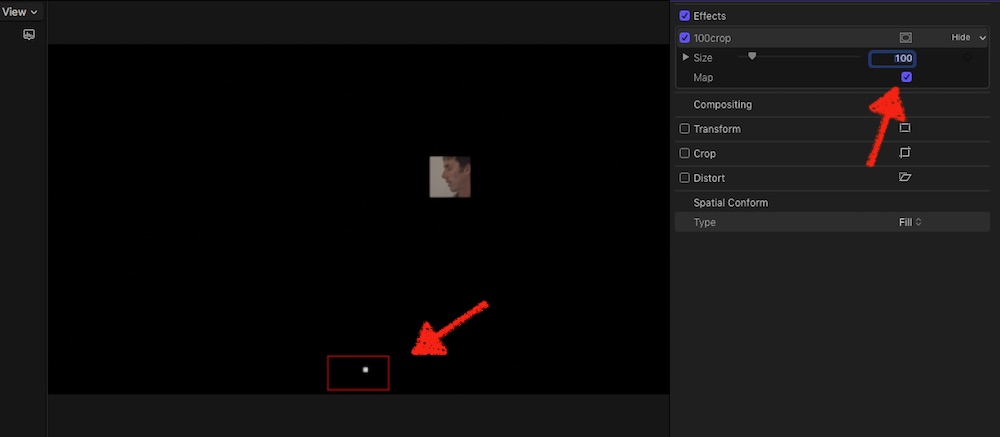
would it help, to have an effect at hand, which instantly crops to 100x100 (scalable) and with an OSC to move in the Preview window?
/ follow the usual install routine for Effects /
Replied by Karsten Schlüter on topic Fewest steps to color balance skin tone?
joema wrote: … it's a little unwieldy to constantly crop and recrop clip after clip, popping between the video inspector and color inspector.…
would it help, to have an effect at hand, which instantly crops to 100x100 (scalable) and with an OSC to move in the Preview window?
/ follow the usual install routine for Effects /
Last edit: 28 Mar 2018 06:37 by Karsten Schlüter.
Please Log in to join the conversation.
28 Mar 2018 06:18 #94865
by Axel
YES!
I think this is agaig. Thanks, Karsten.
Replied by Axel on topic Fewest steps to color balance skin tone?
Karsten Schlüter wrote: would it help, to have an effect at hand, which instantly crops to 100x100 (scalable) and with an OSC to move in the Preview window?
YES!
I think this is agaig. Thanks, Karsten.
Please Log in to join the conversation.
- Karsten Schlüter
-
- Offline
- Moderator
-
Less
More
- Posts: 3790
- Thank you received: 718
28 Mar 2018 06:40 #94866
by Karsten Schlüter
replaced it with version 2… now with a 'Map' for better orientation; switchable, in case it confuses your Scopes…
(Motion is a FUN toy!!)
Replied by Karsten Schlüter on topic Fewest steps to color balance skin tone?
Axel wrote: …YES!
I think this is agaig. Thanks, Karsten.
replaced it with version 2… now with a 'Map' for better orientation; switchable, in case it confuses your Scopes…
(Motion is a FUN toy!!)
Please Log in to join the conversation.
29 Mar 2018 18:55 #94897
by joema
Karsten, thanks that's a help. It's faster and easier than adjusting the crop. The problem is you can't disable cropping (or your effect) while inside the color inspector. The procedure is crop (or use your effect), check vector scope, adjust color wheels/board/curves, remove crop to verify in full frame, repeat. So each cycle requires hopping out of the color inspector to disable the crop, then back in. Is there a way to register a toggle on/off shortcut key for a custom effect which works when that effect isn't selected?
Replied by joema on topic Fewest steps to color balance skin tone?
Karsten Schlüter wrote:
Axel wrote: …YES!
I think this is agaig. Thanks, Karsten.
replaced it with version 2… now with a 'Map' for better orientation; switchable, in case it confuses your Scopes...
Karsten, thanks that's a help. It's faster and easier than adjusting the crop. The problem is you can't disable cropping (or your effect) while inside the color inspector. The procedure is crop (or use your effect), check vector scope, adjust color wheels/board/curves, remove crop to verify in full frame, repeat. So each cycle requires hopping out of the color inspector to disable the crop, then back in. Is there a way to register a toggle on/off shortcut key for a custom effect which works when that effect isn't selected?
Please Log in to join the conversation.
- Karsten Schlüter
-
- Offline
- Moderator
-
Less
More
- Posts: 3790
- Thank you received: 718
30 Mar 2018 04:47 - 30 Mar 2018 04:48 #94901
by Karsten Schlüter
hmm, just tried - not really :
you can right-click my lil cropper, 'Make Default Effect', so applying it to your clips by alt-E.
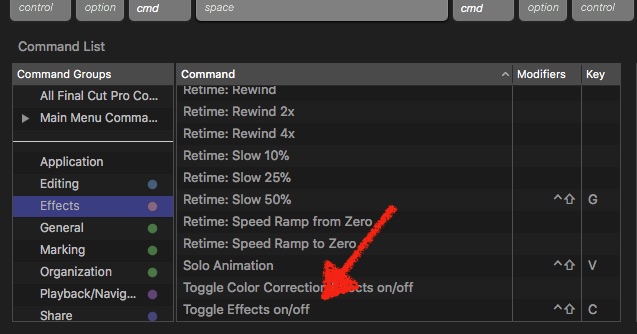
further more, in the Commands/Customize palette, you could assign a short-cut 'Toggle Effect On/Off' …
but…
That toggles just the last-applied effect … so, the finger-artistry would be:
select clip, cmd-6 to apply CC = to launch color-correction, alt-e = to apply crop100, adjust curves/wotever and toggle btw cropped and full-screen by e.g. alt-shift-c ...
…phew! no fun.
Plan b)?
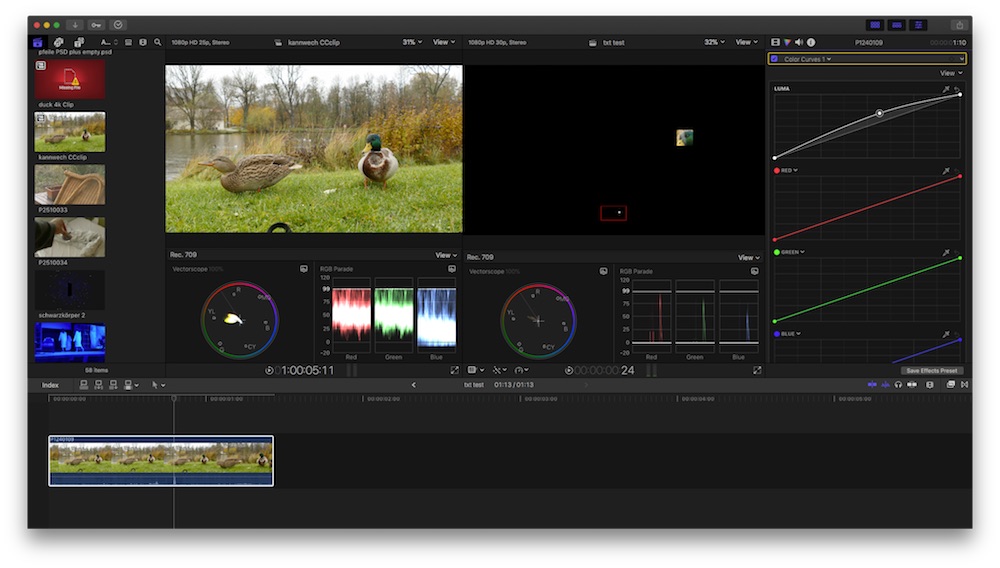
for 'matching' recordings from my <300€ amateur cams, I made me a Workspace, which puts two clips side-by-side … But, no, you need cropped/uncropped of same but affected clip… hmm, beyond my skills, sorry! …
btw: does DaVInci not offer an autoWB with Xrite-charts?? tell Resolve 'this rectangle is an Xrite, get happy with it!" (now THAT would be fun for my trash … but beyond schools budgets …)
Replied by Karsten Schlüter on topic Fewest steps to color balance skin tone?
joema wrote: … Is there a way to register a toggle on/off shortcut key for a custom effect which works when that effect isn't selected?
hmm, just tried - not really :
you can right-click my lil cropper, 'Make Default Effect', so applying it to your clips by alt-E.
further more, in the Commands/Customize palette, you could assign a short-cut 'Toggle Effect On/Off' …
but…
That toggles just the last-applied effect … so, the finger-artistry would be:
select clip, cmd-6 to apply CC = to launch color-correction, alt-e = to apply crop100, adjust curves/wotever and toggle btw cropped and full-screen by e.g. alt-shift-c ...
…phew! no fun.
Plan b)?
for 'matching' recordings from my <300€ amateur cams, I made me a Workspace, which puts two clips side-by-side … But, no, you need cropped/uncropped of same but affected clip… hmm, beyond my skills, sorry! …
btw: does DaVInci not offer an autoWB with Xrite-charts?? tell Resolve 'this rectangle is an Xrite, get happy with it!" (now THAT would be fun for my trash … but beyond schools budgets …)
Last edit: 30 Mar 2018 04:48 by Karsten Schlüter.
Please Log in to join the conversation.
30 Mar 2018 12:44 - 30 Mar 2018 12:46 #94910
by joema
Karsten, thanks for taking the time to make this. I am using this method and it helps.
Yes I also have a workspace for side-by-side matching. It is tricky when working with multicam since there are essentially two different workflows. For regular clips you can display a browser clip and timeline clip, each with their own scopes. If needed you can copy corrections to the browser clip for a "hero" shot. For multicam it's more complex depending on whether you're matching the individual angles within the clip or another clip to the multicam timeline clip. Unlike regular clips, timeline multicam clips dynamically inherit changes from the browser version. It's easy to get confused and unintentionally get additive color correction effects applied at different points.
Don't know about Resolve but Color Finale has this, and we shoot all interviews with the X-Rite passport video color checker card. In Color Finale you draw a box around a frame with the card and it uses all the colors to correct the scene. However using it is quite finicky since even a slight glare or color cast on the card throws things off. The new 10.4 color tools can't do that, but after using that feature a lot in Color Finale I'm not sure of the true value.
Replied by joema on topic Fewest steps to color balance skin tone?
Karsten Schlüter wrote: ...you can right-click my lil cropper, 'Make Default Effect', so applying it to your clips by alt-E...in the Commands/Customize palette, you could assign a short-cut 'Toggle Effect On/Off' …That toggles just the last-applied effect … so, the finger-artistry would be:
select clip, cmd-6 to apply CC = to launch color-correction, alt-e = to apply crop100, adjust curves/wotever and toggle btw cropped and full-screen by e.g. alt-shift-c ...
Karsten, thanks for taking the time to make this. I am using this method and it helps.
Karsten Schlüter wrote: ...for 'matching' recordings from my <300€ amateur cams, I made me a Workspace, which puts two clips side-by-side …
Yes I also have a workspace for side-by-side matching. It is tricky when working with multicam since there are essentially two different workflows. For regular clips you can display a browser clip and timeline clip, each with their own scopes. If needed you can copy corrections to the browser clip for a "hero" shot. For multicam it's more complex depending on whether you're matching the individual angles within the clip or another clip to the multicam timeline clip. Unlike regular clips, timeline multicam clips dynamically inherit changes from the browser version. It's easy to get confused and unintentionally get additive color correction effects applied at different points.
Karsten Schlüter wrote: .....btw: does DaVInci not offer an autoWB with Xrite-charts?? tell Resolve 'this rectangle is an Xrite, get happy with it!"...
Don't know about Resolve but Color Finale has this, and we shoot all interviews with the X-Rite passport video color checker card. In Color Finale you draw a box around a frame with the card and it uses all the colors to correct the scene. However using it is quite finicky since even a slight glare or color cast on the card throws things off. The new 10.4 color tools can't do that, but after using that feature a lot in Color Finale I'm not sure of the true value.
Last edit: 30 Mar 2018 12:46 by joema.
Please Log in to join the conversation.
30 Mar 2018 18:44 - 30 Mar 2018 18:52 #94913
by Axel
Replied by Axel on topic Fewest steps to color balance skin tone?
This probably is irrelevant for joema, who deals with too much footage in multicam. But I think what FCP X encourages people to do is looking for creative solutions, Karstens being one of them.
The same keystroke cascades backwards and forwards, a lot of redundant clicks (yes, including clicks, double clicks and also gestures), could be triggered by one key using a software like Better Touch Tool (there are probably many, this is just he one I once tested myself). Those keys can also be - for instance - a letter pressed for two seconds or specifically the zero on the num pad. By this, you effectively compound sequences of actions.
The problem with this is, it only works for one person who is and stays perfectly aware when to hit that key. And the other problem: programming it so that it works flawlessly needs some time and effort also. But if it can help to abbreviate a lot of repetitive routines it can be worth it.
I said before that I thought Resolve was much better for this. Here is an example. Go directly to 4'53".
He checks for skin tones by drawing a mask over the face. He never leaves the main Color windows, he never has to evoke another effect, the "Power Windows" are always there. He just highlights the inside of the, er, color shape mask, with the magic wand, but he could as well just toggle shift + h. He uses the waveform, but he could as well have used the vectorscope, and he would see the skintone indicator.
Why doesn't the same work in FCP? The tools are there ...
The answer is, FCP is an NLE, and probably the best. It's sort of okay for doing some quick & dirty CC, but as soon as it gets tricky, in becomes a PITA.
When it comes to grouping similar shots, FCP again has the advantage. But you must have organized the material well in advance (which we all do anyway).
The same keystroke cascades backwards and forwards, a lot of redundant clicks (yes, including clicks, double clicks and also gestures), could be triggered by one key using a software like Better Touch Tool (there are probably many, this is just he one I once tested myself). Those keys can also be - for instance - a letter pressed for two seconds or specifically the zero on the num pad. By this, you effectively compound sequences of actions.
The problem with this is, it only works for one person who is and stays perfectly aware when to hit that key. And the other problem: programming it so that it works flawlessly needs some time and effort also. But if it can help to abbreviate a lot of repetitive routines it can be worth it.
I said before that I thought Resolve was much better for this. Here is an example. Go directly to 4'53".
He checks for skin tones by drawing a mask over the face. He never leaves the main Color windows, he never has to evoke another effect, the "Power Windows" are always there. He just highlights the inside of the, er, color shape mask, with the magic wand, but he could as well just toggle shift + h. He uses the waveform, but he could as well have used the vectorscope, and he would see the skintone indicator.
Why doesn't the same work in FCP? The tools are there ...
The answer is, FCP is an NLE, and probably the best. It's sort of okay for doing some quick & dirty CC, but as soon as it gets tricky, in becomes a PITA.
When it comes to grouping similar shots, FCP again has the advantage. But you must have organized the material well in advance (which we all do anyway).
Last edit: 30 Mar 2018 18:52 by Axel.
Please Log in to join the conversation.
