


- Posts: 8
- Thank you received: 0
3 Post Moderation Rule for New Boarders (25 Jan 2021)
New boarders will have their posts moderated - Don't worry if you cannot see your post immediately.
Renaming clips keeps reseting to original name as I type
26 Mar 2018 10:41 #94811
by pokkelZA
Renaming clips keeps reseting to original name as I type was created by pokkelZA
Hi
I am doing work as an assistant editor and have to rename and sync hundreds of clips each day. As I type the new name, FCP reverts it to the original as I'm typing. This is causing me a lot of frustration. I tried to record a screen recording with Quicktime to show people what I mean, but then, for some bizarre reason, it doesn't do it. I know, keep Quicktime open while doing your work... but that will flood my harddrive...
I'm working on a MacPro with Sierra as my OS and on FCP 10.4.
Any advice? Has anyone else come across this issue?
Regards
Wilhelm
I am doing work as an assistant editor and have to rename and sync hundreds of clips each day. As I type the new name, FCP reverts it to the original as I'm typing. This is causing me a lot of frustration. I tried to record a screen recording with Quicktime to show people what I mean, but then, for some bizarre reason, it doesn't do it. I know, keep Quicktime open while doing your work... but that will flood my harddrive...
I'm working on a MacPro with Sierra as my OS and on FCP 10.4.
Any advice? Has anyone else come across this issue?
Regards
Wilhelm
Please Log in to join the conversation.
- Karsten Schlüter
-

- Offline
- Moderator
-

Less
More
- Posts: 3790
- Thank you received: 718
26 Mar 2018 11:00 #94813
by Karsten Schlüter
Replied by Karsten Schlüter on topic Renaming clips keeps reseting to original name as I type
you follow the Batch Rename routine, described here?
help.apple.com/finalcutpro/mac/10.4/#/ver16e105
help.apple.com/finalcutpro/mac/10.4/#/ver16e105
Please Log in to join the conversation.
26 Mar 2018 11:06 #94814
by pokkelZA
Replied by pokkelZA on topic Renaming clips keeps reseting to original name as I type
Hi Karsten
No, I want to simply press Return and rename a clip. Sometimes it works fine, and other times it resets as I type; causing me to rage a bit.
No, I want to simply press Return and rename a clip. Sometimes it works fine, and other times it resets as I type; causing me to rage a bit.
Please Log in to join the conversation.
- Karsten Schlüter
-
- Offline
- Moderator
-
Less
More
- Posts: 3790
- Thank you received: 718
26 Mar 2018 14:48 #94823
by Karsten Schlüter
Replied by Karsten Schlüter on topic Renaming clips keeps reseting to original name as I type
… when I do that several hundred times, I would rage too. :lol:
(you mentioned 100, so, my assumption was you use the Batch rename feature … very handy)
so, you click on a name … in the Inspector or in the Event Browser?
(you mentioned 100, so, my assumption was you use the Batch rename feature … very handy)
so, you click on a name … in the Inspector or in the Event Browser?
Please Log in to join the conversation.
26 Mar 2018 15:13 #94824
by pokkelZA
Replied by pokkelZA on topic Renaming clips keeps reseting to original name as I type
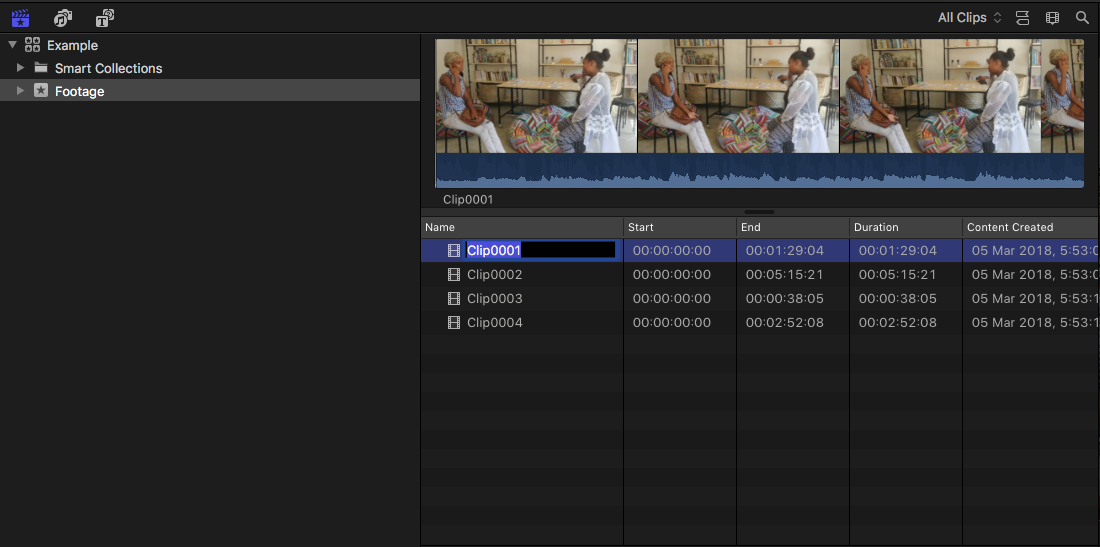
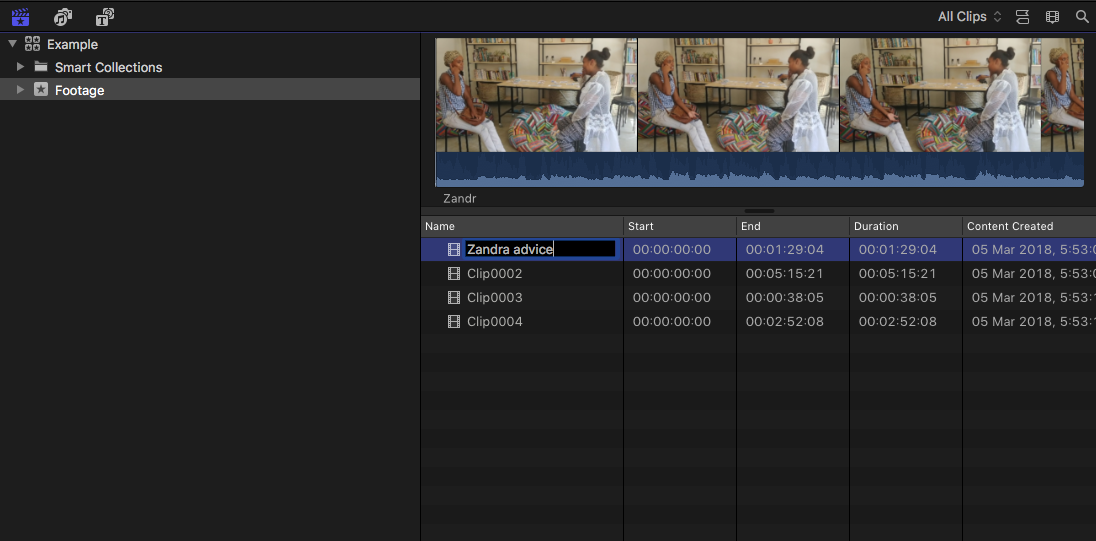
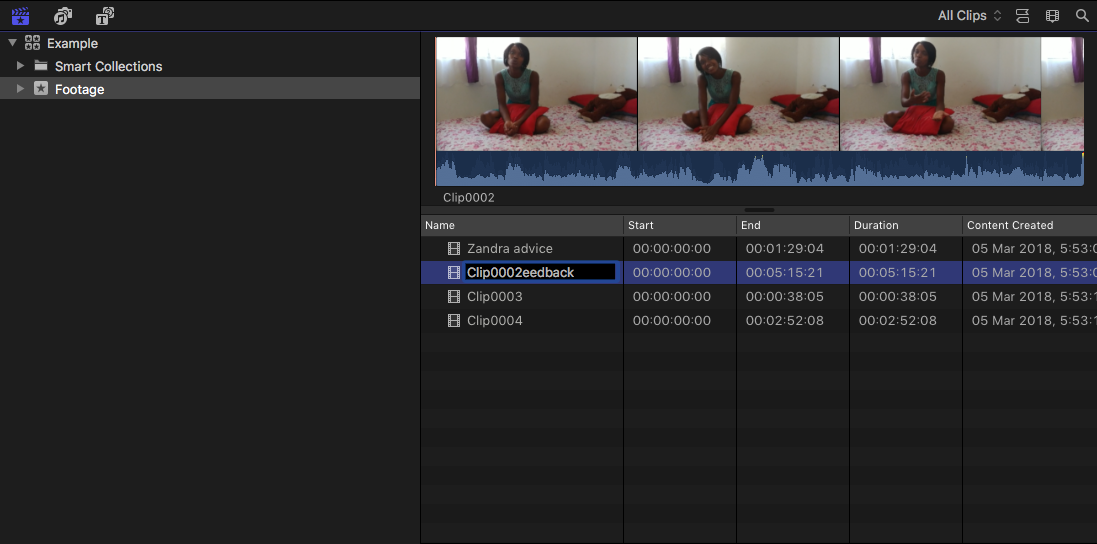
So I attached 3 screenshots to simmulate the problem.
I select the name in the Browser and press Enter/Return to rename it. The first Clip works fine (screenshots 1 and 2).
Then with the next clip I want to rename it Zandra Feedback. Halfway during the rename, the clip name reverts to Clip0002 and since I'm still typing it ends up as Clip0002eedback. Sigh. If I leave it for a second, it reverts back to Clip0002. This is UBER frustrating.
Is this a known bug? I've actually been experiencing it since version 10.3.4 but seem to be the only one in my group of friends...
I select the name in the Browser and press Enter/Return to rename it. The first Clip works fine (screenshots 1 and 2).
Then with the next clip I want to rename it Zandra Feedback. Halfway during the rename, the clip name reverts to Clip0002 and since I'm still typing it ends up as Clip0002eedback. Sigh. If I leave it for a second, it reverts back to Clip0002. This is UBER frustrating.
Is this a known bug? I've actually been experiencing it since version 10.3.4 but seem to be the only one in my group of friends...
Please Log in to join the conversation.
- Karsten Schlüter
-
- Offline
- Moderator
-
Less
More
- Posts: 3790
- Thank you received: 718
26 Mar 2018 15:28 #94826
by Karsten Schlüter
<cough> then it's no bug! A bug is, by definition, a repeatable malfunction … no repetition = no bug
Where are those clips stored, perhaps on some external drive, a NAS or something?
Replied by Karsten Schlüter on topic Renaming clips keeps reseting to original name as I type
pokkelZA wrote: … Is this a known bug?… seem to be the only one in my group of friends...
<cough> then it's no bug! A bug is, by definition, a repeatable malfunction … no repetition = no bug
Where are those clips stored, perhaps on some external drive, a NAS or something?
Please Log in to join the conversation.
26 Mar 2018 15:40 #94827
by pokkelZA
Replied by pokkelZA on topic Renaming clips keeps reseting to original name as I type
So...that was an example of something that's happened to over a thousand clips while working on a drama series. This was just an example of what happens quite regularly with clips I have to process.
Any ideas? The clips are on an external drive. For some shows it's on a RAID, for some, it's just a regular 8TB G-Tech G-Drive.
Any ideas? The clips are on an external drive. For some shows it's on a RAID, for some, it's just a regular 8TB G-Tech G-Drive.
Please Log in to join the conversation.
