


- Posts: 384
- Thank you received: 23
3 Post Moderation Rule for New Boarders (25 Jan 2021)
New boarders will have their posts moderated - Don't worry if you cannot see your post immediately.
Optical flow vs. Frame blending
25 Mar 2018 12:14 - 25 Mar 2018 12:14 #94796
by Makki
Optical flow vs. Frame blending was created by Makki
I am working on a project with flowing water. I have set all the clips and overlays to slower 25%. It tried both optical flow and frame blending. I actually can not see a difference between those options. So my questions is what is the benefit of using optical flow and in what situations. It must be a reason for this option I would think that optical flow should give better result. But I might be wrong.
Last edit: 25 Mar 2018 12:14 by Makki.
Please Log in to join the conversation.
- Karsten Schlüter
-

- Offline
- Moderator
-

Less
More
- Posts: 3790
- Thank you received: 718
25 Mar 2018 14:41 #94797
by Karsten Schlüter
yeah, flowing water is an excellent example for 'natural frame blending' …
Optical Flow makes sense, when you have a designated foreground object and a (ideally not moving) background, generally spoken:

Frame#1 shows a ball at position 1, frame#2 at position 2…
Speed 25%/Frame Blending would fade out circle #1 within four frames, and fade in circle #2.
With Speed 25%/Optical flow, there will actually new content computated: the missing positions between #1 and #2.
as an example, here a 100fps recording, lowered to 10% and OF
Frame blending would in this case 'wobble' the background. And, when you look closer: the 'synthesized' content is a not very precise … I should have used a shorter shutter speed…
Replied by Karsten Schlüter on topic Optical flow vs. Frame blending
Makki wrote: … flowing water.… optical flow and frame blending. I actually can not see a difference between those options.…
yeah, flowing water is an excellent example for 'natural frame blending' …
Optical Flow makes sense, when you have a designated foreground object and a (ideally not moving) background, generally spoken:
Frame#1 shows a ball at position 1, frame#2 at position 2…
Speed 25%/Frame Blending would fade out circle #1 within four frames, and fade in circle #2.
With Speed 25%/Optical flow, there will actually new content computated: the missing positions between #1 and #2.
as an example, here a 100fps recording, lowered to 10% and OF
Frame blending would in this case 'wobble' the background. And, when you look closer: the 'synthesized' content is a not very precise … I should have used a shorter shutter speed…
Please Log in to join the conversation.
25 Mar 2018 15:07 #94799
by Makki
Replied by Makki on topic Optical flow vs. Frame blending
As usual you always come with the best explanation. Thank you so much Karsten 
Please Log in to join the conversation.

27 Mar 2018 21:34 - 27 Mar 2018 21:34 #94855
by Redifer
Replied by Redifer on topic Optical flow vs. Frame blending
In my experience optical flow works best when there is a bit of motion blur in the original footage. If it's too sharp it will get really warpy and generally unacceptable. Also sometimes buildings in the distance with lots of detail will get totally messed up for like ONE FRAME for no discernible reason, even though nothing special is happening to them at that moment in time. So look at optical flow as a potential enhancement but don't count on it to help you out all the time.
Last edit: 27 Mar 2018 21:34 by Redifer.
Please Log in to join the conversation.
- Karsten Schlüter
-
- Offline
- Moderator
-
Less
More
- Posts: 3790
- Thank you received: 718
28 Mar 2018 05:04 #94864
by Karsten Schlüter
Interesting.
Contrary to my experience … are you using FCPX in a latest version? 'cause, not scientifically bullet-proof, but in my observation, Apple has changed/improved OF over the years. Not only making it faster since vers.10.4 using Metal, but 'smarter':
I do lots of football (the one played with the foot …), and for example rotating objects (ball) were always 'wobbly' with OF - that was improved, somewhere btw 10.2 and 10.3.x.
And: 'blurry' content 'wobbles' too - at last here. And the theory behind OF (calculating vectors, yaddayadda) asks for 'clear pixels' too … at last in my low-level understanding.
Replied by Karsten Schlüter on topic Optical flow vs. Frame blending
Redifer wrote: In my experience optical flow works best when there is a bit of motion blur in the original footage.….
Interesting.
Contrary to my experience … are you using FCPX in a latest version? 'cause, not scientifically bullet-proof, but in my observation, Apple has changed/improved OF over the years. Not only making it faster since vers.10.4 using Metal, but 'smarter':
I do lots of football (the one played with the foot …), and for example rotating objects (ball) were always 'wobbly' with OF - that was improved, somewhere btw 10.2 and 10.3.x.
And: 'blurry' content 'wobbles' too - at last here. And the theory behind OF (calculating vectors, yaddayadda) asks for 'clear pixels' too … at last in my low-level understanding.
Please Log in to join the conversation.
28 Mar 2018 22:15 #94885
by Redifer
Replied by Redifer on topic Optical flow vs. Frame blending
I am using the latest version but I haven't tried any high-shutter speed optical flow slowdowns since I've updated. But thinking about it logically, it's just warping between frames. The more differences there are between adjacent frames, the weirder it's gonna look. Some motion blur can decrease that difference. A spinning football or a bicycle wheel for example. are gonna look pretty weird at high shutter speeds. Granted motion blur doesn't really lend itself to a pleasing effect when slowed down, so there's that. I'd try a shot both ways if I had an awesome 100fps camera like you, back to back (same lighting conditions, same subjects, etc, just one has a super-crisp shutter speed and the other has some motion blur). The results would be interesting!
Please Log in to join the conversation.
- Karsten Schlüter
-
- Offline
- Moderator
-
Less
More
- Posts: 3790
- Thank you received: 718
30 Mar 2018 09:40 #94909
by Karsten Schlüter
… nothing fancy in use here a Lumx FZ1000 has a street-price from 500€ …
Had an hour yesterday to tinker something together:
I printed some chart, I thought would be useful and attached it to my tiny drill machine.
upper pic shows a frame, in real speed…
lower pic shows an Optical Flow processed frame of the same clip:

Very dramatically: from 'some' angle-speed on, the OF algorithms create nonsense, that odd 'bubble'… (red rectangle…)
Just to explain the word 'Angle Speed' (I'm not sure that word exists in English):
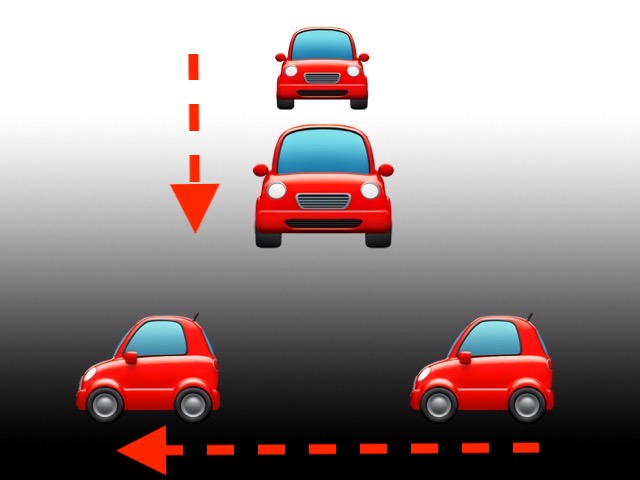
The top car has a speed of say 200km/h - but, due to direction, an angle-speed of close to null => the delta of content from frame#1 to frame#2 is small.
The lower car has a speed of say just 20km/h - but, due to direction, the angle-speed is very high => the 'difference' of content btw #1 and #2 is high…
Same with my propeller - the outer parts are moving 'faster' – too fast, to let OF calculate the in-betweens correctly.
Theoretically, one should be able to calculate the benchmark, what max angle-speed is supported - but that is way above my head, I'm no engineer!! hahaha!!
In short: OF gives best results, as long as the content doesn't move/change 'too much'… wotever 'too much' means :lol:
… the ol' rule from the 50ies comes to mind: don't pan faster than 5 (3?) sec thru a frame…
… next: try with diff. shutter.speeds for diff. amount of blurs… asks for a new chart, my drill has no adjustable speeds… ohh those hobbyists!! LOL
Replied by Karsten Schlüter on topic Optical flow vs. Frame blending
Redifer wrote: … I'd try a shot both ways if I had an awesome 100fps camera like you, back to back (same lighting conditions, same subjects, etc, just one has a super-crisp shutter speed and the other has some motion blur). The results would be interesting!
… nothing fancy in use here a Lumx FZ1000 has a street-price from 500€ …
Had an hour yesterday to tinker something together:
I printed some chart, I thought would be useful and attached it to my tiny drill machine.
upper pic shows a frame, in real speed…
lower pic shows an Optical Flow processed frame of the same clip:
Very dramatically: from 'some' angle-speed on, the OF algorithms create nonsense, that odd 'bubble'… (red rectangle…)
Just to explain the word 'Angle Speed' (I'm not sure that word exists in English):
The top car has a speed of say 200km/h - but, due to direction, an angle-speed of close to null => the delta of content from frame#1 to frame#2 is small.
The lower car has a speed of say just 20km/h - but, due to direction, the angle-speed is very high => the 'difference' of content btw #1 and #2 is high…
Same with my propeller - the outer parts are moving 'faster' – too fast, to let OF calculate the in-betweens correctly.
Theoretically, one should be able to calculate the benchmark, what max angle-speed is supported - but that is way above my head, I'm no engineer!! hahaha!!
In short: OF gives best results, as long as the content doesn't move/change 'too much'… wotever 'too much' means :lol:
… the ol' rule from the 50ies comes to mind: don't pan faster than 5 (3?) sec thru a frame…
… next: try with diff. shutter.speeds for diff. amount of blurs… asks for a new chart, my drill has no adjustable speeds… ohh those hobbyists!! LOL
Please Log in to join the conversation.

