


- Posts: 13
- Thank you received: 0
3 Post Moderation Rule for New Boarders (25 Jan 2021)
New boarders will have their posts moderated - Don't worry if you cannot see your post immediately.
Removing or fading an object from behind a moving subject?
25 Mar 2018 09:23 - 25 Mar 2018 09:25 #94793
by Toby1
Removing or fading an object from behind a moving subject? was created by Toby1
Hi,
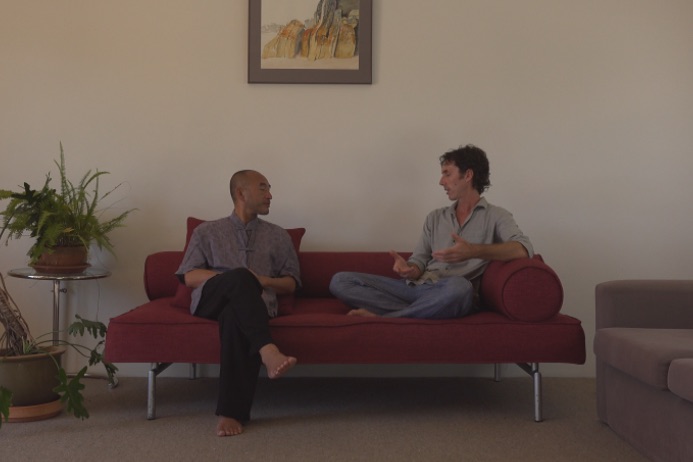
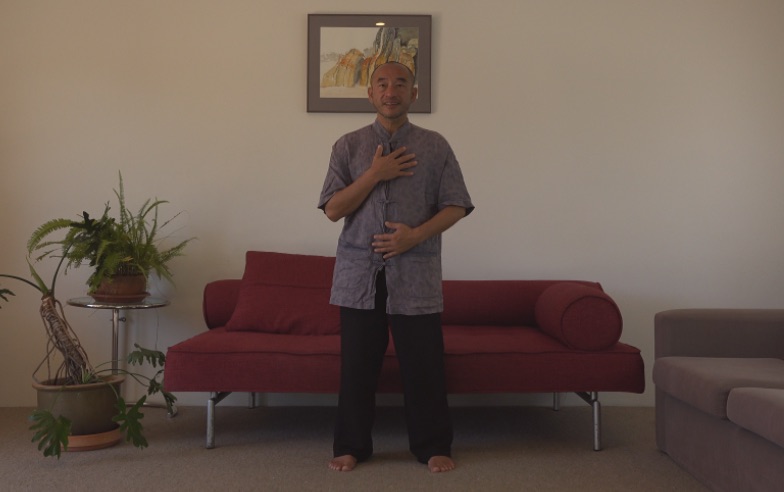
I recently shot a series of interviews/demonstrations on the run in a living room.
There is a picture on the wall behind the subject that I am looking for a way to remove or at least fade. The subject demonstrates Taichi movement.
Any suggestions?
I recently shot a series of interviews/demonstrations on the run in a living room.
There is a picture on the wall behind the subject that I am looking for a way to remove or at least fade. The subject demonstrates Taichi movement.
Any suggestions?
Last edit: 25 Mar 2018 09:25 by Toby1.
Please Log in to join the conversation.
- Karsten Schlüter
-

- Offline
- Moderator
-

Less
More
- Posts: 3790
- Thank you received: 718
25 Mar 2018 15:17 #94800
by Karsten Schlüter
Replied by Karsten Schlüter on topic Removing or fading an object from behind a moving subject?
That is a rather tricky one… because you have TWO subjects to mask and track, have a look:
#1 is your situation, you like to cover/censor/replace the pic - that could be done in FCPX, by manually transform some 'overlay' or a Censor effect (or using Motions tracker, or 99$ TrackX)

but…
#2 …that 'overlay' is covered by subject… so, you would need a mask (or a key) to 'hide' the parts of the overlay which are 'behind' the subject…
#3… in a perfect world, your subject is in some green screen…
#4 … but, with a done recording? I see the only option, to rotoscope the pic in the background… the blue line, hand drawn, every frame…
#1 is your situation, you like to cover/censor/replace the pic - that could be done in FCPX, by manually transform some 'overlay' or a Censor effect (or using Motions tracker, or 99$ TrackX)
but…
#2 …that 'overlay' is covered by subject… so, you would need a mask (or a key) to 'hide' the parts of the overlay which are 'behind' the subject…
#3… in a perfect world, your subject is in some green screen…
#4 … but, with a done recording? I see the only option, to rotoscope the pic in the background… the blue line, hand drawn, every frame…
Please Log in to join the conversation.
26 Mar 2018 10:41 #94810
by Toby1
Replied by Toby1 on topic Removing or fading an object from behind a moving subject?
Thanks Karsten.
I thought it would be difficult.
There is 2 sections in the interview.
1. 2 seated subjects where there is no movement in front of the picture.
2. One of the subjects departs the shot while the demonstrator stands and is now infant of the picture.
I thought it would be difficult.
There is 2 sections in the interview.
1. 2 seated subjects where there is no movement in front of the picture.
2. One of the subjects departs the shot while the demonstrator stands and is now infant of the picture.
Please Log in to join the conversation.
- Karsten Schlüter
-
- Offline
- Moderator
-
Less
More
- Posts: 3790
- Thank you received: 718
26 Mar 2018 10:58 #94812
by Karsten Schlüter
ad1) than apply a Draw Mask, put some solid color under the clip…
ad2) . trouble is : tools like SliceX mask the whole subject or, inverted, its whole surrounding . So, when you track/mask the person, it's not just the pic which gets replaced, but the whole room.
…and as far as I understand your description, it's hand-held (?)… so, again, imho, you have to rotoscope the parts of the background you don't want.
… or, reshoot
Can you post a screenshot of that situation?
Replied by Karsten Schlüter on topic Removing or fading an object from behind a moving subject?
Toby1 wrote: …
1. 2 seated subjects where there is no movement in front of the picture.
2. One of the subjects departs the shot while the demonstrator stands and is now infant of the picture.
ad1) than apply a Draw Mask, put some solid color under the clip…
ad2) . trouble is : tools like SliceX mask the whole subject or, inverted, its whole surrounding . So, when you track/mask the person, it's not just the pic which gets replaced, but the whole room.
…and as far as I understand your description, it's hand-held (?)… so, again, imho, you have to rotoscope the parts of the background you don't want.
… or, reshoot
Can you post a screenshot of that situation?
Please Log in to join the conversation.
26 Mar 2018 11:11 #94815
by Toby1
Replied by Toby1 on topic Removing or fading an object from behind a moving subject?
Please Log in to join the conversation.
- Karsten Schlüter
-
- Offline
- Moderator
-
Less
More
- Posts: 3790
- Thank you received: 718
26 Mar 2018 13:55 #94817
by Karsten Schlüter
Replied by Karsten Schlüter on topic Removing or fading an object from behind a moving subject?
okayyyyy …
for the first shot, it's easy, look:
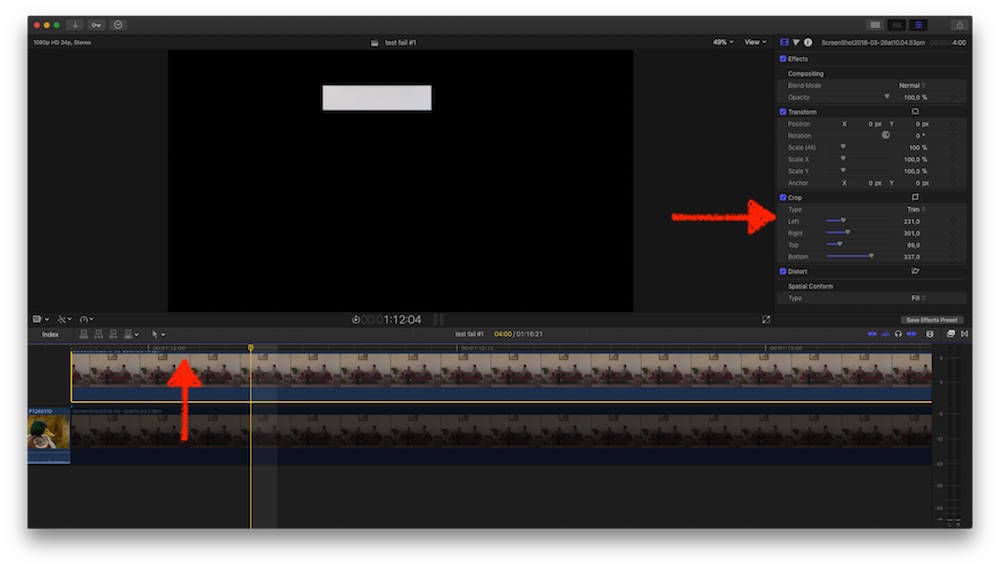
I doubled the clip by alt-drag it up, and cropped it to some area under picture
then…
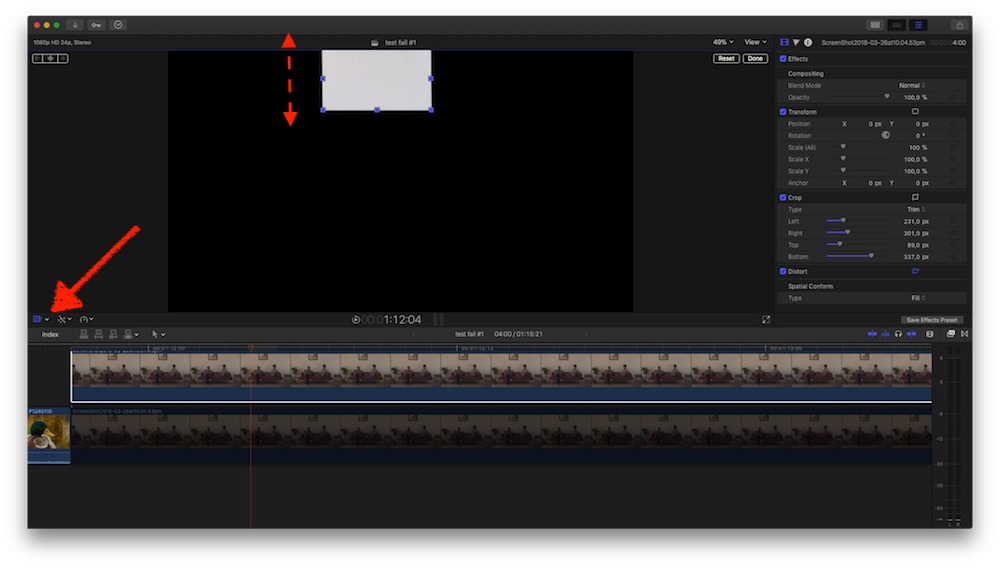
… using the Distortion tool, I stretched the crop to cover the pic .
next...
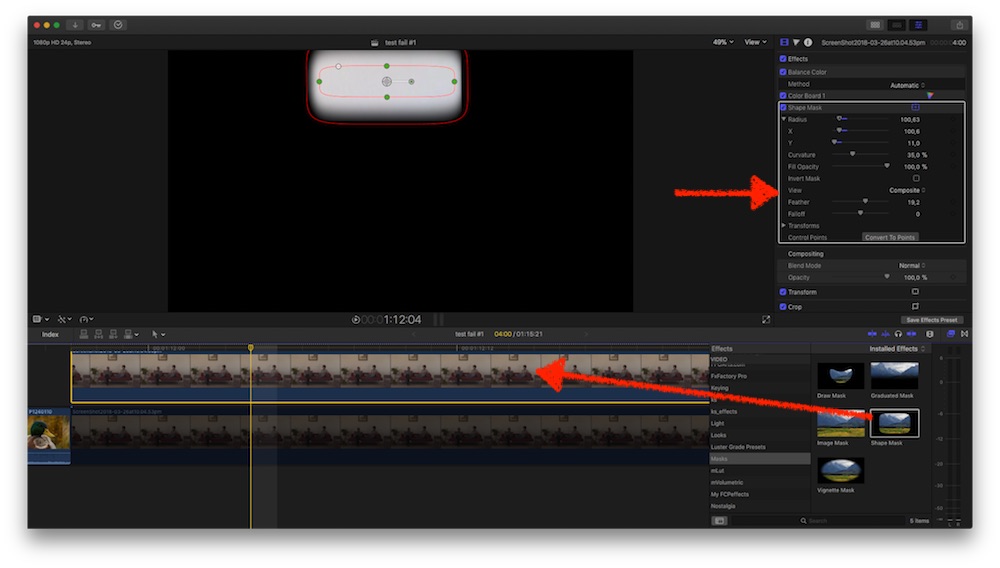
… I applied a rectangle mask, which allow me to feather the 'plaster'.
which, finally, results ....
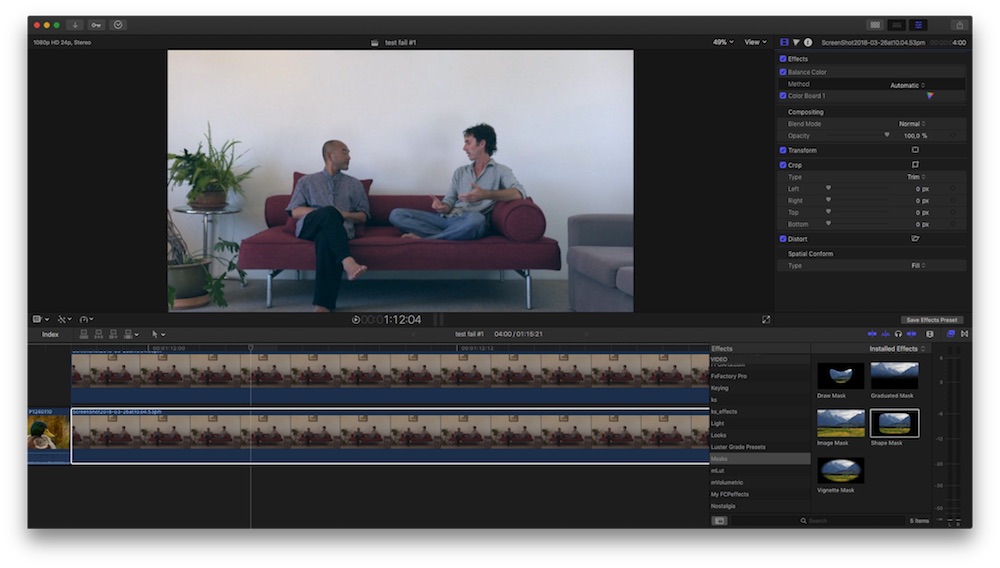
(I allowed me some CC )
for the first shot, it's easy, look:
I doubled the clip by alt-drag it up, and cropped it to some area under picture
then…
… using the Distortion tool, I stretched the crop to cover the pic .
next...
… I applied a rectangle mask, which allow me to feather the 'plaster'.
which, finally, results ....
(I allowed me some CC
) Please Log in to join the conversation.
- Karsten Schlüter
-
- Offline
- Moderator
-
Less
More
- Posts: 3790
- Thank you received: 718
26 Mar 2018 14:03 #94818
by Karsten Schlüter
Replied by Karsten Schlüter on topic Removing or fading an object from behind a moving subject?
The 'covered' pic needs an additional step (and that probably 'kills' your project, or asks for divine patience …)
first, I drag the 'plaster' clip from the first scene over clip#2 …
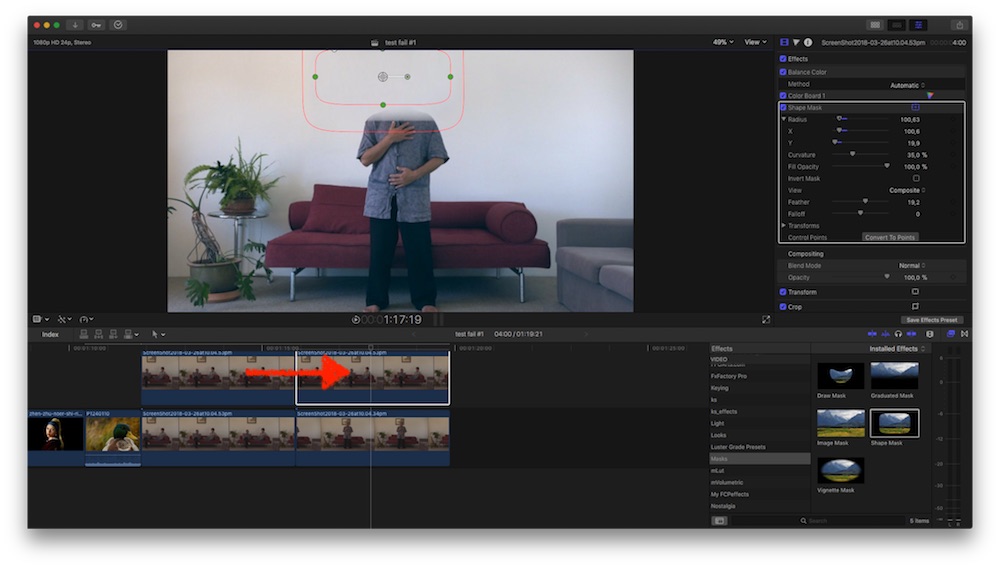
… which vanishes the pic, unfortunately the head ether...
then, I duplicate clip#2 from the timeline and drag it into lane #3, above the plaster-clip
Apply a Draw Mask …
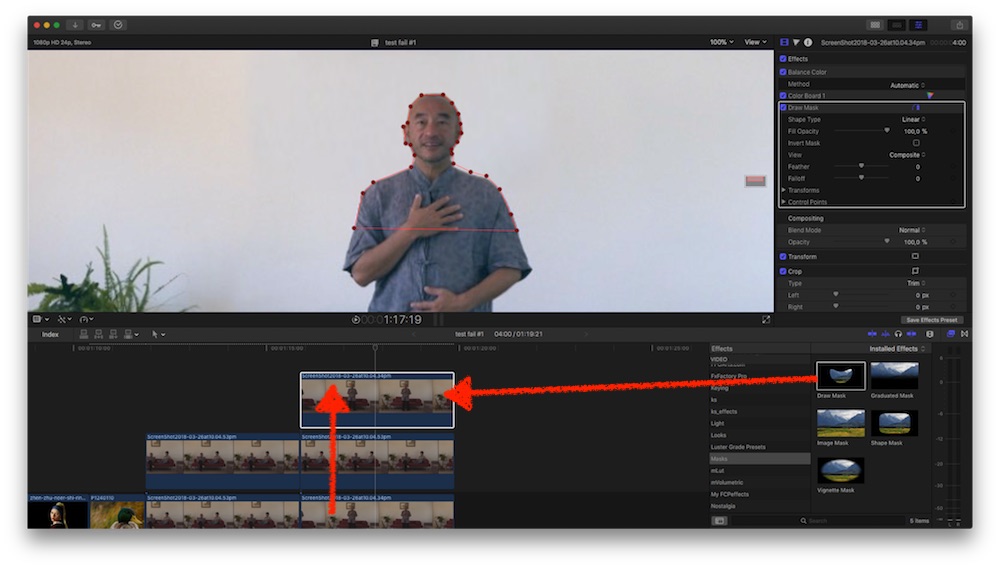
… this is the painstaking part. Plus, you have to adjust this mask every frame or so...
Maybe a tool like SliceX can help you, but I'm not too optimistic .... free trial. Trial
In the end it gives something like:
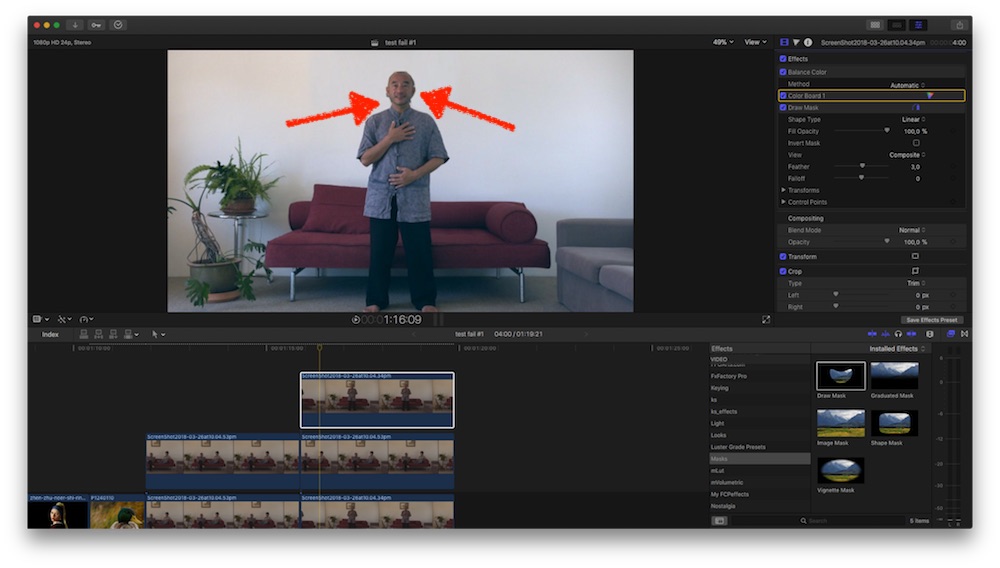
my mask is done quick'n dirty = you see some 'dirt' around his head, not nice.-
But generally spoken like that.
first, I drag the 'plaster' clip from the first scene over clip#2 …
… which vanishes the pic, unfortunately the head ether...
then, I duplicate clip#2 from the timeline and drag it into lane #3, above the plaster-clip
Apply a Draw Mask …
… this is the painstaking part. Plus, you have to adjust this mask every frame or so...
Maybe a tool like SliceX can help you, but I'm not too optimistic .... free trial. Trial
In the end it gives something like:
my mask is done quick'n dirty = you see some 'dirt' around his head, not nice.-
But generally spoken like that.
Please Log in to join the conversation.
- Karsten Schlüter
-
- Offline
- Moderator
-
Less
More
- Posts: 3790
- Thank you received: 718
26 Mar 2018 14:29 #94820
by Karsten Schlüter
Replied by Karsten Schlüter on topic Removing or fading an object from behind a moving subject?
Why not plastering a part the size of the pic, why that extra step with distortion and masking, one could ask?
well, if you watch closer, lights from the left, and there's some 'gradient' in the color(s) of the 'white' wall. By 'sampling' a part at the almost same position as the pic, I copy those gradients....
And why I'm so pessimistic about SliceX? well, the background (=the nasty pic) is very 'wild' and hard to differ from the foreground=subjects head (technically spoken!) … dare to say, a planar tracker as Mocha/SliceX has difficulties to track the content. A smart-tracker, as in iOS (and hidden in HighSierra) could accomplish better … FCPX v10.5?? LOL
well, if you watch closer, lights from the left, and there's some 'gradient' in the color(s) of the 'white' wall. By 'sampling' a part at the almost same position as the pic, I copy those gradients....
And why I'm so pessimistic about SliceX? well, the background (=the nasty pic) is very 'wild' and hard to differ from the foreground=subjects head (technically spoken!) … dare to say, a planar tracker as Mocha/SliceX has difficulties to track the content. A smart-tracker, as in iOS (and hidden in HighSierra) could accomplish better … FCPX v10.5?? LOL
Please Log in to join the conversation.
26 Mar 2018 23:20 #94832
by Toby1
Replied by Toby1 on topic Removing or fading an object from behind a moving subject?
Thanks for all your help Karsten.
Your step by step instructions are great.
I presume section 2 is more complicated to apply to film than a still.
Unfortunately my iMac has had a nervous breakdown= HD collapse, so I can try your suggestion straight away.
I will let you know how I go.
Thanks again
Your step by step instructions are great.
I presume section 2 is more complicated to apply to film than a still.
Unfortunately my iMac has had a nervous breakdown= HD collapse, so I can try your suggestion straight away.
I will let you know how I go.
Thanks again
Please Log in to join the conversation.

27 Mar 2018 12:14 #94845
by lichinho
Replied by lichinho on topic Removing or fading an object from behind a moving subject?
Just to add my $0.02, since you are in excellent hands with Karsten...
Did you consider using some B-roll?
if you could cut to some B-roll before the person stands up, you'd have your masking work greatly simplified; plus adding B-roll is a great way to spice up these otherwise almost static videos of people talking.
Did you consider using some B-roll?
if you could cut to some B-roll before the person stands up, you'd have your masking work greatly simplified; plus adding B-roll is a great way to spice up these otherwise almost static videos of people talking.
Please Log in to join the conversation.
27 Mar 2018 22:19 #94857
by Toby1
Replied by Toby1 on topic Removing or fading an object from behind a moving subject?
Thanks Lichinho.
I was thinking of using B roll to spice ti up.
Unfortunately once the subject stands the show starts, as he demonstrates Tai Chi methods standing. So the picture- masking issue still need s to be resolved.
I was thinking of using B roll to spice ti up.
Unfortunately once the subject stands the show starts, as he demonstrates Tai Chi methods standing. So the picture- masking issue still need s to be resolved.
Please Log in to join the conversation.
27 Mar 2018 22:28 #94858
by Toby1
Replied by Toby1 on topic Removing or fading an object from behind a moving subject?
Hi Karsten,
Forgot to say that the camera is on a tripod.
Forgot to say that the camera is on a tripod.
Please Log in to join the conversation.
- Karsten Schlüter
-
- Offline
- Moderator
-
Less
More
- Posts: 3790
- Thank you received: 718
28 Mar 2018 04:49 #94862
by Karsten Schlüter
good news, but doesn't solve the task to mask out any content before the pic on the wall. That's what rotoscoping << link to wiki, means …
Again, SliceX promises to track such a mask automatically: you once draw the mask, then it follows the subject … will work perfectly in front of the empty wall, but in front of that pic…?,
coremelt offers a free trial and lots of tutorials, give it a shot!
…and don't get irritated, some of the advice has a 10y old (?) as VO … odd for a professional product but maybe Rogers kind of humor(??)
Replied by Karsten Schlüter on topic Removing or fading an object from behind a moving subject?
Toby1 wrote: … camera is on a tripod.
good news, but doesn't solve the task to mask out any content before the pic on the wall. That's what rotoscoping << link to wiki, means …
Again, SliceX promises to track such a mask automatically: you once draw the mask, then it follows the subject … will work perfectly in front of the empty wall, but in front of that pic…?,
coremelt offers a free trial and lots of tutorials, give it a shot!
…and don't get irritated, some of the advice has a 10y old (?) as VO … odd for a professional product but maybe Rogers kind of humor(??)
Please Log in to join the conversation.
