


- Posts: 7
- Thank you received: 1
3 Post Moderation Rule for New Boarders (25 Jan 2021)
New boarders will have their posts moderated - Don't worry if you cannot see your post immediately.
FCPX 10.4 (big) audio issue with P2 spanned clip
21 Mar 2018 16:19 #94760
by Hub
FCPX 10.4 (big) audio issue with P2 spanned clip was created by Hub
When importing panasonic P2 mxf spanned clip , with no audio on CH1, you do not have any audio (on each track)at all in your FCPX 10.4 clip.
(Spanned clip = Quite long clip (>5-4 mn in DVCPRO HD) on your P2 card. ITV for instance.)
Everything is ok with 10.3. (!)
Very very annoying ...
Does anyone encounter the same issue ?
(Spanned clip = Quite long clip (>5-4 mn in DVCPRO HD) on your P2 card. ITV for instance.)
Everything is ok with 10.3. (!)
Very very annoying ...
Does anyone encounter the same issue ?
Please Log in to join the conversation.


22 Mar 2018 04:02 - 22 Mar 2018 04:03 #94765
by dgwvideo
Creating history....one edit at a time !
Replied by dgwvideo on topic FCPX 10.4 (big) audio issue with P2 spanned clip
I see no problem with this and I just tested this with FCPX 10.4 under Sierra for someone else on this forum. Make sure you are using the the latest P2 drivers from Panasonic available on their PASS site. I haven't tried with High Sierra but I know Panasonic has an updated driver for that as well. Also, are you importing from the contents folder which also has the lastclip.txt file at the top level of that directory, or are you importing directly from the camera? If you are just grabbing the mxf file, that may be an issue.
Creating history....one edit at a time !
Last edit: 22 Mar 2018 04:03 by dgwvideo.
Please Log in to join the conversation.
22 Mar 2018 16:29 - 22 Mar 2018 16:30 #94776
by Hub
Replied by Hub on topic FCPX 10.4 (big) audio issue with P2 spanned clip
Last P2 drivers already installed. High Sierra / 10.4
We did the test once more:
No audio on CH1, but audio on CH 2,3&4, and clip duration more than 4mn17 in DVCPRO HD (~4GB). Clip spanned.
Result : No audio on the clip in FCPX 10.4
(Grrrr !)
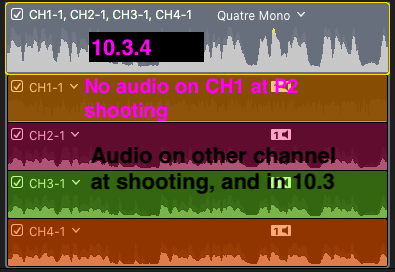
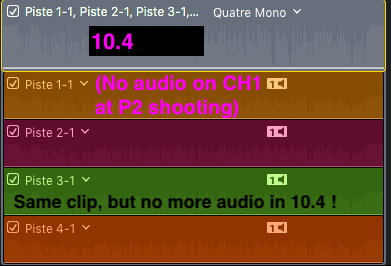
But OK with FCPX 10.3.4 . (Also ok in PPro 2018)
Otherwise, if there is audio on CH1, everything became ok, audio available on each channel. (!).
We did the test once more:
No audio on CH1, but audio on CH 2,3&4, and clip duration more than 4mn17 in DVCPRO HD (~4GB). Clip spanned.
Result : No audio on the clip in FCPX 10.4
(Grrrr !)
But OK with FCPX 10.3.4 . (Also ok in PPro 2018)
Otherwise, if there is audio on CH1, everything became ok, audio available on each channel. (!).
Last edit: 22 Mar 2018 16:30 by Hub.
Please Log in to join the conversation.
