


- Posts: 254
- Thank you received: 9
3 Post Moderation Rule for New Boarders (25 Jan 2021)
New boarders will have their posts moderated - Don't worry if you cannot see your post immediately.
Advice: three monitors for FCPX with iMac 2017 5K?
17 Mar 2018 21:45 #94679
by screendor
Advice: three monitors for FCPX with iMac 2017 5K? was created by screendor
Hey folks:
New iMac 5K 2017, with 2 TB3 connections. Also have TB2 Apple display and an old but good Apple Cinema Display with DVI and Mini Displayport or HDMI connectivity with adapters.
So the question is: can I drive all three with the iMac, with browser on left (TB2 display), timeline in center (iMac, and AV output on right (the cinema display).
And what's the best way to do so while preserving Thunderbolt ports...
I know I need to get a dock but any advice appreciated. Thanks!
New iMac 5K 2017, with 2 TB3 connections. Also have TB2 Apple display and an old but good Apple Cinema Display with DVI and Mini Displayport or HDMI connectivity with adapters.
So the question is: can I drive all three with the iMac, with browser on left (TB2 display), timeline in center (iMac, and AV output on right (the cinema display).
And what's the best way to do so while preserving Thunderbolt ports...
I know I need to get a dock but any advice appreciated. Thanks!
Please Log in to join the conversation.
18 Mar 2018 14:15 - 18 Mar 2018 16:26 #94687
by Axel
Replied by Axel on topic Advice: three monitors for FCPX with iMac 2017 5K?
You are not new to FCPX, so you know that the only way to use 3 monitors is with the third one being "AV out". This can only be done with - at least - a Thunderbolt to HDMI box from Blackmagic or the like. Not expensive.
I once had an MP cheesegrater with a "triptych" through BM Mini Monitor. Resolution of all three displays was 1080, size 23".
I might have a second monitor some day again. Then because I'd want to monitor HDR. When the connection becomes more affordable, and because there is no other option for that.
Right now I have a 27" iMac with 5k retina resolution. On that display, 1080 in 100% has the relative size of a postcard. I raised the whole machine to my eye level. And I sit really close to the display, little more than one foot. I use +0.5 diopter reading glasses.
So for just 1080, I don't need a second monitor. The old argument that AV out is more precise because it doesn't come through the system's color management does only count if you really have a top-notch grading monitor that's perfectly calibrated.
What about UHD? It really seems as if 5k were not enough to display that AND the GUI elements.
Well, 5k is enough. If I use the custom workspaces. "Axels Organisation" is without timeline, a narrow library and four columns of filmstrip thumbnails on the left and a 100% viewer in the middle. Looks like this:
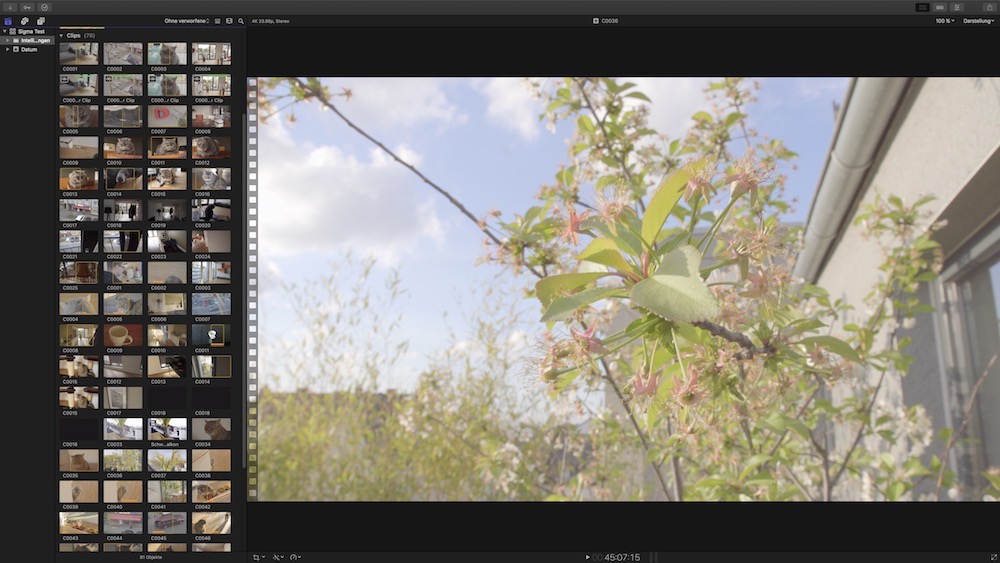
Yes, if I need the inspector and toggle it with cmd+4, the viewer shrinks to 84%. But keep in mind that this first step is to qualify the image, and that works.
You can also qualify without different workspaces, using fullscreen mode and the continuous playback option of the viewer. JKL still works, as well as up and down keys to jump between clips. Unfortunately, you can't use i / o/ f. They should add that!
Once qualified, favored and tagged, one doesn't need full resolution to edit. I left the standard workspace - cmd+0" - as it is.
For Axels Color (custom workspace), I only have a very narrow timeline that can hold the primary and two "track-heights" of connected clips. No Browser, but inspector and effects open, a narrow two-up scope window. And again, 100% UHD preview.
Are three monitors more comfortable? This is totally up to you. With one solution you constantly need to turn your head (and, particularly with the excellent P3 display of the iMac, you might find your other monitors inferior in image quality). With my solution, you need to sit very close to the screen, so you have to make sure you can sit that way for a longer time.
I once had an MP cheesegrater with a "triptych" through BM Mini Monitor. Resolution of all three displays was 1080, size 23".
I might have a second monitor some day again. Then because I'd want to monitor HDR. When the connection becomes more affordable, and because there is no other option for that.
Right now I have a 27" iMac with 5k retina resolution. On that display, 1080 in 100% has the relative size of a postcard. I raised the whole machine to my eye level. And I sit really close to the display, little more than one foot. I use +0.5 diopter reading glasses.
So for just 1080, I don't need a second monitor. The old argument that AV out is more precise because it doesn't come through the system's color management does only count if you really have a top-notch grading monitor that's perfectly calibrated.
What about UHD? It really seems as if 5k were not enough to display that AND the GUI elements.
Well, 5k is enough. If I use the custom workspaces. "Axels Organisation" is without timeline, a narrow library and four columns of filmstrip thumbnails on the left and a 100% viewer in the middle. Looks like this:
Yes, if I need the inspector and toggle it with cmd+4, the viewer shrinks to 84%. But keep in mind that this first step is to qualify the image, and that works.
You can also qualify without different workspaces, using fullscreen mode and the continuous playback option of the viewer. JKL still works, as well as up and down keys to jump between clips. Unfortunately, you can't use i / o/ f. They should add that!
Once qualified, favored and tagged, one doesn't need full resolution to edit. I left the standard workspace - cmd+0" - as it is.
For Axels Color (custom workspace), I only have a very narrow timeline that can hold the primary and two "track-heights" of connected clips. No Browser, but inspector and effects open, a narrow two-up scope window. And again, 100% UHD preview.
Are three monitors more comfortable? This is totally up to you. With one solution you constantly need to turn your head (and, particularly with the excellent P3 display of the iMac, you might find your other monitors inferior in image quality). With my solution, you need to sit very close to the screen, so you have to make sure you can sit that way for a longer time.
Last edit: 18 Mar 2018 16:26 by Axel.
Please Log in to join the conversation.
18 Mar 2018 17:11 #94689
by screendor
Replied by screendor on topic Advice: three monitors for FCPX with iMac 2017 5K?
Thanks for your insights. Much appreciated.
I've been working with two monitor for years--a 27" Thunderbolt display and a 23" Apple cinema Display, with a rarely used client monitor via HDMI, all driven off a 2013 nMP.
Now, with the new iMac 5K, I have an "extra" screen, the 5K one, and so am pondering a three screen situation. Would still use the iMac for grading, but have the left TB display for the browser, the Center iMac for timeline and grading, and the right screen for AV playback.
So just seeing if A) it's possible and what the performance hit will be. And C) Just trying to not eat up all my TB3 ports cause have myriad TB2 raids I need to connect to.
I've been working with two monitor for years--a 27" Thunderbolt display and a 23" Apple cinema Display, with a rarely used client monitor via HDMI, all driven off a 2013 nMP.
Now, with the new iMac 5K, I have an "extra" screen, the 5K one, and so am pondering a three screen situation. Would still use the iMac for grading, but have the left TB display for the browser, the Center iMac for timeline and grading, and the right screen for AV playback.
So just seeing if A) it's possible and
what the performance hit will be. And C) Just trying to not eat up all my TB3 ports cause have myriad TB2 raids I need to connect to. Please Log in to join the conversation.
18 Mar 2018 18:11 - 18 Mar 2018 18:14 #94691
by Axel
Replied by Axel on topic Advice: three monitors for FCPX with iMac 2017 5K?
Couldn't you just daisy-chain the raids with the monitors? Sorry, don't know, never used that, just have a single Pegasus. What I'd do if I were you is migrating the Browser to a second external monitor (have an iPad and used it for that purpose with the Duet display app, which works well over the lighting cable. But at that time I had already unlearned to turn my head). For a start. It's a luxury to have a big browser.
Yes, and the possible performance hit is something else to consider. Then again, you already own the monitors. Just test it. My monitors were old. I tried to give them away, but nobody wanted them.
Yes, and the possible performance hit is something else to consider. Then again, you already own the monitors. Just test it. My monitors were old. I tried to give them away, but nobody wanted them.
Last edit: 18 Mar 2018 18:14 by Axel.
Please Log in to join the conversation.
- Scrubelicious
-

- Offline
- Platinum Member
-

Less
More
- Posts: 1228
- Thank you received: 114
19 Mar 2018 10:16 #94697
by Scrubelicious
Replied by Scrubelicious on topic Advice: three monitors for FCPX with iMac 2017 5K?
the other option is two scale the FCPX window across two screens.
Please Log in to join the conversation.
