


- Posts: 7
- Thank you received: 0
3 Post Moderation Rule for New Boarders (25 Jan 2021)
New boarders will have their posts moderated - Don't worry if you cannot see your post immediately.
FCPX ALWAYS makes optimized while i do not want it actually
- swansestudio
-
 Topic Author
- Offline
- New Member
-

Less
More
09 Mar 2018 12:37 #94539
by swansestudio
Hi ! Wanted to clear, why FCPX ALWAYS tend to render HQ files ?
I've imported assets for project which is made up of 10 RED Raw files and some SONY A6300 files.
While importing I checked only "create proxy" check box.
Now I'm waiting for the proxy creation, as though while it's possible to work right now (so, FCPX could actually read RED RAW without rendering optimized at all), it seems it's very hard to my machine to manage multi cam with both Sony and RED 4k footages,
BUT ! - as you could see,
while proxy media are being created, there is also a big increasing in HQ Media folder as FCPX started and is creating optimized media. But why ?
There is no ANY plugins or time remapping instances in project, just one multicam clip and this check box - creating optimized media for multicam - is unchecked
wonder for what and why fcpx rendering optimized media and how to get rid of it ?
as I plan to make proxy for all and go on with it...
I'v tried import with these setting several times, Ive tried to delete generated optimized media from menu File, but anyway when I've open the project again fcpx start to creating optimized media and flushing my hdd.
Please help with any suggestion .... !!!
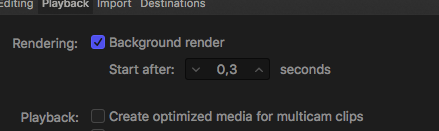
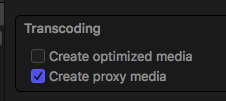
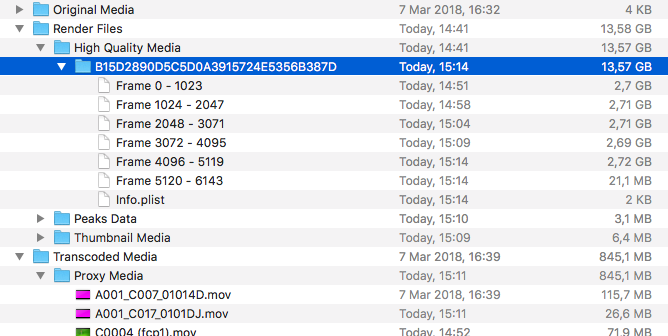
I've imported assets for project which is made up of 10 RED Raw files and some SONY A6300 files.
While importing I checked only "create proxy" check box.
Now I'm waiting for the proxy creation, as though while it's possible to work right now (so, FCPX could actually read RED RAW without rendering optimized at all), it seems it's very hard to my machine to manage multi cam with both Sony and RED 4k footages,
BUT ! - as you could see,
while proxy media are being created, there is also a big increasing in HQ Media folder as FCPX started and is creating optimized media. But why ?
There is no ANY plugins or time remapping instances in project, just one multicam clip and this check box - creating optimized media for multicam - is unchecked
wonder for what and why fcpx rendering optimized media and how to get rid of it ?
as I plan to make proxy for all and go on with it...
I'v tried import with these setting several times, Ive tried to delete generated optimized media from menu File, but anyway when I've open the project again fcpx start to creating optimized media and flushing my hdd.
Please help with any suggestion .... !!!
Please Log in to join the conversation.
- Tom Wolsky
-

- Offline
- Moderator
-

10 Mar 2018 05:17 #94550
by Tom Wolsky
Replied by Tom Wolsky on topic FCPX ALWAYS makes optimized while i do not want it actually
Delete generates library files to dump optimized.
The default playback preference is to create optimized media for multicam. Switch it off.
The default playback preference is to create optimized media for multicam. Switch it off.
Please Log in to join the conversation.


10 Mar 2018 14:30 - 10 Mar 2018 14:32 #94554
by JoeEditor
Replied by JoeEditor on topic FCPX ALWAYS makes optimized while i do not want it actually
Check in Preferences > Playback for the first Playback option, turn it off.
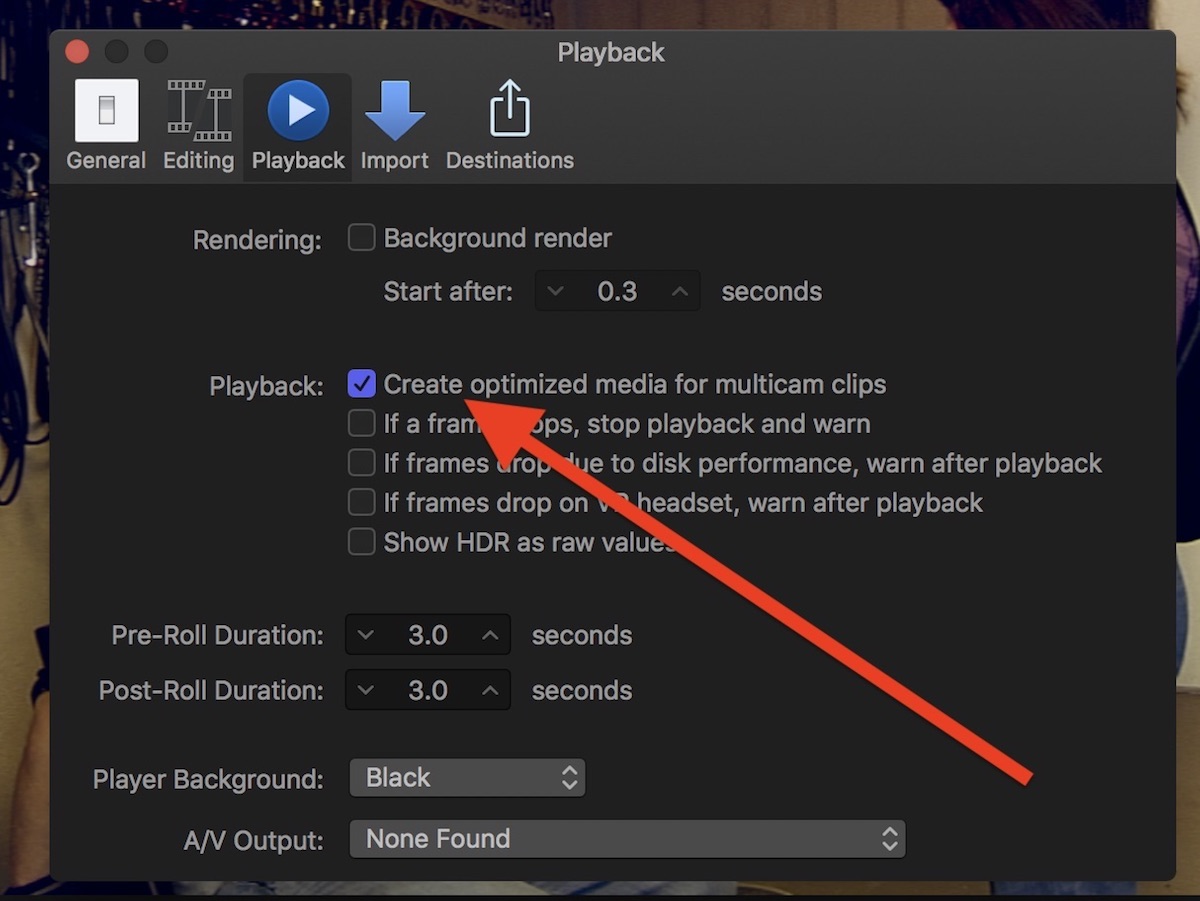
Last edit: 10 Mar 2018 14:32 by JoeEditor.
Please Log in to join the conversation.
- swansestudio
-
Topic Author
- Offline
- New Member
-
Less
More
- Posts: 7
- Thank you received: 0
10 Mar 2018 14:46 #94557
by swansestudio
Replied by swansestudio on topic FCPX ALWAYS makes optimized while i do not want it actually
Wonder, if anybody actually read I'd written ? There was mention in text itself as well as screenshots supplied that I did exactly what you're telling about.
BTW The problem gone. I just needed to turn off background render. Actually I was messed up a bit between optimized vs rendered HQ files.
BTW The problem gone. I just needed to turn off background render. Actually I was messed up a bit between optimized vs rendered HQ files.
Please Log in to join the conversation.
