


- Posts: 3
- Thank you received: 0
3 Post Moderation Rule for New Boarders (25 Jan 2021)
New boarders will have their posts moderated - Don't worry if you cannot see your post immediately.
I'm extremely new to FCPX - Have A question about captions and scroll bars
- nathan.albrecht
-
 Topic Author
- Offline
- New Member
-

Less
More
28 Feb 2018 15:39 #94400
by nathan.albrecht
I'm extremely new to FCPX - Have A question about captions and scroll bars was created by nathan.albrecht
Hello everyone!
Can you let me know if there is a function where I can add a scrolling bar at the bottom of a video that is synced to the length of the video?
I've put a picture here as an example of what we're looking to do.
Thanks for any thoughts on this! Looking forward to working with everyone in the future
Can you let me know if there is a function where I can add a scrolling bar at the bottom of a video that is synced to the length of the video?
I've put a picture here as an example of what we're looking to do.
Thanks for any thoughts on this! Looking forward to working with everyone in the future

Please Log in to join the conversation.
- Tom Wolsky
-

- Offline
- Moderator
-

28 Feb 2018 15:48 #94401
by Tom Wolsky
Replied by Tom Wolsky on topic I'm extremely new to FCPX - Have A question about captions and scroll bars
There may be a plug in for this, I don't know, but you could build it manually. Put a red generator above the video and crop it store the horizontal shape you want. Animate the right side crop so it wipe the red bar across the screen from left to right over the length of the video.
Please Log in to join the conversation.
- nathan.albrecht
-
Topic Author
- Offline
- New Member
-
Less
More
- Posts: 3
- Thank you received: 0
28 Feb 2018 15:50 #94402
by nathan.albrecht
Replied by nathan.albrecht on topic I'm extremely new to FCPX - Have A question about captions and scroll bars
That's great! Thank you so much for the input!
Please Log in to join the conversation.
- Karsten Schlüter
-

- Offline
- Moderator
-
Less
More
- Posts: 3790
- Thank you received: 718
28 Feb 2018 15:53 - 28 Feb 2018 15:55 #94403
by Karsten Schlüter
Replied by Karsten Schlüter on topic I'm extremely new to FCPX - Have A question about captions and scroll bars
Welcome Nathan to fcp.co 
just a 'growing bar', or as a User Interface, to ffwd to some specific point in time?
The later is a html-feature of a website (or feature of an app), not part of a video = FCPX is for editing
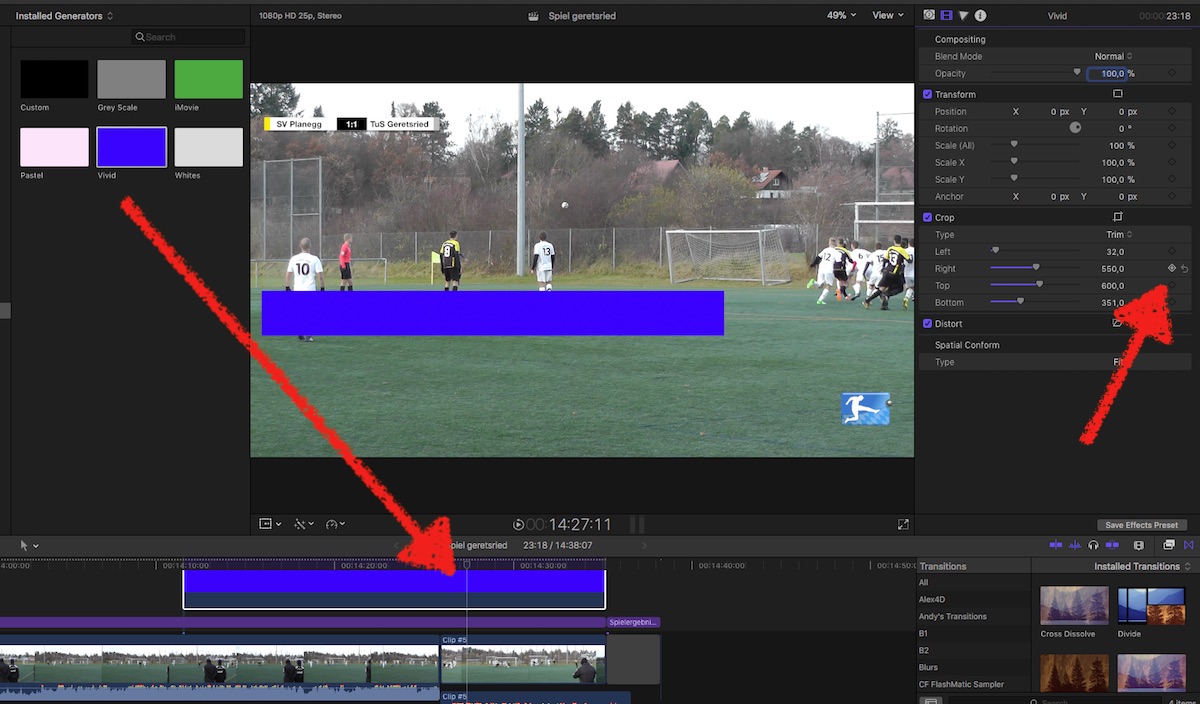
To create a bar, growing in synch with your project, is easy:
apply a Generator/Solid above your timeline, stretch it to full projects length
use the Crop Tool to shape it …
set Playhead to begin of timeline, Crop right to max, create Keyframe
set Playhead to end of timeline, set Crop to zero
==edit==
&%$§" beat by the minute! - my 'paintings' make me slow LOL
just a 'growing bar', or as a User Interface, to ffwd to some specific point in time?
The later is a html-feature of a website (or feature of an app), not part of a video = FCPX is for editing
To create a bar, growing in synch with your project, is easy:
apply a Generator/Solid above your timeline, stretch it to full projects length
use the Crop Tool to shape it …
set Playhead to begin of timeline, Crop right to max, create Keyframe
set Playhead to end of timeline, set Crop to zero
==edit==
&%$§" beat by the minute! - my 'paintings' make me slow LOL
Last edit: 28 Feb 2018 15:55 by Karsten Schlüter.
Please Log in to join the conversation.
- nathan.albrecht
-
Topic Author
- Offline
- New Member
-
Less
More
- Posts: 3
- Thank you received: 0
28 Feb 2018 16:19 #94405
by nathan.albrecht
Replied by nathan.albrecht on topic I'm extremely new to FCPX - Have A question about captions and scroll bars
Oh this is great to! Thanks a bunch!
I'm going to be trying both of these solutions.
Thanks again everyone
I'm going to be trying both of these solutions.
Thanks again everyone
Please Log in to join the conversation.
