


- Posts: 29
- Thank you received: 1
3 Post Moderation Rule for New Boarders (25 Jan 2021)
New boarders will have their posts moderated - Don't worry if you cannot see your post immediately.
Simple Split Screen move in theory, but actually very tricky! Plugin opportunity?
- James Branch
-
 Topic Author
- Offline
- Junior Member
-

Less
More
27 Feb 2018 13:21 - 27 Feb 2018 13:30 #94368
by James Branch
Simple Split Screen move in theory, but actually very tricky! Plugin opportunity? was created by James Branch
Okay, this is a 4k job. Short promo being displayed on a large 4k screen. It includes a shot (slo-mo) that then zooms back to reveal a four-way split also containing 4k shots, some slo-mo, also needing stabilisation, grading, cropping, re-timing etc. See enclosed pictures. I'm not a proficient motion graphics artist so I had to hand this off to an After Effects artist. I couldn't figure out how to do it. I guessed that the four-way split would have to be an 8k compound clip which I could zoom into to get my first shot then zoom out again, but I couldn't make it work. All looked good inside the compound clip but when I went back to the timeline it was a mess. Also I just couldn't get a good zoom in using the key-framing in FCPX. Couldn't find a plugin that would help me. Drop Zones, I find, are too restricting when it comes to fine tuning and dealing with client feedback. I couldn't get DH_Box to work either. I tried doing it in Motion but I'm just not good enough at it and got lost. Especially when dealing with having to retime shots and stabilise them.
What's my point? Should this be so hard to do within FCPX? Is there a gap in the Split Screen/Plugin market for this problem? You've got to be able to fine tune the shots once it's in the split. Re-time, colour correct, re-postition, stabilise, crop etc. as well as being able to adjust the parameters of the split screen and zoom in and out of parts of it easily. Anyone have any ideas? Or it's a motion graphics problem and that's it! Cheers, James
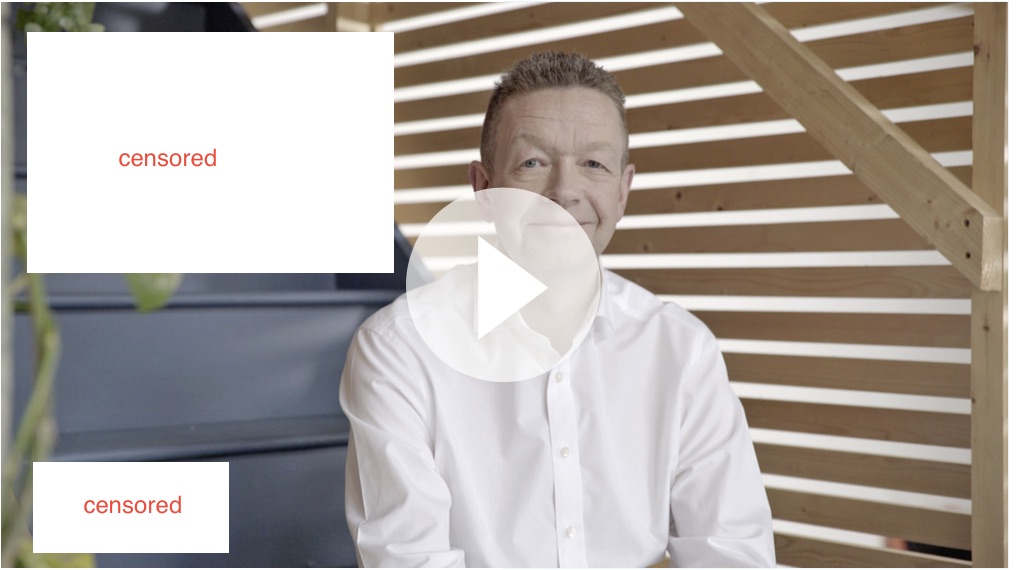

What's my point? Should this be so hard to do within FCPX? Is there a gap in the Split Screen/Plugin market for this problem? You've got to be able to fine tune the shots once it's in the split. Re-time, colour correct, re-postition, stabilise, crop etc. as well as being able to adjust the parameters of the split screen and zoom in and out of parts of it easily. Anyone have any ideas? Or it's a motion graphics problem and that's it! Cheers, James
Last edit: 27 Feb 2018 13:30 by James Branch.
Please Log in to join the conversation.
- peteramwiggins
-

- Offline
- Administrator
-

- The Administrator :)
Less
More
- Posts: 1049
- Thank you received: 404
27 Feb 2018 14:01 #94372
by peteramwiggins
Administrator
Replied by peteramwiggins on topic Simple Split Screen move in theory, but actually very tricky! Plugin opportunity?
james,
The shrink back plugin in my toolkit might help. Watermarked trial available to see if it works or if I might be talking rubbish!
idustrialrevolution.com/collections/xeff...cts/xeffects-toolkit
Peter
The shrink back plugin in my toolkit might help. Watermarked trial available to see if it works or if I might be talking rubbish!
idustrialrevolution.com/collections/xeff...cts/xeffects-toolkit
Peter
Administrator
Please Log in to join the conversation.
- James Branch
-
Topic Author
- Offline
- Junior Member
-
Less
More
- Posts: 29
- Thank you received: 1
27 Feb 2018 14:09 #94375
by James Branch
Replied by James Branch on topic Simple Split Screen move in theory, but actually very tricky! Plugin opportunity?
Thanks Peter. Lots of great stuff in there. I'll have a play. Need something to help format the split screen into an unconventional arrangement - not just a straight four-way 16:9 split. Many thanks!
Please Log in to join the conversation.
- peteramwiggins
-
- Offline
- Administrator
-
- The Administrator :)
Less
More
- Posts: 1049
- Thank you received: 404
27 Feb 2018 14:17 #94376
by peteramwiggins
Administrator
Replied by peteramwiggins on topic Simple Split Screen move in theory, but actually very tricky! Plugin opportunity?
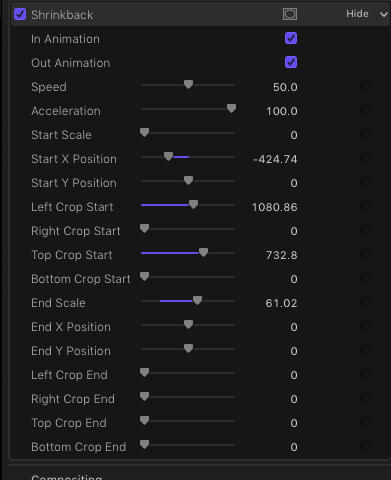
Just the Shrinkback plugin, not the quad one. That has scale, crop etc with acceleration
The Shrinkback plugin has fully customisable start/end parameters
The Shrinkback plugin has fully customisable start/end parameters
Administrator
Please Log in to join the conversation.
- James Branch
-
Topic Author
- Offline
- Junior Member
-
Less
More
- Posts: 29
- Thank you received: 1
27 Feb 2018 14:25 - 27 Feb 2018 14:25 #94377
by James Branch
Replied by James Branch on topic Simple Split Screen move in theory, but actually very tricky! Plugin opportunity?
Hmm, maybe I could make an 8K template in Motion using drop zones. Publish it to FCPX. Fill the drop zones (will have to live with them for now) with compound clips of the footage (makes them editable once in the drop zone (maybe)) and use Shrinkback for the animation in FCPX. That might work. Cheers!
Last edit: 27 Feb 2018 14:25 by James Branch.
Please Log in to join the conversation.
- peteramwiggins
-
- Offline
- Administrator
-
- The Administrator :)
Less
More
- Posts: 1049
- Thank you received: 404
27 Feb 2018 14:49 #94378
by peteramwiggins
Administrator
Replied by peteramwiggins on topic Simple Split Screen move in theory, but actually very tricky! Plugin opportunity?
All you need is a bit of maths and the moves/shapes are easy
Administrator
Please Log in to join the conversation.
- Karsten Schlüter
-

- Offline
- Moderator
-

Less
More
- Posts: 3790
- Thank you received: 718
27 Feb 2018 15:10 #94380
by Karsten Schlüter
imho, this is first of all a workflow problem…
#1: do the four videos interact? Or just have the same length? Then create 4 projects , all same length. Then import all in one Master project, apply 'frame' animations (see #3)
#2: or do they 'interact'? e.g. show one process from diff. angles? Then you need tracks, yep: tracks, for such composition you need tracks.… ok, in FCPX lingo: three additional secondaries… I would give each track its own 'sector'; do the edit, synching, grading, effect stuff, then apply the 'frame' animation.
#3: if you don't want to use Peter's plugin, you do need to use a notepad - if it's a simple symmetric 4-split, scale is 50, position is x960/2820, and y580/1660… but your clips are NOT 16:9 = cropped.
So, the old animation rule 'keyframe backwards':
go in timeline to TC where the clip reaches final size, position and crop, then backwards to starting point, and everything back to zero…
you 'just' have to be very disciplined with what to keyframe when…
Replied by Karsten Schlüter on topic Simple Split Screen move in theory, but actually very tricky! Plugin opportunity?
James Branch wrote: … Re-time, colour correct, re-postition, stabilise, crop etc. as well as being able to adjust the parameters of the split screen and zoom in and out of parts of it easily. Anyone have any ideas? Or it's a motion graphics problem and that's it! …
imho, this is first of all a workflow problem…
#1: do the four videos interact? Or just have the same length? Then create 4 projects , all same length. Then import all in one Master project, apply 'frame' animations (see #3)
#2: or do they 'interact'? e.g. show one process from diff. angles? Then you need tracks, yep: tracks, for such composition you need tracks.… ok, in FCPX lingo: three additional secondaries… I would give each track its own 'sector'; do the edit, synching, grading, effect stuff, then apply the 'frame' animation.
#3: if you don't want to use Peter's plugin, you do need to use a notepad - if it's a simple symmetric 4-split, scale is 50, position is x960/2820, and y580/1660… but your clips are NOT 16:9 = cropped.
So, the old animation rule 'keyframe backwards':
go in timeline to TC where the clip reaches final size, position and crop, then backwards to starting point, and everything back to zero…
you 'just' have to be very disciplined with what to keyframe when…
Please Log in to join the conversation.
- Scott Markowitz
-
- Offline
- Elite Member
-

Less
More
- Posts: 161
- Thank you received: 31
27 Feb 2018 20:11 #94388
by Scott Markowitz
Replied by Scott Markowitz on topic Simple Split Screen move in theory, but actually very tricky! Plugin opportunity?
I love using a plugin whenever I can for these kinds of things. Why not? It's fast, and simple. Always the A option when doing an edit.
Why?
Because there are serious limitations when using keyframes inside FCPX. you have limited control over animation curves, and in this case, you can't ease both scale and position. (If all your moves are linear, then keyframing could be a solution)
If you really want to know how to achieve such a thing just using the FCPX tools, here's what I would consider trying:
(Then, learn how to use Motion, and start making your own big bag of effects that you can reuse and combine together)
1. make a compound clip arranging your elements as you wish them to appear at the end of the move. (Resolution shouldn't matter. Make it 4K)
2. Place the compound clip in your master project
3. Blade (make through-edit) the CC where you want the move to begin, Blade the CC where you you want the move to end
4. Select the segment you just created, and turn on Ken Burns effect. Adjust to create your move.
5. Copy and paste the Ken burns Effect onto the remaining (third) segment of your CC
6. Go into the Crop interface, and reverse the Ken burns (This will ensure that there's no "jump" at that through edit
7. Adjust the out position of the Ken Burns to be as close to the first position as you can get it.
Why?
Because there are serious limitations when using keyframes inside FCPX. you have limited control over animation curves, and in this case, you can't ease both scale and position. (If all your moves are linear, then keyframing could be a solution)
If you really want to know how to achieve such a thing just using the FCPX tools, here's what I would consider trying:
(Then, learn how to use Motion, and start making your own big bag of effects that you can reuse and combine together)
1. make a compound clip arranging your elements as you wish them to appear at the end of the move. (Resolution shouldn't matter. Make it 4K)
2. Place the compound clip in your master project
3. Blade (make through-edit) the CC where you want the move to begin, Blade the CC where you you want the move to end
4. Select the segment you just created, and turn on Ken Burns effect. Adjust to create your move.
5. Copy and paste the Ken burns Effect onto the remaining (third) segment of your CC
6. Go into the Crop interface, and reverse the Ken burns (This will ensure that there's no "jump" at that through edit
7. Adjust the out position of the Ken Burns to be as close to the first position as you can get it.
Please Log in to join the conversation.
- James Branch
-
Topic Author
- Offline
- Junior Member
-
Less
More
- Posts: 29
- Thank you received: 1
05 Mar 2018 21:35 - 05 Mar 2018 21:37 #94478
by James Branch
Replied by James Branch on topic Simple Split Screen move in theory, but actually very tricky! Plugin opportunity?
Hi Scott,
This all worked very well. I ended up using Alex4D's Grow/Shrink plugin for this. It has more control over the speed and ramping of the zoom. I couldn't get Shrinkback to work the way I wanted it to - sorry Peter!
This all worked very well. I ended up using Alex4D's Grow/Shrink plugin for this. It has more control over the speed and ramping of the zoom. I couldn't get Shrinkback to work the way I wanted it to - sorry Peter!
Last edit: 05 Mar 2018 21:37 by James Branch.
Please Log in to join the conversation.
- James Branch
-
Topic Author
- Offline
- Junior Member
-
Less
More
- Posts: 29
- Thank you received: 1
06 Mar 2018 17:39 #94494
by James Branch
Replied by James Branch on topic Simple Split Screen move in theory, but actually very tricky! Plugin opportunity?
This cropped up in my email. Could be handy -
Please Log in to join the conversation.


07 Mar 2018 14:30 #94503
by anickt
Replied by anickt on topic Simple Split Screen move in theory, but actually very tricky! Plugin opportunity?
This is OK. I prefer Hawaiki AutoSplit. More parameters and a little overwhelming at first but more flexible and more options. I use it all the time and make presets for my most-used settings. It has ease parameters which are nice when animating segments on and off screen. Sometimes it will flicker when animating. Usually changing the ease parameter will clear that up.
Please Log in to join the conversation.
