


- Posts: 407
- Thank you received: 16
3 Post Moderation Rule for New Boarders (25 Jan 2021)
New boarders will have their posts moderated - Don't worry if you cannot see your post immediately.
After synching clips...
26 Feb 2018 13:57 #94346
by Albo
After synching clips... was created by Albo
Hi,
Just wondering if I need to keep my unsynched clips in my browser?
I sync Audio 1 and Clip 1.
I get the new synced clip.
I want to remove Audio 1 and clip 1 from the browser.
Thank you,
Alain
Just wondering if I need to keep my unsynched clips in my browser?
I sync Audio 1 and Clip 1.
I get the new synced clip.
I want to remove Audio 1 and clip 1 from the browser.
Thank you,
Alain
Please Log in to join the conversation.
- Tom Wolsky
-

- Offline
- Moderator
-

26 Feb 2018 14:07 #94347
by Tom Wolsky
Replied by Tom Wolsky on topic After synching clips...
You can if you want.
Please Log in to join the conversation.

26 Feb 2018 22:52 #94352
by joema
What Tom said is technically correct but I don't think the parent clips are actually removed when you delete them. If you open the sync or multicam clip then do SHFT+F to find them, they reappear.
Another approach is to reject the parent clips and set the Event Browser filter to "Hide Rejected Clips".
I'm not sure if one way or the other is preferred. Either way it's often a good idea to suppress the parent clips, otherwise it's easy to accidentally start adding ratings or keywords to them. Those are not carried forward to the sync or MC clip.
IMO it works best to rate and keyword the sync or MC clip. Also having the parent clips in the Browser clutters up the display with redundant clips to what's in the sync or MC clip.
Even for single-cam projects with external audio Sam Mestman recommends building it as multicam:
www.fcpworks.com/sync-or-multicam-clips/
Replied by joema on topic After synching clips...
Albo wrote: Just wondering if I need to keep my unsynched clips in my browser?
I sync Audio 1 and Clip 1. I get the new synced clip. I want to remove Audio 1 and clip 1 from the browser...
What Tom said is technically correct but I don't think the parent clips are actually removed when you delete them. If you open the sync or multicam clip then do SHFT+F to find them, they reappear.
Another approach is to reject the parent clips and set the Event Browser filter to "Hide Rejected Clips".
I'm not sure if one way or the other is preferred. Either way it's often a good idea to suppress the parent clips, otherwise it's easy to accidentally start adding ratings or keywords to them. Those are not carried forward to the sync or MC clip.
IMO it works best to rate and keyword the sync or MC clip. Also having the parent clips in the Browser clutters up the display with redundant clips to what's in the sync or MC clip.
Even for single-cam projects with external audio Sam Mestman recommends building it as multicam:
www.fcpworks.com/sync-or-multicam-clips/
Please Log in to join the conversation.
27 Feb 2018 13:26 - 27 Feb 2018 13:28 #94370
by Albo
Replied by Albo on topic After synching clips...
Thank you for the info.
Indeed it did reappear.
I will be tweeking my workflow so I only have my synced clips in the browser.
I'll look up that link you added.
Indeed it did reappear.
I will be tweeking my workflow so I only have my synced clips in the browser.
I'll look up that link you added.
Last edit: 27 Feb 2018 13:28 by Albo.
Please Log in to join the conversation.

28 Feb 2018 12:05 #94395
by JoeEditor
Replied by JoeEditor on topic After synching clips...
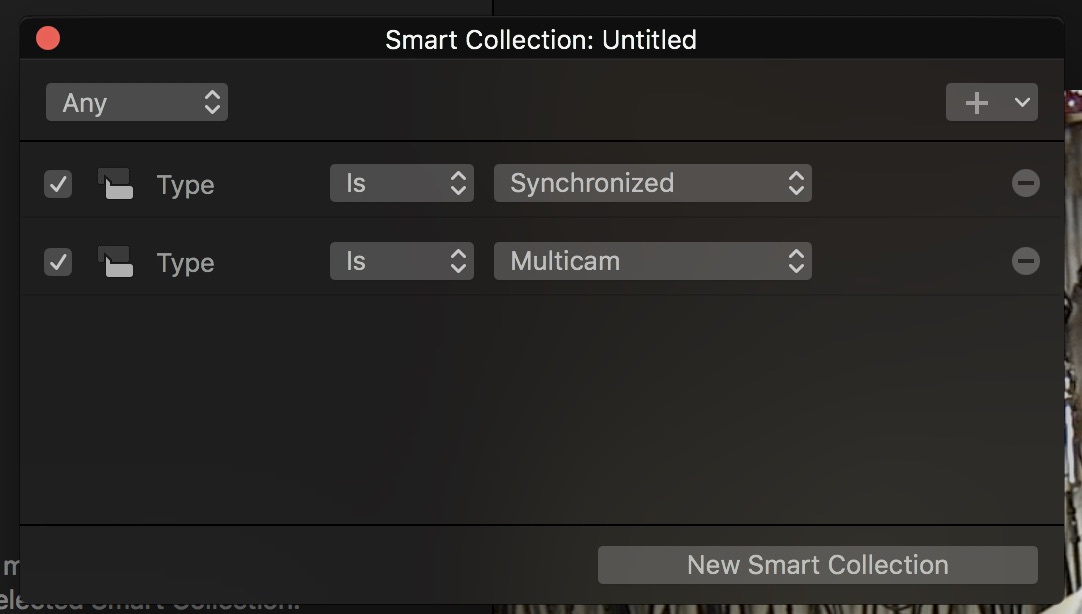
Remember that a Sync Clip is not a physical entity, it does not exist on your hard drive, it is a virtual clip and only exists inside of FCPX. Thus, deleting the parent clips in the Browser doesn't gain you anything. A Smart Collection that filters for only Sync clips would a very simple solution here for media management purposes. Almost all of my Events have a Sync/Multicam Smart Collection for this purpose.
Please Log in to join the conversation.
28 Feb 2018 17:39 #94406
by Albo
Replied by Albo on topic After synching clips...
Thanks for the additional info.
I did add an event where I put all my synced clips.
Never thought of a smart collection. I will look into that.
I simply delete the parent clip to unclutter the browser.
I did add an event where I put all my synced clips.
Never thought of a smart collection. I will look into that.
I simply delete the parent clip to unclutter the browser.
Please Log in to join the conversation.
01 Mar 2018 14:15 #94417
by JoeEditor
Replied by JoeEditor on topic After synching clips...
Deleting things to uncluttered your browser isn't really necessary with smart collections, keyword collections, tags. Shouldn't need to with proper management. But if that works for you. Remember, big thing folks sometimes miss with smart collections is the Condition menu top left; Any or All?
Please Log in to join the conversation.
01 Mar 2018 17:54 #94419
by Albo
Replied by Albo on topic After synching clips...
Well noted.
Thanks.
This will all be usefull for my next project as I impliment a better way to organize.
Thanks.
This will all be usefull for my next project as I impliment a better way to organize.
Please Log in to join the conversation.
