


- Posts: 1
- Thank you received: 0
3 Post Moderation Rule for New Boarders (25 Jan 2021)
New boarders will have their posts moderated - Don't worry if you cannot see your post immediately.
FCPX Transition not in between clips
10 Feb 2018 02:15 #94059
by alexch
FCPX Transition not in between clips was created by alexch
I am using FCPX to edit video & photos. I used to be able to drag and drop a transition in between clips, and it worked fine. But in my new video projects, I just CANNOT drag a drop a transition IN-BETWEEN clips.
I went back to my previous project and checked, the transition still works in that video. Transition can be applied in between clips on that video. But in this new project, the transition only can be applied to BOTH-ENDS of a video or a photo. Also , I cannot drag that transition to make it "in-between." WHY??
Can someone share their experience?
Thank you.
I went back to my previous project and checked, the transition still works in that video. Transition can be applied in between clips on that video. But in this new project, the transition only can be applied to BOTH-ENDS of a video or a photo. Also , I cannot drag that transition to make it "in-between." WHY??
Can someone share their experience?
Thank you.
Please Log in to join the conversation.
- JarrodMFay
-

- Offline
- Elite Member
-

Less
More
- Posts: 172
- Thank you received: 34
10 Feb 2018 04:16 #94061
by JarrodMFay
Replied by JarrodMFay on topic FCPX Transition not in between clips
Do you have the clip selected when you drag the transition on? Try selecting the vertical line between the two clips and then drag the transition on that. It works fine for me.
Please Log in to join the conversation.
- Tom Wolsky
-

- Offline
- Moderator
-

10 Feb 2018 05:50 #94065
by Tom Wolsky
Replied by Tom Wolsky on topic FCPX Transition not in between clips
Can you post a screenshot of the timeline area where the transition cannot be applied?
Please Log in to join the conversation.
- JarrodMFay
-
- Offline
- Elite Member
-
Less
More
- Posts: 172
- Thank you received: 34
10 Feb 2018 14:57 #94077
by JarrodMFay
Replied by JarrodMFay on topic FCPX Transition not in between clips
Sorry, I won't be in front of my editing workstation until tomorrow. Meanwhile just try clicking on the edge of the shot where you want the transition and drag the transition there. See if that does what you're asking.
Please Log in to join the conversation.


11 Feb 2018 11:21 - 11 Feb 2018 11:21 #94084
by joema
When applying a transition, you may get the warning: "there is not enough extra media beyond clip edges to create the transition". Maybe your previous material had longer head/tail "handles" on the clips, and you did not get this error then.
Since a transition between two clips must have some overlap area for the transition, if insufficient media "handles" exist it must pull media from both clips to make the transition. As implemented, this creates a ripple edit and slightly shortens the timeline. On fixed-length material, this might be undesirable.
This is further complicated by FCPX always putting all transitions "on center" -- IOW you cannot bias the transition toward one side of the clip.
At 33:30 into this video, editor Mike Matzdorff demonstrates a small but very useful trick in FCPX to avoid this. Note the keyboard command he uses to lift the clip and create a gap is OPT+CMD+ up arrow.
Note also once the transition effect is added the clip becomes a secondary storyline and must be dragged by the "shelf" -- the little border on top.
Replied by joema on topic FCPX Transition not in between clips
alexch wrote: ....I used to be able to drag and drop a transition in between clips, and it worked fine. But in my new video projects, I just CANNOT drag a drop a transition IN-BETWEEN clips...in this new project, the transition only can be applied to BOTH-ENDS of a video or a photo. Also , I cannot drag that transition to make it "in-between." WHY??...
When applying a transition, you may get the warning: "there is not enough extra media beyond clip edges to create the transition". Maybe your previous material had longer head/tail "handles" on the clips, and you did not get this error then.
Since a transition between two clips must have some overlap area for the transition, if insufficient media "handles" exist it must pull media from both clips to make the transition. As implemented, this creates a ripple edit and slightly shortens the timeline. On fixed-length material, this might be undesirable.
This is further complicated by FCPX always putting all transitions "on center" -- IOW you cannot bias the transition toward one side of the clip.
At 33:30 into this video, editor Mike Matzdorff demonstrates a small but very useful trick in FCPX to avoid this. Note the keyboard command he uses to lift the clip and create a gap is OPT+CMD+ up arrow.
Note also once the transition effect is added the clip becomes a secondary storyline and must be dragged by the "shelf" -- the little border on top.
Last edit: 11 Feb 2018 11:21 by joema.
Please Log in to join the conversation.
15 Aug 2020 18:36 #109291
by Arash
Replied by Arash on topic FCPX Transition not in between clips
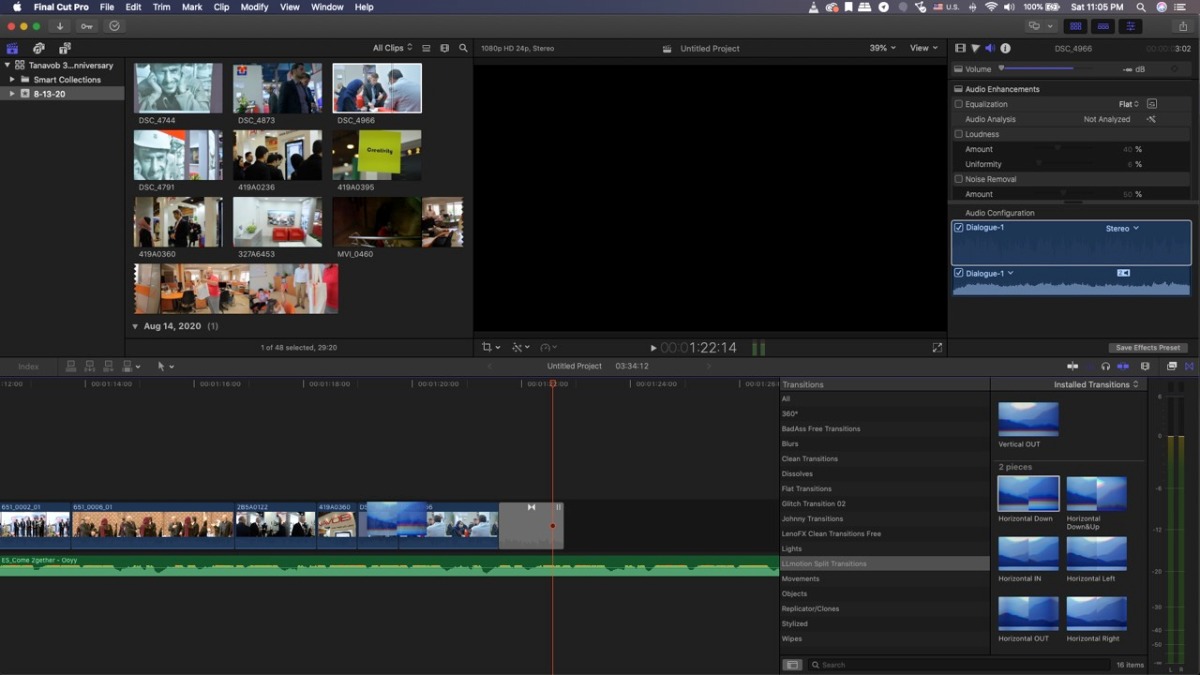
I have the same problem and still couldn't find a solution, here's the screenshot of the screen so you can see exactly what I mean.
Please Log in to join the conversation.

16 Aug 2020 06:07 #109303
by dgwvideo
Creating history....one edit at a time !
Replied by dgwvideo on topic FCPX Transition not in between clips
That looks like exactly what Joema is describing above to the other poster. Try shortening the end of the leftmost clip and beginning of the rightmost clip by about 10 or 12 frames each, and try applying the transition again. If insufficient handles are the issue, you should get a message in FCPX informing you of that. If so, shorten the clips a bit more and try again - or use the advise given in the above post.
Creating history....one edit at a time !
Please Log in to join the conversation.
- Tom Wolsky
-
- Offline
- Moderator
-
16 Aug 2020 13:05 #109307
by Tom Wolsky
Replied by Tom Wolsky on topic FCPX Transition not in between clips
You’re transitioning to nothing. What transition are you using? Some won’t really work in this configuration.
Please Log in to join the conversation.

16 Aug 2020 14:10 - 16 Aug 2020 14:12 #109309
by VTC
Replied by VTC on topic FCPX Transition not in between clips
My solution for not having enough material for a transition is to speed ramp both video ends slower so it has more material to work with and doesn't shorten the timeline. Nobody normal can tell what's cleverly happened but another pinhead editor might pick up on it only because, well, editors can be pinheads and look for things like that. The main thing to remember here is that you're editing for pedestrians, not pinheads.
Last edit: 16 Aug 2020 14:12 by VTC.
Please Log in to join the conversation.

16 Aug 2020 23:16 #109315
by JoeEditor
Replied by JoeEditor on topic FCPX Transition not in between clips
Or you could take 4 seconds and just trim your edits properly, and not insult both your peers and your audience.
Please Log in to join the conversation.
