




- Posts: 170
- Thank you received: 2
3 Post Moderation Rule for New Boarders (25 Jan 2021)
New boarders will have their posts moderated - Don't worry if you cannot see your post immediately.
Transition Help
05 Feb 2018 05:52 #93895
by PhilCF
Transition Help was created by PhilCF
I wondered if there was a better way for me to do transitions than my current method.
If it's just 2 clips on the timeline, you just drag a transition in between the clips, or highlight and "command T" - If there's enough clip overlap, the transition slips in just fine.
My issue is with compound clips. If I have several tracks of b-roll and I want them all to cross dissolve into the next clip, this is where I run into problems. I am currently dragging each clip out to the left and right. Then compounding the clip, then ripple editing the compounded clip so that FCP recognises I have enough "overlapped" clip to insert a transition.
When I have a clip with multiple tracks feeding into another clip with multiple tracks, this process can be extremely cumbersome and clumsy... I'm just wondering if there is a better way?
Thanks to all in advance.
If it's just 2 clips on the timeline, you just drag a transition in between the clips, or highlight and "command T" - If there's enough clip overlap, the transition slips in just fine.
My issue is with compound clips. If I have several tracks of b-roll and I want them all to cross dissolve into the next clip, this is where I run into problems. I am currently dragging each clip out to the left and right. Then compounding the clip, then ripple editing the compounded clip so that FCP recognises I have enough "overlapped" clip to insert a transition.
When I have a clip with multiple tracks feeding into another clip with multiple tracks, this process can be extremely cumbersome and clumsy... I'm just wondering if there is a better way?
Thanks to all in advance.
Please Log in to join the conversation.
- Karsten Schlüter
-

- Offline
- Moderator
-

Less
More
- Posts: 3790
- Thank you received: 718
06 Feb 2018 04:56 #93926
by Karsten Schlüter
of actually no real help, but keep in mind: FCPX isn't made to handle 'tracks' … it's a clip-based editor.
So, you probably have to re-consider very generally your workflow …
Replied by Karsten Schlüter on topic Transition Help
phil@circuitfactory.ae wrote: …When I have a clip with multiple tracks feeding into another clip with multiple tracks, ….
of actually no real help, but keep in mind: FCPX isn't made to handle 'tracks' … it's a clip-based editor.
So, you probably have to re-consider very generally your workflow …
Please Log in to join the conversation.
06 Feb 2018 07:39 #93929
by PhilCF
Replied by PhilCF on topic Transition Help
Do you by any chance know any paid tutorials or youtube vids that cover the nitty gritty details of transitions? I feel this is one area where I am sorely lacking. I learned to do it the wrong way and have never corrected course !
Phil
Phil
Please Log in to join the conversation.
- Karsten Schlüter
-
- Offline
- Moderator
-
Less
More
- Posts: 3790
- Thank you received: 718
06 Feb 2018 08:24 #93931
by Karsten Schlüter
on risking to echoe myself:
I dare to say, your problem doesn't lie in 'transitions', but how you handle the Secondary Storyline… There are no tracks in FCPX. And when you treat the 2ndary as one, the probs start…
Alone …
… shows a huge lack in understanding the CONCEPT of Final Cut…
Bite the bullet, back to square #1, and give yourself a restart from the ground…
I'm biased with recommendations, satisfied customer of rippletraining.com - exactly my speed, level and 'tone'… they offer +400 free tuts on YT… the $$ ones are more in-depth, more … 'educational'.
Books recommendation: any from honorable board member Tom Wolsky.
Don't miss the Manual which comes included with FCPX…
And, by far not meant cynical - but if you prefer 'stapling clips' and pre-edit in the timeline, go very basic, and consider Premiere… every one the tool he needs.-
Replied by Karsten Schlüter on topic Transition Help
phil@circuitfactory.ae wrote: Do you by any chance know any paid tutorials or youtube vids that cover the nitty gritty details of transitions?…
on risking to echoe myself:
I dare to say, your problem doesn't lie in 'transitions', but how you handle the Secondary Storyline… There are no tracks in FCPX. And when you treat the 2ndary as one, the probs start…
Alone …
… currently dragging each clip out to the left and right. Then compounding the clip, then ripple editing the compounded clip so that FCP recognises I have enough "overlapped" clip to insert a transition …
… shows a huge lack in understanding the CONCEPT of Final Cut…
Bite the bullet, back to square #1, and give yourself a restart from the ground…
I'm biased with recommendations, satisfied customer of rippletraining.com - exactly my speed, level and 'tone'… they offer +400 free tuts on YT… the $$ ones are more in-depth, more … 'educational'.
Books recommendation: any from honorable board member Tom Wolsky.
Don't miss the Manual which comes included with FCPX…
And, by far not meant cynical - but if you prefer 'stapling clips' and pre-edit in the timeline, go very basic, and consider Premiere… every one the tool he needs.-
Please Log in to join the conversation.


06 Feb 2018 12:03 - 06 Feb 2018 12:11 #93937
by Axel
Replied by Axel on topic Transition Help
I hope I don't sound like a wisenheimer, this is meant as a thought-provoking impulse:
Transitions are an important part of film language's grammar. It's a good practice to always double-check whether a simple cut can't say the same in a better way. That's usually the case.
The standard crossfade you apply with cmd+t actually is a complicated and mathematically very exact thing. The opacity of the out-clip and that of the in-clip always add to 100% - or else you never could add crossfades to connected/secondary clips.
If you do it right, if you don't just try to avoid harsh, hard cuts (those get noticed, which is why they can be more powerful in effect, but you can also make smooth cuts, fluent cuts, so-called invisible cuts. They are visible, but they feel natural, they don't draw attention to them), if you use them to say later, somewhere else or if you want to accentuate the comparison between two images - then you don't just sloppily hit cmd + t.
If you keyframe the opacity of a connected clip, this effectively works like a genuine crossfade as well, but you can time the visibility, the feel of the transition with much greater precision.
At least you should always try to check these alternative paths for a transition:
(EDIT: the attachment doesn't get attached - showed the ease-curves of a standard crossfade in Inspector vs. the four curves available in the compositing-editor in the timeline)
Most feature films have no or few crossfades, maybe three or four within a hundred minutes runtime. Their editors sometimes spent hours to finetune every single one of them. Avoidance of hard cuts says amateur, good transitions say mastery ...
Transitions are an important part of film language's grammar. It's a good practice to always double-check whether a simple cut can't say the same in a better way. That's usually the case.
The standard crossfade you apply with cmd+t actually is a complicated and mathematically very exact thing. The opacity of the out-clip and that of the in-clip always add to 100% - or else you never could add crossfades to connected/secondary clips.
If you do it right, if you don't just try to avoid harsh, hard cuts (those get noticed, which is why they can be more powerful in effect, but you can also make smooth cuts, fluent cuts, so-called invisible cuts. They are visible, but they feel natural, they don't draw attention to them), if you use them to say later, somewhere else or if you want to accentuate the comparison between two images - then you don't just sloppily hit cmd + t.
If you keyframe the opacity of a connected clip, this effectively works like a genuine crossfade as well, but you can time the visibility, the feel of the transition with much greater precision.
At least you should always try to check these alternative paths for a transition:
(EDIT: the attachment doesn't get attached
- showed the ease-curves of a standard crossfade in Inspector vs. the four curves available in the compositing-editor in the timeline)Most feature films have no or few crossfades, maybe three or four within a hundred minutes runtime. Their editors sometimes spent hours to finetune every single one of them. Avoidance of hard cuts says amateur, good transitions say mastery ...
Last edit: 06 Feb 2018 12:11 by Axel.
Please Log in to join the conversation.

06 Feb 2018 12:42 #93938
by JoeEditor
Replied by JoeEditor on topic Transition Help
Here's a good start.
help.apple.com/finalcutpro/mac/10.4/#/ver2833f6b2
And like Karsten said, get out of the Track paradigm mentally. Don't even use the term. This is a different universe.
help.apple.com/finalcutpro/mac/10.4/#/ver2833f6b2
And like Karsten said, get out of the Track paradigm mentally. Don't even use the term. This is a different universe.
Please Log in to join the conversation.
06 Feb 2018 15:34 #93949
by PhilCF
I am not saying any of the above to show-off... just to explain that I have a pretty solid understanding of the software, but because I taught myself, I am extremely crappy in a number of areas - the transition process being one of them. Hence trying to find a focussed tutorial on that specific area.
TIA x
Replied by PhilCF on topic Transition Help
The problem that I have with a re-start from the ground is that I am proficient across most of FCPX. I watched a complete Lynda series on 2.0 speed and also the Lynda FCPX tip of the day, and I learn nothing new. I am far from a newbie in FCPX. I can manage a library, know when to shoot 4K vs HD, understand the nuances of slow mo, can sharpen, color / work with luts, keyword, favourite, audio retouching, saved presets, every function I use is keyboard shortcutted etc...Karsten Schlüter wrote: … shows a huge lack in understanding the CONCEPT of Final Cut…
Bite the bullet, back to square #1, and give yourself a restart from the ground…
I am not saying any of the above to show-off... just to explain that I have a pretty solid understanding of the software, but because I taught myself, I am extremely crappy in a number of areas - the transition process being one of them. Hence trying to find a focussed tutorial on that specific area.
TIA x
Please Log in to join the conversation.
- Karsten Schlüter
-
- Offline
- Moderator
-
Less
More
- Posts: 3790
- Thank you received: 718
06 Feb 2018 16:59 - 06 Feb 2018 17:02 #93951
by Karsten Schlüter
Again - sorry for patronizing you, to treat you 'smart'- I'm no Certified Trainer, nor a pro, 'enthusiastic hobbyist' I'd label me myself …
No, I mentioned CONCEPT … that is beyond knobs&sliders … mantra: No Tracks. Forget the concept of layers in an NLE (fun-fact: layers and storyline concept are both from the same mind)
for a start: you're abusing the storyline for 'pre-edit' …
No need to push anything to a free 'track', edit at place, time for some Red Arrows
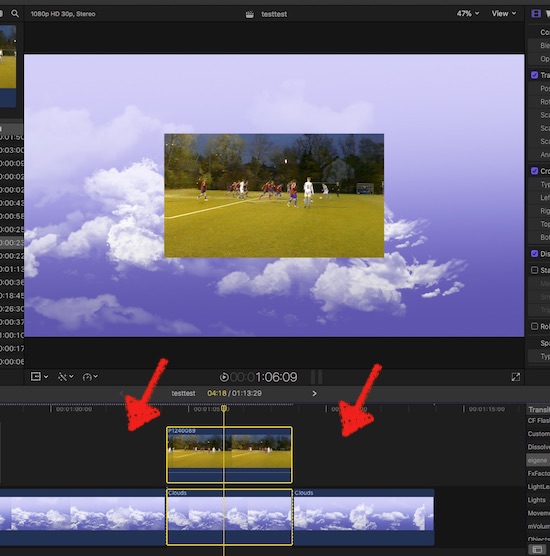
I'm in the middle of a project (ok, a blue sky with a soccer green as insert is no real project :woohoo: …)
compound both parts = no 'beef'/handles for a dissolve - you know that situation …

NO Tracks! The compound is a clip; double-click it, and it opens its own timeline (no tracks either); extend the material:
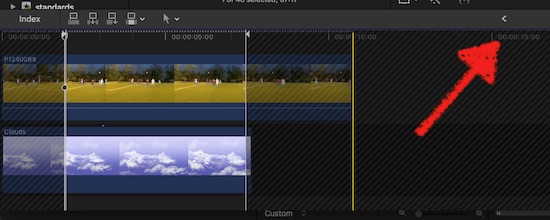
click the < to return to your main project/storyline … tadahhh: handles, dissolve possible.
And no tracks …
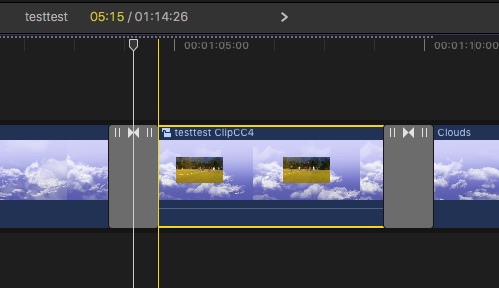
Maybe as a thoughts-kicker:
why stapling tracks while you see only one anyhow? (comps excluded)
… don't want to treat you wiseguy-ish … but you're doctoring from the wrong side of the prob....
sorry to appeal snooty … but no tracks.
Replied by Karsten Schlüter on topic Transition Help
phil@circuitfactory.ae wrote: … I am proficient across most of FCPX. …
Again - sorry for patronizing you, to treat you 'smart'- I'm no Certified Trainer, nor a pro, 'enthusiastic hobbyist' I'd label me myself …
No, I mentioned CONCEPT … that is beyond knobs&sliders … mantra: No Tracks. Forget the concept of layers in an NLE (fun-fact: layers and storyline concept are both from the same mind)
for a start: you're abusing the storyline for 'pre-edit' …
No need to push anything to a free 'track', edit at place, time for some Red Arrows
I'm in the middle of a project (ok, a blue sky with a soccer green as insert is no real project :woohoo: …)
compound both parts = no 'beef'/handles for a dissolve - you know that situation …
NO Tracks! The compound is a clip; double-click it, and it opens its own timeline (no tracks either); extend the material:
click the < to return to your main project/storyline … tadahhh: handles, dissolve possible.
And no tracks …
Maybe as a thoughts-kicker:
why stapling tracks while you see only one anyhow? (comps excluded)
… don't want to treat you wiseguy-ish … but you're doctoring from the wrong side of the prob....
sorry to appeal snooty … but no tracks.
Last edit: 06 Feb 2018 17:02 by Karsten Schlüter.
Please Log in to join the conversation.
07 Feb 2018 08:26 #93980
by PhilCF
Replied by PhilCF on topic Transition Help
Karsten... Firstly, thank you so much for taking the time to screenshot all that stuff and help someone out. (the football cloud project looks like a future epic 
I was indeed using too much "B-Roll" on a secondary line. I will just use "Option+Command+Down arrow" to put the clip into the main timeline.
The bit I wasn't aware of was when you open that bad boy up, you can then give it more footage which will remove those bloody red bars.
One more thing... I didn't understand your "thought's kicker" - can you please explain that one again?
I was indeed using too much "B-Roll" on a secondary line. I will just use "Option+Command+Down arrow" to put the clip into the main timeline.
The bit I wasn't aware of was when you open that bad boy up, you can then give it more footage which will remove those bloody red bars.
One more thing... I didn't understand your "thought's kicker" - can you please explain that one again?
Please Log in to join the conversation.
- Karsten Schlüter
-
- Offline
- Moderator
-
Less
More
- Posts: 3790
- Thank you received: 718
07 Feb 2018 17:19 #93989
by Karsten Schlüter
well, due to my age, I could hold here offhand a keynote of 3h, about Edit user-interfaces, beginning with Steenbeck and Moviola, then software mimicking it (Quantels Paintbox had a vertical timeline), finally Premiere = layers as in Photoshop and FCPX = a clip focussed NLE.
No, my brash comment was meant:
When you staple 7 lanes of video over each other - you 'see' just one = the actual storyline.
ok, edit titan Walter Murch says, he wants all alternatives at an edit-point in view… and simply switch lanes to see the diff. options at work. (FCPX offers that with its Auditions).
FCPX has a different concept: it's not a timeline anymore (which would, for example, allow to set Markers at future, now empty places), but a storyline, one clip after the other… so when you move a sequence, all attached material moves too (magnetic), and no 'gaps' in the story, nor in the lanes…
So - when you pre-view, pre-select and 'pre-edit' in an Eventbrowser, and use the timeline 'just' for assembling only the 'good takes', there's little need for tracks.
… you see only one lane in a movie… never 2 or 7 or 30 simultaneously … that's what I meant. Sorry for the limitations of my English…
Replied by Karsten Schlüter on topic Transition Help
phil@circuitfactory.ae wrote: ... I didn't understand your "thought's kicker" - can you please explain that one again?
well, due to my age, I could hold here offhand a keynote of 3h, about Edit user-interfaces, beginning with Steenbeck and Moviola, then software mimicking it (Quantels Paintbox had a vertical timeline), finally Premiere = layers as in Photoshop and FCPX = a clip focussed NLE.
No, my brash comment was meant:
When you staple 7 lanes of video over each other - you 'see' just one = the actual storyline.
ok, edit titan Walter Murch says, he wants all alternatives at an edit-point in view… and simply switch lanes to see the diff. options at work. (FCPX offers that with its Auditions).
FCPX has a different concept: it's not a timeline anymore (which would, for example, allow to set Markers at future, now empty places), but a storyline, one clip after the other… so when you move a sequence, all attached material moves too (magnetic), and no 'gaps' in the story, nor in the lanes…
So - when you pre-view, pre-select and 'pre-edit' in an Eventbrowser, and use the timeline 'just' for assembling only the 'good takes', there's little need for tracks.
… you see only one lane in a movie… never 2 or 7 or 30 simultaneously … that's what I meant. Sorry for the limitations of my English…
Please Log in to join the conversation.

07 Feb 2018 18:47 - 07 Feb 2018 18:48 #93993
by thinkfilm
Replied by thinkfilm on topic Transition Help
Karsten,
I believe I would like to hear your keynote on edit user interfaces. I still get a warm feeling when I hear the words gang-synchronizer, hot splicer and Oldelft Cinemonta.
I believe I would like to hear your keynote on edit user interfaces. I still get a warm feeling when I hear the words gang-synchronizer, hot splicer and Oldelft Cinemonta.
Last edit: 07 Feb 2018 18:48 by thinkfilm.
Please Log in to join the conversation.
