


- Posts: 3
- Thank you received: 0
3 Post Moderation Rule for New Boarders (25 Jan 2021)
New boarders will have their posts moderated - Don't worry if you cannot see your post immediately.
Watch my "360 Guided Perspective Videos" Technique.
- Limelight-Muskoka
-
 Topic Author
- Offline
- New Member
-

Less
More
27 Jan 2018 03:03 - 27 Jan 2018 05:49 #93726
by Limelight-Muskoka
I love the FCPX 10.4 update. Have you tried keyframing 360 content of the orientation with the "Orient tool" of the camera viewport on the timeline? A cool method of a guided tour in a 360. To pan to the best view of all the action. While it has been mentioned that titles might not be implemented well with the technique I think this is being a bit over critical. The ability to fine-tune the viewport framing is a dynamic way to make the content more interesting. You can at anytime still manipulate the viewport perspective and have the orientation dynamically move for the audience.
Watch at the 2 min mark.
Also watch this sample version
Watch at the 2 min mark.
Also watch this sample version
Last edit: 27 Jan 2018 05:49 by Limelight-Muskoka.
Please Log in to join the conversation.
- Karsten Schlüter
-

- Offline
- Moderator
-

Less
More
- Posts: 3790
- Thank you received: 718
27 Jan 2018 04:54 - 27 Jan 2018 04:54 #93728
by Karsten Schlüter
Replied by Karsten Schlüter on topic Watch my "360 Guided Perspective Videos" Technique.
Welcome Chris to fcp.co 
… I'm an old man, little convinced about this 360°-stuff … looks like, you're an expert, so please help me to cross the road:
Watched your video … the controls still allow me to pan around like crazy, which results in …
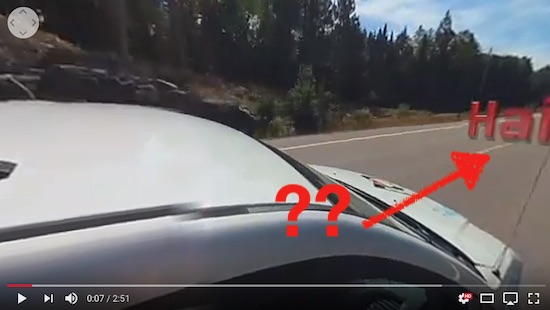
… the opportunity to miss the Title. For example.
And I watched carefully min 2 …
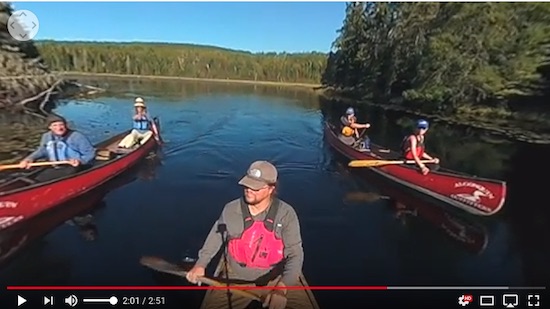
… which demoes what?
In my ignorance: 360 allows to reframe a shot … nice2have, but … what about pointing a camera into desired direction?
No offense, sorry to 'attack' a first time poster, but it looks like, your example demoes your excitement about a new feature AND demoes my dilemma, why not using old features (selecting point of interest while recording, not in post)

… I'm an old man, little convinced about this 360°-stuff … looks like, you're an expert, so please help me to cross the road:
Limelight-Muskoka wrote: … A cool method of a guided tour in a 360. To pan to the best view of all the action. … Watch at the 2 min mark.
Watched your video … the controls still allow me to pan around like crazy, which results in …
… the opportunity to miss the Title. For example.
And I watched carefully min 2 …
… which demoes what?
In my ignorance: 360 allows to reframe a shot … nice2have, but … what about pointing a camera into desired direction?
No offense, sorry to 'attack' a first time poster, but it looks like, your example demoes your excitement about a new feature AND demoes my dilemma, why not using old features (selecting point of interest while recording, not in post)
Last edit: 27 Jan 2018 04:54 by Karsten Schlüter.
Please Log in to join the conversation.
- Limelight-Muskoka
-
Topic Author
- Offline
- New Member
-
Less
More
- Posts: 3
- Thank you received: 0
27 Jan 2018 05:08 - 27 Jan 2018 05:52 #93732
by Limelight-Muskoka
Replied by Limelight-Muskoka on topic Watch my "360 Guided Perspective Videos" Technique.
What this represents is the ability to dynamically finetune the viewport with pans added to the perspective in the post.
The reply of the individual concerning their looking away from the title might suggest that titles maybe should not be added to this 360 technique. But the underlining technique will be a benefit of 360 VR editing in FCPx 10.4.
While some might not like this technique for vestibule VR headsets as they overshoot content. For those that use a windowed view through a desktop or tablet or iphone might find this technique of interest.
Keyframe any type of pan, tilt or even roll over time to 360 VR content.
The reply of the individual concerning their looking away from the title might suggest that titles maybe should not be added to this 360 technique. But the underlining technique will be a benefit of 360 VR editing in FCPx 10.4.
While some might not like this technique for vestibule VR headsets as they overshoot content. For those that use a windowed view through a desktop or tablet or iphone might find this technique of interest.
Keyframe any type of pan, tilt or even roll over time to 360 VR content.
Last edit: 27 Jan 2018 05:52 by Limelight-Muskoka.
Please Log in to join the conversation.
- Karsten Schlüter
-
- Offline
- Moderator
-
Less
More
- Posts: 3790
- Thank you received: 718
27 Jan 2018 05:19 #93734
by Karsten Schlüter
Replied by Karsten Schlüter on topic Watch my "360 Guided Perspective Videos" Technique.
don't get hasty with your posts, Chris, may I remind you …
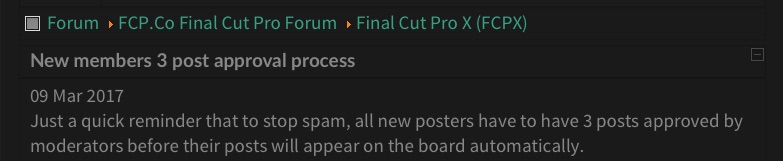
(deleted your double/triple posts, ok?)
again, in my old-school words:
all you do is a reframing of a recording in post, right?
Nice.
What we did with 4k and 'Ken Burns', now with additional pan&tilt.
why not …
… but not shattering my world …
(deleted your double/triple posts, ok?)
again, in my old-school words:
all you do is a reframing of a recording in post, right?
Nice.
What we did with 4k and 'Ken Burns', now with additional pan&tilt.
why not …
… but not shattering my world …
Please Log in to join the conversation.
- Limelight-Muskoka
-
Topic Author
- Offline
- New Member
-
Less
More
- Posts: 3
- Thank you received: 0
27 Jan 2018 05:33 #93736
by Limelight-Muskoka
Replied by Limelight-Muskoka on topic Watch my "360 Guided Perspective Videos" Technique.
I create a starting point view at the beginning of a 360 VR clip and type in the pan tilt and roll values creating a keyframe where I then go to the end of the clip or also any point in between and set orientation values that I keyframe into the clip over time.
Please Log in to join the conversation.
