


- Posts: 265
- Thank you received: 7
3 Post Moderation Rule for New Boarders (25 Jan 2021)
New boarders will have their posts moderated - Don't worry if you cannot see your post immediately.
How to make a custom default transition?
- bradywurtz
-
 Topic Author
- Offline
- Elite Member
-

Less
More
25 Jan 2018 04:50 #93656
by bradywurtz
How to make a custom default transition? was created by bradywurtz
I normally just add the regular default transition in my projects, but I also go into the settings of that transition and change the 'Look' option from Video to Film.
How can i go about creating this as a new transition and saving it as a default transition to make my life easier? I don't see anywhere to save the transition as a new one, and i right click on the transition and it won't let me open it in Motion. I know i can click on transitions already in FCPX and make them default, but i want to edit this normal one a bit and THEN save it.
any suggestions?
How can i go about creating this as a new transition and saving it as a default transition to make my life easier? I don't see anywhere to save the transition as a new one, and i right click on the transition and it won't let me open it in Motion. I know i can click on transitions already in FCPX and make them default, but i want to edit this normal one a bit and THEN save it.
any suggestions?
Please Log in to join the conversation.
- Karsten Schlüter
-

- Offline
- Moderator
-

Less
More
- Posts: 3790
- Thank you received: 718
25 Jan 2018 05:15 #93658
by Karsten Schlüter
Replied by Karsten Schlüter on topic How to make a custom default transition?
…which Transition specifically?
Please Log in to join the conversation.


25 Jan 2018 11:59 #93670
by JoeEditor
Replied by JoeEditor on topic How to make a custom default transition?
Yes, what Karsten said, as I've yet to see a transition (created in Motion) that won't let you open it in Motion. Unless it is a coded third party plugin (not created in Motion), then you can't simply open it in Motion. I suspect that's the case here.
So, "…which Transition specifically?"
So, "…which Transition specifically?"
Please Log in to join the conversation.
- Tom Wolsky
-

- Offline
- Moderator
-
25 Jan 2018 12:02 #93671
by Tom Wolsky
Replied by Tom Wolsky on topic How to make a custom default transition?
He wants a custom cross dissolve set to a film dissolve rather than video.
Please Log in to join the conversation.
25 Jan 2018 12:11 #93675
by JoeEditor
Replied by JoeEditor on topic How to make a custom default transition?
If he's referring to the built-in Cross Dissolve, no, that's coded, can't alter it.
Please Log in to join the conversation.
- Tom Wolsky
-
- Offline
- Moderator
-
25 Jan 2018 12:21 #93676
by Tom Wolsky
Replied by Tom Wolsky on topic How to make a custom default transition?
Is there any way to make a cross dissolve in Motion with the film dissolve? Thanks Ben.
Please Log in to join the conversation.
25 Jan 2018 15:06 - 25 Jan 2018 15:06 #93678
by JoeEditor
Replied by JoeEditor on topic How to make a custom default transition?
I don't see why not. What makes the Film setting different from the Video setting? I've never explored the Film setting.
Last edit: 25 Jan 2018 15:06 by JoeEditor.
Please Log in to join the conversation.
- Tom Wolsky
-
- Offline
- Moderator
-
25 Jan 2018 16:11 #93682
by Tom Wolsky
Replied by Tom Wolsky on topic How to make a custom default transition?
I don't really know. It's a slightly different look. Maybe it uses a different opacity curve or something. Video looks like a straight linear opacity cross fade.
Please Log in to join the conversation.
- bradywurtz
-
Topic Author
- Offline
- Elite Member
-
Less
More
- Posts: 265
- Thank you received: 7
25 Jan 2018 16:37 #93684
by bradywurtz
Replied by bradywurtz on topic How to make a custom default transition?
Sorry if I wasn't clear on it before.
But yes, it's the default cross dissolve transition. Command + T i believe is the shortcut.
When you add that transition, if you click on it and go to the inspector, you can change the Look of it. By default it's set to Video which is some sort of typical lineal cross dissolve. But there is a look called 'film' in the drop down, and that's what i typically use. If i find the cross dissolve in the transition panel, and right click on it, it only lets me set it as default, not open it in motion, which is what i'm use to doing with the effects.
Also, if i open Motion and create a transition, the default they give you is a cross dissolve, but i can't find any settings inside Motion to add the 'film' look.
But yes, it's the default cross dissolve transition. Command + T i believe is the shortcut.
When you add that transition, if you click on it and go to the inspector, you can change the Look of it. By default it's set to Video which is some sort of typical lineal cross dissolve. But there is a look called 'film' in the drop down, and that's what i typically use. If i find the cross dissolve in the transition panel, and right click on it, it only lets me set it as default, not open it in motion, which is what i'm use to doing with the effects.
Also, if i open Motion and create a transition, the default they give you is a cross dissolve, but i can't find any settings inside Motion to add the 'film' look.
Please Log in to join the conversation.
- Karsten Schlüter
-
- Offline
- Moderator
-
Less
More
- Posts: 3790
- Thank you received: 718
25 Jan 2018 16:48 #93686
by Karsten Schlüter
When you try to reenact that dissolve, you have to. keyframe the opacity of both clips, and adjust in the Keyframe Editor the keyframes to Ease both:
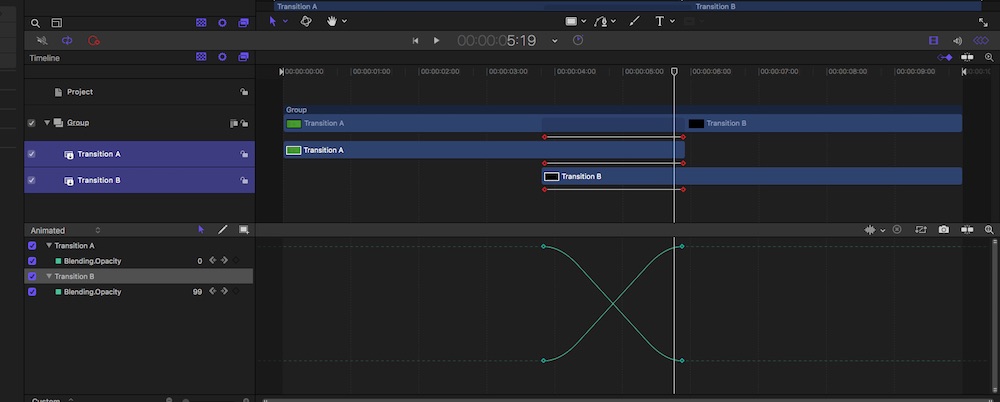
… to sim the other settings, you have to apply diff. Comp modes to the layers.
Replied by Karsten Schlüter on topic How to make a custom default transition?
bradywurtz wrote: … but i can't find any settings inside Motion to add the 'film' look.
When you try to reenact that dissolve, you have to. keyframe the opacity of both clips, and adjust in the Keyframe Editor the keyframes to Ease both:
… to sim the other settings, you have to apply diff. Comp modes to the layers.
Please Log in to join the conversation.
- bradywurtz
-
Topic Author
- Offline
- Elite Member
-
Less
More
- Posts: 265
- Thank you received: 7
25 Jan 2018 19:05 #93692
by bradywurtz
Replied by bradywurtz on topic How to make a custom default transition?
Got it! I did 'Add' to the Blend mode and it worked like a charm! Thanks!!!!!!
Please Log in to join the conversation.

- bradywurtz
-
Topic Author
- Offline
- Elite Member
-
Less
More
- Posts: 265
- Thank you received: 7
26 Jan 2018 03:58 #93707
by bradywurtz
Replied by bradywurtz on topic How to make a custom default transition?
i knew you knew
Please Log in to join the conversation.
