


- Posts: 6
- Thank you received: 0
3 Post Moderation Rule for New Boarders (25 Jan 2021)
New boarders will have their posts moderated - Don't worry if you cannot see your post immediately.
break apart for compound clip is grayed out-what causes this?
- david.hill
-
 Topic Author
- Offline
- New Member
-

Less
More
22 Jan 2018 16:20 #93604
by david.hill
I have a short project that I created a compound clip of, which I now need to break apart, but the drop down is grayed out-how do I overcome this?
All clips originated in Apple Motion , were rendered and imported into FCPX. No audio-it's digital signage.
I've done this before without issue.
All clips originated in Apple Motion , were rendered and imported into FCPX. No audio-it's digital signage.
I've done this before without issue.
Please Log in to join the conversation.


23 Jan 2018 13:26 #93612
by JoeEditor
Replied by JoeEditor on topic break apart for compound clip is grayed out-what causes this?
Screen shot showing the highlighted compound in your Timeline, and the menu option grayed out? I'm able to do this just fine.
What macOS and FCPX versions are you running?
Have you tried to relaunch FCPX and try it?
What macOS and FCPX versions are you running?
Have you tried to relaunch FCPX and try it?
Please Log in to join the conversation.
- david.hill
-
Topic Author
- Offline
- New Member
-
Less
More
- Posts: 6
- Thank you received: 0
25 Jan 2018 03:19 #93653
by david.hill
Replied by david.hill on topic break apart for compound clip is grayed out-what causes this?
I'm running Sierra and FCPX 10.4.
Yes, I've relaunched the app.
Yes, I've relaunched the app.
Please Log in to join the conversation.
25 Jan 2018 12:06 #93673
by JoeEditor
Replied by JoeEditor on topic break apart for compound clip is grayed out-what causes this?
Screen shot, please.
Please Log in to join the conversation.
- david.hill
-
Topic Author
- Offline
- New Member
-
Less
More
- Posts: 6
- Thank you received: 0
25 Jan 2018 14:49 #93677
by david.hill
Replied by david.hill on topic break apart for compound clip is grayed out-what causes this?
/Users/southcliff/Desktop/Screen Shot 2018-01-25 at 8.43.49 AM (2).png
Please Log in to join the conversation.
- david.hill
-
Topic Author
- Offline
- New Member
-
Less
More
- Posts: 6
- Thank you received: 0
25 Jan 2018 16:51 #93687
by david.hill
Replied by david.hill on topic break apart for compound clip is grayed out-what causes this?
Here's the screen shot.
Please Log in to join the conversation.
- david.hill
-
Topic Author
- Offline
- New Member
-
Less
More
- Posts: 6
- Thank you received: 0
25 Jan 2018 16:52 #93688
by david.hill
Replied by david.hill on topic break apart for compound clip is grayed out-what causes this?
Here's the screen shot.
Please Log in to join the conversation.
25 Jan 2018 17:11 #93690
by JoeEditor
Replied by JoeEditor on topic break apart for compound clip is grayed out-what causes this?
Make sure it is no wider than 1200 pixels, and a JPEG format.
Please Log in to join the conversation.
- david.hill
-
Topic Author
- Offline
- New Member
-
Less
More
- Posts: 6
- Thank you received: 0
25 Jan 2018 19:46 #93693
by david.hill
Replied by david.hill on topic break apart for compound clip is grayed out-what causes this?
/Users/southcliff/Desktop/Screen Shotx.jpg
Please Log in to join the conversation.
26 Jan 2018 00:02 #93703
by JoeEditor
Replied by JoeEditor on topic break apart for compound clip is grayed out-what causes this?
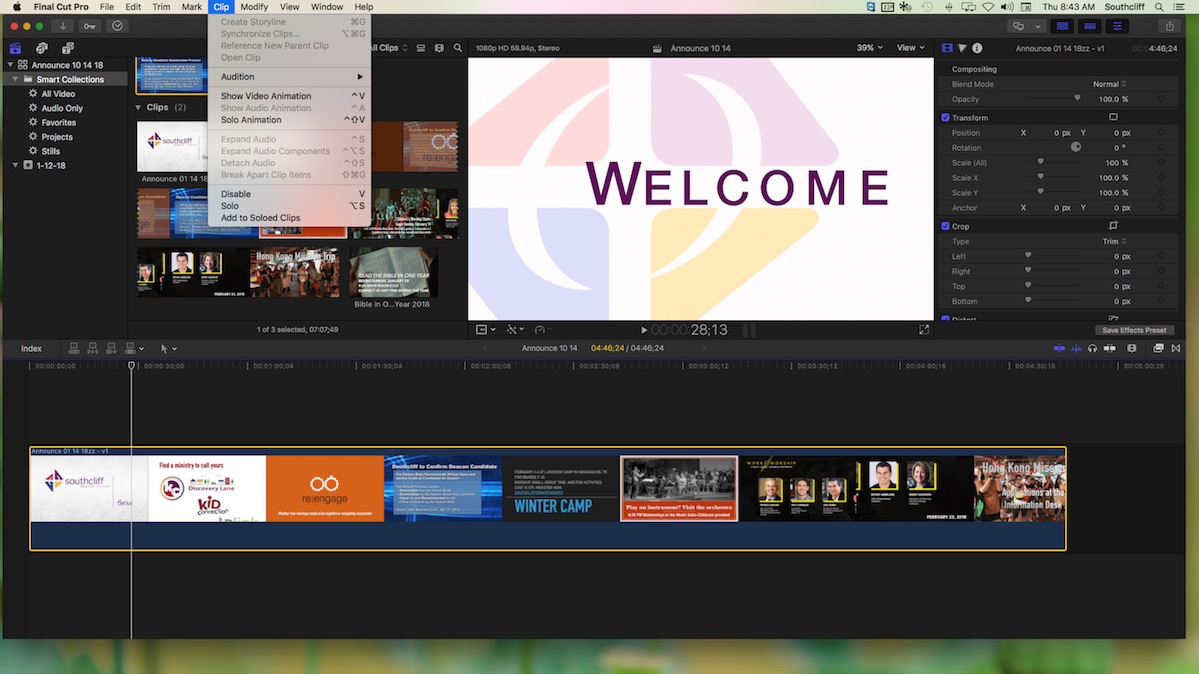
Looking at your screen shot, you have a clip in the Timeline highlighted in yellow, which is fine. But you also have a Project in the Browser highlighted in yellow at the same time. That should be impossible to do. You can't have both selected at once. Not sure what's going on there.
If you have a clip in the Timeline highlighted in yellow, anything previously selected in the Browser should be highlighted in white.
Thus, if you have an element in the Browser highlighted in yellow, anything selected in the Timeline should be highlighted in white.
It is acting like you have a Project selected in the Browser, which will grey out that option.
If you have a clip in the Timeline highlighted in yellow, anything previously selected in the Browser should be highlighted in white.
Thus, if you have an element in the Browser highlighted in yellow, anything selected in the Timeline should be highlighted in white.
It is acting like you have a Project selected in the Browser, which will grey out that option.
Please Log in to join the conversation.
- Karsten Schlüter
-

- Offline
- Moderator
-

Less
More
- Posts: 3790
- Thank you received: 718
26 Jan 2018 04:30 - 26 Jan 2018 04:32 #93709
by Karsten Schlüter
Replied by Karsten Schlüter on topic break apart for compound clip is grayed out-what causes this?
none of your clips in the Event Browser, and esp. the one in the timeline area indicated as 'compounds':
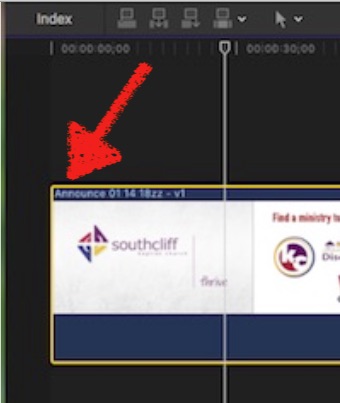
… looks to me like a 'solid' single clip = nothing to break apart....
for comparison, from the Manual:
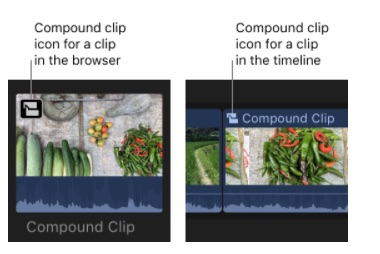
??
… looks to me like a 'solid' single clip = nothing to break apart....
for comparison, from the Manual:
??
Last edit: 26 Jan 2018 04:32 by Karsten Schlüter.
Please Log in to join the conversation.

26 Jan 2018 19:09 #93723
by anickt
Karsten - the name of the clip you are pointing at with the red arrow is what you get when you use the Open Clip menu item. I don't ever use Open Clip but I have seen others use it improperly and that may be the root of this issue.
Replied by anickt on topic break apart for compound clip is grayed out-what causes this?
Karsten Schlüter wrote: none of your clips in the Event Browser, and esp. the one in the timeline area indicated as 'compounds':
… looks to me like a 'solid' single clip = nothing to break apart....
for comparison, from the Manual:
??
Karsten - the name of the clip you are pointing at with the red arrow is what you get when you use the Open Clip menu item. I don't ever use Open Clip but I have seen others use it improperly and that may be the root of this issue.
Please Log in to join the conversation.
- Karsten Schlüter
-
- Offline
- Moderator
-
Less
More
- Posts: 3790
- Thank you received: 718
27 Jan 2018 05:29 #93735
by Karsten Schlüter
hmmm… for sure you're right about opening a compound in its own timeline …
but …
none of the other clips in the OPs browser has a CC-indicator.
And, when you open a clip in its own timeline, you instantly get a 'go back'-button in the status bar:
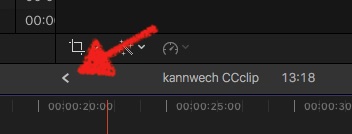
… no such thing in the OPs screenshot.
standing by my point: no compounds = no break apart.
(assuming re-imported, edited projects …?)
Replied by Karsten Schlüter on topic break apart for compound clip is grayed out-what causes this?
anickt wrote: … is what you get when you use the Open Clip menu item. …
hmmm… for sure you're right about opening a compound in its own timeline …
but …
none of the other clips in the OPs browser has a CC-indicator.
And, when you open a clip in its own timeline, you instantly get a 'go back'-button in the status bar:
… no such thing in the OPs screenshot.
standing by my point: no compounds = no break apart.
(assuming re-imported, edited projects …?)
Please Log in to join the conversation.
27 Jan 2018 14:08 #93739
by JoeEditor
Replied by JoeEditor on topic break apart for compound clip is grayed out-what causes this?
I'm with Karsten on this. Couple of things are wrong with that screenshot.
Please Log in to join the conversation.
