


- Posts: 10
- Thank you received: 0
3 Post Moderation Rule for New Boarders (25 Jan 2021)
New boarders will have their posts moderated - Don't worry if you cannot see your post immediately.
Proposal for a More Efficient Timeline
16 Jan 2018 21:55 - 16 Jan 2018 22:01 #93389
by TraiGuzie
Proposal for a More Efficient Timeline was created by TraiGuzie
I feel that there is a lot of wasted space in the timeline on any view that shows the audio waveforms, which makes it particularly tight when working on a laptop. I did a mock up in photoshop taking out all the extraneous space and overlaying the audio waveforms on top of the video. Exact same amount of space used but you can fit 5 rows where you could previously fit 3. Obviously Apple could do an even better job visually with this concept, but I am curios what everyone thinks about the idea.
Last edit: 16 Jan 2018 22:01 by TraiGuzie.
Please Log in to join the conversation.
16 Jan 2018 22:02 - 17 Jan 2018 18:10 #93390
by TraiGuzie
Replied by TraiGuzie on topic Proposal for a More Efficient Timeline
I added the images but cannot get them to show in the post, here are links to them both:
Current:
barnoneweddings.com/films/current_timeline.png
Proposed:
barnoneweddings.com/films/clean_timeline.jpg
Note: The Primary storyline is not intentionally left blank, I just hadn't gotten there yet on this edit before I had the inspiration to photoshop.
Current:
barnoneweddings.com/films/current_timeline.png
Proposed:
barnoneweddings.com/films/clean_timeline.jpg
Note: The Primary storyline is not intentionally left blank, I just hadn't gotten there yet on this edit before I had the inspiration to photoshop.
Last edit: 17 Jan 2018 18:10 by TraiGuzie.
Please Log in to join the conversation.

17 Jan 2018 07:58 - 17 Jan 2018 08:11 #93393
by Axel
Replied by Axel on topic Proposal for a More Efficient Timeline
Constantly thinking and dreaming about improvements, I was blown away by the 10.3 update. With all combinations of clip appearance, zoom function (for lanes, in the german version blatantly translated as "Spuren" = "tracks"), using auditions and overwriting connected clips to the primary storyline as soon as I'm certain about their position, I feel confident that six layers could be there instead of your three (not tested right away).
I sometimes think, why doesn't this behave so and so? And a little later I know the answer: because it had limitations in other circumstances.
In your example you could overwrite the slug in the PSL very early on with your actual CLIP. Imo it takes too much space to *keep* all video connected to it. This once connected clip can be lifted from there at any time (if you have to trim it, but then again, I'd rather connect the next clip above it to define it's out-point), without consequences . You can still roll-edit. You could also show the synched clips' Dialogue role as a lane, this would enable you to decide whether to see the music's or the dialog 's waveform (if necessary).
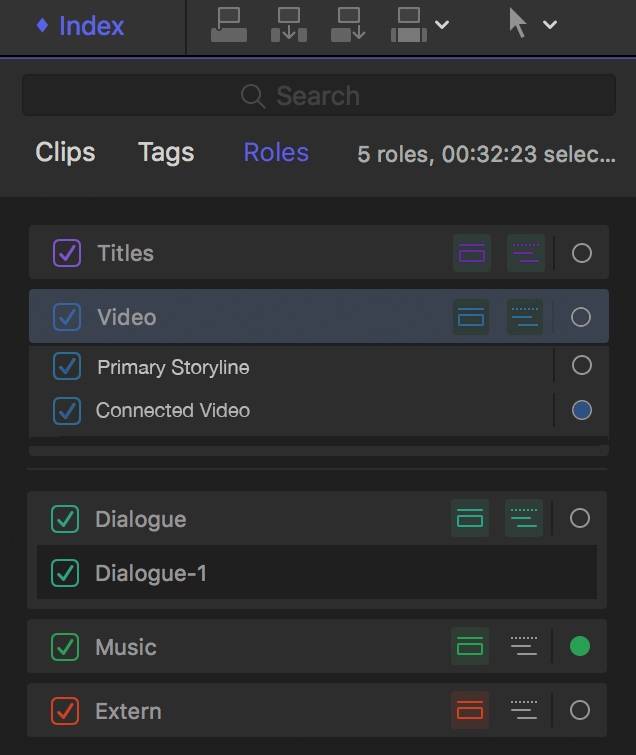
We won't see "video lanes" - for obvious reasons. But we might be able to zoom on video roles. I also photoshopped an alternative timeline index. By zooming on the (automatically assigned) video-"role" "Connected Clips" you would make your slug a thin grey line. Your logo you could be a purple line if you admitted that it functions as a title. This is not perfectly thought out yet (as you see ).
).
I sometimes think, why doesn't this behave so and so? And a little later I know the answer: because it had limitations in other circumstances.
In your example you could overwrite the slug in the PSL very early on with your actual CLIP. Imo it takes too much space to *keep* all video connected to it. This once connected clip can be lifted from there at any time (if you have to trim it, but then again, I'd rather connect the next clip above it to define it's out-point), without consequences . You can still roll-edit. You could also show the synched clips' Dialogue role as a lane, this would enable you to decide whether to see the music's or the dialog 's waveform (if necessary).
We won't see "video lanes" - for obvious reasons. But we might be able to zoom on video roles. I also photoshopped an alternative timeline index. By zooming on the (automatically assigned) video-"role" "Connected Clips" you would make your slug a thin grey line. Your logo you could be a purple line if you admitted that it functions as a title. This is not perfectly thought out yet (as you see
).
Last edit: 17 Jan 2018 08:11 by Axel.
Please Log in to join the conversation.
- Karsten Schlüter
-

- Offline
- Moderator
-

Less
More
- Posts: 3790
- Thank you received: 718
17 Jan 2018 08:08 #93394
by Karsten Schlüter
Replied by Karsten Schlüter on topic Proposal for a More Efficient Timeline
… a few randomly thoughts on your suggestions:
• your top lane 'logo' has no audio… in your version, you simply omit the empty lower 'waveform bar' part of the clip
question for the GUI designer: but then, how to differ that from a 'muted'/'don't show waveforms'?
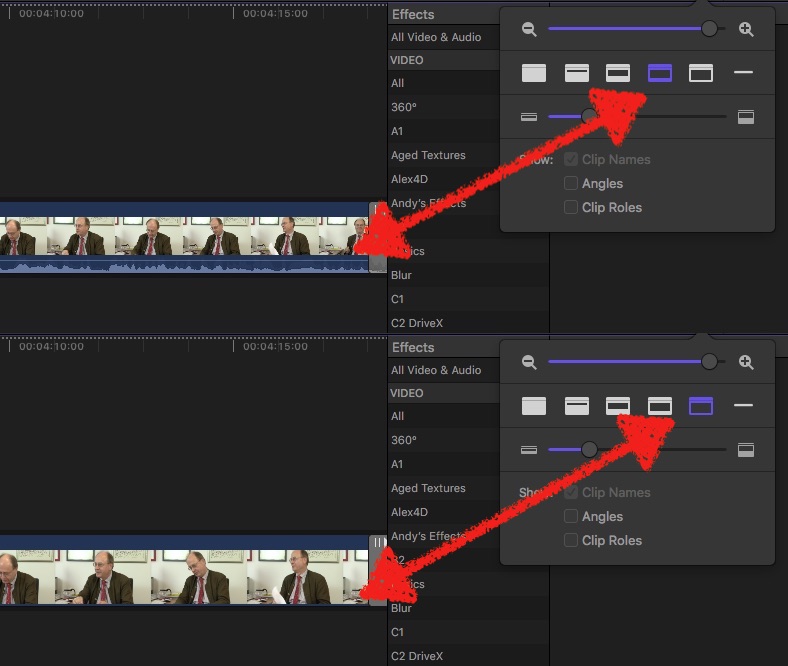
• that huge 'gap' clip, which is in your project no 'filler' but a track-replacement , does indeed need at that position not that height, and generally - imho! - shouldn't match with generic interface colors; a diff.grey and/or texture (checkerboard?) would make it more obvious as a "needs content!"
To minimize its size is -imho!- not optional - you would shrink the storyline, THE mother of timeline… putting a gap-bar into it is a workaround, not general rule… For music-videos, for instance, one would put an audio-clip into it… again: no sense to minimize it…
• blending waveforms into clip content… hmm? to make any use of waveforms, most editors I guess would prefer a constant, solid background. Plus: It would make fast 'Range'n Drag'-Ducking impossible:
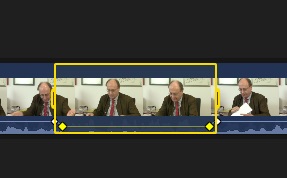
…because the Range tool can not 'know' wether you select A or V…
…
• your top lane 'logo' has no audio… in your version, you simply omit the empty lower 'waveform bar' part of the clip
question for the GUI designer: but then, how to differ that from a 'muted'/'don't show waveforms'?
• that huge 'gap' clip, which is in your project no 'filler' but a track-replacement
, does indeed need at that position not that height, and generally - imho! - shouldn't match with generic interface colors; a diff.grey and/or texture (checkerboard?) would make it more obvious as a "needs content!"To minimize its size is -imho!- not optional - you would shrink the storyline, THE mother of timeline… putting a gap-bar into it is a workaround, not general rule… For music-videos, for instance, one would put an audio-clip into it… again: no sense to minimize it…
• blending waveforms into clip content… hmm? to make any use of waveforms, most editors I guess would prefer a constant, solid background. Plus: It would make fast 'Range'n Drag'-Ducking impossible:
…because the Range tool can not 'know' wether you select A or V…
…
Please Log in to join the conversation.

17 Jan 2018 10:09 #93400
by Stu Wart
okay... but which "obvious reasons". Because I would "dream" of visually separated levels, not so much for the editing itself but everything that goes upon
Replied by Stu Wart on topic Proposal for a More Efficient Timeline
Axel wrote:
We won't see "video lanes" - for obvious reasons.
okay... but which "obvious reasons". Because I would "dream" of visually separated levels, not so much for the editing itself but everything that goes upon
Please Log in to join the conversation.
17 Jan 2018 10:49 #93403
by Axel
Because of the rule above hides beneath, the layer-law, if you will. With video clips checkerboarded into lanes , you'd lose the correct visual representation of what's visible and why - because it's on top. I think it's really enough to be able to assign video roles for "anything beyond editing".
For the TO's request, it would be useful to be able to minimize either the storyline or connected clips (with secondary storylines, which are also connected). I consider this a very special feature, but why not? I for one would certainly use that.
Replied by Axel on topic Proposal for a More Efficient Timeline
Stu Wart wrote:
Axel wrote:
We won't see "video lanes" - for obvious reasons.
okay... but which "obvious reasons". Because I would "dream" of visually separated levels, not so much for the editing itself but everything that goes upon
Because of the rule above hides beneath, the layer-law, if you will. With video clips checkerboarded into lanes , you'd lose the correct visual representation of what's visible and why - because it's on top. I think it's really enough to be able to assign video roles for "anything beyond editing".
For the TO's request, it would be useful to be able to minimize either the storyline or connected clips (with secondary storylines, which are also connected). I consider this a very special feature, but why not? I for one would certainly use that.
Please Log in to join the conversation.
17 Jan 2018 11:24 #93406
by Stu Wart
still don't get it, sorry. We are talking about elements that would be stacked one above the other in the same given order anyway... So what's wrong with visually distintive "Roles colored" lanes at different levels ?
Replied by Stu Wart on topic Proposal for a More Efficient Timeline
Axel wrote:
Stu Wart wrote:
Axel wrote:
We won't see "video lanes" - for obvious reasons.
okay... but which "obvious reasons". Because I would "dream" of visually separated levels, not so much for the editing itself but everything that goes upon
Because of the rule above hides beneath, the layer-law, if you will. With video clips checkerboarded into lanes , you'd lose the correct visual representation of what's visible and why - because it's on top. I think it's really enough to be able to assign video roles for "anything beyond editing".
.
still don't get it, sorry. We are talking about elements that would be stacked one above the other in the same given order anyway... So what's wrong with visually distintive "Roles colored" lanes at different levels ?
Please Log in to join the conversation.
- Karsten Schlüter
-
- Offline
- Moderator
-
Less
More
- Posts: 3790
- Thank you received: 718
17 Jan 2018 11:34 #93407
by Karsten Schlüter
That is discussed now for about 7 (?) years … :pinch:
Layers are handy for composition (compare: Photoshop, Brady Bunch, etc)
… but less useful when the objective is story-telling => there's just one 'pic' on the screen, not several... there comes one shot/scene/sequence after the other. Not 'over' each other.
This is the fundamental concept of FCPX; if you prefer tracks, use Premiere or Avid or… but if the lanes do NOT represent the same scenery but simultaneously from diff. angles (aka Multicam), than is the question what for? Why staple clips in the STORYline?
You see the 'lanes' content in the EventBrowser; you can skim thru, pre-select, filter, keyword, smart-collect, what not.... what you can NOT do with dozen of tracks stapled in a timeline…
Replied by Karsten Schlüter on topic Proposal for a More Efficient Timeline
Stu Wart wrote: …okay... but which "obvious reasons". …
That is discussed now for about 7 (?) years … :pinch:
Layers are handy for composition (compare: Photoshop, Brady Bunch, etc)
… but less useful when the objective is story-telling => there's just one 'pic' on the screen, not several... there comes one shot/scene/sequence after the other. Not 'over' each other.
This is the fundamental concept of FCPX; if you prefer tracks, use Premiere or Avid or… but if the lanes do NOT represent the same scenery but simultaneously from diff. angles (aka Multicam), than is the question what for? Why staple clips in the STORYline?
You see the 'lanes' content in the EventBrowser; you can skim thru, pre-select, filter, keyword, smart-collect, what not.... what you can NOT do with dozen of tracks stapled in a timeline…
Please Log in to join the conversation.
17 Jan 2018 12:50 - 17 Jan 2018 12:54 #93409
by Stu Wart
yes that is EXACTLY what I said with " not so much for the editing itself but everything that goes upon " but you chose to be patronizing and grumpy instead of consider that very aspect. I still would like to have a visuel control on how titles, (foreign versions... ) , effects layers, and so many things... stack themselves. Not messing with editing to start with. Still would be connected etc , nothing change about the concept.
and who wants to " staple clips in the STORYline?" certainly not me. Just read before grumble
Replied by Stu Wart on topic Proposal for a More Efficient Timeline
Karsten Schlüter wrote:
Stu Wart wrote: …okay... but which "obvious reasons". …
That is discussed now for about 7 (?) years … :pinch:
Layers are handy for composition (compare: Photoshop, Brady Bunch, etc)
… but less useful when the objective is story-telling => there's just one 'pic' on the screen, not several... there comes one shot/scene/sequence after the other. Not 'over' each other.
This is the fundamental concept of FCPX; if you prefer tracks, use Premiere or Avid or… but if the lanes do NOT represent the same scenery but simultaneously from diff. angles (aka Multicam), than is the question what for? Why staple clips in the STORYline?
You see the 'lanes' content in the EventBrowser; you can skim thru, pre-select, filter, keyword, smart-collect, what not.... what you can NOT do with dozen of tracks stapled in a timeline…
yes that is EXACTLY what I said with " not so much for the editing itself but everything that goes upon " but you chose to be patronizing and grumpy instead of consider that very aspect. I still would like to have a visuel control on how titles, (foreign versions... ) , effects layers, and so many things... stack themselves. Not messing with editing to start with. Still would be connected etc , nothing change about the concept.
and who wants to " staple clips in the STORYline?" certainly not me. Just read before grumble
Last edit: 17 Jan 2018 12:54 by Stu Wart.
Please Log in to join the conversation.

17 Jan 2018 17:12 #93425
by JoeEditor
Replied by JoeEditor on topic Proposal for a More Efficient Timeline
" I still would like to have a visuel control on how titles, (foreign versions... ) , effects layers, and so many things... stack themselves. "
You are free to move clips up an down to stack them as you wish. But they're stacked in a specific order to start with for a specific purpose. Rearranging the stack would cause things to not show up on screen properly. If I put a cutaway over a title, for example, the title is now hidden.
So things are stacked just fine as is, and you CAN rearrange the stack order to your hearts desire.
Or I'm missing the point...
You are free to move clips up an down to stack them as you wish. But they're stacked in a specific order to start with for a specific purpose. Rearranging the stack would cause things to not show up on screen properly. If I put a cutaway over a title, for example, the title is now hidden.
So things are stacked just fine as is, and you CAN rearrange the stack order to your hearts desire.
Or I'm missing the point...
Please Log in to join the conversation.
17 Jan 2018 18:14 #93428
by TraiGuzie
Replied by TraiGuzie on topic Proposal for a More Efficient Timeline
Yeah the primary storyline was not intentionally left blank, sometimes I put stuff "on top" till I like the order and then overwrite.
Please Log in to join the conversation.
17 Jan 2018 21:44 #93436
by JoeEditor
Why not just put it in the Primary Storyline to start with?
Replied by JoeEditor on topic Proposal for a More Efficient Timeline
TraiGuzie wrote: Yeah the primary storyline was not intentionally left blank, sometimes I put stuff "on top" till I like the order and then overwrite.
Why not just put it in the Primary Storyline to start with?
Please Log in to join the conversation.
18 Jan 2018 01:22 #93438
by TraiGuzie
Replied by TraiGuzie on topic Proposal for a More Efficient Timeline
I just like the extra assurance and flexibly of knowing I won't be moving anything around downstream while Im just getting a rough order and length of the b-roll covering the main dialog. The longer I have been using FCPX(since 10.0) the less prep work I do and the more I just throw things right on the timeline. I essentially use that instead of favoriting anymore.
Please Log in to join the conversation.
- Karsten Schlüter
-
- Offline
- Moderator
-
Less
More
- Posts: 3790
- Thank you received: 718
18 Jan 2018 07:40 #93443
by Karsten Schlüter
… I could link you to an excellent article, describing the advantages/disadvantages of Additive and Subtractive Editing, but you would call me again 'patronizing' you … (??)
-bye-
Replied by Karsten Schlüter on topic Proposal for a More Efficient Timeline
TraiGuzie wrote: … The longer I have been using FCPX(since 10.0) the less prep work I do and the more I just throw things right on the timeline.….
… I could link you to an excellent article, describing the advantages/disadvantages of Additive and Subtractive Editing, but you would call me again 'patronizing' you … (??)
-bye-
Please Log in to join the conversation.
18 Jan 2018 14:54 #93449
by Axel
Provide the link anyway. I have been called worse things here than just patronizing. Additive and Subtractive Editing, that's the stuff I like to read!
Replied by Axel on topic Proposal for a More Efficient Timeline
Karsten Schlüter wrote:
TraiGuzie wrote: … The longer I have been using FCPX(since 10.0) the less prep work I do and the more I just throw things right on the timeline.….
… I could link you to an excellent article, describing the advantages/disadvantages of Additive and Subtractive Editing, but you would call me again 'patronizing' you … (??)
Provide the link anyway. I have been called worse things here than just patronizing. Additive and Subtractive Editing, that's the stuff I like to read!
Please Log in to join the conversation.
- Karsten Schlüter
-
- Offline
- Moderator
-
Less
More
- Posts: 3790
- Thank you received: 718
18 Jan 2018 15:25 #93451
by Karsten Schlüter
nur für Dich, Axel …
from T.Payton…
blog.frame.io/2016/10/18/make-fcp-x-log-better-1/
and don't miss pt II, mentioning the 'lean forward moment' …
blog.frame.io/2016/11/02/make-fcp-x-log-better-2/
… even when you do use some/many/all of those 'hints', it's a nice to read summary.
Replied by Karsten Schlüter on topic Proposal for a More Efficient Timeline
Axel wrote: … Additive and Subtractive Editing, that's the stuff I like to read!
nur für Dich, Axel
…from T.Payton…
blog.frame.io/2016/10/18/make-fcp-x-log-better-1/
and don't miss pt II, mentioning the 'lean forward moment' …
blog.frame.io/2016/11/02/make-fcp-x-log-better-2/
… even when you do use some/many/all of those 'hints', it's a nice to read summary.
Please Log in to join the conversation.
18 Jan 2018 21:45 #93485
by Axel
Replied by Axel on topic Proposal for a More Efficient Timeline
Thanks, Karsten.
This is invaluable. These are very smart tips. I wonder why I missed this. Should be mandatory for every FCP editor.
BUT
There are other, more chaotic workflows. I know editors who only have a vague idea when they start, and haphazardly throw interesting bits and pieces into the timeline, rearrange them, copy and paste them. The first attempts are rough sketches, and they frequently start all over in the next session. During this process they make up their minds. It's maddening to watch them, but in the end their results (often) prove them right.
When in one of his last steps Payton finally edits in the timeline, he merely executes an existing concept.The way he develops it is extremely structured and efficient. I like it. Just that there can be other approaches, and they don't have to be inferior.
This is invaluable. These are very smart tips. I wonder why I missed this. Should be mandatory for every FCP editor.
BUT
There are other, more chaotic workflows. I know editors who only have a vague idea when they start, and haphazardly throw interesting bits and pieces into the timeline, rearrange them, copy and paste them. The first attempts are rough sketches, and they frequently start all over in the next session. During this process they make up their minds. It's maddening to watch them, but in the end their results (often) prove them right.
When in one of his last steps Payton finally edits in the timeline, he merely executes an existing concept.The way he develops it is extremely structured and efficient. I like it. Just that there can be other approaches, and they don't have to be inferior.
Please Log in to join the conversation.
- Karsten Schlüter
-
- Offline
- Moderator
-
Less
More
- Posts: 3790
- Thank you received: 718
19 Jan 2018 04:59 - 19 Jan 2018 05:00 #93490
by Karsten Schlüter
is this word listed in my Dictionaries???
Thomas' article is headlined 'Interviews' … ok, even for editing Interviews one could try a 'chaotic' approach …
And sure, huge difference to cut a 3 day long interview down to 10min, or staple randomly shot clips to a music-video…
… and in creativity there reigns only one rule:
Rule #1: you are allowed to break any rule…
But, after this detour into arthouse, back2topic:
choice of weapon/tool is essential. And FCPX has no tracks. Period. :silly:
Replied by Karsten Schlüter on topic Proposal for a More Efficient Timeline
Axel wrote: … haphazardly ….
is this word listed in my Dictionaries???
Thomas' article is headlined 'Interviews' … ok, even for editing Interviews one could try a 'chaotic' approach …
And sure, huge difference to cut a 3 day long interview down to 10min, or staple randomly shot clips to a music-video…
… and in creativity there reigns only one rule:
Rule #1: you are allowed to break any rule…
But, after this detour into arthouse, back2topic:
choice of weapon/tool is essential. And FCPX has no tracks. Period. :silly:
Last edit: 19 Jan 2018 05:00 by Karsten Schlüter.
Please Log in to join the conversation.
19 Jan 2018 08:00 - 19 Jan 2018 08:03 #93492
by Axel
I was searching for "auf's Geratewohl" (other LEO translations: by the off chance, at random, hit-or-miss).
His example of course makes any other MO look inappropriate. He essentially edits TEXT.
Yes, but I think there is more to it. I'm sorry that I can't provide a link to this. One of my lecturers at HFF in Munich (your place?) was obsessed with the (his?) term "narrational economy" (clumsy translation of Erzählökonomie). In a nutshell it means that all information a written script must contain translates differently to film. Through casting, acting, framing, lighting asf and of course editing ("Montage") you provide a lot of subtext. You need much less time to say the same things. And you can say / suggest / hint at much more things. It's not only more efficient but more powerful.
When I first read "Additive" and "Subtractive" I thought of these old lectures. The exercises were to take a lengthy description and shorten it, put all necessary information in as few images as possible. And then go ahead and cut away information intentionally. Because the missing parts, i.e. the gaps between A and C and D and F, trigger the attention of the recipient and make film the interactive and engaging medium it ideally is. A bold cut at the right point (subtractive) is where you hold your breath or lean forward.
The whole structure you set up in advance, meticulously with charts and diagrams, is a very useful method. Even for a music video. You know the song, you know it's rhythm, it's mood, and you know all footage beforehand. You already have a concept. You know whether you will illustrate, tell a story, show the band or do a mix of these. But in the timeline you react to your concept, you have to be prepared to question it. Not only if it makes any sense logically (the exception with music videos, that's why I rarely like them).
This is not ratio vs. instinct / intuition. It's the two stages of planning and evaluation, the latter being as important. A good editor doesn't just make it fit, he/she changes the plan if necessary:
Where in this thread does anybody say FCPX had tracks?
I'd say that with a magnetic primary storyline and connected B-roll it's much easier to structure a narration than with independent tracks. Much more easy to change things. But that's the extend of it. Ease of use.
Replied by Axel on topic Proposal for a More Efficient Timeline
Karsten Schlüter wrote:
Axel wrote: … haphazardly ….
is this word listed in my Dictionaries???
I was searching for "auf's Geratewohl" (other LEO translations: by the off chance, at random, hit-or-miss).
Karsten Schlüter wrote: Thomas' article is headlined 'Interviews' … ok, even for editing Interviews one could try a 'chaotic' approach …)
His example of course makes any other MO look inappropriate. He essentially edits TEXT.
Karsten Schlüter wrote: And sure, huge difference to cut a 3 day long interview down to 10min, or staple randomly shot clips to a music-video…
Yes, but I think there is more to it. I'm sorry that I can't provide a link to this. One of my lecturers at HFF in Munich (your place?) was obsessed with the (his?) term "narrational economy" (clumsy translation of Erzählökonomie). In a nutshell it means that all information a written script must contain translates differently to film. Through casting, acting, framing, lighting asf and of course editing ("Montage") you provide a lot of subtext. You need much less time to say the same things. And you can say / suggest / hint at much more things. It's not only more efficient but more powerful.
When I first read "Additive" and "Subtractive" I thought of these old lectures. The exercises were to take a lengthy description and shorten it, put all necessary information in as few images as possible. And then go ahead and cut away information intentionally. Because the missing parts, i.e. the gaps between A and C and D and F, trigger the attention of the recipient and make film the interactive and engaging medium it ideally is. A bold cut at the right point (subtractive) is where you hold your breath or lean forward.
The whole structure you set up in advance, meticulously with charts and diagrams, is a very useful method. Even for a music video. You know the song, you know it's rhythm, it's mood, and you know all footage beforehand. You already have a concept. You know whether you will illustrate, tell a story, show the band or do a mix of these. But in the timeline you react to your concept, you have to be prepared to question it. Not only if it makes any sense logically (the exception with music videos, that's why I rarely like them).
This is not ratio vs. instinct / intuition. It's the two stages of planning and evaluation, the latter being as important. A good editor doesn't just make it fit, he/she changes the plan if necessary:
Karsten Schlüter wrote: But, after this detour into arthouse, back2topic:
choice of weapon/tool is essential. And FCPX has no tracks. Period. :silly:
Where in this thread does anybody say FCPX had tracks?
I'd say that with a magnetic primary storyline and connected B-roll it's much easier to structure a narration than with independent tracks. Much more easy to change things. But that's the extend of it. Ease of use.
Last edit: 19 Jan 2018 08:03 by Axel.
Please Log in to join the conversation.
- Karsten Schlüter
-
- Offline
- Moderator
-
Less
More
- Posts: 3790
- Thank you received: 718
19 Jan 2018 08:16 #93493
by Karsten Schlüter
… interesting read!
reminds me of an old idea of mine, to ask Peter for a new sub-forum 'coffee table' for all those 'philosophical', less 'topic' more 'generic' talks …
(not meant offensive!! I LOVE those 'verkopft' talks!)
… auf's Geratewohl … wow, from the list of Endangered Phrases, hm?? << now THAT was meant offensive! :lol: :lol: :lol:
Replied by Karsten Schlüter on topic Proposal for a More Efficient Timeline
Axel wrote: …// full quote // ...
… interesting read!
reminds me of an old idea of mine, to ask Peter for a new sub-forum 'coffee table' for all those 'philosophical', less 'topic' more 'generic' talks …
(not meant offensive!! I LOVE those 'verkopft' talks!)
… auf's Geratewohl … wow, from the list of Endangered Phrases, hm?? << now THAT was meant offensive! :lol: :lol: :lol:
Please Log in to join the conversation.
