




- Posts: 119
- Thank you received: 6
3 Post Moderation Rule for New Boarders (25 Jan 2021)
New boarders will have their posts moderated - Don't worry if you cannot see your post immediately.
Animate rectangle to linked x-size
16 Jan 2018 10:20 - 16 Jan 2018 10:21 #93364
by Suzero
Animate rectangle to linked x-size was created by Suzero
Hi I am trying to create a title in which the background layer of the title grows to the right from a left-positioned anchor point. I can keyframe it, but I also want the x-scale of the rectangle to be adjustable in FCPX (published parameter). So far this doesn't work because the moment I put the title in a timeline the grow animation just jumps to the set x-scale value.
OR
I want the grow animation to rely on an x-scale value linked to the length of the text in the title.
To complicate matters, I have 2 titles (name and function) which I have separated to make inputting the text in FCPX easier. However, I would want the x-scale of the rectangle to look at the longest of the 2 titles and adjust to that.
I know I am making this complicated. I hope there's a simple solution
PS: I am trying to attach an image to this post but keep getting an error about "unmet dependencies". Does anybody know what's wrong? Neither PNG nor JPG uploads.
OR
I want the grow animation to rely on an x-scale value linked to the length of the text in the title.
To complicate matters, I have 2 titles (name and function) which I have separated to make inputting the text in FCPX easier. However, I would want the x-scale of the rectangle to look at the longest of the 2 titles and adjust to that.
I know I am making this complicated. I hope there's a simple solution
PS: I am trying to attach an image to this post but keep getting an error about "unmet dependencies". Does anybody know what's wrong? Neither PNG nor JPG uploads.
Last edit: 16 Jan 2018 10:21 by Suzero.
Please Log in to join the conversation.
- Karsten Schlüter
-

- Offline
- Moderator
-

Less
More
- Posts: 3790
- Thank you received: 718
16 Jan 2018 11:51 - 16 Jan 2018 17:59 #93370
by Karsten Schlüter
Replied by Karsten Schlüter on topic Animate rectangle to linked x-size
nice riddle …

several options to accomplish. here's mine:
auto-adjust size:
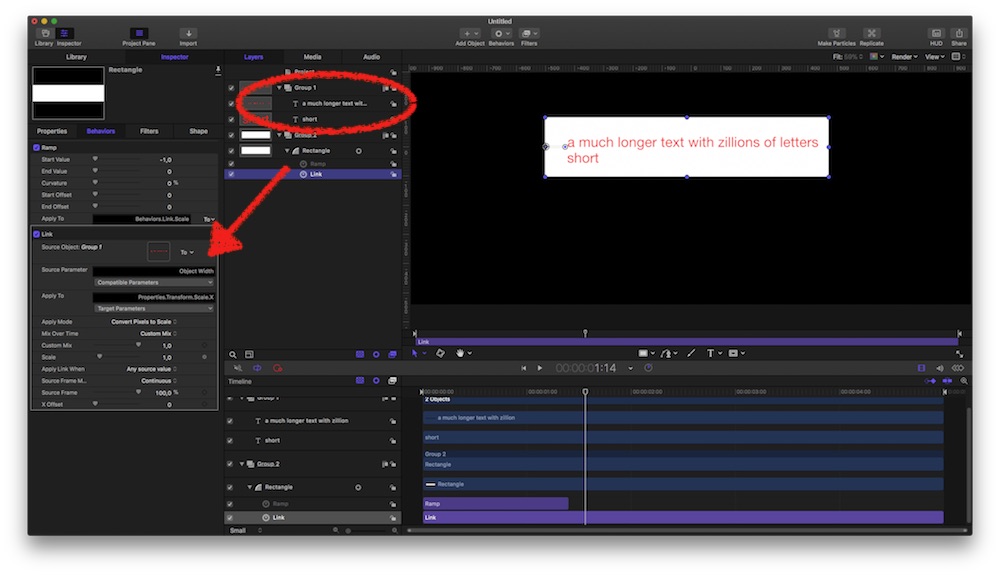
link the Scale of the Rectangle to the two-text-Groups Width = the Group automatically has the width of the longer of the two…).
Grow Bar:
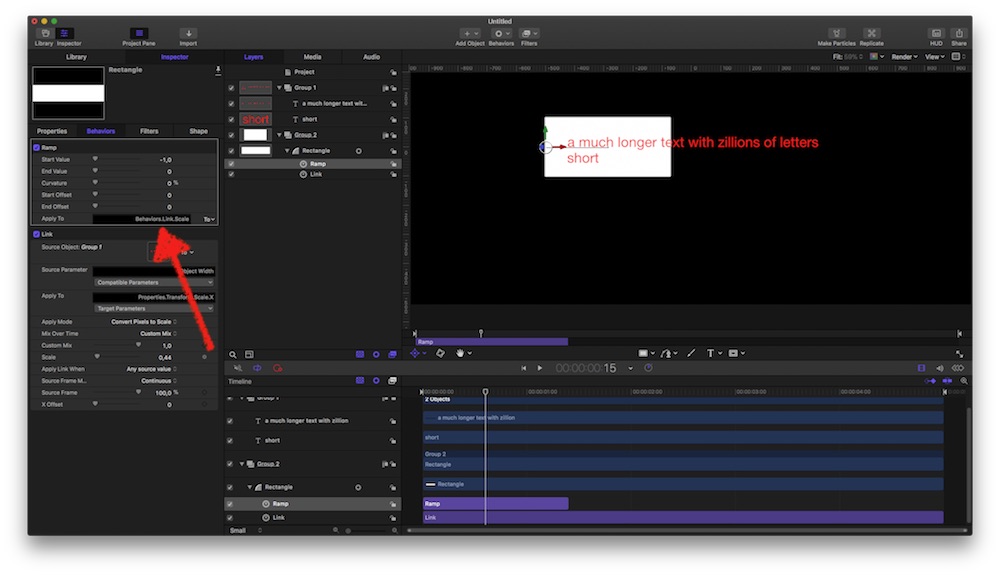
adjust its Anchor Point to its left edge; apply to that Link Behavior a Ramp to its Scale
new project file attached to post below..........
several options to accomplish. here's mine:
auto-adjust size:
link the Scale of the Rectangle to the two-text-Groups Width = the Group automatically has the width of the longer of the two…).
Grow Bar:
adjust its Anchor Point to its left edge; apply to that Link Behavior a Ramp to its Scale
new project file attached to post below..........
Last edit: 16 Jan 2018 17:59 by Karsten Schlüter.
Please Log in to join the conversation.
16 Jan 2018 12:45 - 16 Jan 2018 12:46 #93372
by Suzero
Replied by Suzero on topic Animate rectangle to linked x-size
Hi Karsten,
Thanks for your reply and attached project.
If I open it in Motion though the background rectangle is less wide than the long text.
Thanks for your reply and attached project.
If I open it in Motion though the background rectangle is less wide than the long text.
Last edit: 16 Jan 2018 12:46 by Suzero.
Please Log in to join the conversation.
16 Jan 2018 12:47 #93373
by Suzero
Replied by Suzero on topic Animate rectangle to linked x-size
Argh I still can't attach any images. Is it a problem on my end or are others experiencing this problem too?
Please Log in to join the conversation.
- Karsten Schlüter
-
- Offline
- Moderator
-
Less
More
- Posts: 3790
- Thank you received: 718
16 Jan 2018 17:52 - 16 Jan 2018 17:58 #93383
by Karsten Schlüter
To test its 'auto fit' in Motion, you have to change texts in the Inspector >>
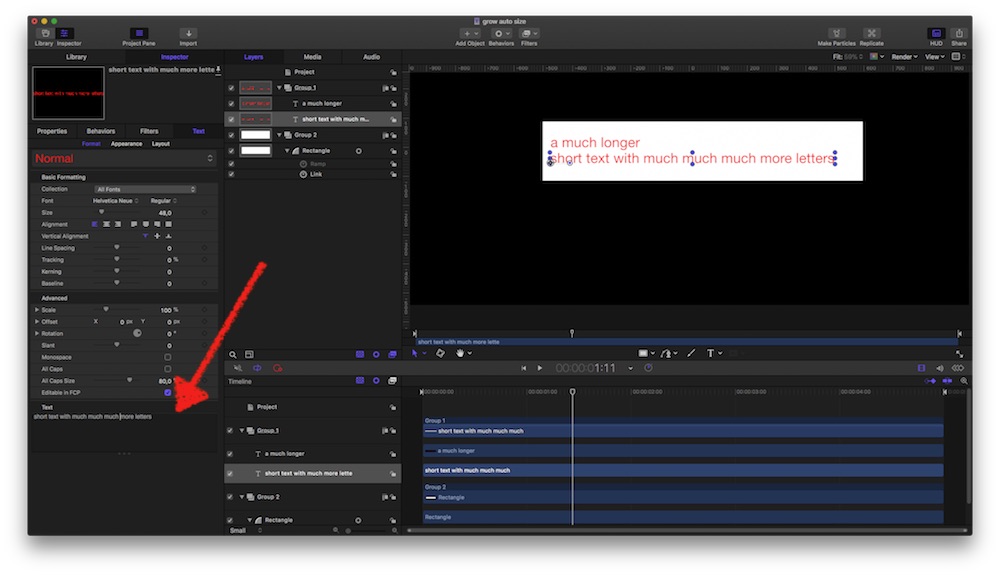
oh, was too hasty - give THIS version a try:
Replied by Karsten Schlüter on topic Animate rectangle to linked x-size
Suzero wrote: …
If I open it in Motion though the background rectangle is less wide than the long text.
To test its 'auto fit' in Motion, you have to change texts in the Inspector >>
oh, was too hasty - give THIS version a try:
Last edit: 16 Jan 2018 17:58 by Karsten Schlüter.
Please Log in to join the conversation.
- Karsten Schlüter
-
- Offline
- Moderator
-
Less
More
- Posts: 3790
- Thank you received: 718
16 Jan 2018 17:57 #93384
by Karsten Schlüter
well, I can
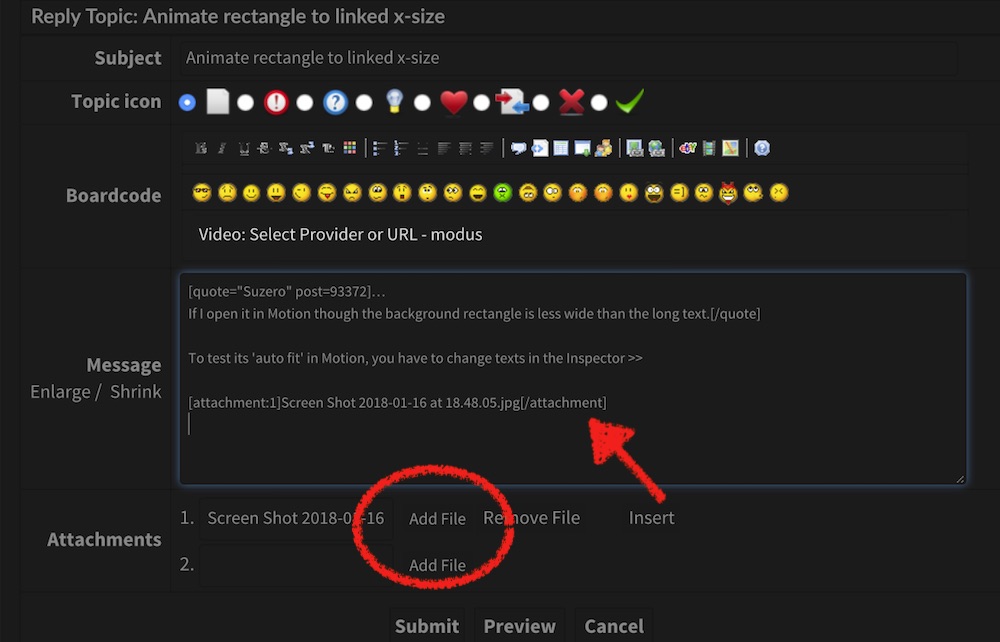
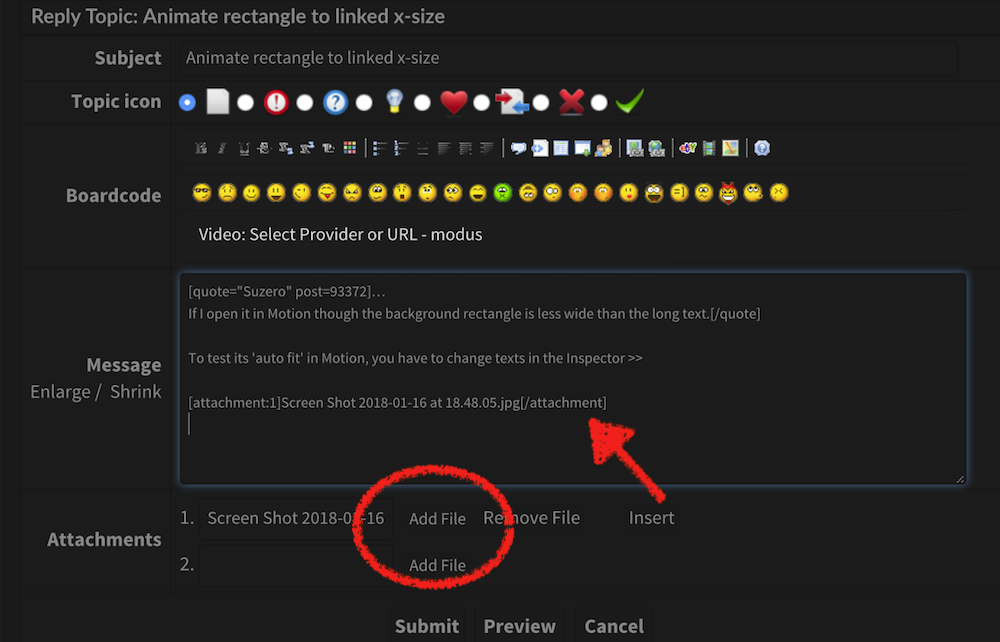
(use the 'Add File' button, for inserting use files in jpg and max. width of 1000pix; and hit Insert; for larger scale pics (>1000pix wide) just AddFile, jpg appears as attachment …)
Replied by Karsten Schlüter on topic Animate rectangle to linked x-size
Suzero wrote: … Is it a problem on my end …
well, I can
(use the 'Add File' button, for inserting use files in jpg and max. width of 1000pix; and hit Insert; for larger scale pics (>1000pix wide) just AddFile, jpg appears as attachment …)
Please Log in to join the conversation.
