


- Posts: 10
- Thank you received: 1
3 Post Moderation Rule for New Boarders (25 Jan 2021)
New boarders will have their posts moderated - Don't worry if you cannot see your post immediately.
fcpx wiever problem
13 Jan 2018 19:01 - 14 Jan 2018 08:58 #93256
by vladiciu
fcpx 10.4 the best
fcpx wiever problem was created by vladiciu
hi all, I installed high sierra and fcpx 10.4 when I amount any clip mts from the broswer and insert it in the timeline and then click on it, in the secondary monitor where I see the wiever full screen, suddenly everything becomes attached, green with much grain!
What could it be? with fcpx 10.3.4 this does not happen.
// Mod here: deleted your double-post, if that is ok for you //
//
What could it be? with fcpx 10.3.4 this does not happen.
// Mod here: deleted your double-post, if that is ok for you
// fcpx 10.4 the best
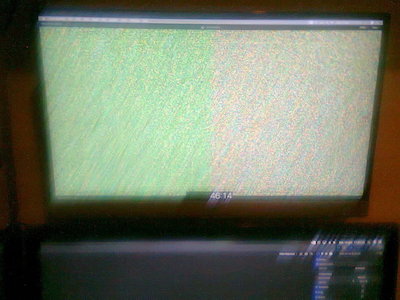
Last edit: 14 Jan 2018 08:58 by Karsten Schlüter.
Please Log in to join the conversation.
14 Jan 2018 09:21 #93265
by vladiciu
fcpx 10.4 the best
Replied by vladiciu on topic fcpx wiever problem
sorry moderator for posting a double pos and thanks for correcting
:dry:
:dry:
fcpx 10.4 the best
Please Log in to join the conversation.

14 Jan 2018 14:20 #93274
by JoeEditor
Replied by JoeEditor on topic fcpx wiever problem
I don't know what "wiever" means...
Please Log in to join the conversation.
- Karsten Schlüter
-

- Offline
- Moderator
-

Less
More
- Posts: 3790
- Thank you received: 718
14 Jan 2018 14:24 #93277
by Karsten Schlüter
c'mon Ben!!
all letters, just a slightly diff. arrangement (hint: v - w)
Replied by Karsten Schlüter on topic fcpx wiever problem
FCPX.guru wrote: I don't know what "wiever" means...
c'mon Ben!!
all letters, just a slightly diff. arrangement (hint: v - w)
Please Log in to join the conversation.
14 Jan 2018 14:26 #93278
by vladiciu
fcpx 10.4 the best
Replied by vladiciu on topic fcpx wiever problem
sorry for my bad english but I meant this attached
thank you
thank you
fcpx 10.4 the best

Please Log in to join the conversation.
14 Jan 2018 14:28 #93281
by JoeEditor
Replied by JoeEditor on topic fcpx wiever problem
I've not had coffee this morning, it's very early (and stupid cold) here.
Please Log in to join the conversation.
- Karsten Schlüter
-
- Offline
- Moderator
-
Less
More
- Posts: 3790
- Thank you received: 718
14 Jan 2018 14:32 #93282
by Karsten Schlüter
This fully explains and excuses it! My sympathies!
back2topic…
sidenote: I would never mess with a guy named 'Vlad' (SCNR for this silly reference to Count Dracula… my bad humor :evil: )
Replied by Karsten Schlüter on topic fcpx wiever problem
FCPX.guru wrote: I've not had coffee this morning, …
This fully explains and excuses it! My sympathies!
back2topic…
sidenote: I would never mess with a guy named 'Vlad' (SCNR for this silly reference to Count Dracula… my bad humor :evil: )
Please Log in to join the conversation.
14 Jan 2018 15:16 #93283
by JoeEditor
Replied by JoeEditor on topic fcpx wiever problem
OK, so the clip shows fuzzy. Let's look at the details we need to troubleshoot.
First, I'd delete prefs and renders, cause it's easy and eliminates the easiest things to fix.
Next, I'd ask the following:
- What codec are these clips (what is the source, codec, frame size)?
- What macOS version is running?
- What are the drive specs (int/ext, connection type, % free space)?
First, I'd delete prefs and renders, cause it's easy and eliminates the easiest things to fix.
Next, I'd ask the following:
- What codec are these clips (what is the source, codec, frame size)?
- What macOS version is running?
- What are the drive specs (int/ext, connection type, % free space)?
Please Log in to join the conversation.
14 Jan 2018 15:51 #93284
by vladiciu
fcpx 10.4 the best
Replied by vladiciu on topic fcpx wiever problem
ok the clips are as attached to the lumix GH2
I installed high sierra 10.13.2
OS high sierra in a ssd 240 gb all x fcpx in a HD sata 1 TB
however, this problem does with any type of clip even HDV as well as with AVCHD
and I want to warn that with fcpx 10.3.4 everything works beautifully, so according to the problem and of fcpx 10.4.
thank you
I installed high sierra 10.13.2
OS high sierra in a ssd 240 gb all x fcpx in a HD sata 1 TB
however, this problem does with any type of clip even HDV as well as with AVCHD
and I want to warn that with fcpx 10.3.4 everything works beautifully, so according to the problem and of fcpx 10.4.
thank you
fcpx 10.4 the best

Please Log in to join the conversation.
- DmitriZigany
-

- Offline
- Platinum Member
-

Less
More
- Posts: 730
- Thank you received: 26
14 Jan 2018 17:24 #93287
by DmitriZigany
Replied by DmitriZigany on topic fcpx wiever problem
It's not that long ago that .mts files were supported in FCPX at all... And it still seems to me like they still are a bit trouble some... I was lazy and use some in a current project... not sure if it's because of them, but I'm getting beach balls a lot and thumbnails are slow to show up etc...
If possible, I would recommend not using .mts files... If you import footage using FCPX instead of dragging them manually from the cards, it seems to behave much better. At least that's my experience...
If possible, I would recommend not using .mts files... If you import footage using FCPX instead of dragging them manually from the cards, it seems to behave much better. At least that's my experience...
Please Log in to join the conversation.
15 Jan 2018 15:45 - 15 Jan 2018 15:45 #93311
by JoeEditor
You can't, you also can't use private messaging, this site's not had those functions in a very, very long time.
And yes, very off topic, and there is a forum here for site feedback.
Replied by JoeEditor on topic fcpx wiever problem
vladiciu wrote: thanks
sorry if I'm ot but I can not change my avatar image, but how do you do it?
:huh:
You can't, you also can't use private messaging, this site's not had those functions in a very, very long time.
And yes, very off topic, and there is a forum here for site feedback.
Last edit: 15 Jan 2018 15:45 by JoeEditor.
Please Log in to join the conversation.

