


- Posts: 15
- Thank you received: 1
3 Post Moderation Rule for New Boarders (25 Jan 2021)
New boarders will have their posts moderated - Don't worry if you cannot see your post immediately.
Is this a new bug, unique to 10.4?
03 Jan 2018 17:33 #92967
by dpcam1
Is this a new bug, unique to 10.4? was created by dpcam1
I've just upgraded to 10.4 and am experiencing some frustration when copying and pasting titles from one project to another. I'm on Sierra with a fresh install of OSX and FCPX and am using a 2011 Imac.
To save time I'm copying and pasting titles from one project to another; something I'd have thought should be trouble free and part of anyone's workflow. The problems begin when I try to edit the pasted title. I click in the text inspector, go backspace to start deleting the text and the program crashes with the spinning beach ball appearing. Has anyone else noticed this?
It's extremely annoying; at the moment I'm having to recreate titles to avoid a crash. The problem seems random as it doesn't seem to happen every time but frequently enough to be a pain.
To save time I'm copying and pasting titles from one project to another; something I'd have thought should be trouble free and part of anyone's workflow. The problems begin when I try to edit the pasted title. I click in the text inspector, go backspace to start deleting the text and the program crashes with the spinning beach ball appearing. Has anyone else noticed this?
It's extremely annoying; at the moment I'm having to recreate titles to avoid a crash. The problem seems random as it doesn't seem to happen every time but frequently enough to be a pain.
Please Log in to join the conversation.


03 Jan 2018 18:35 #92968
by JoeEditor
Replied by JoeEditor on topic Is this a new bug, unique to 10.4?
hhhhmmm... I'm not seeing that. But, some folks are seeing odd behaviors with 10.4 here and there. First, go to the feedback page and report it, in detail, ASAP.
Have you tried trashing preferences?
Is this a stock title, an add-on title, or something you created yourself?
If it is something you created yourself, if possible, go to that title in the Title Browser, right-clic, Open In Motion, and save to be sure it is updated to the correct version.
Have you tried trashing preferences?
Is this a stock title, an add-on title, or something you created yourself?
If it is something you created yourself, if possible, go to that title in the Title Browser, right-clic, Open In Motion, and save to be sure it is updated to the correct version.
Please Log in to join the conversation.
03 Jan 2018 19:08 #92969
by dpcam1
Replied by dpcam1 on topic Is this a new bug, unique to 10.4?
Thanks for your reply, much appreciated.
I've done the trash preferences thing, to no avail.
My titles were not custom made but dragged in to the timeline from the custom and typewriter presets. I've tried eliminating non system fonts as well.
I'm pretty sure this wasn't something happening in previous versions of FCPX as copying/ pasting titles from one project is such a common thing to do.
You mention a feedback page. Which one are you referring to, Apple's or this website?
I've done the trash preferences thing, to no avail.
My titles were not custom made but dragged in to the timeline from the custom and typewriter presets. I've tried eliminating non system fonts as well.
I'm pretty sure this wasn't something happening in previous versions of FCPX as copying/ pasting titles from one project is such a common thing to do.
You mention a feedback page. Which one are you referring to, Apple's or this website?
Please Log in to join the conversation.
04 Jan 2018 02:37 #92973
by JoeEditor
Replied by JoeEditor on topic Is this a new bug, unique to 10.4?
The feedback page for each application. They are in fact read and cataloged and tracked. They are really important to the future of the Apple pro video applications.
www.apple.com/feedback/finalcutpro.html
www.apple.com/feedback/finalcutpro.html
Please Log in to join the conversation.
04 Jan 2018 02:52 #92974
by dpcam1
Replied by dpcam1 on topic Is this a new bug, unique to 10.4?
Found it, thanks, and have logged my problem.
Please Log in to join the conversation.
- Karsten Schlüter
-

- Offline
- Moderator
-

Less
More
- Posts: 3790
- Thank you received: 718
04 Jan 2018 06:22 #92975
by Karsten Schlüter
Replied by Karsten Schlüter on topic Is this a new bug, unique to 10.4?
@Dave
…just a stab into the foggy dark:
Are both projects involved in that copy/paste procedure are made with identical versions of FCPX?
And/or, are bth projects in the same Lib? If not, are both Libs 'updated' to the same version of FPX?
…just a stab into the foggy dark:
Are both projects involved in that copy/paste procedure are made with identical versions of FCPX?
And/or, are bth projects in the same Lib? If not, are both Libs 'updated' to the same version of FPX?
Please Log in to join the conversation.
04 Jan 2018 07:19 #92976
by dpcam1
Replied by dpcam1 on topic Is this a new bug, unique to 10.4?
Thanks for your interest, Karsten.
Both were made with identical versions of Fcpx, 10.4, but were actually started in 10.3.4, as I remember.....and then I did the upgrade and that was after my raid drive crashed and I had to rebuild them via back ups onto a new drive. Whoops, all sounds a bit messy now.
So, the chronology of the problem may be; libraries originally built in 10.3.4, hard drive dies, libraries rebuilt via back ups and then an upgrade to 10.4.
I've since done a clean install of Sierra and reinstalled Fcpx.
I'm pretty sure I've already done this but I'll create a new library, injest some footage and then create a new project and try copying and pasting to it.
Both were made with identical versions of Fcpx, 10.4, but were actually started in 10.3.4, as I remember.....and then I did the upgrade and that was after my raid drive crashed and I had to rebuild them via back ups onto a new drive. Whoops, all sounds a bit messy now.
So, the chronology of the problem may be; libraries originally built in 10.3.4, hard drive dies, libraries rebuilt via back ups and then an upgrade to 10.4.
I've since done a clean install of Sierra and reinstalled Fcpx.
I'm pretty sure I've already done this but I'll create a new library, injest some footage and then create a new project and try copying and pasting to it.
Please Log in to join the conversation.
04 Jan 2018 07:35 #92978
by dpcam1
Replied by dpcam1 on topic Is this a new bug, unique to 10.4?
Ok, so I created a new library, injested some footage, created a project, put a clip in it, followed by two titles on top of that clip, one on top of the other, then made a new project, put a clip in that then copy and pasted the titles from the first project to the second, went to edit the title in the inspector and was met by the spinning ball.
Please Log in to join the conversation.
- Karsten Schlüter
-
- Offline
- Moderator
-
Less
More
- Posts: 3790
- Thank you received: 718
04 Jan 2018 08:51 #92979
by Karsten Schlüter
so did I:
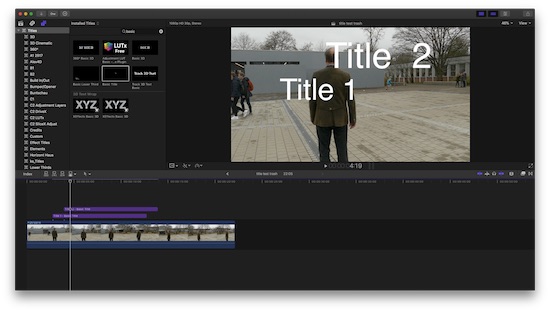
Project A, copied the two titles…
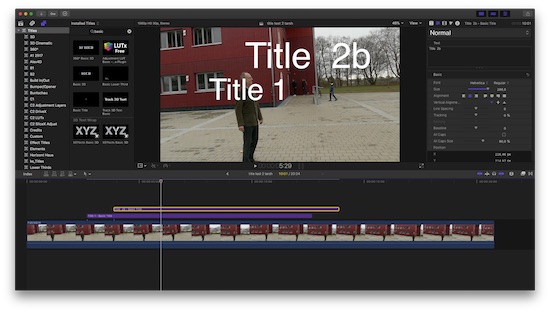
… into another one - can edit them without any flaws…
It is simple to declare your 'crash & repair'-maneuvers as reason for some 'odd' behavior… but, I have no clue, how to fix it. Fingers crossed, more profound board members chime in …
Replied by Karsten Schlüter on topic Is this a new bug, unique to 10.4?
dpcam1 wrote: Ok, so I created a new library, injested some footage, created a project, put a clip in it, followed by two titles on top of that clip, one on top of the other, then made a new project, put a clip in that then copy and pasted the titles from the first project to the second, went to edit the title in the inspector and was met by the spinning ball.
so did I:
Project A, copied the two titles…
… into another one - can edit them without any flaws…
It is simple to declare your 'crash & repair'-maneuvers as reason for some 'odd' behavior… but, I have no clue, how to fix it. Fingers crossed, more profound board members chime in …
Please Log in to join the conversation.
04 Jan 2018 09:22 #92980
by dpcam1
Replied by dpcam1 on topic Is this a new bug, unique to 10.4?
yeah, it's pretty weird behaviour....really don't know what to do...it's such a great program otherwise!!!
Is your computer a lot newer than mine?...I'm running a 2011 iMac.
Is your computer a lot newer than mine?...I'm running a 2011 iMac.
Please Log in to join the conversation.
- Karsten Schlüter
-
- Offline
- Moderator
-
Less
More
- Posts: 3790
- Thank you received: 718
04 Jan 2018 09:25 #92981
by Karsten Schlüter
late 2012 MacMni… not that much newer :silly:
No, as mentioned: something in the data-base is corrupted. We don't know, how you repaired it, we don't know, wether you have erased any old render files, you did reset the prefs, don't you? …
too many buttons to play with.
Sorry, I'm of no help…
Replied by Karsten Schlüter on topic Is this a new bug, unique to 10.4?
dpcam1 wrote: …
Is your computer a lot newer than mine?...I'm running a 2011 iMac.
late 2012 MacMni… not that much newer :silly:
No, as mentioned: something in the data-base is corrupted. We don't know, how you repaired it, we don't know, wether you have erased any old render files, you did reset the prefs, don't you? …
too many buttons to play with.
Sorry, I'm of no help…
Please Log in to join the conversation.
04 Jan 2018 10:13 #92982
by dpcam1
Replied by dpcam1 on topic Is this a new bug, unique to 10.4?
I reset the prefs everytime it crashes, but that doesn't seem to help much.
Please Log in to join the conversation.
04 Jan 2018 10:15 #92983
by dpcam1
Replied by dpcam1 on topic Is this a new bug, unique to 10.4?
the other trick I've seen mentioned here a fair bit is to create a new user account and see it that changes anything...?
Please Log in to join the conversation.
04 Jan 2018 18:10 #92996
by dpcam1
Replied by dpcam1 on topic Is this a new bug, unique to 10.4?
Have tried using an earlier version of fcpx, 10.3, and removed all third party plugins, results were the same.
I think this must be an issue with fcpx and Sierra. Am going to try the same test on my partners iMac which is running an earlier version of OS X.
I think this must be an issue with fcpx and Sierra. Am going to try the same test on my partners iMac which is running an earlier version of OS X.
Please Log in to join the conversation.
04 Jan 2018 18:54 #92997
by dpcam1
Replied by dpcam1 on topic Is this a new bug, unique to 10.4?
Getting closer to what's happening. I think it's some kind of render bug. If I wait for the render bar to clear before doing any text editing there are far less crashes. It's still occasionally happening though.
Please Log in to join the conversation.
04 Jan 2018 19:06 #92998
by JoeEditor
Replied by JoeEditor on topic Is this a new bug, unique to 10.4?
Turn off Background Rendering, delete all current render files, try again.
Please Log in to join the conversation.
04 Jan 2018 19:48 #93002
by dpcam1
Replied by dpcam1 on topic Is this a new bug, unique to 10.4?
Did that; copy and pasted from one project to a newer version, editing that text with success but when I copied text from 4th project to the first project the crash happened. I've seen that happen repeatedly. So, it seems to behave itself as I create new projects and copy and paste from the earlier one to the new one but if I copy titles from the latest version and try to paste back into the earliest a crash occurs.
Please Log in to join the conversation.
04 Jan 2018 20:55 #93005
by dpcam1
Replied by dpcam1 on topic Is this a new bug, unique to 10.4?
It's definitely an operating system, fcpx version bug. I tried the same tests on my partners 2011 iMac with very similar specs to mine, running El Capitan and fcpx 10.2.3 and it never failed once.
Please Log in to join the conversation.
