


- Posts: 3
- Thank you received: 0
3 Post Moderation Rule for New Boarders (25 Jan 2021)
New boarders will have their posts moderated - Don't worry if you cannot see your post immediately.
Why do I keep getting weird green bars and flashes after exporting videos???
- BenLandersMedia
-
 Topic Author
- Offline
- New Member
-

Less
More
02 Jan 2018 15:24 #92931
by BenLandersMedia
Why do I keep getting weird green bars and flashes after exporting videos??? was created by BenLandersMedia
Hey guys, I'm new to the forum, but looking for some help - when I export bigger projects I keep getting green bars and flashes (these do not appear on the timeline during the editing process, only after the export).
Any help or advice? I have noticed that this usually happens with bigger projects and especially when any photos are included in the project - but it happens with only video sometimes as well.
Attached is a screenshot of the flash
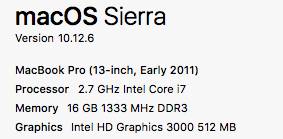
My computer specs are attached as well ... is my computer too old to process bigger projects?
Any help or advice? I have noticed that this usually happens with bigger projects and especially when any photos are included in the project - but it happens with only video sometimes as well.
Attached is a screenshot of the flash
My computer specs are attached as well ... is my computer too old to process bigger projects?
Please Log in to join the conversation.


04 Jan 2018 15:25 #92991
by JoeEditor
Replied by JoeEditor on topic Why do I keep getting weird green bars and flashes after exporting videos???
No, this is going to be a codec and/or GPU issue, but you should be getting clean exports.
What third party plugins are you using in that Timeline?
What camera shot the footage your using?
Did you optimize or generate proxy media?
What drive is all your media and Libraries on?
What third party plugins are you using in that Timeline?
What camera shot the footage your using?
Did you optimize or generate proxy media?
What drive is all your media and Libraries on?
Please Log in to join the conversation.
- BenLandersMedia
-
Topic Author
- Offline
- New Member
-
Less
More
- Posts: 3
- Thank you received: 0
04 Jan 2018 20:25 #93004
by BenLandersMedia
Replied by BenLandersMedia on topic Why do I keep getting weird green bars and flashes after exporting videos???
Thanks for the reply:
I don't use any plugins with FCPX
Camera was a Canon 70D and also a GoPro Hero5\
I did not optimize anything, just imported straight from the camera card - this is what I've always done - is this not best practice?
Not sure how to generate proxy media either, or what that means.
The drive and media libraries are all on the computer hardrive - I back up the footage on an external after importing to FCPX, but everything is saved on the computer until exporting the project.
I don't use any plugins with FCPX
Camera was a Canon 70D and also a GoPro Hero5\
I did not optimize anything, just imported straight from the camera card - this is what I've always done - is this not best practice?
Not sure how to generate proxy media either, or what that means.
The drive and media libraries are all on the computer hardrive - I back up the footage on an external after importing to FCPX, but everything is saved on the computer until exporting the project.
Please Log in to join the conversation.
- Karsten Schlüter
-

- Offline
- Moderator
-

Less
More
- Posts: 3790
- Thank you received: 718
05 Jan 2018 04:12 #93007
by Karsten Schlüter
… using FCPX' Import routine (cmd-i), or by dragging .mts-files into it?
Replied by Karsten Schlüter on topic Why do I keep getting weird green bars and flashes after exporting videos???
BenLandersMedia wrote: … just imported straight from the camera card ….
… using FCPX' Import routine (cmd-i), or by dragging .mts-files into it?
Please Log in to join the conversation.
- BenLandersMedia
-
Topic Author
- Offline
- New Member
-
Less
More
- Posts: 3
- Thank you received: 0
05 Jan 2018 20:04 #93035
by BenLandersMedia
Replied by BenLandersMedia on topic Why do I keep getting weird green bars and flashes after exporting videos???
I used the "import" function via the FCPX menu.
Although I have done the drag and drop before in the past, will that cause problems?
With the photos - I found if I resized them to a smaller file (1080p) and then reimported them it solved the problem, could that be related to the problem I'm having with the video exporting as well?
Although I have done the drag and drop before in the past, will that cause problems?
With the photos - I found if I resized them to a smaller file (1080p) and then reimported them it solved the problem, could that be related to the problem I'm having with the video exporting as well?
Please Log in to join the conversation.
