




- Posts: 31
- Thank you received: 0
3 Post Moderation Rule for New Boarders (25 Jan 2021)
New boarders will have their posts moderated - Don't worry if you cannot see your post immediately.
Matching powerpoint colour?
28 Dec 2017 12:37 #92763
by paz
Matching powerpoint colour? was created by paz
Hi all, I'm creating video stings for a conference which punctuate powerpoint. Although the powerpoint operator and myself type in the same RGB figures to get the clients correct colours they don't match when I import a frame exported from PPT into FCPX - any comments welcome.
Please Log in to join the conversation.
- Tom Wolsky
-

- Offline
- Moderator
-

29 Dec 2017 08:06 #92796
by Tom Wolsky
Replied by Tom Wolsky on topic Matching powerpoint colour?
Where do you need to apply the color in FCP? To a title? Import the PPT frame and use the Apple Color Picker eyedropper to select the color from the frame.
Please Log in to join the conversation.
- Karsten Schlüter
-

- Offline
- Moderator
-
Less
More
- Posts: 3790
- Thank you received: 718
29 Dec 2017 10:21 #92803
by Karsten Schlüter
Replied by Karsten Schlüter on topic Matching powerpoint colour?
conc. 'painting by numbers'…
the color-system in use makes a difference too, have a look:
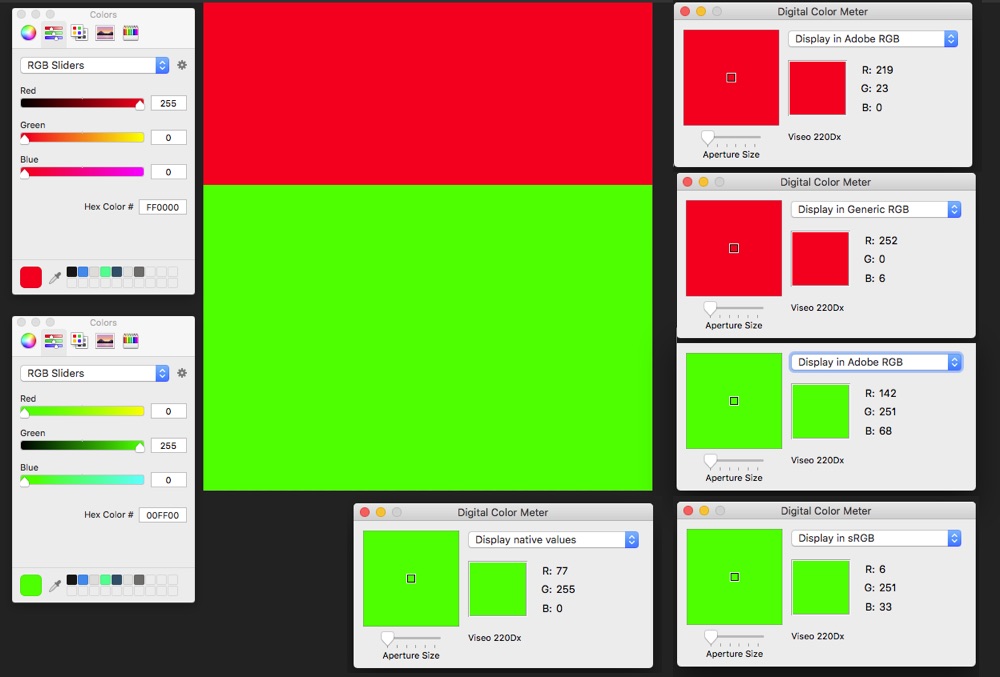
on the left, those are the RGB # in Pixelmator. 255/0/0 and 0/255/0
Using macOS own's ColorMeter, and choosing diff. systems gives quiet different numbers.
You need matching ColorSystems too…
the color-system in use makes a difference too, have a look:
on the left, those are the RGB # in Pixelmator. 255/0/0 and 0/255/0
Using macOS own's ColorMeter, and choosing diff. systems gives quiet different numbers.
You need matching ColorSystems too…
Please Log in to join the conversation.
29 Dec 2017 10:44 #92805
by paz
Replied by paz on topic Matching powerpoint colour?
Hi Tom thanks for the comments. I got the ppt from the operator and exported both png and jpegs of the frame I needed (which was a logo as a watermark over the BG colour) I did import them but am really worried that my RGB version looks so different to the PPT imports. Also when I use the colour picker on the PPT import it comes up with different RGB reading! My worry is when we are on site and the client says "thats not our colour" and I can't say with hand on heart that it is. My thought is that something changes when importing/exporting? Attached shows PPT import at top and FCPX colour at bottom -thanks Bob

Please Log in to join the conversation.
29 Dec 2017 10:49 #92806
by paz
Replied by paz on topic Matching powerpoint colour?
Hi Karsten, many thanks for your comments it seems more complex than I thought! I think I'll have to contact the PPT operator and see what system he is using and take it from there? Q Do you think that if I match his colours on my edit that the exports will then be correct? - best Bob
Please Log in to join the conversation.
- Karsten Schlüter
-
- Offline
- Moderator
-
Less
More
- Posts: 3790
- Thank you received: 718
29 Dec 2017 11:16 #92807
by Karsten Schlüter
When it comes to matching colors, I would never make any prophecies :silly:
The difference is - imho - way too much to be explained by just color-spaces. Many designers are used to use the CMYK standard = print.
Ask him, which system he uses… for video sRGB would be fine (probably)
How are ppt and your video 'combined'? Do you put the charts into the video? Then use FCPX ColorPicker to find the right color.
Here an example, the lower part (bg and text) is done that way:
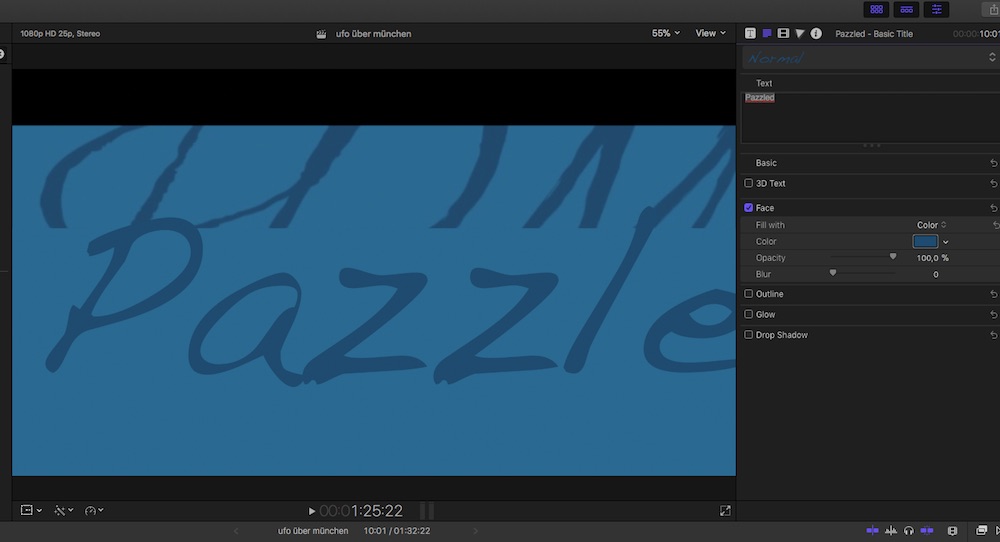
… BUT test, how colors look on final output !! The compression could do some harm either… colors are … difficult. We should have stayed with b/w…
Replied by Karsten Schlüter on topic Matching powerpoint colour?
paz wrote: … Q Do you think that if I match his colours on my edit that the exports will then be correct? - best Bob
When it comes to matching colors, I would never make any prophecies :silly:
The difference is - imho - way too much to be explained by just color-spaces. Many designers are used to use the CMYK standard = print.
Ask him, which system he uses… for video sRGB would be fine (probably)
How are ppt and your video 'combined'? Do you put the charts into the video? Then use FCPX ColorPicker to find the right color.
Here an example, the lower part (bg and text) is done that way:
… BUT test, how colors look on final output !! The compression could do some harm either… colors are … difficult. We should have stayed with b/w…
Please Log in to join the conversation.
29 Dec 2017 19:30 #92822
by paz
Replied by paz on topic Matching powerpoint colour?
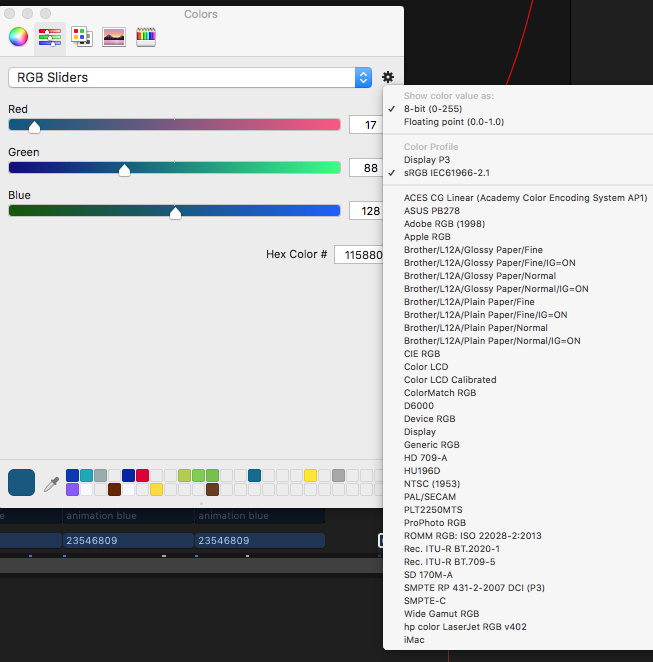
Hi Karsten, thanks so much for doing a test. I followed your previous logic and found the cog on the colour picker which showed I was using sRGB IEC61966-2.1 colour space so I dropped down to 'general RGB' and entered the correct numbers and low and behold this then matched the powerpoint import! )
Now I'll have to see if the export matches the PPT?
Many thanks again - best Bob
)Now I'll have to see if the export matches the PPT?
Many thanks again - best Bob

Please Log in to join the conversation.
- Karsten Schlüter
-
- Offline
- Moderator
-
Less
More
- Posts: 3790
- Thank you received: 718
30 Dec 2017 03:41 #92828
by Karsten Schlüter
'have to' is such a strong word … I would, just to be safe. 'Video' treats colors different than web or print, different encoders allow different color-spaces, yaddayaddayadda …
(some hundred years ago, when I was in the ad business, we had a client making fashion - he came with samples of cloth into the shop, hold it aside the printed ads, "no, doesn't match!" - a nightmare :silly: … for the print-specialist)
Impressed, that switching the color-space affects in such a dramatic way!! … good you found out … have fun with your project!
Replied by Karsten Schlüter on topic Matching powerpoint colour?
paz wrote: …Now I'll have to see if the export matches the PPT?…
'have to' is such a strong word … I would, just to be safe. 'Video' treats colors different than web or print, different encoders allow different color-spaces, yaddayaddayadda …
(some hundred years ago, when I was in the ad business, we had a client making fashion - he came with samples of cloth into the shop, hold it aside the printed ads, "no, doesn't match!" - a nightmare :silly: … for the print-specialist)
Impressed, that switching the color-space affects in such a dramatic way!! … good you found out … have fun with your project!
Please Log in to join the conversation.
