


- Posts: 1
- Thank you received: 0
3 Post Moderation Rule for New Boarders (25 Jan 2021)
New boarders will have their posts moderated - Don't worry if you cannot see your post immediately.
Dumbing down surgical light (hospital theatre)
- james.irvine
-
 Topic Author
- Offline
- New Member
-

Less
More
26 Dec 2017 20:13 #92739
by james.irvine
Dumbing down surgical light (hospital theatre) was created by james.irvine
Hi all
So i've just filmed an operation, and some of it came out way to bright! Is there a way to target the bright lit surgical lamp and dumb it down in FCP ?
Please see screen shot
Thanks in advance
So i've just filmed an operation, and some of it came out way to bright! Is there a way to target the bright lit surgical lamp and dumb it down in FCP ?
Please see screen shot
Thanks in advance
Please Log in to join the conversation.
- Karsten Schlüter
-

- Offline
- Moderator
-

Less
More
- Posts: 3790
- Thank you received: 718
27 Dec 2017 04:43 #92743
by Karsten Schlüter
Replied by Karsten Schlüter on topic Dumbing down surgical light (hospital theatre)
Welcome James to fcp.co 

hmm, hit cmd-7 to pop-up the scopes, choose Waveform/Luma … if the peaks form a straight horizontal flat line (pun intended) beyond 100IRE…
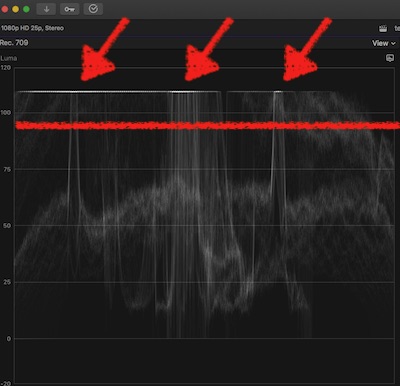
… then there's no hope to fix that: sure you can lower the 'Whites' to some grayish, but, sorry to tell you, details are lost on recording. No way to fix that.
Next time: if you use a consumer cam, they often offer some 'stage light/theatre' mode … or, if you're an advanced photog, avoid auto-modes, switchOn your cams Histogram, or so-called 'Zebra' to check exposure while recording … hope, you're not the surgeon - both hands to the patient, please!!
(sorry, serious attack of weird German humor…)
If there's no/little flat-lines, use the Color Board/Exposure and lower the Highlight puck down…
please resize & reformat any pics to max 1000pix wide/jpg before posting here …… Please see screen shot
…it came out way to bright …
hmm, hit cmd-7 to pop-up the scopes, choose Waveform/Luma … if the peaks form a straight horizontal flat line (pun intended) beyond 100IRE…
… then there's no hope to fix that: sure you can lower the 'Whites' to some grayish, but, sorry to tell you, details are lost on recording. No way to fix that.
Next time: if you use a consumer cam, they often offer some 'stage light/theatre' mode … or, if you're an advanced photog, avoid auto-modes, switchOn your cams Histogram, or so-called 'Zebra' to check exposure while recording … hope, you're not the surgeon - both hands to the patient, please!!
(sorry, serious attack of weird German humor…)
If there's no/little flat-lines, use the Color Board/Exposure and lower the Highlight puck down…
Please Log in to join the conversation.
