


- Posts: 54
- Thank you received: 0
3 Post Moderation Rule for New Boarders (25 Jan 2021)
New boarders will have their posts moderated - Don't worry if you cannot see your post immediately.
FCPX does not conform 25 or 30fps clips on a 23.98fps timeline
- Domscillator
-
 Topic Author
- Offline
- Senior Member
-

Less
More
24 Dec 2017 01:16 #92686
by Domscillator
Hello everyone!
I have a weird thing going in FCP 10.4
So I have a 23.98p timeline.
When I drop a 25p clip into the timeline instead of conforming it to 23.98, it slows down the clip making it longer and of course, the audio gets pitched down as well (slightly).
Trying to re-time the clip doesn't give me the "Automatic" option. It seems that FCP is interpreting the footage as 23.98.
I performed a few tests. I dropped in a 60p clip and everything looked fine. Correct duration, and I was getting the "Automatic" option when trying to retime (hence getting the slow down effect).
Any idea why this is happening? I also tried 30fps and get the same problem.
Am I missing something?
Many thanks in advance!
FCPX 10.4
Mac OSX Sierra
I have a weird thing going in FCP 10.4
So I have a 23.98p timeline.
When I drop a 25p clip into the timeline instead of conforming it to 23.98, it slows down the clip making it longer and of course, the audio gets pitched down as well (slightly).
Trying to re-time the clip doesn't give me the "Automatic" option. It seems that FCP is interpreting the footage as 23.98.
I performed a few tests. I dropped in a 60p clip and everything looked fine. Correct duration, and I was getting the "Automatic" option when trying to retime (hence getting the slow down effect).
Any idea why this is happening? I also tried 30fps and get the same problem.
Am I missing something?
Many thanks in advance!
FCPX 10.4
Mac OSX Sierra
Please Log in to join the conversation.
- Tom Wolsky
-

- Offline
- Moderator
-

24 Dec 2017 12:01 - 24 Dec 2017 12:21 #92690
by Tom Wolsky
Replied by Tom Wolsky on topic FCPX does not conform 25 or 30fps clips on a 23.98fps timeline
The behavior you describe in 10.4 seems strange. Not what I'm seeing. For 25p media it does drop in with a speed change, but that's pretty standard behavior when going from 25 to 24. Automatic speed is available for me. I don't see the speed change for 30p media, and again automatic speed is available. Strange that the application should behave differently for us. Maybe the length of the clip is a factor.
Last edit: 24 Dec 2017 12:21 by Tom Wolsky.
Please Log in to join the conversation.
- Domscillator
-
Topic Author
- Offline
- Senior Member
-
Less
More
- Posts: 54
- Thank you received: 0
24 Dec 2017 12:45 #92691
by Domscillator
Hi Tom,
Thanks for the reply.
It is strange indeed. Automatic speed is definitely not available. What I've noticed is that all the clips that have the same behaviour are mp4 files that were exported from Premiere Pro (or downloaded through my Youtube channel after its encoding).
Could this be the reason?
Replied by Domscillator on topic FCPX does not conform 25 or 30fps clips on a 23.98fps timeline
Tom Wolsky wrote: The behavior you describe in 10.4 seems strange. Not what I'm seeing. For 25p media it does drop in with a speed change, but that's pretty standard behavior when going from 25 to 24. Automatic speed is available for me. I don't see the speed change for 30p media, and again automatic speed is available. Strange that the application should behave differently for us. Maybe the length of the clip is a factor.
Hi Tom,
Thanks for the reply.
It is strange indeed. Automatic speed is definitely not available. What I've noticed is that all the clips that have the same behaviour are mp4 files that were exported from Premiere Pro (or downloaded through my Youtube channel after its encoding).
Could this be the reason?
Please Log in to join the conversation.
- Tom Wolsky
-
- Offline
- Moderator
-
25 Dec 2017 07:25 #92707
by Tom Wolsky
Replied by Tom Wolsky on topic FCPX does not conform 25 or 30fps clips on a 23.98fps timeline
I don’t know. You might want to use Media Info to see if there’s anything strange about thae files.
Please Log in to join the conversation.
- haysoos123
-

- Offline
- Platinum Member
-

Less
More
- Posts: 402
- Thank you received: 72
26 Dec 2017 19:55 #92738
by haysoos123
Replied by haysoos123 on topic FCPX does not conform 25 or 30fps clips on a 23.98fps timeline
Hi guys, Alex4D made a pretty comprehensive chart about what happens to different frame rates.
alex4d.com/notes/item/final-cut-pro-x-rate-conform
Short answer is that for certain framerates, it does an auto conform because FCPX tries to anticipate what people commonly try to do (example is that when you put 25 fps into a 23.976 timeline, most of the time you want it to conform, so it does this). If you're aware of what it tries to do, you can manually do what's needed in your case.
alex4d.com/notes/item/final-cut-pro-x-rate-conform
Short answer is that for certain framerates, it does an auto conform because FCPX tries to anticipate what people commonly try to do (example is that when you put 25 fps into a 23.976 timeline, most of the time you want it to conform, so it does this). If you're aware of what it tries to do, you can manually do what's needed in your case.
Please Log in to join the conversation.
- Domscillator
-
Topic Author
- Offline
- Senior Member
-
Less
More
- Posts: 54
- Thank you received: 0
26 Dec 2017 20:14 #92740
by Domscillator
Wow, this explains a lot! Thanks for the link this is an excellent clarification!
Replied by Domscillator on topic FCPX does not conform 25 or 30fps clips on a 23.98fps timeline
haysoos123 wrote: Hi guys, Alex4D made a pretty comprehensive chart about what happens to different frame rates.
alex4d.com/notes/item/final-cut-pro-x-rate-conform
Short answer is that for certain framerates, it does an auto conform because FCPX tries to anticipate what people commonly try to do (example is that when you put 25 fps into a 23.976 timeline, most of the time you want it to conform, so it does this). If you're aware of what it tries to do, you can manually do what's needed in your case.
Wow, this explains a lot! Thanks for the link this is an excellent clarification!
Please Log in to join the conversation.
- ronny courtens
-

- Offline
- Moderator
-
Less
More
- Posts: 4455
- Thank you received: 962
29 Dec 2017 13:19 - 29 Dec 2017 13:24 #92812
by ronny courtens
Replied by ronny courtens on topic FCPX does not conform 25 or 30fps clips on a 23.98fps timeline
This does not explain the issue you are having.
As Alex says, when you drop a 25p clip onto a 23.98p timeline, FCP X will automatically conform the 25p footage to the 23.98p timeline frame rate. That is a good thing.
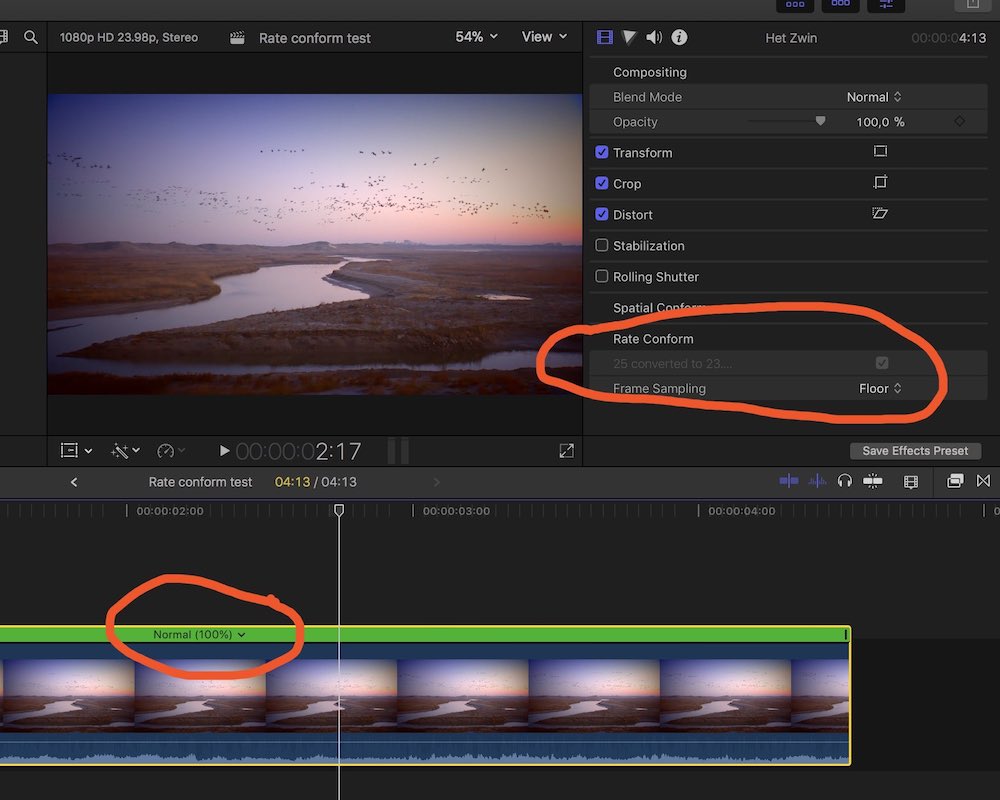
BUT automatic conforming does NOT alter the speed of your footage. It simply removes frames to make the 25p footage play at 100% speed on your 23.98fps timeline, as you can see in the screenshot from a little test I just made:
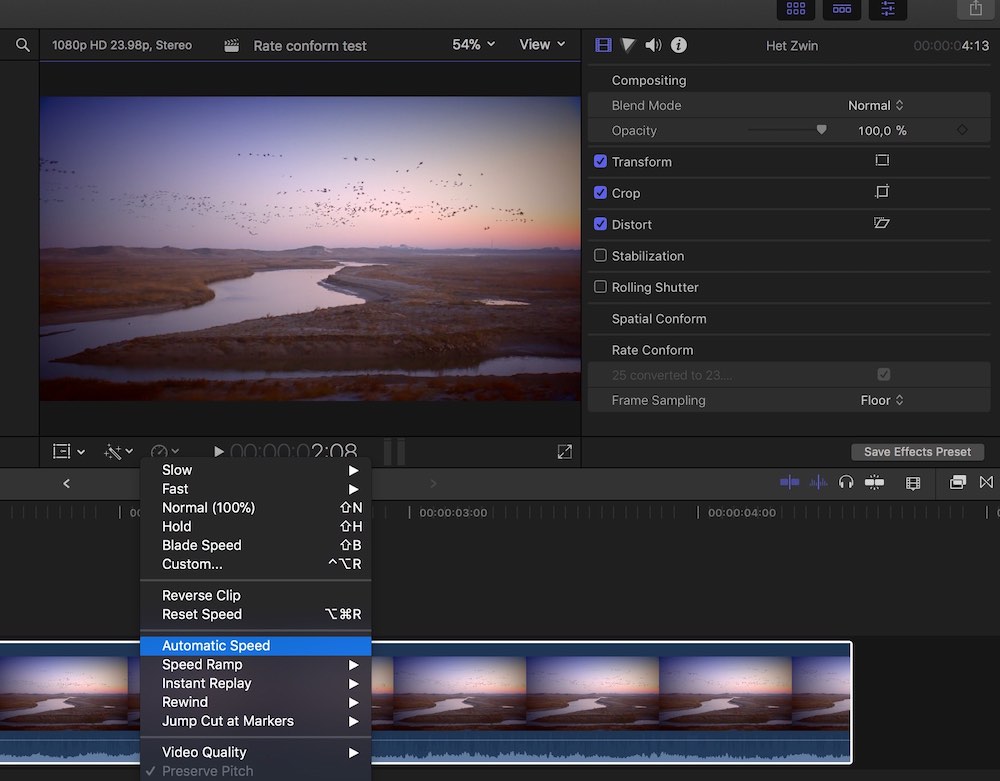
When your footage is conformed, you still have the option to use Automatic Speed:
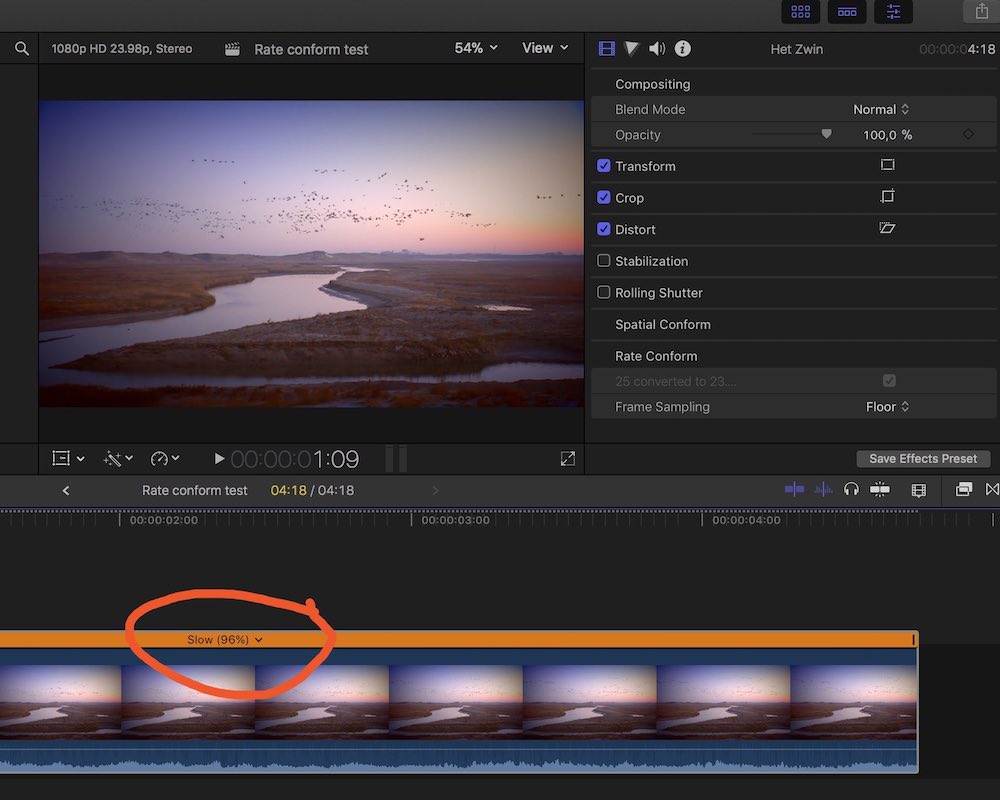
When you choose Automatic Speed with 25fps footage on a 23.98fps timeline, no frames will be removed, so the footage will play slower:
You say that when you drop a 25p clip onto a 23.98p timeline, FCP X automatically slows down the footage and you cannot use Automatic Speed to make it play at 100%. This should NOT happen, it's exactly the opposite of what the test shows.
The only reason why I can see FCP X doing this, is when the metadata of the clips is incorrect. This can happen with clips exported from Premiere if the XMP metadata that Premiere adds leads to a wrong interpretation of the clip's frame rate.
- Ronny
As Alex says, when you drop a 25p clip onto a 23.98p timeline, FCP X will automatically conform the 25p footage to the 23.98p timeline frame rate. That is a good thing.
BUT automatic conforming does NOT alter the speed of your footage. It simply removes frames to make the 25p footage play at 100% speed on your 23.98fps timeline, as you can see in the screenshot from a little test I just made:
When your footage is conformed, you still have the option to use Automatic Speed:
When you choose Automatic Speed with 25fps footage on a 23.98fps timeline, no frames will be removed, so the footage will play slower:
You say that when you drop a 25p clip onto a 23.98p timeline, FCP X automatically slows down the footage and you cannot use Automatic Speed to make it play at 100%. This should NOT happen, it's exactly the opposite of what the test shows.
The only reason why I can see FCP X doing this, is when the metadata of the clips is incorrect. This can happen with clips exported from Premiere if the XMP metadata that Premiere adds leads to a wrong interpretation of the clip's frame rate.
- Ronny
Last edit: 29 Dec 2017 13:24 by ronny courtens.
Please Log in to join the conversation.

30 Dec 2017 01:23 - 30 Dec 2017 01:34 #92827
by rgpearson
Replied by rgpearson on topic FCPX does not conform 25 or 30fps clips on a 23.98fps timeline
Ronny, I think you have the last part backwards. In your example, automatic speed should actually speed up the clip to return to its native duration.
If you look at my example, I'd like to keep the duration of my 10 second clip, but auto speed makes it 10s20f.
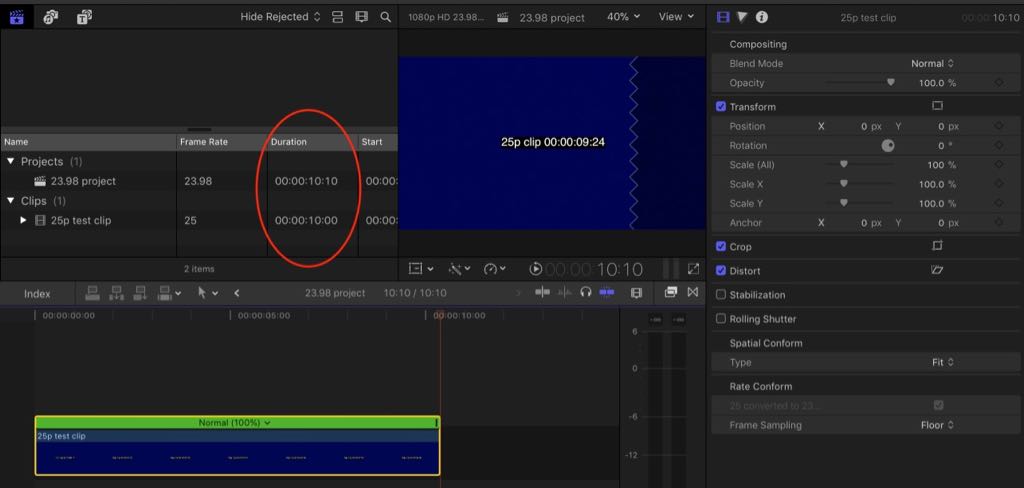
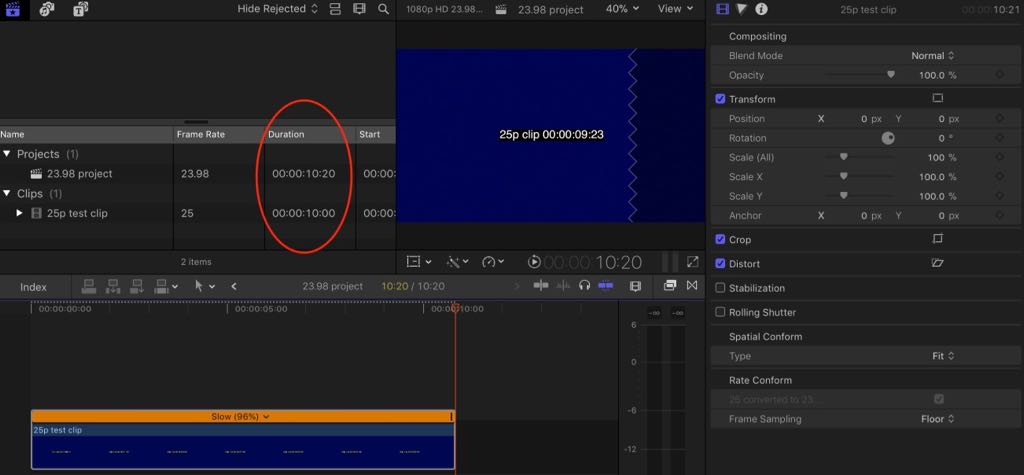
Ideally I could just uncheck the rate conform box in the inspector (feedback sent to Apple about this a while back).
If you look at my example, I'd like to keep the duration of my 10 second clip, but auto speed makes it 10s20f.
Ideally I could just uncheck the rate conform box in the inspector (feedback sent to Apple about this a while back).
Last edit: 30 Dec 2017 01:34 by rgpearson. Reason: adding images...
Please Log in to join the conversation.
