




- Posts: 21
- Thank you received: 3
3 Post Moderation Rule for New Boarders (25 Jan 2021)
New boarders will have their posts moderated - Don't worry if you cannot see your post immediately.
Who's got the best shortcut keys for new color corrections?
19 Dec 2017 00:26 #92464
by mmorache
I have some favorite custom keyboard shortcuts, but I'm looking at all the possible color functions I can apply to keys, and my mind is blown.
Who has the best custom keys to open and edit the new color controls? I need something I can wrap my mind around that will turn into muscle memory quickly.
Who has the best custom keys to open and edit the new color controls? I need something I can wrap my mind around that will turn into muscle memory quickly.
Please Log in to join the conversation.


19 Dec 2017 01:42 #92467
by JoeEditor
Replied by JoeEditor on topic Who's got the best shortcut keys for new color corrections?
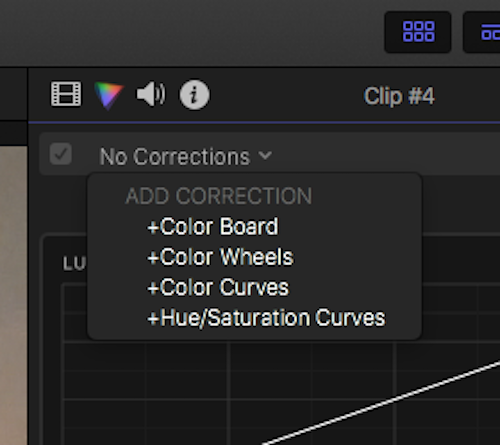
Since Command-6 givers me access to all the color tools at once, plus a button in the Inspector that does that, I don't see the need for a lot more commands to confuse my little dyslexic brain (for real). But whatever y'all come up with I'm sure will be very efficient. The options are there! I'm interested to see how other handle this.
Please Log in to join the conversation.
- Karsten Schlüter
-

- Offline
- Moderator
-

Less
More
- Posts: 3790
- Thank you received: 718
19 Dec 2017 09:06 #92483
by Karsten Schlüter
Replied by Karsten Schlüter on topic Who's got the best shortcut keys for new color corrections?
… in addendum to Ben's advice:
in FCPX' prefs you can set your preferred CC tool for cmd-6:
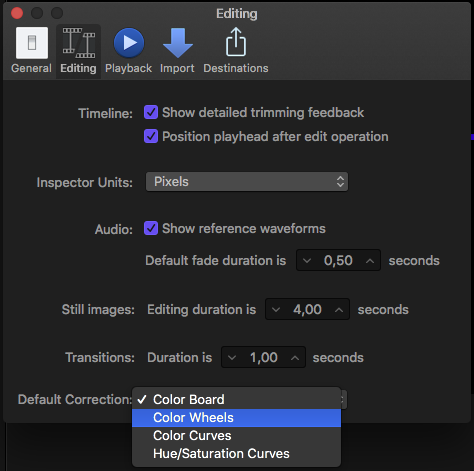
in FCPX' prefs you can set your preferred CC tool for cmd-6:
Please Log in to join the conversation.

19 Dec 2017 09:08 - 19 Dec 2017 09:28 #92484
by Axel
Replied by Axel on topic Who's got the best shortcut keys for new color corrections?
Don't know if these are "the BEST" shortcuts, but I share them nonetheless in order to find the best ones. I usually change things quite often as I learn tricks and improvements from others.
First of all, I wouldn't use the "Custom LUT" effect from he effects window. When dealing with Slog2, I do use a LUT, the Omeneo primers, which very subtly and specifically correct Sony's color science and little else. In 10.3 and before I had used mLut to load them.
Now, in case you didn't already see that, you can now permanently add a custom camera LUT in the info tab ("general" or "settings").
For balance (alt+cmd+b) there doesn't seem to be a shortcut for using the manual color picker right away? This would be better.
The color board was a good method to quickly color correct your clips. I had little to complain. However, with the color wheels, I think I won't use it anymore. So I made cmd+6 the wheels (preferences). Except that this command actually does something else, read on.
I make it to be the default effect (alt+e). You have to do that manually once, because per default the color board still is the default effect. And cmd+6 now has become more like a navigation shortcut, see below.
To add color curves, I chose alt+cmd+6, to apply hue-saturation curves: ctrl+cmd+6 (BTW: did you notice that with the little dot in the circle on the left side of each curve you seemingly can adjust the "outside" of your selection?). Both are not "go to"-commands (BTW #2: If you first applied color curves with the above shortcut, cmd+6 will later show you the curves instead of the wheels!).
What's missing? I noticed I have to jump between effects (aka video information) and color tab regularly. "Go to color tab" is actually cmd+6. Everything related to a window navigation with "tab" didn't work for me in the past, and doesn't work now. I can't get myself to remember the right modifyer when to go back and forth, particularly if one effect on the list is currently selected.
So I need one more shortcut asap: Go to video information. Right now I couldn't find an entry in command editor? In the past, I didn't need a shortcut because it didn't need to be changed that often. Any help much appreciated.
I love shortcuts, but only if there aren't too many. I'd never try to adjust curves with keystrokes for example (if that's possible at all). So once I'm in the color tab, my hand is on the mouse anyway, and I can as well click to browse previous corrections. Any thoughts on that?
First of all, I wouldn't use the "Custom LUT" effect from he effects window. When dealing with Slog2, I do use a LUT, the Omeneo primers, which very subtly and specifically correct Sony's color science and little else. In 10.3 and before I had used mLut to load them.
Now, in case you didn't already see that, you can now permanently add a custom camera LUT in the info tab ("general" or "settings").
For balance (alt+cmd+b) there doesn't seem to be a shortcut for using the manual color picker right away? This would be better.
The color board was a good method to quickly color correct your clips. I had little to complain. However, with the color wheels, I think I won't use it anymore. So I made cmd+6 the wheels (preferences). Except that this command actually does something else, read on.
I make it to be the default effect (alt+e). You have to do that manually once, because per default the color board still is the default effect. And cmd+6 now has become more like a navigation shortcut, see below.
To add color curves, I chose alt+cmd+6, to apply hue-saturation curves: ctrl+cmd+6 (BTW: did you notice that with the little dot in the circle on the left side of each curve you seemingly can adjust the "outside" of your selection?). Both are not "go to"-commands (BTW #2: If you first applied color curves with the above shortcut, cmd+6 will later show you the curves instead of the wheels!).
What's missing? I noticed I have to jump between effects (aka video information) and color tab regularly. "Go to color tab" is actually cmd+6. Everything related to a window navigation with "tab" didn't work for me in the past, and doesn't work now. I can't get myself to remember the right modifyer when to go back and forth, particularly if one effect on the list is currently selected.
So I need one more shortcut asap: Go to video information. Right now I couldn't find an entry in command editor? In the past, I didn't need a shortcut because it didn't need to be changed that often. Any help much appreciated.
I love shortcuts, but only if there aren't too many. I'd never try to adjust curves with keystrokes for example (if that's possible at all). So once I'm in the color tab, my hand is on the mouse anyway, and I can as well click to browse previous corrections. Any thoughts on that?
Last edit: 19 Dec 2017 09:28 by Axel.
Please Log in to join the conversation.
19 Dec 2017 13:04 #92499
by JoeEditor
Replied by JoeEditor on topic Who's got the best shortcut keys for new color corrections?
Control-Tab is a new one that comes with 10.4 that quickly cycles you through the Inspector tabs, FYI.
That along with my previous post and Karsten's post, I don't need any other shortcuts. I keep it simple. 10 paragraphs on keyboard commands to me, IMHO, is a sign you're getting overly complicated and over thinking things. But that's just me. I'm particular about keeping things simple. I've found in my personal observations with the thousands of students I've taught over the past decade+ and the colleagues I work with, too many custom commands causes them to slow down, trying to remember stuff, rather than just work. A mouse click is still faster than trying to remember a command. Just my humble two cents.
That along with my previous post and Karsten's post, I don't need any other shortcuts. I keep it simple. 10 paragraphs on keyboard commands to me, IMHO, is a sign you're getting overly complicated and over thinking things. But that's just me. I'm particular about keeping things simple. I've found in my personal observations with the thousands of students I've taught over the past decade+ and the colleagues I work with, too many custom commands causes them to slow down, trying to remember stuff, rather than just work. A mouse click is still faster than trying to remember a command. Just my humble two cents.
Please Log in to join the conversation.
19 Dec 2017 22:50 #92525
by mmorache
Replied by mmorache on topic Who's got the best shortcut keys for new color corrections?
Thanks for the answers and insight.
I decided to use the Control-Option-Command for my color effecting, since they are generally open, and they are close to shortcuts that exist for the color board (Control-Command).
With the three keys pressed I'm using B for board, C for curves, H for hue/sat, W for wheels, 1, 2 and 3 for copy color from previous, 2nd back and 3rd back.
⌃⌥⌘ Delete to reset all, arrow keys to nudge controls.
I'm not sure what I'll set the default to. Possibly curves, because I tend to add an s-curve to most of my clips. Although, I may be alone on this, I've gotten quite use to the color boards, and I really don't enjoy the color wheels. It's more difficult for me to adjust and to see which colors I'm effecting. On the color boards, pulling some blue out of the pictures is as simple as dragging the puck to the blue, and pulling it down.
I decided to use the Control-Option-Command for my color effecting, since they are generally open, and they are close to shortcuts that exist for the color board (Control-Command).
With the three keys pressed I'm using B for board, C for curves, H for hue/sat, W for wheels, 1, 2 and 3 for copy color from previous, 2nd back and 3rd back.
⌃⌥⌘ Delete to reset all, arrow keys to nudge controls.
I'm not sure what I'll set the default to. Possibly curves, because I tend to add an s-curve to most of my clips. Although, I may be alone on this, I've gotten quite use to the color boards, and I really don't enjoy the color wheels. It's more difficult for me to adjust and to see which colors I'm effecting. On the color boards, pulling some blue out of the pictures is as simple as dragging the puck to the blue, and pulling it down.
Please Log in to join the conversation.

19 Dec 2017 23:57 #92528
by BCH
Sorry for my bad english.
Replied by BCH on topic Who's got the best shortcut keys for new color corrections?
Color board and color wheels are the same thing; just UI changes. If you prefer color board is your choice. But in the new color wheels there are two things added very important for color grading. There are a temperature and a tint sliders. With this two sliders you get the best and easy way to get a right white balance. And there are a mix slider added. In my opinion, the best way for color grading is to go to "the too much point" and after go back to something not too much. And go down the mix shader is a very easy way for go back in your color correction.I've gotten quite use to the color boards, and I really don't enjoy the color wheels. It's more difficult for me to adjust and to see which colors I'm effecting. On the color boards, pulling some blue out of the pictures is as simple as dragging the puck to the blue, and pulling it down.
Sorry for my bad english.
Please Log in to join the conversation.


20 Dec 2017 01:24 #92531
by FernKraft
Replied by FernKraft on topic Who's got the best shortcut keys for new color corrections?
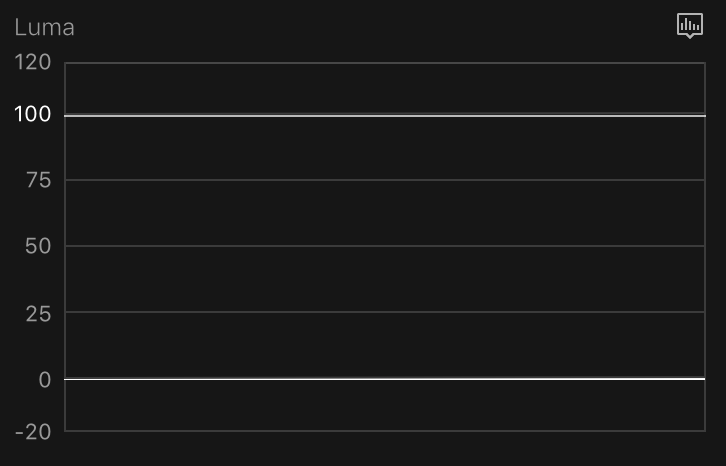
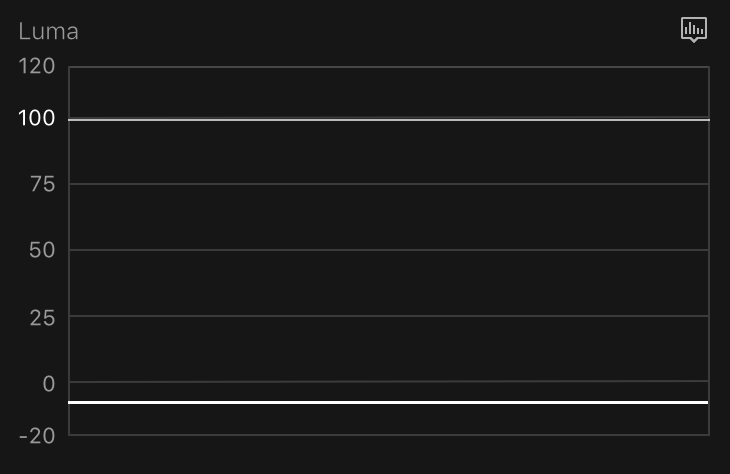
Not be nitpickity, but there IS a difference between the colour board and Wheels. I'm not sure the reason as to why they are different, but you can see the difference buy just dragging the highlights all the way down (-100% on the colour board). this will result in a flat line at 0 IRE when dealing with the colour board,meanwhile, the Wheels will result in a flat line at -7 IRE. ( and seem to have no limit to how low they can go interns of the minus number.) On my footage it reaches -7 IRE at -1 shadows, but I can keep going well beyond -1 shadows.
I suspect it has something to do with floating point vs. not, but I could be wrong. I'm still in the midst of testing/researching.
If anybody know the answer, please post it!
I suspect it has something to do with floating point vs. not, but I could be wrong. I'm still in the midst of testing/researching.
If anybody know the answer, please post it!
Please Log in to join the conversation.
20 Dec 2017 10:36 - 20 Dec 2017 10:37 #92547
by Axel
Funny enough, just tried that with a rec_709 project. Both the board and the wheels produce a flat line at zero. But only with the board the shadows go beyond zero. Someone has to explain.
It would be shameful if for color correction anything else than floating point was used. And it meant that Apple lies:
Replied by Axel on topic Who's got the best shortcut keys for new color corrections?
FernKraft wrote: ... you can see the difference buy just dragging the highlights all the way down (-100% on the colour board). this will result in a flat line at 0 IRE when dealing with the colour board,meanwhile, the Wheels will result in a flat line at -7 IRE. ( and seem to have no limit to how low they can go interns of the minus number.) On my footage it reaches -7 IRE at -1 shadows, but I can keep going well beyond -1 shadows.
Funny enough, just tried that with a rec_709 project. Both the board and the wheels produce a flat line at zero. But only with the board the shadows go beyond zero. Someone has to explain.
FernKraft wrote: I suspect it has something to do with floating point vs. not, but I could be wrong.
It would be shameful if for color correction anything else than floating point was used. And it meant that Apple lies:
FinalCut Pro X Technical Specifications wrote: High-precision floating-point render in linear-light color space
Last edit: 20 Dec 2017 10:37 by Axel.
Please Log in to join the conversation.
20 Dec 2017 12:06 - 20 Dec 2017 12:08 #92553
by JoeEditor
Replied by JoeEditor on topic Who's got the best shortcut keys for new color corrections?
When I use either wheels or the board, I can put the color data beyond 0 and 100. Both use the same mechanisms under the hood, only difference is the GUI.
Last edit: 20 Dec 2017 12:08 by JoeEditor.
Please Log in to join the conversation.
20 Dec 2017 15:32 #92566
by FernKraft
Replied by FernKraft on topic Who's got the best shortcut keys for new color corrections?
Interesting,
With the colour board if I only touch the Highlights control the scopes stop at 0 IRE when I bring the Highlights all the way down. The only way with the colour board that I can make it go below 0 IRE is if I use the shadows control as well.
but to get on the actual topic.
I make G my "colour effects toggle"
It's a shame it' doesn't include the Custom LUTs as a "colour effect" so if you do have a LUT effect enabled, it stays on.
With the colour board if I only touch the Highlights control the scopes stop at 0 IRE when I bring the Highlights all the way down. The only way with the colour board that I can make it go below 0 IRE is if I use the shadows control as well.
but to get on the actual topic.
I make G my "colour effects toggle"
It's a shame it' doesn't include the Custom LUTs as a "colour effect" so if you do have a LUT effect enabled, it stays on.
Please Log in to join the conversation.
