


- Posts: 3
- Thank you received: 0
3 Post Moderation Rule for New Boarders (25 Jan 2021)
New boarders will have their posts moderated - Don't worry if you cannot see your post immediately.
LUT Adjustment Layer w/ color correction
- lexurious18
-
 Topic Author
- Offline
- New Member
-

Less
More
11 Dec 2017 05:45 #92203
by lexurious18
LUT Adjustment Layer w/ color correction was created by lexurious18
Hey guys. New to the forum. I have an adjustment layer with a LUT applied over all my clips but everytime I go to tweak the colors/exposure on my clips the adjustment layer gets selected instead. is there a way I can bypass the still visible LUT layer & target the clips below w/o having to manually click on each one when correcting?
Please Log in to join the conversation.

11 Dec 2017 09:43 #92211
by Axel
If you color correct a sequence one clip after another, it's important to specifically go to and select the next clip anyway. Just stopping the playhead/skimmer over a clip does not select it, and all further operations seemingly had no effect because you would just ruin the correction on the previous clip without noticing it.
There are two ways:
1. click once on the next clip.
2. Down arrow, then "c".
Which one you prefer is completely up to you.
How comes that the adjustment layer - a connected clip - gets selected? Right now I see only one scenario how this can be: your mouse pointer hovers over the adjustment layer with clip skimming enabled. This will define this clip as the target of the action. Also only possible if you use a combination of mouse and shortcuts: "c" will select any clip the clip skimmer is over.
Doesn't work like I described? Then that's a strange behavior, and you should screen capture the problem for us.
Replied by Axel on topic LUT Adjustment Layer w/ color correction
lexurious18 wrote: ... is there a way I can bypass the still visible LUT layer & target the clips below w/o having to manually click on each one when correcting?
If you color correct a sequence one clip after another, it's important to specifically go to and select the next clip anyway. Just stopping the playhead/skimmer over a clip does not select it, and all further operations seemingly had no effect because you would just ruin the correction on the previous clip without noticing it.
There are two ways:
1. click once on the next clip.
2. Down arrow, then "c".
Which one you prefer is completely up to you.
How comes that the adjustment layer - a connected clip - gets selected? Right now I see only one scenario how this can be: your mouse pointer hovers over the adjustment layer with clip skimming enabled. This will define this clip as the target of the action. Also only possible if you use a combination of mouse and shortcuts: "c" will select any clip the clip skimmer is over.
Doesn't work like I described? Then that's a strange behavior, and you should screen capture the problem for us.
Please Log in to join the conversation.

11 Dec 2017 13:09 - 11 Dec 2017 13:11 #92219
by JoeEditor
Replied by JoeEditor on topic LUT Adjustment Layer w/ color correction
The TOP level clip in a layer gets automatically selected when the playhead is over it. If you have the same effect added to two clips (color board in my example below), simply changing the playhead position will switch which clip's copy of that effect is active in the Inspector.
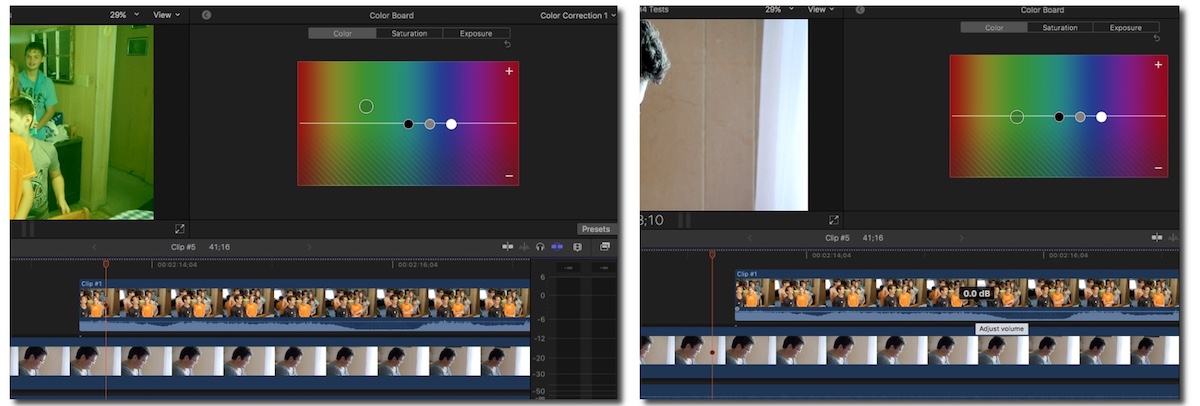
Last edit: 11 Dec 2017 13:11 by JoeEditor.
Please Log in to join the conversation.
11 Dec 2017 20:33 - 12 Dec 2017 08:57 #92228
by Axel
Replied by Axel on topic LUT Adjustment Layer w/ color correction
@FCPX.guru
Wow, thanks again!
I did it wrong all the time!
I had the habit of selecting the first clip for CC. Then playing or jumping to the next does not deselect the previous one, therefore not autoselect the current one. Great advice, as usual
EDIT:
But then again, this was exactly why lexurious18 asked in the first place. If you want to CC beneath the adjustment layer, you have to select the clips manually.
Wow, thanks again!
I did it wrong all the time!
I had the habit of selecting the first clip for CC. Then playing or jumping to the next does not deselect the previous one, therefore not autoselect the current one. Great advice, as usual
EDIT:
But then again, this was exactly why lexurious18 asked in the first place. If you want to CC beneath the adjustment layer, you have to select the clips manually.
Last edit: 12 Dec 2017 08:57 by Axel.
Please Log in to join the conversation.
- lexurious18
-
Topic Author
- Offline
- New Member
-
Less
More
- Posts: 3
- Thank you received: 0
12 Dec 2017 18:52 #92266
by lexurious18
Yea, hopefully there will be any option or something in 10.4 to bypass built in adjustment layer selections
Replied by lexurious18 on topic LUT Adjustment Layer w/ color correction
FCPX.guru wrote: The TOP level clip in a layer gets automatically selected when the playhead is over it. If you have the same effect added to two clips (color board in my example below), simply changing the playhead position will switch which clip's copy of that effect is active in the Inspector.
Yea, hopefully there will be any option or something in 10.4 to bypass built in adjustment layer selections
Please Log in to join the conversation.
13 Dec 2017 09:31 - 13 Dec 2017 09:46 #92283
by Axel
The adjustment layer equals a parallel node in Resolve. There are different purposes to use LUTs, and most of them don't require an adjustment layer. People mostly do it for practical reasons. With the LUT loader integrated in the color tab (!) of 10.4, you will probably stop using one.
Here is the thing: a normalization LUT, like i.e. Slog2 to rec_709, would ideally be used for preview purposes only. That means: for editing, not for grading. Because NO MATTER if you put the LUT first in the order of effects or parallel, it distorts a lot of values with less accuracy than a 32-bit floating point correction, since it has a limited number of reference points. People don't care because of the WYSIWYG-principle, they see a willfully degraded image from the start, and they start from there.
You could edit with the adjustment layer and v it or delete it before you start CC.
Then there are the so-called primers, they need to be "first nodes" anyway (hence the name) and look-LUTs, they get applied after CC.
Replied by Axel on topic LUT Adjustment Layer w/ color correction
lexurious18 wrote: Yea, hopefully there will be any option or something in 10.4 to bypass built in adjustment layer selections
The adjustment layer equals a parallel node in Resolve. There are different purposes to use LUTs, and most of them don't require an adjustment layer. People mostly do it for practical reasons. With the LUT loader integrated in the color tab (!) of 10.4, you will probably stop using one.
Here is the thing: a normalization LUT, like i.e. Slog2 to rec_709, would ideally be used for preview purposes only. That means: for editing, not for grading. Because NO MATTER if you put the LUT first in the order of effects or parallel, it distorts a lot of values with less accuracy than a 32-bit floating point correction, since it has a limited number of reference points. People don't care because of the WYSIWYG-principle, they see a willfully degraded image from the start, and they start from there.
You could edit with the adjustment layer and v it or delete it before you start CC.
Then there are the so-called primers, they need to be "first nodes" anyway (hence the name) and look-LUTs, they get applied after CC.
Last edit: 13 Dec 2017 09:46 by Axel.
Please Log in to join the conversation.
15 Dec 2017 06:55 - 15 Dec 2017 07:18 #92348
by Axel
Replied by Axel on topic LUT Adjustment Layer w/ color correction
There is an indeed excellent and in-depth tutorial for the new CC-tools on Youtube - in german (good for me :whistle: ). EDIT: but as if on cue, tons of new tutorials appeared, among them the popular duo Martin & Spencer ...
Here is a very early thought on a possible workflow without LUTs (ironically after the loader now is integrated):
1. normalize the LOG footage with curves, save as effect preset, make the latter the default, apply it with cmd+e.
2. make the wheels the standard CC-effect (preferences), evoke it with cmd+6.
3. choose a third custom shortcut for HSL-curves (or jump between the CC-tools with ctrl+tab).
Like I said, you might still use adjustment layers, but for CC? There are better options.
Here is a very early thought on a possible workflow without LUTs (ironically after the loader now is integrated):
1. normalize the LOG footage with curves, save as effect preset, make the latter the default, apply it with cmd+e.
2. make the wheels the standard CC-effect (preferences), evoke it with cmd+6.
3. choose a third custom shortcut for HSL-curves (or jump between the CC-tools with ctrl+tab).
Like I said, you might still use adjustment layers, but for CC? There are better options.
Last edit: 15 Dec 2017 07:18 by Axel.
Please Log in to join the conversation.
- Karsten Schlüter
-

- Offline
- Moderator
-

Less
More
- Posts: 3790
- Thank you received: 718
15 Dec 2017 08:22 #92349
by Karsten Schlüter
… would you like to share the URL of that, please?
'excellent' and 'German' to describe a FCPX tutorial usually except each other. :woohoo:
And after yesterdays AlexiBexi shock (why on earth gets such an %$§"!! a pre-sale device?? Do subscriber-numbers justify anything???) I would be happy to watch a best-practice-example.……
Replied by Karsten Schlüter on topic LUT Adjustment Layer w/ color correction
Axel wrote: There is an indeed excellent and in-depth tutorial for the new CC-tools on Youtube - in German…
… would you like to share the URL of that, please?
'excellent' and 'German' to describe a FCPX tutorial usually except each other. :woohoo:
And after yesterdays AlexiBexi shock (why on earth gets such an %$§"!! a pre-sale device?? Do subscriber-numbers justify anything???) I would be happy to watch a best-practice-example.……
Please Log in to join the conversation.
15 Dec 2017 08:55 #92351
by Axel
Hier (here):
He promises one for HDR too. In the meantime, improve your french from school with this brand new one:
Exciting times! Googled the AJA 4k Plus box mentioned there. It's 2600 €! Is this really a must? What about the 2017's iMac specs that say:
Would be so nice to just have to plug in an HDR monitor/TV. Movie quiz: "would that it were so simple!"
Replied by Axel on topic LUT Adjustment Layer w/ color correction
Karsten Schlüter wrote:
Axel wrote: There is an indeed excellent and in-depth tutorial for the new CC-tools on Youtube - in German…
… would you like to share the URL of that, please?
Hier (here):
He promises one for HDR too. In the meantime, improve your french from school with this brand new one:
Exciting times! Googled the AJA 4k Plus box mentioned there. It's 2600 €! Is this really a must? What about the 2017's iMac specs that say:
Thunderbolt 3 digital video output
Native DisplayPort output over USB‑C
Would be so nice to just have to plug in an HDR monitor/TV. Movie quiz: "would that it were so simple!"
Please Log in to join the conversation.
- Karsten Schlüter
-
- Offline
- Moderator
-
Less
More
- Posts: 3790
- Thank you received: 718
15 Dec 2017 09:01 #92353
by Karsten Schlüter
Replied by Karsten Schlüter on topic LUT Adjustment Layer w/ color correction
ach so, olle Robin Kurz… ja DER kann's.
… wußte nicht, dass er auch gratis was anbietet… kannte bisher nur teaser von ihm.
DANKE fürs teilen …
… wußte nicht, dass er auch gratis was anbietet… kannte bisher nur teaser von ihm.
DANKE fürs teilen …
Please Log in to join the conversation.
