


3 Post Moderation Rule for New Boarders (25 Jan 2021)
New boarders will have their posts moderated - Don't worry if you cannot see your post immediately.
Warning Alert - Rendering compare buffers
- Betancourt
-
 Topic Author
- Offline
- Premium Member
-

Less
More
26 Nov 2017 00:04 #91936
by Betancourt
Pablo Betancourt
Warning Alert - Rendering compare buffers was created by Betancourt
What does this alert mean?
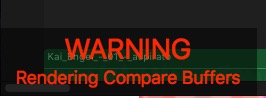
First time I see this in fcpx.
Using fcpx 10.3.4 on Mac OS Sierra 10.12.6
First time I see this in fcpx.
Using fcpx 10.3.4 on Mac OS Sierra 10.12.6
Pablo Betancourt
Please Log in to join the conversation.
- Karsten Schlüter
-

- Offline
- Moderator
-

Less
More
- Posts: 3790
- Thank you received: 718
26 Nov 2017 03:51 #91937
by Karsten Schlüter
Replied by Karsten Schlüter on topic Warning Alert - Rendering compare buffers
no idea, but 'compare buffers' is a feature of coremelts Chromatic plugin … ask them 
Please Log in to join the conversation.
- Betancourt
-
Topic Author
- Offline
- Premium Member
-
26 Nov 2017 04:19 #91938
by Betancourt
Pablo Betancourt
Replied by Betancourt on topic Warning Alert - Rendering compare buffers
Yep! Chromatic is applied to one of my clips. I'll ask them
tks,
Pablo
tks,
Pablo
Pablo Betancourt
Please Log in to join the conversation.
- Karsten Schlüter
-
- Offline
- Moderator
-
Less
More
- Posts: 3790
- Thank you received: 718
26 Nov 2017 05:11 #91940
by Karsten Schlüter
Replied by Karsten Schlüter on topic Warning Alert - Rendering compare buffers
… interesting, it doesn't utilize some OS-routine/pop-up/'window' for such an alert …
glad to be helpful
glad to be helpful
Please Log in to join the conversation.


26 Nov 2017 16:58 #91946
by JoeEditor
That is caused by hitting the Caps Lock key when you have Chromatic applied to a clip in your timeline. It is simply a warning that Chromatic is filling it's compare buffers when the Caps Lock is on.
Replied by JoeEditor on topic Warning Alert - Rendering compare buffers
Betancourt wrote: What does this alert mean?
First time I see this in fcpx.
Using fcpx 10.3.4 on Mac OS Sierra 10.12.6
That is caused by hitting the Caps Lock key when you have Chromatic applied to a clip in your timeline. It is simply a warning that Chromatic is filling it's compare buffers when the Caps Lock is on.
Please Log in to join the conversation.
