


- Posts: 2
- Thank you received: 0
3 Post Moderation Rule for New Boarders (25 Jan 2021)
New boarders will have their posts moderated - Don't worry if you cannot see your post immediately.
How to make a video overlay loop over entire storyline?
- diana.anastasia
-
 Topic Author
- Offline
- New Member
-

Less
More
17 Nov 2017 19:28 #91778
by diana.anastasia
Hi guys
I come from a music background and I'm used to very easily drag out clips so they will loop over my entire project in Logic...
I can't find a way to do this in Final Cut Pro with video clips, am I missing something?
I use 10sec texture filter overlays over most of my projects, often several layers of them, and it would be handy to have these videos loop over everything else that I have going on underneath. I know I can copy and paste them 40 times but it's not very elegant, and if I then make adjustments on the clips underneath, it all gets jumbled up and I have to start over again with the overlays
Thanks
I come from a music background and I'm used to very easily drag out clips so they will loop over my entire project in Logic...
I can't find a way to do this in Final Cut Pro with video clips, am I missing something?
I use 10sec texture filter overlays over most of my projects, often several layers of them, and it would be handy to have these videos loop over everything else that I have going on underneath. I know I can copy and paste them 40 times but it's not very elegant, and if I then make adjustments on the clips underneath, it all gets jumbled up and I have to start over again with the overlays
Thanks
Please Log in to join the conversation.
- Karsten Schlüter
-

- Offline
- Moderator
-

Less
More
- Posts: 3790
- Thank you received: 718
18 Nov 2017 06:50 - 18 Nov 2017 06:53 #91783
by Karsten Schlüter
Replied by Karsten Schlüter on topic How to make a video overlay loop over entire storyline?
Welcome, Diana/Anastasia to fcp.co 
No, sorry to say, 'looping' is in Video a playback feature, no editing-thingie
The most elegant way would be to transform your overlays into a real 'effect' by using Motion5:
basically, you would add your overlays and filter settings there, perhaps publish a few parameters - and, applied into an FCPX project, such an effect would loop endlessly to your needs.
rethinking my reply …
I could tinker you 'quick'n dirty' such an effect, it would contain a 'box'/well, you drop your texture into, and then it gets loop.... if you like (?)
diana.anastasia wrote: …… I use 10sec texture filter overlays over most of my projects, often several layers of them, … know I can copy and paste them 40 times but it's not very elegant, …
No, sorry to say, 'looping' is in Video a playback feature, no editing-thingie
The most elegant way would be to transform your overlays into a real 'effect' by using Motion5:
basically, you would add your overlays and filter settings there, perhaps publish a few parameters - and, applied into an FCPX project, such an effect would loop endlessly to your needs.
rethinking my reply …
I could tinker you 'quick'n dirty' such an effect, it would contain a 'box'/well, you drop your texture into, and then it gets loop.... if you like (?)
Last edit: 18 Nov 2017 06:53 by Karsten Schlüter.
Please Log in to join the conversation.


18 Nov 2017 12:36 #91786
by JoeEditor
Replied by JoeEditor on topic How to make a video overlay loop over entire storyline?
"...and if I then make adjustments on the clips underneath, it all gets jumbled up and I have to start over again with the overlays"
Put the first two in a connected storyline. Then Option-drag will duplicate. Select more than one to duplicate to make it faster. Then put them all into a Compound Clip. Not perfect, but a huge help.
Or create a template as Karsten says, set the end of the video clips to loop.
Put the first two in a connected storyline. Then Option-drag will duplicate. Select more than one to duplicate to make it faster. Then put them all into a Compound Clip. Not perfect, but a huge help.
Or create a template as Karsten says, set the end of the video clips to loop.
Please Log in to join the conversation.
- Karsten Schlüter
-
- Offline
- Moderator
-
Less
More
- Posts: 3790
- Thank you received: 718
18 Nov 2017 14:35 #91788
by Karsten Schlüter
Replied by Karsten Schlüter on topic How to make a video overlay loop over entire storyline?
… as mentioned, quick'n dirty:
dl and unzip attached files, drag resulting folder into ~/Movies/Motion Templates/Effects.
In FCPX you should see in the Effects Tab tab a new one: ks_overlay
Drag it onto your clip OR onto an Adjustment Layer (if you want the effect over the whole project)

In the Inspector, the plugin offers a well, click on that and…

… you're allowed to select an 'Overlay Clip' from your browser. The preview shows instantly how it affects the clip.
I published a few b parameters, e.g. to adjust the size of the overlay…
And, for sure, you can select opacity and comp-mode of the overlay:
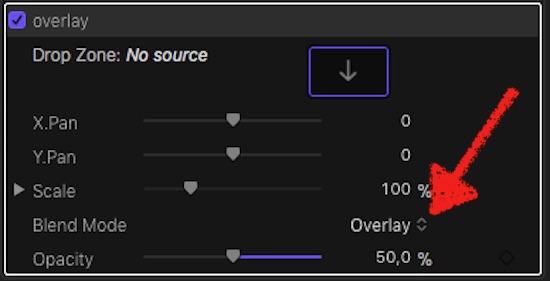
Overlaid clips get looped every 10secs… to mention that.
Feel free to modify (in Motion) to your needs…
dl and unzip attached files, drag resulting folder into ~/Movies/Motion Templates/Effects.
In FCPX you should see in the Effects Tab tab a new one: ks_overlay
Drag it onto your clip OR onto an Adjustment Layer (if you want the effect over the whole project)
In the Inspector, the plugin offers a well, click on that and…
… you're allowed to select an 'Overlay Clip' from your browser. The preview shows instantly how it affects the clip.
I published a few b parameters, e.g. to adjust the size of the overlay…
And, for sure, you can select opacity and comp-mode of the overlay:
Overlaid clips get looped every 10secs… to mention that.
Feel free to modify (in Motion) to your needs…
Please Log in to join the conversation.
- diana.anastasia
-
Topic Author
- Offline
- New Member
-
Less
More
- Posts: 2
- Thank you received: 0
18 Nov 2017 16:37 #91789
by diana.anastasia
Replied by diana.anastasia on topic How to make a video overlay loop over entire storyline?
Thank you so much, using Effects sounds like what I need to do. I’m not familiar with Motion (I don’t think i have that plugin) so I’m gonna get my hands on it and go from there. I tried to do something similar before dragging my overlays into the Motion Templates folder but nothing happened, so I will follow your instructions and give this a proper try
Thanks
Thanks
Please Log in to join the conversation.
- JorgeIsEditingNow
-

- Offline
- New Member
-
Less
More
- Posts: 8
- Thank you received: 0
11 Oct 2021 19:29 #116676
by JorgeIsEditingNow
Replied by JorgeIsEditingNow on topic How to make a video overlay loop over entire storyline?
This is awesome!... THANK YOU so much for this resource... I can use it for many things!
Please Log in to join the conversation.

11 Oct 2021 22:37 #116678
by PaulG
Replied by PaulG on topic How to make a video overlay loop over entire storyline?
Or you could go into After Effects where looping footage is trivially easy.
Please Log in to join the conversation.
