


- Posts: 120
- Thank you received: 3
3 Post Moderation Rule for New Boarders (25 Jan 2021)
New boarders will have their posts moderated - Don't worry if you cannot see your post immediately.
Can Camcorder Settings be Viewed in FCPX
12 Oct 2017 21:10 - 12 Oct 2017 21:14 #91079
by RayPaula
Can Camcorder Settings be Viewed in FCPX was created by RayPaula
Newbie question...... I did a video of a Christmas play last year in a auditorium. The video came out very good but, I can't remember what settings I used such as Gain, Iris, PP, etc. I downloaded the card and kept it intact in which I archived it within FCPX.. I would like to use the same settings for another upcoming play. Is there a way to see what my settings were on my camcorder within FCPX? Thanks, Ray 
Last edit: 12 Oct 2017 21:14 by RayPaula.
Please Log in to join the conversation.


12 Oct 2017 22:15 #91080
by joema
Unfortunately video "EXIF" data is not standardized the way stills are. Video cameras often use proprietary and undocumented data structures to record this. Thus deciphering it requires reverse engineering and the metadata is subject to change without notice.
Probably the best way to attempt extracting that info is using the command-line tool ExifTool, which works on both video and stills. For some video cameras it can extract a fair amount of info from the files, from others not so much: www.sno.phy.queensu.ca/~phil/exiftool/
Some camera manufacturers may have vendor-specific software tools to decode this. Some of the tools may be publicly available whereas others may be for internal support or product development.
A still camera can record EXIF, IPTC and XMP metadata for each image. But with video cameras, various exposure and other parameters can fluctuate over the span of a clip. What you ideally want is not the parameters at the start of a (say) 15 minute clip, but the parameters of the clip range of interest. This would require writing all that frame-unique metadata 30 or 60 times a second, or some protocol for sample frequency every x frames. I don't know which (if any) cameras do this. Maybe a RED camera or others which record lots of metadata in sidecar files do .
Replied by joema on topic Can Camcorder Settings be Viewed in FCPX
RayPaula wrote: ...Gain, Iris, PP, etc. ...Is there a way to see what my settings were on my camcorder within FCPX?...
Unfortunately video "EXIF" data is not standardized the way stills are. Video cameras often use proprietary and undocumented data structures to record this. Thus deciphering it requires reverse engineering and the metadata is subject to change without notice.
Probably the best way to attempt extracting that info is using the command-line tool ExifTool, which works on both video and stills. For some video cameras it can extract a fair amount of info from the files, from others not so much: www.sno.phy.queensu.ca/~phil/exiftool/
Some camera manufacturers may have vendor-specific software tools to decode this. Some of the tools may be publicly available whereas others may be for internal support or product development.
A still camera can record EXIF, IPTC and XMP metadata for each image. But with video cameras, various exposure and other parameters can fluctuate over the span of a clip. What you ideally want is not the parameters at the start of a (say) 15 minute clip, but the parameters of the clip range of interest. This would require writing all that frame-unique metadata 30 or 60 times a second, or some protocol for sample frequency every x frames. I don't know which (if any) cameras do this. Maybe a RED camera or others which record lots of metadata in sidecar files do .
Please Log in to join the conversation.

14 Oct 2017 01:44 - 14 Oct 2017 01:46 #91096
by dgwvideo
Creating history....one edit at a time !
Replied by dgwvideo on topic Can Camcorder Settings be Viewed in FCPX
In addition to what Joema said, here is another consideration. Gain, Iris, focus and those types of settings probably won't be of much help unless your next shoot is lit exactly the same way and your position to the subject(s) are identical. More than likely a different shoot in a different venue will require changing all those items anyway. It seems what you really want is to make sure your frame rate, codec and shutter speed can be known so they can be duplicated. FCPX will tell you the first two and programs like Sony's Catalyst (if using a recognized Sony camera will tell you shutter speed (in addition to Iris, gain and other items - although as Joema points out, it won't display changes to those parameters over time). For interviews and basic static shots it can be useful. For run and gun with adjustments on the fly - forget it.
Creating history....one edit at a time !
Last edit: 14 Oct 2017 01:46 by dgwvideo.
Please Log in to join the conversation.
14 Oct 2017 12:37 #91102
by RayPaula
Replied by RayPaula on topic Can Camcorder Settings be Viewed in FCPX
Thanks to both of you......... Very helpful information. The shoot will be identical lighting and position. In fact, it will be the same show that was performed previously. Better story lines along with actors will be the changes. My camcorder is a Sony PXW-X70. I haven't downloaded Sony's Catalyst but, I will do so. Thanks again for the help. Ray 
Please Log in to join the conversation.
14 Oct 2017 12:43 #91103
by joema
There are three items termed Sony Catalyst. (1) Catalyst Prepare, (2) Catalyst Edit, (3) Catalyst Browse.
The first two are subscription-only. Catalyst Browse is free and that's what lets you see the acquisition metadata on some Sony video files. It works on our A6300, A6500 and A7RII cameras which all shoot XAVC-S. I don't know what other Sony file formats it works on. It is available on both Mac and Windows.
Replied by joema on topic Can Camcorder Settings be Viewed in FCPX
RayPaula wrote: ...camcorder is a Sony PXW-X70. I haven't downloaded Sony's Catalyst but, I will do so....
There are three items termed Sony Catalyst. (1) Catalyst Prepare, (2) Catalyst Edit, (3) Catalyst Browse.
The first two are subscription-only. Catalyst Browse is free and that's what lets you see the acquisition metadata on some Sony video files. It works on our A6300, A6500 and A7RII cameras which all shoot XAVC-S. I don't know what other Sony file formats it works on. It is available on both Mac and Windows.
Please Log in to join the conversation.
14 Oct 2017 12:59 #91104
by RayPaula
Thanks.... I will download Catalyst Browse today
Replied by RayPaula on topic Can Camcorder Settings be Viewed in FCPX
joema wrote:
RayPaula wrote: ...camcorder is a Sony PXW-X70. I haven't downloaded Sony's Catalyst but, I will do so....
There are three items termed Sony Catalyst. (1) Catalyst Prepare, (2) Catalyst Edit, (3) Catalyst Browse.
The first two are subscription-only. Catalyst Browse is free and that's what lets you see the acquisition metadata on some Sony video files. It works on our A6300, A6500 and A7RII cameras which all shoot XAVC-S. I don't know what other Sony file formats it works on. It is available on both Mac and Windows.
Thanks.... I will download Catalyst Browse today
Please Log in to join the conversation.
14 Oct 2017 15:43 #91105
by dgwvideo
Creating history....one edit at a time !
Replied by dgwvideo on topic Can Camcorder Settings be Viewed in FCPX
It works on PXW-X180 with XAVC-I codec and all flavors of HD422 that I have seen. I believe it also works on most, if not all PMW series.
Creating history....one edit at a time !
Please Log in to join the conversation.
14 Oct 2017 16:06 - 14 Oct 2017 16:35 #91106
by RayPaula
Replied by RayPaula on topic Can Camcorder Settings be Viewed in FCPX
I downloaded Catalyst Browse without any issues on my 2016 MacBook Pro. Catalyst Browse read my Private Folder in which I was able to get tons of information as you stated. Only thing I find hard to believe is the "Camera Master Gain Adjustment" which shows 27.00 dB. I thought for sure I was shooting with my gain set at 12dB at the most........ video is extremely clean with the exception with a little noise in the red's with a fogger being used. Thanks again for pointing me in the right direction. I might add, I'm glad I kept my folders intact...... Ray
Last edit: 14 Oct 2017 16:35 by RayPaula.
Please Log in to join the conversation.
14 Oct 2017 19:22 - 14 Oct 2017 19:23 #91107
by RayPaula
Replied by RayPaula on topic Can Camcorder Settings be Viewed in FCPX
Interesting....... I can't open a video Archive that I created in FCPX in Catalyst Browse. The archive I made was directly off my SD card at the time. I made FCPX archives in order to reformat my SDXC card. I'm really glad now that I kept the original "Private" folder on another drive. :huh:
Last edit: 14 Oct 2017 19:23 by RayPaula.
Please Log in to join the conversation.
14 Oct 2017 19:25 #91108
by dgwvideo
Creating history....one edit at a time !
Replied by dgwvideo on topic Can Camcorder Settings be Viewed in FCPX
It may be that Catalyst is not reading the data from your PXW-X70 correctly. You can check your camera settings to see if that high of a gain is selectable. I'd expect extremely grainy footage with that setting.
Here is typical acquisition data from a PXW-X180 during setup.
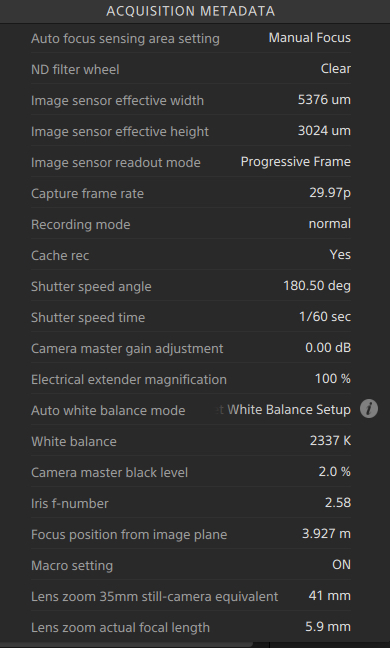
Here is typical acquisition data from a PXW-X180 during setup.
Creating history....one edit at a time !
Please Log in to join the conversation.
14 Oct 2017 19:32 #91109
by dgwvideo
This is normal because the archive file that FCPX creates is strictly for use by FCPX. I am not aware of any other app that would recognize it.
Creating history....one edit at a time !
Replied by dgwvideo on topic Can Camcorder Settings be Viewed in FCPX
RayPaula wrote: Interesting....... I can't open a video Archive that I created in FCPX in Catalyst Browse.
This is normal because the archive file that FCPX creates is strictly for use by FCPX. I am not aware of any other app that would recognize it.
Creating history....one edit at a time !
Please Log in to join the conversation.
14 Oct 2017 19:51 #91111
by RayPaula
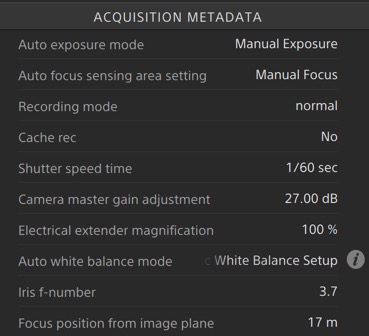
Must be....... at 27dB, noise would be extremely noticeable. My PXW-X70 will go as high as 33dB. As always, I start out with 0dB, I simply can't believe I was above 12dB's due to the 4k footage being super clean with the exception of the red's under fog. Here's a shot of the metadata;
Replied by RayPaula on topic Can Camcorder Settings be Viewed in FCPX
dgwvideo wrote: It may be that Catalyst is not reading the data from your PXW-X70 correctly. You can check your camera settings to see if that high of a gain is selectable. I'd expect extremely grainy footage with that setting.
Must be....... at 27dB, noise would be extremely noticeable. My PXW-X70 will go as high as 33dB. As always, I start out with 0dB, I simply can't believe I was above 12dB's due to the 4k footage being super clean with the exception of the red's under fog. Here's a shot of the metadata;
Please Log in to join the conversation.
14 Oct 2017 19:51 #91112
by RayPaula
Just what I figured......
Replied by RayPaula on topic Can Camcorder Settings be Viewed in FCPX
dgwvideo wrote:
RayPaula wrote: Interesting....... I can't open a video Archive that I created in FCPX in Catalyst Browse.
This is normal because the archive file that FCPX creates is strictly for use by FCPX. I am not aware of any other app that would recognize it.
Just what I figured......
Please Log in to join the conversation.
