


- Posts: 96
- Thank you received: 2
3 Post Moderation Rule for New Boarders (25 Jan 2021)
New boarders will have their posts moderated - Don't worry if you cannot see your post immediately.
Voiceover - Primary or Secondary Storyline?
22 Sep 2017 06:35 #90722
by Finbo
Voiceover - Primary or Secondary Storyline? was created by Finbo
Is there a best/better workflow for laying voiceover?
I think there are three options:
Record vo direct to the timeline first - but this leaves a strange gap at the beginning (don't know why) and then connect video clips.
Record vo to a different project, then edit the clips you want and put them on the primary storyline in the project, along with interviews where you'll actually edit the piece and then use video clips as connected clips.
Edit a few video clips to the primary storyline first, then record the vo direct to the timeline as the secondary storyline and build it from there.
Just to add, it's likely the vo will done in chunks as you go along, rather than have it all ready at the beginning.
Pieces will be news & doco style with a mix of vo, interviews and video clips.
Emphasis will be on letting the pieces breathe with natural sound being used where possible/suitable in between the vo and interviews.
Very occasionally music may be used, but not often.
Which is the best way of working?
Do any of the methods make much difference?
Or is there another, better way?
Thanks
I think there are three options:
Record vo direct to the timeline first - but this leaves a strange gap at the beginning (don't know why) and then connect video clips.
Record vo to a different project, then edit the clips you want and put them on the primary storyline in the project, along with interviews where you'll actually edit the piece and then use video clips as connected clips.
Edit a few video clips to the primary storyline first, then record the vo direct to the timeline as the secondary storyline and build it from there.
Just to add, it's likely the vo will done in chunks as you go along, rather than have it all ready at the beginning.
Pieces will be news & doco style with a mix of vo, interviews and video clips.
Emphasis will be on letting the pieces breathe with natural sound being used where possible/suitable in between the vo and interviews.
Very occasionally music may be used, but not often.
Which is the best way of working?
Do any of the methods make much difference?
Or is there another, better way?
Thanks
Please Log in to join the conversation.

22 Sep 2017 11:20 - 22 Sep 2017 11:22 #90725
by JoeEditor
Replied by JoeEditor on topic Voiceover - Primary or Secondary Storyline?
There's no one right way to do it, whatever works for you. I do a lot of VO work, almost daily. I get my script, a VO Project, and record. Then I have no more use for that Project, as the Master Clips of those recordings are in the Browser now. I can then cut them up as needed and drop them as connected clips to the editing project, tweak as needed.
Some folks like to read along with the video, but this is not for everyone. It's enough to read from a script and get the emotion right in your voice, much less have to follow something visually at the same time. I try to avoid this, personally, it is too distracting.
Dependa on what works for you personally.
OH, one thing you want to do for sure, make a custom audio sub-role for Dialogue that is Voice Over, and put them in to a Smart Collection so you can find them and mix them easily.
Some folks like to read along with the video, but this is not for everyone. It's enough to read from a script and get the emotion right in your voice, much less have to follow something visually at the same time. I try to avoid this, personally, it is too distracting.
Dependa on what works for you personally.
OH, one thing you want to do for sure, make a custom audio sub-role for Dialogue that is Voice Over, and put them in to a Smart Collection so you can find them and mix them easily.
Last edit: 22 Sep 2017 11:22 by JoeEditor.
Please Log in to join the conversation.

22 Sep 2017 21:32 - 22 Sep 2017 21:33 #90730
by Redifer
Replied by Redifer on topic Voiceover - Primary or Secondary Storyline?
When my project is timed to the voiceover, then the VO is in the primary storyline. I can't imagine doing it any other way without going absolutely insane. I just make sure that voiceover is good to go as one long already edited audio file per voiceover segment (you could use compound clips as well). If I need a little bit more space between sentences here and there it's easy to do by cutting and inserting a gap or simply pressing P and dragging a bit to the right.
Last edit: 22 Sep 2017 21:33 by Redifer.
Please Log in to join the conversation.
- simon.a.billington
-

- Offline
- Elite Member
-

Less
More
- Posts: 179
- Thank you received: 10
22 Sep 2017 23:15 #90733
by simon.a.billington
Replied by simon.a.billington on topic Voiceover - Primary or Secondary Storyline?
There is no right way no, But I do think it helps to consider function.
Are you letting the voice over dictate the cuts, or do want to add narration to an already composited scene. If it's the first then it makes more sense to have the voiceover take the role of the primary storyline. If it's the latter, it makes more sense to have it as a secondary.
Are you letting the voice over dictate the cuts, or do want to add narration to an already composited scene. If it's the first then it makes more sense to have the voiceover take the role of the primary storyline. If it's the latter, it makes more sense to have it as a secondary.
Please Log in to join the conversation.

23 Sep 2017 16:01 - 23 Sep 2017 17:58 #90747
by Rorick
I think that it's easier in the end to record to a dedicated audio programme such as Logic. If you want visual cues, Logic and some of the other audio programmes will import your footage.
Audio programmes are set up for efficiently recording takes and phrase replacement, and for detailed editing of things like electrical hum, breaths, mouth noises, etc.
macProVideo has a good series on voiceover recording and editing, and three of the videos in the series are specifically on voicing to picture. The presenter uses Logic: www.macprovideo.com/tutorial/logic-pro-x...ecording-and-editing
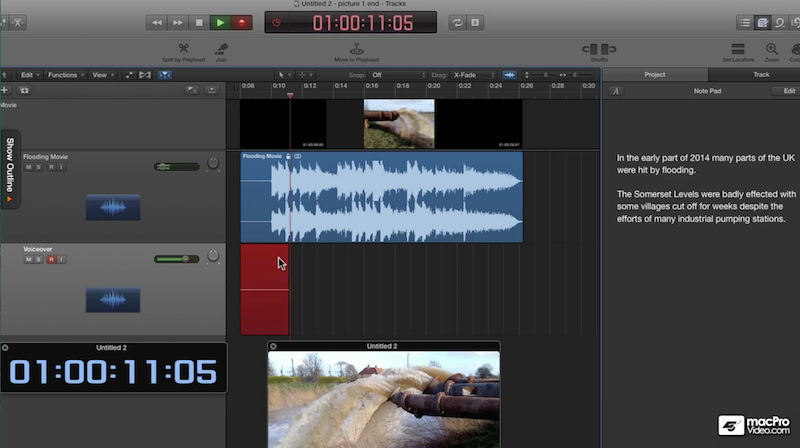
Here is a screenshot from the macProVideo series. It shows the video footage and under it the video's music and sound effects track (the blue track). The voiceover artist is reading from the script in the Logic Notepad on the right (very handy), and is recording to the red track. He also has a free-floating timecode display open and an additional floating copy of the footage. He is just showing possible configurations. One can choose which of these elements to display:
Replied by Rorick on topic Voiceover - Primary or Secondary Storyline?
Finbo wrote:
Or is there another, better way?
I think that it's easier in the end to record to a dedicated audio programme such as Logic. If you want visual cues, Logic and some of the other audio programmes will import your footage.
Audio programmes are set up for efficiently recording takes and phrase replacement, and for detailed editing of things like electrical hum, breaths, mouth noises, etc.
macProVideo has a good series on voiceover recording and editing, and three of the videos in the series are specifically on voicing to picture. The presenter uses Logic: www.macprovideo.com/tutorial/logic-pro-x...ecording-and-editing
Here is a screenshot from the macProVideo series. It shows the video footage and under it the video's music and sound effects track (the blue track). The voiceover artist is reading from the script in the Logic Notepad on the right (very handy), and is recording to the red track. He also has a free-floating timecode display open and an additional floating copy of the footage. He is just showing possible configurations. One can choose which of these elements to display:
Last edit: 23 Sep 2017 17:58 by Rorick.
Please Log in to join the conversation.
24 Sep 2017 20:56 #90762
by JoeEditor
Replied by JoeEditor on topic Voiceover - Primary or Secondary Storyline?
I used to use Logic's VO multi-take function, but with the magnetic timeline in FCPX, I find this works WAY easier and faster. I record my VO work, if I flub a line, I go back and repeat that line, replete a line to get it better, take breaths, whatever. Then I just cut out what I don't need/want. Super fast, super easy, and much less complicated than having multiple takes on top of each other. And I do this pretty much every day. There's these to show how.
www.macprovideo.com/hub/final-cut/fcp-x-...-editing-short-takes
www.macprovideo.com/hub/final-cut/fcp-x-...diting-long-projects
www.macprovideo.com/hub/final-cut/fcp-x-...-editing-short-takes
www.macprovideo.com/hub/final-cut/fcp-x-...diting-long-projects
Please Log in to join the conversation.
25 Sep 2017 03:15 - 25 Sep 2017 04:45 #90770
by Rorick
Hi Mr. Balser,
I don't doubt that you find recording into Final Cut "super fast, super easy". Glad it works for you.
As someone who uses both Final Cut and Logic, my personal experience is that Logic is head and shoulders above Final Cut as a sound recording and editing platform. It's worth noting that you say nothing about sound editing, which is a pretty important part of voice over performance.
It is a pleasure that I can edit voice over both within Logic, just from the point of view of screen real estate let alone tools, and can set Logic Preferences to iZotope RX as my Audio Editor, bringing up the entire RX window with a simple key command instead of dealing with individual RX components as plugins, a number of important RX components being not even available as plugins.
Voice artists almost uniformly record to Logic and similar programmes rather than to Final Cut. One reason is that Final Cut is great for video editing, but is no better than adequate when it comes to sound. It no doubt works fine for your macProVideo screencast tutorial courses (or do you use Screenflow?), but in my respectful view Final Cut, compared to Logic and Pro Tools, pales as a sound recorder/editor on anything more demanding.
It's one thing to be a fan of Final Cut as a video editor. It's another to suggest that for narration recording and editing it is a replacement/better than programmes like Logic, Pro Tools and Audition. For that matter, in its current state of development iZotope RX would make a fine choice as one's narration recorder and editor, just for its editing capabilities.
Replied by Rorick on topic Voiceover - Primary or Secondary Storyline?
FCPX.guru wrote: I used to use Logic's VO multi-take function, but with the magnetic timeline in FCPX, I find this works WAY easier and faster. I record my VO work, if I flub a line, I go back and repeat that line, replete a line to get it better, take breaths, whatever. Then I just cut out what I don't need/want. Super fast, super easy, and much less complicated than having multiple takes on top of each other. And I do this pretty much every day. There's these to show how.
www.macprovideo.com/hub/final-cut/fcp-x-...-editing-short-takes
www.macprovideo.com/hub/final-cut/fcp-x-...diting-long-projects
Hi Mr. Balser,
I don't doubt that you find recording into Final Cut "super fast, super easy". Glad it works for you.
As someone who uses both Final Cut and Logic, my personal experience is that Logic is head and shoulders above Final Cut as a sound recording and editing platform. It's worth noting that you say nothing about sound editing, which is a pretty important part of voice over performance.
It is a pleasure that I can edit voice over both within Logic, just from the point of view of screen real estate let alone tools, and can set Logic Preferences to iZotope RX as my Audio Editor, bringing up the entire RX window with a simple key command instead of dealing with individual RX components as plugins, a number of important RX components being not even available as plugins.
Voice artists almost uniformly record to Logic and similar programmes rather than to Final Cut. One reason is that Final Cut is great for video editing, but is no better than adequate when it comes to sound. It no doubt works fine for your macProVideo screencast tutorial courses (or do you use Screenflow?), but in my respectful view Final Cut, compared to Logic and Pro Tools, pales as a sound recorder/editor on anything more demanding.
It's one thing to be a fan of Final Cut as a video editor. It's another to suggest that for narration recording and editing it is a replacement/better than programmes like Logic, Pro Tools and Audition. For that matter, in its current state of development iZotope RX would make a fine choice as one's narration recorder and editor, just for its editing capabilities.
Last edit: 25 Sep 2017 04:45 by Rorick.
Please Log in to join the conversation.
25 Sep 2017 08:35 #90772
by Finbo
Replied by Finbo on topic Voiceover - Primary or Secondary Storyline?
Thanks for all the information.
I don't need Logic Pro for this type of work and plan to carry on using FCP X to record voiceover.
It's interesting that no one method of using the voiceover as the primary or secondary storyline is seen to be better/more efficient than the other.
I don't need Logic Pro for this type of work and plan to carry on using FCP X to record voiceover.
It's interesting that no one method of using the voiceover as the primary or secondary storyline is seen to be better/more efficient than the other.
Please Log in to join the conversation.
25 Sep 2017 12:35 - 25 Sep 2017 12:40 #90774
by JoeEditor
Replied by JoeEditor on topic Voiceover - Primary or Secondary Storyline?
Rorick, I am a professional voice talent, I’m also an Apple cert’ed trainer for both FCPX and Logic Pro X. I’m a music composer and have been doing all of this since the 1970’s. Nothing I need to do with voice over work that I can’t do easily in FCPX. Many of my colleagues use FCPX now for recording their VO work. Logic offers no advantage to VO work. RX is not part of a good VO workflow, and is available as a plugin with FCPX as a side note.
Sound design is a very different subject I said nothing about, and has nothing to do with VO work.
I stand by my professional experiences and opinion.
Sound design is a very different subject I said nothing about, and has nothing to do with VO work.
I stand by my professional experiences and opinion.
Last edit: 25 Sep 2017 12:40 by JoeEditor.
Please Log in to join the conversation.
25 Sep 2017 12:38 - 25 Sep 2017 12:39 #90775
by JoeEditor
Record in Primary Storyline. You could record as a Connected Clip, but convert to a Connected Storyline first as the magnetic properties are what make FCPX amazing for VO work specifically. Either way you have the same result, just different locations.
Replied by JoeEditor on topic Voiceover - Primary or Secondary Storyline?
Finbo wrote: It's interesting that no one method of using the voiceover as the primary or secondary storyline is seen to be better/more efficient than the other.
Record in Primary Storyline. You could record as a Connected Clip, but convert to a Connected Storyline first as the magnetic properties are what make FCPX amazing for VO work specifically. Either way you have the same result, just different locations.
Last edit: 25 Sep 2017 12:39 by JoeEditor.
Please Log in to join the conversation.
25 Sep 2017 19:19 #90786
by dmetz
Replied by dmetz on topic Voiceover - Primary or Secondary Storyline?
I'll typically place VO as a connected (secondary) storyline, since it's usually visuals or music driving my edits.
Since my work environment can be a bit noisy, I've got a VO booth next to the workstation - large diaphragm condenser through a JoeMeek studio channel into a mono Sound Studio track. I really enjoy Sound Studio, just because it's super clean, simple, and allows quick editing (for me). For just VO, Logic seems like overkill.
Since my work environment can be a bit noisy, I've got a VO booth next to the workstation - large diaphragm condenser through a JoeMeek studio channel into a mono Sound Studio track. I really enjoy Sound Studio, just because it's super clean, simple, and allows quick editing (for me). For just VO, Logic seems like overkill.
Please Log in to join the conversation.
25 Sep 2017 19:49 #90787
by JoeEditor
Replied by JoeEditor on topic Voiceover - Primary or Secondary Storyline?
I've plugged a Mojave MA-200 into an Apogee Quartest and recorded to GarageBand on an iPad (honest, actually did this a lot) on location at a local business, using a Flexion Filter (original model), and got amazing VO work done. Again, actually have done this more times than I care to think. But works great.
Please Log in to join the conversation.
- haysoos123
-
- Offline
- Platinum Member
-

Less
More
- Posts: 402
- Thank you received: 72
28 Sep 2017 23:46 #90857
by haysoos123
Replied by haysoos123 on topic Voiceover - Primary or Secondary Storyline?
I disagree that you can't do proper VO work directly in FCPX and have it turn out great. In fact, VO recording/editing is probably the easiest type of dialogue editing because generally you record the VO in a sound booth with little to no noise in a predictable environment.
Don't tell any of our clients or agencies, but we're now routinely delivering audio mixes for our spots directly from FCPX (stereo and 5.1). These are projects that would have gone for a mix session in an audio post house in the past. Most all of the plugins are the same, including iZotope, etc., so really the differences are in the way the programs handle buses, organization, etc. This is more than adequate for 60 or 30 second spots.
As for the OP, of course do what works for you. In my process, we record line-by-line directly to the timeline and mark the takes we like. Even though the picture plays at the same time, it's only an "approximation" of where the VO line might end up because we'll fine-tune the position of the line afterward. In the final pass, we'll often A/B our favorite takes for each line and make the decision there. Each VO line will be an attached clip or storyline.
Don't tell any of our clients or agencies, but we're now routinely delivering audio mixes for our spots directly from FCPX (stereo and 5.1). These are projects that would have gone for a mix session in an audio post house in the past. Most all of the plugins are the same, including iZotope, etc., so really the differences are in the way the programs handle buses, organization, etc. This is more than adequate for 60 or 30 second spots.
As for the OP, of course do what works for you. In my process, we record line-by-line directly to the timeline and mark the takes we like. Even though the picture plays at the same time, it's only an "approximation" of where the VO line might end up because we'll fine-tune the position of the line afterward. In the final pass, we'll often A/B our favorite takes for each line and make the decision there. Each VO line will be an attached clip or storyline.
Please Log in to join the conversation.
- simon.a.billington
-
- Offline
- Elite Member
-
Less
More
- Posts: 179
- Thank you received: 10
01 Oct 2017 01:09 #90903
by simon.a.billington
FCPX can do a competent enough job recording voices overs and doing basic audio edits. It can get a bit tricky when the best audio edit cross points are between frame, but that's when you can consider doing a sub-frame J or L cut and manually draw in some equal power audio fades to help easy the transition if it sounds a little glitchy.
Even that is easy enough to achieve,
I'd rathe do a lot of this inside FCPX myself to save going out to Logic, then back in to FCPX again , then back out to Logic for a proper audio mix, then back in to FCPX to finalise. It seems tedious and overkill
Besides if you do an edit in Logic that would require removing or extending any frames, it actually can't do that, so you risk your audio becoming out of sync. So it is best to do the bulk of your edits inside FCPX anyway.
What you will want to consider doing externally is any noise reduction processes, any big mixes that require lots of tracks and anything that requires more advanced special attention done to the audio.
Mind you, if and when Apple incorporates a Role Mixer, there will be more you will be able to accomplish without leaving FCPX.
Replied by simon.a.billington on topic Voiceover - Primary or Secondary Storyline?
Finbo wrote: Thanks for all the information.
I don't need Logic Pro for this type of work and plan to carry on using FCP X to record voiceover.
It's interesting that no one method of using the voiceover as the primary or secondary storyline is seen to be better/more efficient than the other.
FCPX can do a competent enough job recording voices overs and doing basic audio edits. It can get a bit tricky when the best audio edit cross points are between frame, but that's when you can consider doing a sub-frame J or L cut and manually draw in some equal power audio fades to help easy the transition if it sounds a little glitchy.
Even that is easy enough to achieve,
I'd rathe do a lot of this inside FCPX myself to save going out to Logic, then back in to FCPX again , then back out to Logic for a proper audio mix, then back in to FCPX to finalise. It seems tedious and overkill
Besides if you do an edit in Logic that would require removing or extending any frames, it actually can't do that, so you risk your audio becoming out of sync. So it is best to do the bulk of your edits inside FCPX anyway.
What you will want to consider doing externally is any noise reduction processes, any big mixes that require lots of tracks and anything that requires more advanced special attention done to the audio.
Mind you, if and when Apple incorporates a Role Mixer, there will be more you will be able to accomplish without leaving FCPX.
Please Log in to join the conversation.
