


- Posts: 11
- Thank you received: 0
3 Post Moderation Rule for New Boarders (25 Jan 2021)
New boarders will have their posts moderated - Don't worry if you cannot see your post immediately.
A few questions from someone fairly new to FCPX
14 Sep 2017 08:01 - 14 Sep 2017 08:08 #90531
by Joey06
A few questions from someone fairly new to FCPX was created by Joey06
Hi all,
I've been using FCPX on and off for a while, but have only recently switched from Premiere Pro for more serious projects. There are a few things that I have not been able to get my head around recently as I get towards the end of my first serious FCPX project. These questions are some that I have not been able to find complete answers to after doing a fair bit of online research. I would appreciate any help the community here is able to give me and I apologise in advance if the answers to some of these questions are very obvious.
Firstly, when it come to titles, where are created titles stored in FCPX? In Premiere Pro, when you create a new title, it gets automatically stored in the project panel and you are able to drag it into the timeline from there. Titles are in one central location which makes it easy to access them whenever you need to use them again in the edit. I have not been able to find where the titles I have made in my FCPX project are being stored. They don't seem to be in the library which is sort of like the equivalent to the project panel in Premiere. I have just been copying and pasting them from different parts of the timeline for now, which is a bit annoying I must say. Not sure where else to be looking for them?
Secondly, how do you add a cross dissolve to just one end of a clip in the primary storyline? I have some instances in my project where I am adding something (graphic, ect) that does not fill the whole screen, over the top of the main clip (someone talking to the camera). I usually have the main clip blurred in the background for the duration of the graphic clip (which I fade in and out). FCPX won't allow me to cross dissolve the blurred clip on just one end when it's in the primary storyline. Obviously cross dissolves are generally for transitioning between two different clips, but I have always used them in Premiere Pro on the start or end of a clip I am blurring to put something over the top of, otherwise it just abruptly cuts to a blurred shot while the graphic is still fading in.
Thirdly, (and this has been the thing which has been irritating me the most while I've been trying to figure it out) how do you apply audio effects to multiple specific audio clips throughout the timeline when you want to balance/level the audio? I have master shots of someone talking/presenting to the camera mixed in with B roll and cutaway shots. In Premiere Pro, I could easily select all the master clips in the timeline and apply my audio corrections and balancing through the audio gain settings to all these clips at once. I can not figure out how to apply the 'limiter' audio effect (which seems to be the recommended way to balance audio in FCPX, although if anyone has any other recommendations, I'm keen to hear them) to all my master shot audio clips at once so that they are all level. I have read and seen tutorials where people have just selected all the audio in their timeline and used compound clips to do this in FCPX, but this is not working for me, as I have lots of other shots mixed in which need their audio corrected manually, clip by clip. I have tried selecting all the master clips and making them into a compound clip, but this ruins my edit and puts things way out of place.
Thanks for taking the time to read. I apologise if it's been hard to understand everything, I've tried to be as specific as possible.
I've been using FCPX on and off for a while, but have only recently switched from Premiere Pro for more serious projects. There are a few things that I have not been able to get my head around recently as I get towards the end of my first serious FCPX project. These questions are some that I have not been able to find complete answers to after doing a fair bit of online research. I would appreciate any help the community here is able to give me and I apologise in advance if the answers to some of these questions are very obvious.
Firstly, when it come to titles, where are created titles stored in FCPX? In Premiere Pro, when you create a new title, it gets automatically stored in the project panel and you are able to drag it into the timeline from there. Titles are in one central location which makes it easy to access them whenever you need to use them again in the edit. I have not been able to find where the titles I have made in my FCPX project are being stored. They don't seem to be in the library which is sort of like the equivalent to the project panel in Premiere. I have just been copying and pasting them from different parts of the timeline for now, which is a bit annoying I must say. Not sure where else to be looking for them?
Secondly, how do you add a cross dissolve to just one end of a clip in the primary storyline? I have some instances in my project where I am adding something (graphic, ect) that does not fill the whole screen, over the top of the main clip (someone talking to the camera). I usually have the main clip blurred in the background for the duration of the graphic clip (which I fade in and out). FCPX won't allow me to cross dissolve the blurred clip on just one end when it's in the primary storyline. Obviously cross dissolves are generally for transitioning between two different clips, but I have always used them in Premiere Pro on the start or end of a clip I am blurring to put something over the top of, otherwise it just abruptly cuts to a blurred shot while the graphic is still fading in.
Thirdly, (and this has been the thing which has been irritating me the most while I've been trying to figure it out) how do you apply audio effects to multiple specific audio clips throughout the timeline when you want to balance/level the audio? I have master shots of someone talking/presenting to the camera mixed in with B roll and cutaway shots. In Premiere Pro, I could easily select all the master clips in the timeline and apply my audio corrections and balancing through the audio gain settings to all these clips at once. I can not figure out how to apply the 'limiter' audio effect (which seems to be the recommended way to balance audio in FCPX, although if anyone has any other recommendations, I'm keen to hear them) to all my master shot audio clips at once so that they are all level. I have read and seen tutorials where people have just selected all the audio in their timeline and used compound clips to do this in FCPX, but this is not working for me, as I have lots of other shots mixed in which need their audio corrected manually, clip by clip. I have tried selecting all the master clips and making them into a compound clip, but this ruins my edit and puts things way out of place.
Thanks for taking the time to read. I apologise if it's been hard to understand everything, I've tried to be as specific as possible.
Last edit: 14 Sep 2017 08:08 by Joey06. Reason: Details
Please Log in to join the conversation.
- Tom Wolsky
-

- Offline
- Moderator
-

14 Sep 2017 10:13 #90533
by Tom Wolsky
Replied by Tom Wolsky on topic A few questions from someone fairly new to FCPX
Titles are stored in the project. You can copy/paste them. Option-drag to duplicate. You can save styles and format as presets. Titles aren’t saved anywhere with the application itself.
Not quite understanding what you’re doing with the blue and what comes after it. There is a specific title that will blur the background when the t ct fades up. You can also keyframe the opacity in the video animation controls in the timeline of that helps, or keyframe the blur values if that helps.
Apply the effect to one clip and adjust it so it’s right for you. Copy the clip. Use the timeline index to find and select all the other master clips and use paste attributes.
Not quite understanding what you’re doing with the blue and what comes after it. There is a specific title that will blur the background when the t ct fades up. You can also keyframe the opacity in the video animation controls in the timeline of that helps, or keyframe the blur values if that helps.
Apply the effect to one clip and adjust it so it’s right for you. Copy the clip. Use the timeline index to find and select all the other master clips and use paste attributes.
Please Log in to join the conversation.
14 Sep 2017 12:02 - 14 Sep 2017 12:10 #90536
by Joey06
I kinda figured this was the case, but wasn't 100 percent sure. I knew about saving styles and presets ect. Don't really understand why created titles wouldn't be saved in the library. Not a huge deal really, just something to get used to I suppose.
I'm just blurring the main video of someone speaking while a graphic related to what they're talking about is overlaid in front. It's a fairly common effect. I know you can keyframe the blur to come in and out, but it's pretty irritating and time consuming having to do this for each and every graphic. Basically, the question I'm asking is can you add a cross dissolve to only one end of a clip in the primary storyline like you can in the Premiere Pro timeline?
Correct me if I'm wrong, but I though when you're trying to balance/level audio the effect should be applied to all the clips at the one time so that it can analyse all of them at the same time and actually apply the effect correctly. If you can apply effects to one clip and then copy and paste the effect to all the others, why can't you just select them all and apply the effect at the start? Seems very counterintuitive.
Replied by Joey06 on topic A few questions from someone fairly new to FCPX
Tom Wolsky wrote: Titles are stored in the project. You can copy/paste them. Option-drag to duplicate. You can save styles and format as presets. Titles aren’t saved anywhere with the application itself.
I kinda figured this was the case, but wasn't 100 percent sure. I knew about saving styles and presets ect. Don't really understand why created titles wouldn't be saved in the library. Not a huge deal really, just something to get used to I suppose.
Tom Wolsky wrote: Not quite understanding what you’re doing with the blue and what comes after it. There is a specific title that will blur the background when the t ct fades up. You can also keyframe the opacity in the video animation controls in the timeline of that helps, or keyframe the blur values if that helps.
I'm just blurring the main video of someone speaking while a graphic related to what they're talking about is overlaid in front. It's a fairly common effect. I know you can keyframe the blur to come in and out, but it's pretty irritating and time consuming having to do this for each and every graphic. Basically, the question I'm asking is can you add a cross dissolve to only one end of a clip in the primary storyline like you can in the Premiere Pro timeline?
Tom Wolsky wrote: Apply the effect to one clip and adjust it so it’s right for you. Copy the clip. Use the timeline index to find and select all the other master clips and use paste attributes.
Correct me if I'm wrong, but I though when you're trying to balance/level audio the effect should be applied to all the clips at the one time so that it can analyse all of them at the same time and actually apply the effect correctly. If you can apply effects to one clip and then copy and paste the effect to all the others, why can't you just select them all and apply the effect at the start? Seems very counterintuitive.
Last edit: 14 Sep 2017 12:10 by Joey06. Reason: Details
Please Log in to join the conversation.
- Tom Wolsky
-
- Offline
- Moderator
-
14 Sep 2017 12:18 #90538
by Tom Wolsky
Replied by Tom Wolsky on topic A few questions from someone fairly new to FCPX
You did notice that there is a blur title already? If you cut the background clip on either side of the title you can cross dissolve to a blurred portion of the clip. Don’t understand how a one should de dissolve would work in this instance and what the effect would be that was different from a cross dissolve.
To apply an audio effect to the lnegth of the clip you would have to bake it into the clip. You can open a clip in the browser and apply the effect to the audio before you edit, but that effect will not be constant after you cut the clip. As you say, each instance of the effect will be somewhat different.
To apply an audio effect to the lnegth of the clip you would have to bake it into the clip. You can open a clip in the browser and apply the effect to the audio before you edit, but that effect will not be constant after you cut the clip. As you say, each instance of the effect will be somewhat different.
Please Log in to join the conversation.
- haysoos123
-

- Offline
- Platinum Member
-

Less
More
- Posts: 402
- Thank you received: 72
20 Sep 2017 01:28 #90648
by haysoos123
Replied by haysoos123 on topic A few questions from someone fairly new to FCPX
For your cross dissolve, it's a little difficult to parse what exactly you mean. Do you mean to have a cross dissolve between two clips, where the cross dissolve starts on the B side only, for example? In FCPX, cross dissolves in the primary storyline always have an A and B side, because either you're dissolving from nothing (slug), or you're dissolving from another clip. If you think about it logically, this HAS to be always the case. If you're dissolving from black slug, FCPX will always show that "midpoint" of the dissolve as the "cut" in between. But that "start" of that dissolve is the left-most frame of the dissolve.
If you attach a lone clip about the primary, you can have the dissolve start at the top of the clip, if that's a more comfortable representation for you. But look-wise, the dissolve will look identical.
In any case, the answer is yes, you can get it to look exactly how you want it. If I've misunderstood your question, please attach a picture so we can see what you mean.
If you attach a lone clip about the primary, you can have the dissolve start at the top of the clip, if that's a more comfortable representation for you. But look-wise, the dissolve will look identical.
In any case, the answer is yes, you can get it to look exactly how you want it. If I've misunderstood your question, please attach a picture so we can see what you mean.
Please Log in to join the conversation.
20 Sep 2017 02:00 #90649
by Joey06
Replied by Joey06 on topic A few questions from someone fairly new to FCPX
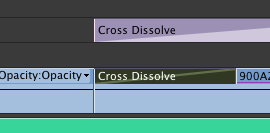
It's not really a cross dissolve between two clips actually, more a dissolve into an effect. I have attached a screenshot from Premiere Pro which shows what I am trying to achieve in FCPX.
As you can see in the screenshot, Premiere Pro allows me to put a cross dissolve on only the start of the clip which has the graphic on top of it. This gives a nice transition effect to clips I have blurred so that I can fade in a graphic on top of them.
As you can see in the screenshot, Premiere Pro allows me to put a cross dissolve on only the start of the clip which has the graphic on top of it. This gives a nice transition effect to clips I have blurred so that I can fade in a graphic on top of them.
Please Log in to join the conversation.
- Tom Wolsky
-
- Offline
- Moderator
-
20 Sep 2017 02:10 #90650
by Tom Wolsky
Replied by Tom Wolsky on topic A few questions from someone fairly new to FCPX
I have no idea what Premiere is trying to represent. Is the opacity changing? Are these two different clips? Is there an abrupt cut from one clip to the other clip in Black the fade up? That’s what the graphical representation seems to look like. Is that what you want? Or is it the same clip that’s had one segment blurred?
Please Log in to join the conversation.
20 Sep 2017 02:59 #90651
by Joey06
Replied by Joey06 on topic A few questions from someone fairly new to FCPX
In this instance it's the same clip which has been cut where the graphic begins to fade in (as can be seen in the purple above). The cut is because the primary clip in track one blurs so that the graphic can stand out above it. I never mentioned anything about the opacity changing, abruptly cutting to another clip, etc. All I ever talked about was using a blur effect.
Regardless of whether or not you understand the exact details of the blur effect I am trying to achieve, the screenshot very clearly shows what I was asking in my main question. Premiere Pro allows you to use a cross dissolve on only one side of a cut, can FCPX do this as well?
Regardless of whether or not you understand the exact details of the blur effect I am trying to achieve, the screenshot very clearly shows what I was asking in my main question. Premiere Pro allows you to use a cross dissolve on only one side of a cut, can FCPX do this as well?
Please Log in to join the conversation.
- Tom Wolsky
-
- Offline
- Moderator
-
20 Sep 2017 03:39 #90652
by Tom Wolsky
Replied by Tom Wolsky on topic A few questions from someone fairly new to FCPX
Cut the clip. Blur the second segment. Apply the cross dissolve between the two clips. If you want it to start as the title fades in roll the cross dissolve to the right so it lines up with the fade on the title.
Again, I’m pretty sure there is a pre/built title in FCP that will automatically blur the background video as the title fades in.
The more common way to do what is not to do it by cutting the clip but by keyframing the blur value as the title fades in.
Again, I’m pretty sure there is a pre/built title in FCP that will automatically blur the background video as the title fades in.
The more common way to do what is not to do it by cutting the clip but by keyframing the blur value as the title fades in.
Please Log in to join the conversation.
20 Sep 2017 04:04 #90653
by Joey06
Replied by Joey06 on topic A few questions from someone fairly new to FCPX
This is what I have done, but I don't like how FCPX won't allow me to just start the cross dissolve on one side. It appears my question has been answered: No, FCPX won't allow you to use a cross dissolve on only one side of a cut like Premiere Pro will. With your suggestion about rolling the cross dissolve to the right to match the graphic fade in, how can I do this without it lengthening the left side as well? Can you have custom durations for each side of the cross dissolve in FCPX?
This is NOT a title, this is a custom made graphic related to the content of the video.
As I've already said, I know that you can use keyframes to fade in the blur. However, this is time consuming and irritating to have to do every time there is a graphic when you should be able to just put a cross dissolve in on one side of a cut with one simple keyboard shortcut like you can in Premiere Pro.
This is NOT a title, this is a custom made graphic related to the content of the video.
As I've already said, I know that you can use keyframes to fade in the blur. However, this is time consuming and irritating to have to do every time there is a graphic when you should be able to just put a cross dissolve in on one side of a cut with one simple keyboard shortcut like you can in Premiere Pro.
Please Log in to join the conversation.

20 Sep 2017 04:34 #90655
by JoeEditor
Replied by JoeEditor on topic A few questions from someone fairly new to FCPX
You blade a clip, you want the left side to be normal, the right side to dissolve into a blur. Well, that's a simple cross dissolve. Seems in PPro you're over complicating the effect.
I think you're trying to force FCPX do act like PPro, which rarely is a good idea. The overall effect, from what I understand, is very easy to do, but you'd simply use a standard cross dissolve between one clip and a blurred clip. Don't see the point in the dissolve being only on one side. It's still a dissolve doing the same thin.
If we misunderstand, a video clip of what you're trying to do would be necessary.
I think you're trying to force FCPX do act like PPro, which rarely is a good idea. The overall effect, from what I understand, is very easy to do, but you'd simply use a standard cross dissolve between one clip and a blurred clip. Don't see the point in the dissolve being only on one side. It's still a dissolve doing the same thin.
If we misunderstand, a video clip of what you're trying to do would be necessary.
Please Log in to join the conversation.
20 Sep 2017 05:37 - 20 Sep 2017 05:43 #90656
by Joey06
Replied by Joey06 on topic A few questions from someone fairly new to FCPX
I respectfully disagree with your statement that I'm over complicating the effect in Premiere Pro. It simply comes down to you not really understanding what I'm actually trying to do. (Which is not necessarily your fault.) When it comes to some of the topics I have brought up in my initial post, my current opinion is that FCPX makes these things overcomplicated and harder than they need to be.
I went into FCPX specifically not trying to force it to behave like Premiere Pro as I'd read everywhere that this wasn't the way to go about it. Generally, I enjoy editing in FCPX more than Premiere Pro and have embraced most of the major differences between the two programs. Each program has strengths and weaknesses and in my opinion Premiere Pro beats FCPX in some areas, one of them being when it comes to ease of use and customisation of transitions. Does this mean I'm going to stop using FCPX? No. However, I will maintain that FCPX does not do some things as well as Premiere and it will continue to frustrate me until I get used to it.
I can't post any video as the content I'm working on is currently unreleased and I don't have any permission to do so. However in this situation I would not call the effect a simple cross dissolve between two clips, but rather a fade in of one clip using the cross dissolve effect. Anyway, my initial questions have either been answered or I have figured out a way to do them to an acceptable level since starting this thread.
On a somewhat related note, is it possible to change the duration of each side of a cross dissolve separately in FCPX so each side can have a different duration?
I went into FCPX specifically not trying to force it to behave like Premiere Pro as I'd read everywhere that this wasn't the way to go about it. Generally, I enjoy editing in FCPX more than Premiere Pro and have embraced most of the major differences between the two programs. Each program has strengths and weaknesses and in my opinion Premiere Pro beats FCPX in some areas, one of them being when it comes to ease of use and customisation of transitions. Does this mean I'm going to stop using FCPX? No. However, I will maintain that FCPX does not do some things as well as Premiere and it will continue to frustrate me until I get used to it.
I can't post any video as the content I'm working on is currently unreleased and I don't have any permission to do so. However in this situation I would not call the effect a simple cross dissolve between two clips, but rather a fade in of one clip using the cross dissolve effect. Anyway, my initial questions have either been answered or I have figured out a way to do them to an acceptable level since starting this thread.
On a somewhat related note, is it possible to change the duration of each side of a cross dissolve separately in FCPX so each side can have a different duration?
Last edit: 20 Sep 2017 05:43 by Joey06.
Please Log in to join the conversation.
- Tom Wolsky
-
- Offline
- Moderator
-
20 Sep 2017 05:37 #90657
by Tom Wolsky
Replied by Tom Wolsky on topic A few questions from someone fairly new to FCPX
The effect in FCP should be the same as he effect in Premiere. The graphical display might look as if it starts at the beginning of the clip, but it’s still as cross dissolve and produces the same effect as FCP with the dissolve shifted over to the right. The midpoint of the dissolve will be in the same place.
Please Log in to join the conversation.
- Tom Wolsky
-
- Offline
- Moderator
-
20 Sep 2017 05:43 #90658
by Tom Wolsky
Replied by Tom Wolsky on topic A few questions from someone fairly new to FCPX
So that it, for instance, dissolved slowly to the mid-point, and then quickly beyond it? No, not with a transition, only by keyframing the opacity. I suppose you could build a custom transition in Motion that would do it.
Please Log in to join the conversation.
20 Sep 2017 05:55 - 20 Sep 2017 05:57 #90659
by Joey06
Yeah, I guess that's one way to put it. It's quite disappointing to hear that this cannot be done on the default transitions. I can't understand why fairly basic customisation which is included in other programs is not included in FCPX.
Replied by Joey06 on topic A few questions from someone fairly new to FCPX
Tom Wolsky wrote: So that it, for instance, dissolved slowly to the mid-point, and then quickly beyond it? No, not with a transition, only by keyframing the opacity. I suppose you could build a custom transition in Motion that would do it.
Yeah, I guess that's one way to put it. It's quite disappointing to hear that this cannot be done on the default transitions. I can't understand why fairly basic customisation which is included in other programs is not included in FCPX.
Last edit: 20 Sep 2017 05:57 by Joey06.
Please Log in to join the conversation.
- Tom Wolsky
-
- Offline
- Moderator
-
20 Sep 2017 06:02 #90660
by Tom Wolsky
Replied by Tom Wolsky on topic A few questions from someone fairly new to FCPX
I don’t know, it seems as if there’s a pretty extensive list of cross dissolve options for different types of looks. That said, the differences are so subtle I doubt the 99% of viewers would see the difference between them even if stepping through the transitions frame by frame.
Please Log in to join the conversation.
- Karsten Schlüter
-

- Offline
- Moderator
-
Less
More
- Posts: 3790
- Thank you received: 718
20 Sep 2017 06:28 #90662
by Karsten Schlüter
Replied by Karsten Schlüter on topic A few questions from someone fairly new to FCPX
the manual version of this common effect:
set 4 keyframes for amount of Blur in the Inspector: Blur 0% = video sharp, fades to blurred (bg for title) say 40%, until keyframe#3, blur 'fade-out' to 0% …
set 4 keyframes for amount of Blur in the Inspector: Blur 0% = video sharp, fades to blurred (bg for title) say 40%, until keyframe#3, blur 'fade-out' to 0% …
Please Log in to join the conversation.

20 Sep 2017 18:27 #90682
by Witthaus
Replied by Witthaus on topic A few questions from someone fairly new to FCPX
Please Log in to join the conversation.
22 Sep 2017 13:26 #90726
by Joey06
Thanks for the tip.
Replied by Joey06 on topic A few questions from someone fairly new to FCPX
Witthaus wrote: If you do a lot of these, this plug-in looks promising.
fxfactory.com/info/hawaikisuperdissolve/
Thanks for the tip.
Please Log in to join the conversation.
