


- Posts: 39
- Thank you received: 1
3 Post Moderation Rule for New Boarders (25 Jan 2021)
New boarders will have their posts moderated - Don't worry if you cannot see your post immediately.
Occasional and Random Audio dropout during timeline playback
05 Sep 2017 13:51 - 05 Sep 2017 13:51 #90317
by StingRay
Hardware: L2013 MacPro/32GB RAM/8Core. Thunderbolt G-RAID (0) for video playback. FCPX 10.3.4. MacOS X Sierra 10.12.6
Hello
I'm occasionally getting audio dropout (it goes silent for a second or so) during video playback on the timeline. These are not nested clips or heavily processed clips with overlays etc.. Happens at random and just occasionally. If it were a data throughput issue I would expect issues with the video but that seems to be fine. Hmmm?
All clips were exported using KYNO media management software exported as ProRes 422 with Audio 48K/hz 16bit (PCM I believe).
Any ideas anyone please?
Thank you in advance.
Hello
I'm occasionally getting audio dropout (it goes silent for a second or so) during video playback on the timeline. These are not nested clips or heavily processed clips with overlays etc.. Happens at random and just occasionally. If it were a data throughput issue I would expect issues with the video but that seems to be fine. Hmmm?
All clips were exported using KYNO media management software exported as ProRes 422 with Audio 48K/hz 16bit (PCM I believe).
Any ideas anyone please?
Thank you in advance.
Last edit: 05 Sep 2017 13:51 by StingRay.
Please Log in to join the conversation.
- simon.a.billington
-

- Offline
- Elite Member
-

Less
More
- Posts: 179
- Thank you received: 10
23 Sep 2017 00:11 #90739
by simon.a.billington
Replied by simon.a.billington on topic Occasional and Random Audio dropout during timeline playback
And clearly no visual signs of drop outs when you look at the the audio waveforms??
And are you working from proxies??
One thing you can try is deleting your timeline cache and letting it re-render.
And are you working from proxies??
One thing you can try is deleting your timeline cache and letting it re-render.
Please Log in to join the conversation.
23 Sep 2017 00:54 #90741
by StingRay
Hi Simon,
There are no visual signs of dropout on the wav forms… That all looks fine. I am not working from proxies but Pro Res - ‘better wuality’ in the viewer. I have tried ‘better performance‘ but this resulted in the same issue albeit only very slightly less. I would’ve thought if it were a data throughput problem then I will be getting dropped out in the video which I am not. I’ve not had this issue before. I will try deleting the cache on the timeline as you have suggested and report back. Thank you for your reply
Replied by StingRay on topic Occasional and Random Audio dropout during timeline playback
simon.a.billington wrote: And clearly no visual signs of drop outs when you look at the the audio waveforms??
And are you working from proxies??
One thing you can try is deleting your timeline cache and letting it re-render.
Hi Simon,
There are no visual signs of dropout on the wav forms… That all looks fine. I am not working from proxies but Pro Res - ‘better wuality’ in the viewer. I have tried ‘better performance‘ but this resulted in the same issue albeit only very slightly less. I would’ve thought if it were a data throughput problem then I will be getting dropped out in the video which I am not. I’ve not had this issue before. I will try deleting the cache on the timeline as you have suggested and report back. Thank you for your reply
Please Log in to join the conversation.

23 Sep 2017 16:27 - 24 Sep 2017 06:24 #90748
by Axel
Same thing here.
What I did:
1. Browsed the SDXC card with Kyno.
2. Made subclips.
3. Exported subclips as ProResHQ (transcoded) to a folder created within the export dialog.
4. Quitted Kyno.
5. Imported the folder in FCP, leaving files in place.
... that led to:
... sound occassionally dropping during playback - also in Browser
... but only in the first run.
New try:
Selected all transcoded clips in new folder: shift + cmd + f (send to FCP X), in the dialog left leave files in place checked, go!
That *seemed* to have solved the issue. Strange though, that ordinary ProRes-files should cause this.
Asked for an explanation in the Kyno forum.
Replied by Axel on topic Occasional and Random Audio dropout during timeline playback
StingRay wrote: All clips were exported using KYNO media management software exported as ProRes 422 with Audio 48K/hz 16bit (PCM I believe).
Same thing here.
What I did:
1. Browsed the SDXC card with Kyno.
2. Made subclips.
3. Exported subclips as ProResHQ (transcoded) to a folder created within the export dialog.
4. Quitted Kyno.
5. Imported the folder in FCP, leaving files in place.
... that led to:
... sound occassionally dropping during playback - also in Browser
... but only in the first run.
New try:
Selected all transcoded clips in new folder: shift + cmd + f (send to FCP X), in the dialog left leave files in place checked, go!
That *seemed* to have solved the issue. Strange though, that ordinary ProRes-files should cause this.
Asked for an explanation in the Kyno forum.
Last edit: 24 Sep 2017 06:24 by Axel.
Please Log in to join the conversation.
- Karsten Schlüter
-

- Offline
- Moderator
-

Less
More
- Posts: 3790
- Thank you received: 718
24 Sep 2017 06:53 #90755
by Karsten Schlüter
Replied by Karsten Schlüter on topic Occasional and Random Audio dropout during timeline playback
@Axel…
You, as a fan of Kyno, are maybe interested in this lil' demo of grandmaster Larry Jordan at one LACPUG lately
Have to confess, Larry is - for me! - in his webinars too…pastoral.
But live, he's really funny…
You, as a fan of Kyno, are maybe interested in this lil' demo of grandmaster Larry Jordan at one LACPUG lately
Have to confess, Larry is - for me! - in his webinars too…pastoral.
But live, he's really funny…
Please Log in to join the conversation.
24 Sep 2017 07:31 - 24 Sep 2017 08:14 #90758
by Axel
Many years ago, I had bought a training for Soundtrack Pro by Larry. It went for hours. All the time I thought, they should dub him for a german version with Elmar Gunsch (who you probably remember). Very pleasing, soothing voice. I was irritated how he pronounced certain words. "H" like in "HD" he pronounced "hage" . The "i" in "Multitrack " was "eye". His humor reminds me of another german voice, Hanns Dieter Hüsch. In my childhood he had improvised ALL voices for classic american silent movies on TV (the series was called Fathers Of Slapstick) . Many levels of irony, delivered very dryly.
The Kyno feature requests posted in the forum may lead to this lean and practical tool becoming bloatware. I am all against it. But that's what people want. An all-in-one solution. They should add JKL (Larry mentions it above, and K will pause playback, but J or L will make the playhead jump five frames forward or backwards - not functional) and perhaps skimming (though they say the latter is difficult to implement, given that you can browse every video source on your system). I understand the wish to be able to bake in LUTs and other things. In the end, it's better to have a program that works perfectly in it's main discipline (like FCP as an NLE) instead of carrying around a heavy Swiss army knife in case you need to brush your teeth abroad.
Replied by Axel on topic Occasional and Random Audio dropout during timeline playback
Karsten Schlüter wrote: Have to confess, Larry is - for me! - in his webinars too…pastoral.
But live, he's really funny…
Many years ago, I had bought a training for Soundtrack Pro by Larry. It went for hours. All the time I thought, they should dub him for a german version with Elmar Gunsch (who you probably remember). Very pleasing, soothing voice. I was irritated how he pronounced certain words. "H" like in "HD" he pronounced "hage" . The "i" in "Multitrack " was "eye". His humor reminds me of another german voice, Hanns Dieter Hüsch. In my childhood he had improvised ALL voices for classic american silent movies on TV (the series was called Fathers Of Slapstick) . Many levels of irony, delivered very dryly.
The Kyno feature requests posted in the forum may lead to this lean and practical tool becoming bloatware. I am all against it. But that's what people want. An all-in-one solution. They should add JKL (Larry mentions it above, and K will pause playback, but J or L will make the playhead jump five frames forward or backwards - not functional) and perhaps skimming (though they say the latter is difficult to implement, given that you can browse every video source on your system). I understand the wish to be able to bake in LUTs and other things. In the end, it's better to have a program that works perfectly in it's main discipline (like FCP as an NLE) instead of carrying around a heavy Swiss army knife in case you need to brush your teeth abroad.
Last edit: 24 Sep 2017 08:14 by Axel.
Please Log in to join the conversation.
26 Sep 2017 21:56 - 27 Sep 2017 11:23 #90807
by StingRay
Replied by StingRay on topic Occasional and Random Audio dropout during timeline playback
Thank you Axel. Not sure what you meant by 'Sending Clips to FCPX' ? Do you mean importing them directly into the FCPX Library (meaning the Library file itself?)
UPDATED: I know RX6 De-Reverb has been causing me audio breakup when I apply it to my final mix (compounded project) Lane(s).. the less tracks I have with RX6 then cleaner (less breakup) there is on the audio. THIS IS ACTUALLY ANOTHER QUESTION as the original issue on this post was dropping audio having used Kyno - this happens without the RX6 plugins ...
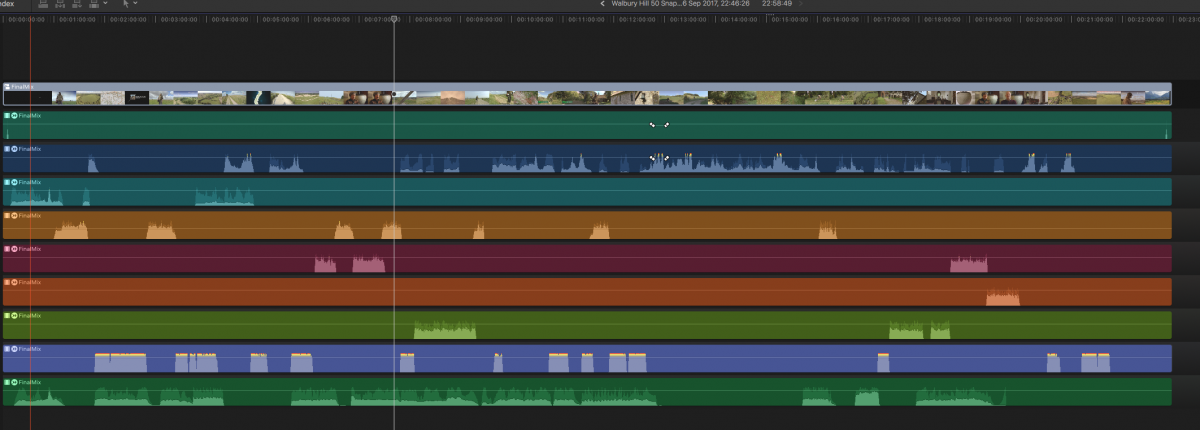
UPDATED: I know RX6 De-Reverb has been causing me audio breakup when I apply it to my final mix (compounded project) Lane(s).. the less tracks I have with RX6 then cleaner (less breakup) there is on the audio. THIS IS ACTUALLY ANOTHER QUESTION as the original issue on this post was dropping audio having used Kyno - this happens without the RX6 plugins ...
Last edit: 27 Sep 2017 11:23 by StingRay.
Please Log in to join the conversation.
26 Sep 2017 21:56 - 27 Sep 2017 11:23 #90808
by StingRay
Replied by StingRay on topic Occasional and Random Audio dropout during timeline playback
Thank you Axel. Not sure what you meant by 'Sending Clips to FCPX' ? Do you mean importing them directly into the FCPX Library (meaning the Library file itself?)
UPDATED: I know RX6 De-Reverb has been causing me audio breakup when I apply it to my final mix (compounded project) Lane(s).. the less tracks I have with RX6 then cleaner (less breakup) there is on the audio. THIS IS ACTUALLY ANOTHER QUESTION as the original issue on this post was dropping audio having used Kyno - this happens without the RX6 plugins ...
No idea why this posted twice?!!
UPDATED: I know RX6 De-Reverb has been causing me audio breakup when I apply it to my final mix (compounded project) Lane(s).. the less tracks I have with RX6 then cleaner (less breakup) there is on the audio. THIS IS ACTUALLY ANOTHER QUESTION as the original issue on this post was dropping audio having used Kyno - this happens without the RX6 plugins ...
No idea why this posted twice?!!
Last edit: 27 Sep 2017 11:23 by StingRay.
Please Log in to join the conversation.
27 Sep 2017 15:44 #90826
by Axel
Replied by Axel on topic Occasional and Random Audio dropout during timeline playback
Yes, these are two different issues. As for the Kyno-related one with audio dropping upon playback, you definitely should always use shift command f to send content to FCP via XML. There isn't an explanation yet in Kyno forum, but at least one user more confirms the behavior. Try it and report your experience.
Please Log in to join the conversation.
- Scott Markowitz
-
- Offline
- Elite Member
-
Less
More
- Posts: 161
- Thank you received: 31
27 Sep 2017 16:03 #90828
by Scott Markowitz
Replied by Scott Markowitz on topic Occasional and Random Audio dropout during timeline playback
I have experienced the same drop out of audio during playback in timelines.
Have completely attributed my problem to slow media drives.
Switching to proxy playback will almost always negate the problem.
If in Original/Optimized mode, rendering the timeline (Render All) will almost always eliminate the problem as well.
Have completely attributed my problem to slow media drives.
Switching to proxy playback will almost always negate the problem.
If in Original/Optimized mode, rendering the timeline (Render All) will almost always eliminate the problem as well.
Please Log in to join the conversation.
27 Sep 2017 19:49 #90833
by Axel
Replied by Axel on topic Occasional and Random Audio dropout during timeline playback
In my case, this definitely has nothing to do with i/o speed as bottleneck. I use Resolve and AAE for post, and there is no way to make FCP link to ProTes via XML as long as the originals exist. So I made "Throw-Away-Libraries" that I used to produce ProTes and later on extract Optimized Media. No problems there. The problem first encountered with Kyno ceased for me with using XML, must have to do with metadata. Or so.
Please Log in to join the conversation.
- simon.a.billington
-
- Offline
- Elite Member
-
Less
More
- Posts: 179
- Thank you received: 10
01 Oct 2017 00:41 - 01 Oct 2017 00:41 #90898
by simon.a.billington
Replied by simon.a.billington on topic Occasional and Random Audio dropout during timeline playback
The DeReverb in RX is a great one, but processor intensive. It's very possible the breakups there are due to CPU overloads and not being able to crunch the numbers in time. Especially if you have video effects going on at the same time.
Or it could be choking if you have too many video streams in your edit, plus RX on top.
When dealing with denoising I prefer to do it offline and reimport it. Compound clips will keep it together with its parent clip and you can deactivate the original audio just so it's always there in case you need to redo the audio cleanup in whatever way.
That's just how I do it though.
Or it could be choking if you have too many video streams in your edit, plus RX on top.
When dealing with denoising I prefer to do it offline and reimport it. Compound clips will keep it together with its parent clip and you can deactivate the original audio just so it's always there in case you need to redo the audio cleanup in whatever way.
That's just how I do it though.
Last edit: 01 Oct 2017 00:41 by simon.a.billington.
Please Log in to join the conversation.
- simon.a.billington
-
- Offline
- Elite Member
-
Less
More
- Posts: 179
- Thank you received: 10
01 Oct 2017 00:43 - 01 Oct 2017 00:44 #90899
by simon.a.billington
Replied by simon.a.billington on topic Occasional and Random Audio dropout during timeline playback
[wrong place]
Last edit: 01 Oct 2017 00:44 by simon.a.billington.
Please Log in to join the conversation.
- simon.a.billington
-
- Offline
- Elite Member
-
Less
More
- Posts: 179
- Thank you received: 10
01 Oct 2017 00:45 #90900
by simon.a.billington
This is often the case with dropouts.
Replied by simon.a.billington on topic Occasional and Random Audio dropout during timeline playback
Scott Markowitz wrote: I have experienced the same drop out of audio during playback in timelines.
Have completely attributed my problem to slow media drives.
Switching to proxy playback will almost always negate the problem.
If in Original/Optimized mode, rendering the timeline (Render All) will almost always eliminate the problem as well.
This is often the case with dropouts.
Please Log in to join the conversation.
