


- Posts: 19
- Thank you received: 2
3 Post Moderation Rule for New Boarders (25 Jan 2021)
New boarders will have their posts moderated - Don't worry if you cannot see your post immediately.
Animate Shape Filling (like liquid filling a glass)
31 Aug 2017 22:09 #90221
by rvgeeks
Animate Shape Filling (like liquid filling a glass) was created by rvgeeks
Hi All,
Not sure if this is an FCPX thing (effect, plugin, filter, etc) or a Motion thing... so let me know if I should re-post this in Motion...
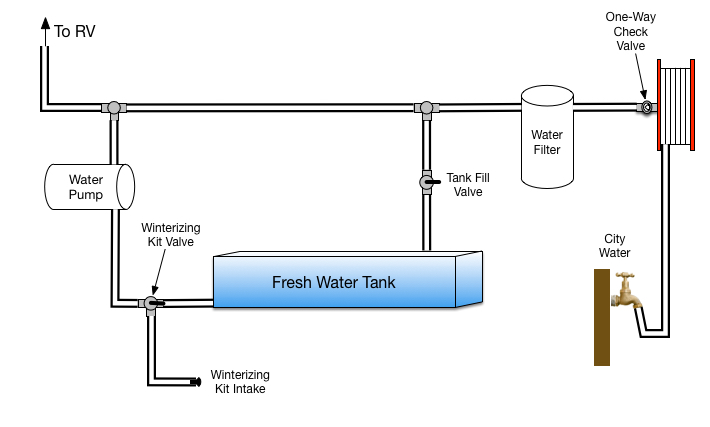
... but what I'm trying to do is add some kind of fill animation to a graphic. I created a plumbing schematic in Omnigraffle that I was going to import as an image into FCPX. I then want to be able to animate some lines/shapes as fill... mimicking water filling a pipe along a path.
Is there a plugin/effect that could do that? Or does anyone have any idea of how to try and tackle this?
Thanks, in advance, for any ideas!
Not sure if this is an FCPX thing (effect, plugin, filter, etc) or a Motion thing... so let me know if I should re-post this in Motion...
... but what I'm trying to do is add some kind of fill animation to a graphic. I created a plumbing schematic in Omnigraffle that I was going to import as an image into FCPX. I then want to be able to animate some lines/shapes as fill... mimicking water filling a pipe along a path.
Is there a plugin/effect that could do that? Or does anyone have any idea of how to try and tackle this?
Thanks, in advance, for any ideas!
Please Log in to join the conversation.

31 Aug 2017 22:51 #90222
by ianstubbs
Replied by ianstubbs on topic Animate Shape Filling (like liquid filling a glass)
In my view this would be best done in Motion. Think about which elements you want to animate and export as separate PDFs from Omnigraffle. Animating masks and paths with behaviours/keyframes you should be able to achieve something very professional looking but you will need some knowledge of Motion. Posting the diagram with a description of what you want to animate would enable more detailed advice to be offered - this may be achievable in FCPX but Motion is the better tool for something like this.
Ian.
Ian.
Please Log in to join the conversation.
31 Aug 2017 23:12 - 31 Aug 2017 23:12 #90223
by rvgeeks
Replied by rvgeeks on topic Animate Shape Filling (like liquid filling a glass)
Thanks, Ian. Attached is the image I'm looking to animate the fill of the pipes/lines connecting the elements
Last edit: 31 Aug 2017 23:12 by rvgeeks.
Please Log in to join the conversation.
- Karsten Schlüter
-

- Offline
- Moderator
-

Less
More
- Posts: 3790
- Thank you received: 718
01 Sep 2017 03:33 #90225
by Karsten Schlüter
Replied by Karsten Schlüter on topic Animate Shape Filling (like liquid filling a glass)
What Ian says …
• option #1: if your drawing app supports layers, draw on individual layers the 'water ways', save it in psd/Photoshop format => will import as a 'compound with tracks' in FCPX; animate each track with masks … tricky, not my personal pref …
• option #2: Motion. Simply use the Bezier-tool, add Behaviour/Shape/Write-on...
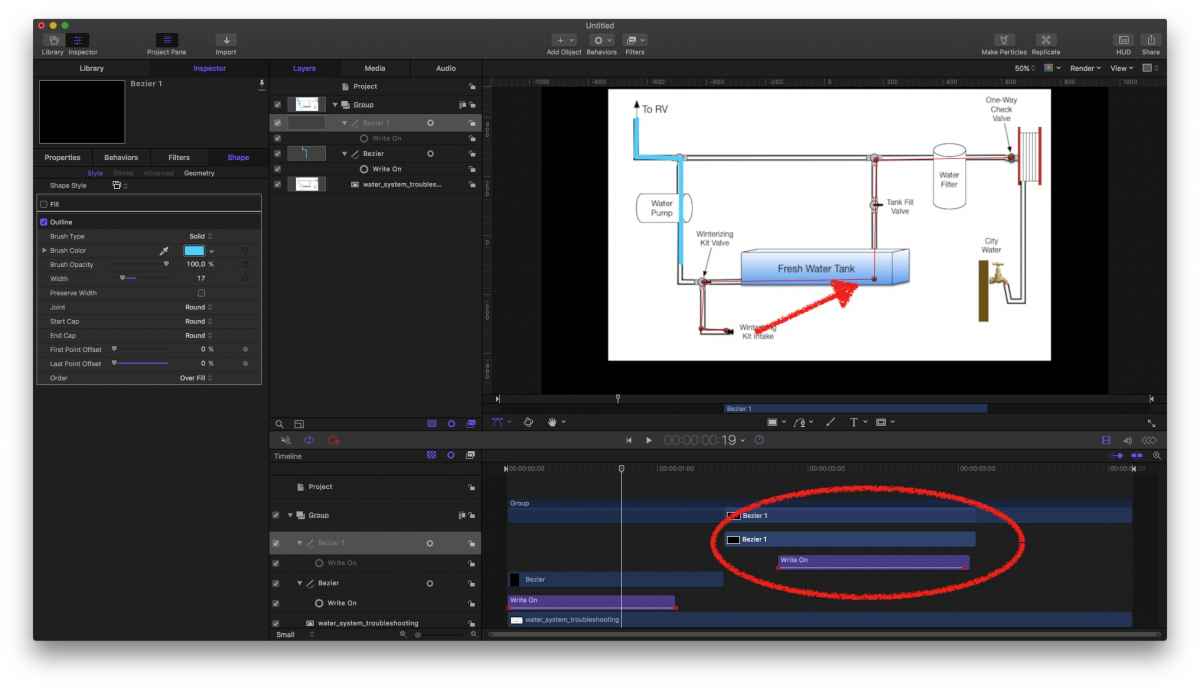
length of Behaviour determines speed, you can apply several layers for several animations in one chart etc etc. really simple …
• option #1: if your drawing app supports layers, draw on individual layers the 'water ways', save it in psd/Photoshop format => will import as a 'compound with tracks' in FCPX; animate each track with masks … tricky, not my personal pref …
• option #2: Motion. Simply use the Bezier-tool, add Behaviour/Shape/Write-on...
length of Behaviour determines speed, you can apply several layers for several animations in one chart etc etc. really simple …
Please Log in to join the conversation.
01 Sep 2017 04:10 #90228
by rvgeeks
Replied by rvgeeks on topic Animate Shape Filling (like liquid filling a glass)
Thanks, Karsten! I'll have to check this out (don't have any experience with Motion) and see if I can figure it out.
Please Log in to join the conversation.
- Karsten Schlüter
-
- Offline
- Moderator
-
Less
More
- Posts: 3790
- Thank you received: 718
01 Sep 2017 05:37 #90230
by Karsten Schlüter
Motion is a breed of its own … but your task is really no rocket-science… those 'Behaviours' are very handy. With some background in FCPX and any 'Paint' app (what is a layer? what is a bezier?) you will manage it.
For step-by-step advice, just ask …
Replied by Karsten Schlüter on topic Animate Shape Filling (like liquid filling a glass)
rvgeeks wrote: … have to check this out (don't have any experience with Motion) and see if I can figure it out.
Motion is a breed of its own … but your task is really no rocket-science… those 'Behaviours' are very handy. With some background in FCPX and any 'Paint' app (what is a layer? what is a bezier?) you will manage it.
For step-by-step advice, just ask …
Please Log in to join the conversation.
01 Sep 2017 10:52 #90236
by ianstubbs
Replied by ianstubbs on topic Animate Shape Filling (like liquid filling a glass)
I had a few moments so I created a Motion file using your graphic and animated a possible water path, masking off the taps etc. - here is a download link for the file and an export for you to play with/build on.
Ian.
www.dropbox.com/sh/w03ay6do02i6le6/AACsQ...W4so6V5kgxQgQIa?dl=0
Ian.
www.dropbox.com/sh/w03ay6do02i6le6/AACsQ...W4so6V5kgxQgQIa?dl=0
Please Log in to join the conversation.


01 Sep 2017 13:30 - 01 Sep 2017 13:32 #90239
by JoeEditor
Replied by JoeEditor on topic Animate Shape Filling (like liquid filling a glass)
I did the graphics for a TV show last year about how to upgrade antique and classic cars for modern street safety. Lots of animations showing flow of various fluids in breaking, steering, etc, systems. Did lots of this.
Fastest, easiest way to do thus is draw a line (in Motion that represents your liquid flow. Then keyframe the start and/or end offsets. I found this faster than getting caught up in overly complicated masks and behaviors. A keyframe is fast and easier to adjust in this specific situation.
Although the water holding tanks I just make a thick line with a circle to mask that curved top. Fast, easy, I'll offer a download of a finished Motion project soon as I'm back in my studio.
This is my opinion after having done 2 dozen of theses same animations.
Fastest, easiest way to do thus is draw a line (in Motion that represents your liquid flow. Then keyframe the start and/or end offsets. I found this faster than getting caught up in overly complicated masks and behaviors. A keyframe is fast and easier to adjust in this specific situation.
Although the water holding tanks I just make a thick line with a circle to mask that curved top. Fast, easy, I'll offer a download of a finished Motion project soon as I'm back in my studio.
This is my opinion after having done 2 dozen of theses same animations.
Last edit: 01 Sep 2017 13:32 by JoeEditor.
Please Log in to join the conversation.

01 Sep 2017 15:55 #90244
by Pielle
Replied by Pielle on topic Animate Shape Filling (like liquid filling a glass)
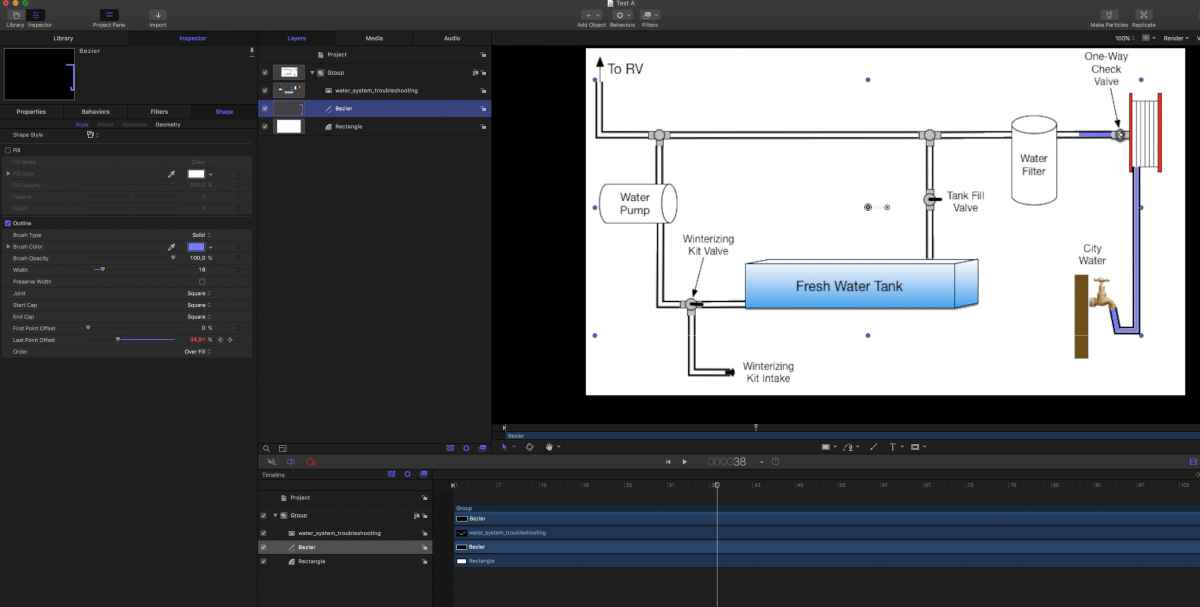
Hi I agree with Ben. The simplest way is to draw a Bezier line along the water path and animate it with the change of (last point offset) = 0 to the first frame and 100 to the end point of the animation. I attach an example to you. enjoy
Please Log in to join the conversation.
01 Sep 2017 16:10 #90245
by rvgeeks
Replied by rvgeeks on topic Animate Shape Filling (like liquid filling a glass)
You're awesome, Ian! Thanks so much... downloading it now! Can't thank you enough!
Please Log in to join the conversation.
01 Sep 2017 16:11 #90246
by rvgeeks
Replied by rvgeeks on topic Animate Shape Filling (like liquid filling a glass)
Appreciate the help, Karsten!
Please Log in to join the conversation.
01 Sep 2017 16:13 #90248
by rvgeeks
Replied by rvgeeks on topic Animate Shape Filling (like liquid filling a glass)
Thanks so much, Pielle! Really appreciate your help!
Please Log in to join the conversation.
- Karsten Schlüter
-
- Offline
- Moderator
-
Less
More
- Posts: 3790
- Thank you received: 718
01 Sep 2017 16:34 #90251
by Karsten Schlüter
What's wrong with my suggestion, using the Write-On Behaviour?
… dare to say, faster …
Replied by Karsten Schlüter on topic Animate Shape Filling (like liquid filling a glass)
FCPX.guru wrote: … . Then keyframe the start and/or end offsets. ….
What's wrong with my suggestion, using the Write-On Behaviour?
… dare to say, faster …
Please Log in to join the conversation.
01 Sep 2017 21:25 #90258
by JoeEditor
I explained I've done a lot of these, and in this situation I can control the keyframes faster and easier than a behavior. After doing so many of this exact same thing myself, that's my conclusion.
Replied by JoeEditor on topic Animate Shape Filling (like liquid filling a glass)
Karsten Schlüter wrote:
FCPX.guru wrote: … . Then keyframe the start and/or end offsets. ….
What's wrong with my suggestion, using the Write-On Behaviour?
… dare to say, faster …
I explained I've done a lot of these, and in this situation I can control the keyframes faster and easier than a behavior. After doing so many of this exact same thing myself, that's my conclusion.
Please Log in to join the conversation.
01 Sep 2017 22:01 #90263
by ianstubbs
Replied by ianstubbs on topic Animate Shape Filling (like liquid filling a glass)
I have done many a map with animated train lines and used the write on behaviour successfully. Equally, when I have needed to vary the speed or even pause the animation at various points I've used keyframes on start and end points. I use the method that's most appropriate for the task at the time. Both have their place for me.
Ian.
Ian.
Please Log in to join the conversation.
