


- Posts: 76
- Thank you received: 1
3 Post Moderation Rule for New Boarders (25 Jan 2021)
New boarders will have their posts moderated - Don't worry if you cannot see your post immediately.
Bringing a 25p compound clip into a 23.98fps project - HELP
- coffee_king
-
 Topic Author
- Offline
- Senior Member
-

Less
More
29 Aug 2017 13:45 #90133
by coffee_king
Hi Guys
Im getting really confused as to whats going on here so maybe you guys can help me out?
I always work in 24p (Well 23.98) . My footage is shot in 24p and my project is in 24p.
I have some other footage that Ive edited (Its a Multicam) that I want to add to this 24p project but its from a 25p project.
I didnt shoot the footage myself and its actually from various cameras in 25p/50p/24p and other frame rates.
When I try to bring this 25p into my 24p project the audio from this 25p drops down in tone and its all goes out of sync.
What am I doing wrong and how can I avoid this please?
Thanks in advance.
Im getting really confused as to whats going on here so maybe you guys can help me out?
I always work in 24p (Well 23.98) . My footage is shot in 24p and my project is in 24p.
I have some other footage that Ive edited (Its a Multicam) that I want to add to this 24p project but its from a 25p project.
I didnt shoot the footage myself and its actually from various cameras in 25p/50p/24p and other frame rates.
When I try to bring this 25p into my 24p project the audio from this 25p drops down in tone and its all goes out of sync.
What am I doing wrong and how can I avoid this please?
Thanks in advance.
Please Log in to join the conversation.


29 Aug 2017 23:28 #90147
by JoeEditor
Replied by JoeEditor on topic Bringing a 25p compound clip into a 23.98fps project - HELP
Audio at different sample/frame rates won't match up....
Please Log in to join the conversation.
- coffee_king
-
Topic Author
- Offline
- Senior Member
-
Less
More
- Posts: 76
- Thank you received: 1
30 Aug 2017 07:41 #90170
by coffee_king
Replied by coffee_king on topic Bringing a 25p compound clip into a 23.98fps project - HELP
Hi
What are my options then please?
Can I export/import and bake in the audio/video etc?
What are my options then please?
Can I export/import and bake in the audio/video etc?
Please Log in to join the conversation.


30 Aug 2017 12:30 #90174
by joenca
Replied by joenca on topic Bringing a 25p compound clip into a 23.98fps project - HELP
What's happening is that FCPX automatically conforms certain frame rates to certain others. That means that 25 fps video that is edited into a 24 fps project will play back at a slower frame rate than it was recorded. The incoming clip will be longer and audio will have a lower pitch. You can verify this by going to the bottom of the video tab in the inspector. There should be a box called Rate Conform that says "25 converted to 24". There is more detail
here
.
Unfortunately, even though there is a check box for the conform, it cannot be unchecked and overridden within FCPX as far as I know. You could try and speed up the clips in the timeline to match their original speed, but that would probably get quite messy right away.
My suggestion would be to convert the 25 fps footage to 24 fps before editing it into your project. Compressor can do it, you should probably convert to some variant of ProRes. Choose the desired frame rate in the video tab of the inspector and under Quality, choose Good or Best. Finally, go to the General tab in the inspector and make sure that Retiming is set to "Set duration to: 100% of source".
Good luck!
Unfortunately, even though there is a check box for the conform, it cannot be unchecked and overridden within FCPX as far as I know. You could try and speed up the clips in the timeline to match their original speed, but that would probably get quite messy right away.
My suggestion would be to convert the 25 fps footage to 24 fps before editing it into your project. Compressor can do it, you should probably convert to some variant of ProRes. Choose the desired frame rate in the video tab of the inspector and under Quality, choose Good or Best. Finally, go to the General tab in the inspector and make sure that Retiming is set to "Set duration to: 100% of source".
Good luck!
Please Log in to join the conversation.
30 Aug 2017 14:19 #90178
by JoeEditor
Replied by JoeEditor on topic Bringing a 25p compound clip into a 23.98fps project - HELP
It's not the frame rate that causes the audio to drift, it's the audio sample rate. You can try converting in Compressor to match audio sample rates.
Please Log in to join the conversation.
- coffee_king
-
Topic Author
- Offline
- Senior Member
-
Less
More
- Posts: 76
- Thank you received: 1
30 Aug 2017 15:09 #90183
by coffee_king
Thanks for this advice.
I assume you mean "Retiming quality"?
Quality> Retiming quality> Best Motion Compensated?
With
Retiming> Set duration to
is greyed out
I can select
So source frames play at 24 fps
though
So will try it on this and advise how it goes.
Once again many thanks
Replied by coffee_king on topic Bringing a 25p compound clip into a 23.98fps project - HELP
Hifb_527411383 wrote: What's happening is that FCPX automatically conforms certain frame rates to certain others. That means that 25 fps video that is edited into a 24 fps project will play back at a slower frame rate than it was recorded. The incoming clip will be longer and audio will have a lower pitch. You can verify this by going to the bottom of the video tab in the inspector. There should be a box called Rate Conform that says "25 converted to 24". There is more detail here .
Unfortunately, even though there is a check box for the conform, it cannot be unchecked and overridden within FCPX as far as I know. You could try and speed up the clips in the timeline to match their original speed, but that would probably get quite messy right away.
My suggestion would be to convert the 25 fps footage to 24 fps before editing it into your project. Compressor can do it, you should probably convert to some variant of ProRes. Choose the desired frame rate in the video tab of the inspector and under Quality, choose Good or Best. Finally, go to the General tab in the inspector and make sure that Retiming is set to "Set duration to: 100% of source".
Good luck!
Thanks for this advice.
I assume you mean "Retiming quality"?
Quality> Retiming quality> Best Motion Compensated?
With
Retiming> Set duration to
is greyed out
I can select
So source frames play at 24 fps
though
So will try it on this and advise how it goes.
Once again many thanks
Please Log in to join the conversation.
- coffee_king
-
Topic Author
- Offline
- Senior Member
-
Less
More
- Posts: 76
- Thank you received: 1
30 Aug 2017 15:11 #90184
by coffee_king
Replied by coffee_king on topic Bringing a 25p compound clip into a 23.98fps project - HELP
No, sorry didnt work. The audio has gone out of sync.
Its 24p though now.
Any further suggestions?
Its 24p though now.
Any further suggestions?
Please Log in to join the conversation.
30 Aug 2017 16:18 #90191
by joenca
Replied by joenca on topic Bringing a 25p compound clip into a 23.98fps project - HELP
Give some details about how stuff goes out of sync. Is it a multicam situation where the cameras were shooting at different rates and they no longer sync with each other? Or do you mean that the audio and video from the same camera drift out of sync?
Please Log in to join the conversation.
30 Aug 2017 16:27 #90192
by joenca
Replied by joenca on topic Bringing a 25p compound clip into a 23.98fps project - HELP
How long are clips we are talking about, and by how much do they drift out of sync?
Please Log in to join the conversation.
30 Aug 2017 17:02 #90194
by joenca
Replied by joenca on topic Bringing a 25p compound clip into a 23.98fps project - HELP
Can you verify that the Compressor export is the same length as the original 25 fps clip?
Regarding frame rate vs sample rate; playing back 25 fps video at 24 fps will make it 4% longer, so it will drift way out of sync quite quickly. Sample rate variations between devices are in my experience much smaller, which will still cause sync problems for long recordings.
Regarding frame rate vs sample rate; playing back 25 fps video at 24 fps will make it 4% longer, so it will drift way out of sync quite quickly. Sample rate variations between devices are in my experience much smaller, which will still cause sync problems for long recordings.
Please Log in to join the conversation.
- coffee_king
-
Topic Author
- Offline
- Senior Member
-
Less
More
- Posts: 76
- Thank you received: 1
31 Aug 2017 13:21 #90214
by coffee_king
Replied by coffee_king on topic Bringing a 25p compound clip into a 23.98fps project - HELP
Some further details are here:
Live performance footage 25p project of myself - Musician
25p (I chose 25p as most of the clips were 25p) Total time of project 3:29:10
Not edited using “Multicam” in FCPX, but using various different cameras at different frame rates
Multiple cameras at 25p
One camera at 23.98p
One camera at 50p
Audio recorded on all cameras and also recorded separately.
Ive been editing/syncing the video to the properly recorded live audio myself and its all synced up nicely
Image attached of timeline if this helps at all.
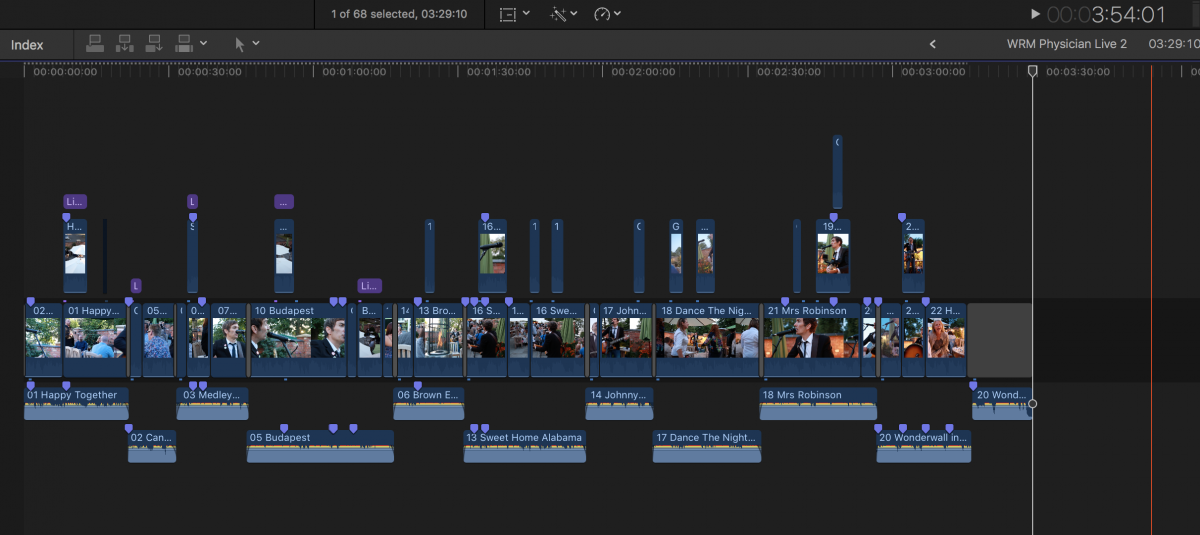
This 25p Live Footage Project needs to go at the end of the Vlog 24p footage.
————————————
Vlog 24p project
24p
Multiple cameras at 24p
——————————
The one I ran through compressor last night as per your instructions to convert from 25p to 24p ended up with a running approx 3m38s.
Its is now 24p.
The audio is now in the correct key, but it drifts/is no longer in snyc.
It instantly starts to drift and gets worse
The audio is faster than the video (although its in the correct key) and ends up finishing at 8-9 second before the video does
————
Ive now tried converting it again and where as like I said earlier
Retiming> Set duration to
is greyed out
I can select the time duration so Ive set that to exactly what it was before 3:29:10 (although it was a pain making it stay at this number) Also to note Set duration to percentage is still greyed out but has changed to 100.01%
From this it is now pretty much fine. These is a slight weird issue when there is a close up of me strumming my guitar and then later on when someone walks past the camera but I can live with all this.
So it must have been the RETIMING that I hadnt done right (As I hadnt selected this in the middle section once I’d added how to export it)
So thanks for your help.
Once more thing though, how can I avoid this in the future if Im working with other peoples mixed frame rates?
Live performance footage 25p project of myself - Musician
25p (I chose 25p as most of the clips were 25p) Total time of project 3:29:10
Not edited using “Multicam” in FCPX, but using various different cameras at different frame rates
Multiple cameras at 25p
One camera at 23.98p
One camera at 50p
Audio recorded on all cameras and also recorded separately.
Ive been editing/syncing the video to the properly recorded live audio myself and its all synced up nicely
Image attached of timeline if this helps at all.
This 25p Live Footage Project needs to go at the end of the Vlog 24p footage.
————————————
Vlog 24p project
24p
Multiple cameras at 24p
——————————
The one I ran through compressor last night as per your instructions to convert from 25p to 24p ended up with a running approx 3m38s.
Its is now 24p.
The audio is now in the correct key, but it drifts/is no longer in snyc.
It instantly starts to drift and gets worse
The audio is faster than the video (although its in the correct key) and ends up finishing at 8-9 second before the video does
————
Ive now tried converting it again and where as like I said earlier
Retiming> Set duration to
is greyed out
I can select the time duration so Ive set that to exactly what it was before 3:29:10 (although it was a pain making it stay at this number) Also to note Set duration to percentage is still greyed out but has changed to 100.01%
From this it is now pretty much fine. These is a slight weird issue when there is a close up of me strumming my guitar and then later on when someone walks past the camera but I can live with all this.
So it must have been the RETIMING that I hadnt done right (As I hadnt selected this in the middle section once I’d added how to export it)
So thanks for your help.
Once more thing though, how can I avoid this in the future if Im working with other peoples mixed frame rates?
Please Log in to join the conversation.
31 Aug 2017 13:35 #90215
by JoeEditor
Replied by JoeEditor on topic Bringing a 25p compound clip into a 23.98fps project - HELP
"Regarding frame rate vs sample rate; playing back 25 fps video at 24 fps will make it 4% longer, so it will drift way out of sync quite quickly. Sample rate variations between devices are in my experience much smaller, which will still cause sync problems for long recordings."
That's only true if you conform to play as something other than 100% speed, which is not what FCPX does by default. It will play both clips for the same original duration in the Timeline. I do these daily.
That's only true if you conform to play as something other than 100% speed, which is not what FCPX does by default. It will play both clips for the same original duration in the Timeline. I do these daily.
Please Log in to join the conversation.
01 Sep 2017 08:28 #90233
by joenca
Replied by joenca on topic Bringing a 25p compound clip into a 23.98fps project - HELP
OK, so the clip you converted in Compressor turned out longer than the original, even though the duration was set to 100%? That sounds like a bug, I'll see if I can replicate it. Anyhow, you had the right idea to enter the duration in timecode instead of percent, great that you got it working!
The only way to avoid similar issues is to make sure that all cameras are recording at the same frame rate. In my opinion 25 is better than 24 or 23.98, if only to avoid the confusion between 24 and 23.98.
If this is not an option, the way you've solved it now is probably your best option. That is, to convert all footage that needs it to the project frame rate before editing, and making sure that Compressor (or whatever converter you're using) does the right thing by confirming the playback duration is the same.
FCPX.guru, your Final Cut must work differently than mine. On my machine, a 25 fps clip edited into a 24 fps project definitely plays back at the slower frame rate and thus becomes longer. In the screen shot below, I have two clips created in Motion, both exactly 10 seconds long with burned-in timecode. One is 24 fps and the other 25 fps. The project is at 24 fps. The 24 fps clip is on the main storyline.
The 25 fps clip is connected to the main storyline in the standard way. Since it plays back at the slower rate it becomes longer (10:10), verifiable in the timeline and browser. The playhead is parked at 9:00 in the timeline, but the 25 fps clips timecode burn-in shows 8:16, since it is playing back slower.
For some reason Apple has chosen not to show this in the retiming tools, the 25 fps clip is shown to be at 100%, even though it is not. Instead it is shown in the Rate Conform box in the inspector, which reads "25 converted to 24", and can't be changed, at least on my machine.

FCPX.guru, what does your Rate Conform box say for 25 fps clips in 24 fps project? And what method is used for playing back 25 fps clips so they maintain the same duration? Is it just dropping frames or just doing som sort of blending or optical flow?
The only way to avoid similar issues is to make sure that all cameras are recording at the same frame rate. In my opinion 25 is better than 24 or 23.98, if only to avoid the confusion between 24 and 23.98.
If this is not an option, the way you've solved it now is probably your best option. That is, to convert all footage that needs it to the project frame rate before editing, and making sure that Compressor (or whatever converter you're using) does the right thing by confirming the playback duration is the same.
FCPX.guru, your Final Cut must work differently than mine. On my machine, a 25 fps clip edited into a 24 fps project definitely plays back at the slower frame rate and thus becomes longer. In the screen shot below, I have two clips created in Motion, both exactly 10 seconds long with burned-in timecode. One is 24 fps and the other 25 fps. The project is at 24 fps. The 24 fps clip is on the main storyline.
The 25 fps clip is connected to the main storyline in the standard way. Since it plays back at the slower rate it becomes longer (10:10), verifiable in the timeline and browser. The playhead is parked at 9:00 in the timeline, but the 25 fps clips timecode burn-in shows 8:16, since it is playing back slower.
For some reason Apple has chosen not to show this in the retiming tools, the 25 fps clip is shown to be at 100%, even though it is not. Instead it is shown in the Rate Conform box in the inspector, which reads "25 converted to 24", and can't be changed, at least on my machine.
FCPX.guru, what does your Rate Conform box say for 25 fps clips in 24 fps project? And what method is used for playing back 25 fps clips so they maintain the same duration? Is it just dropping frames or just doing som sort of blending or optical flow?
Please Log in to join the conversation.
- coffee_king
-
Topic Author
- Offline
- Senior Member
-
Less
More
- Posts: 76
- Thank you received: 1
06 Sep 2017 13:30 #90329
by coffee_king
Replied by coffee_king on topic Bringing a 25p compound clip into a 23.98fps project - HELP
Just wanted to say thanks for your help everyone on this one.
I haven't responded sooner as even though I am subscribed to this (and all topics I post on) I NEVER get email notifications for some reason.
I haven't responded sooner as even though I am subscribed to this (and all topics I post on) I NEVER get email notifications for some reason.
Please Log in to join the conversation.
07 Sep 2017 02:48 - 07 Sep 2017 02:50 #90340
by JoeEditor
Replied by JoeEditor on topic Bringing a 25p compound clip into a 23.98fps project - HELP
FCPX will play clips at original duration regardless of the FPS of the clip or timeline.
Here's two clips, both 10 seconds long, one 24fps and one 60fps.
Here's two timelines, one 24fps and one 60fps.
I dropped both clips into both timelines, didn't touch anything, and both clips play at the same duration, 10 seconds. I do this daily for broadcast television with individual clips recorded on different cameras at different frame rates, interlaced and progressive all mixed together, and with mixed multicams, never had an issue.
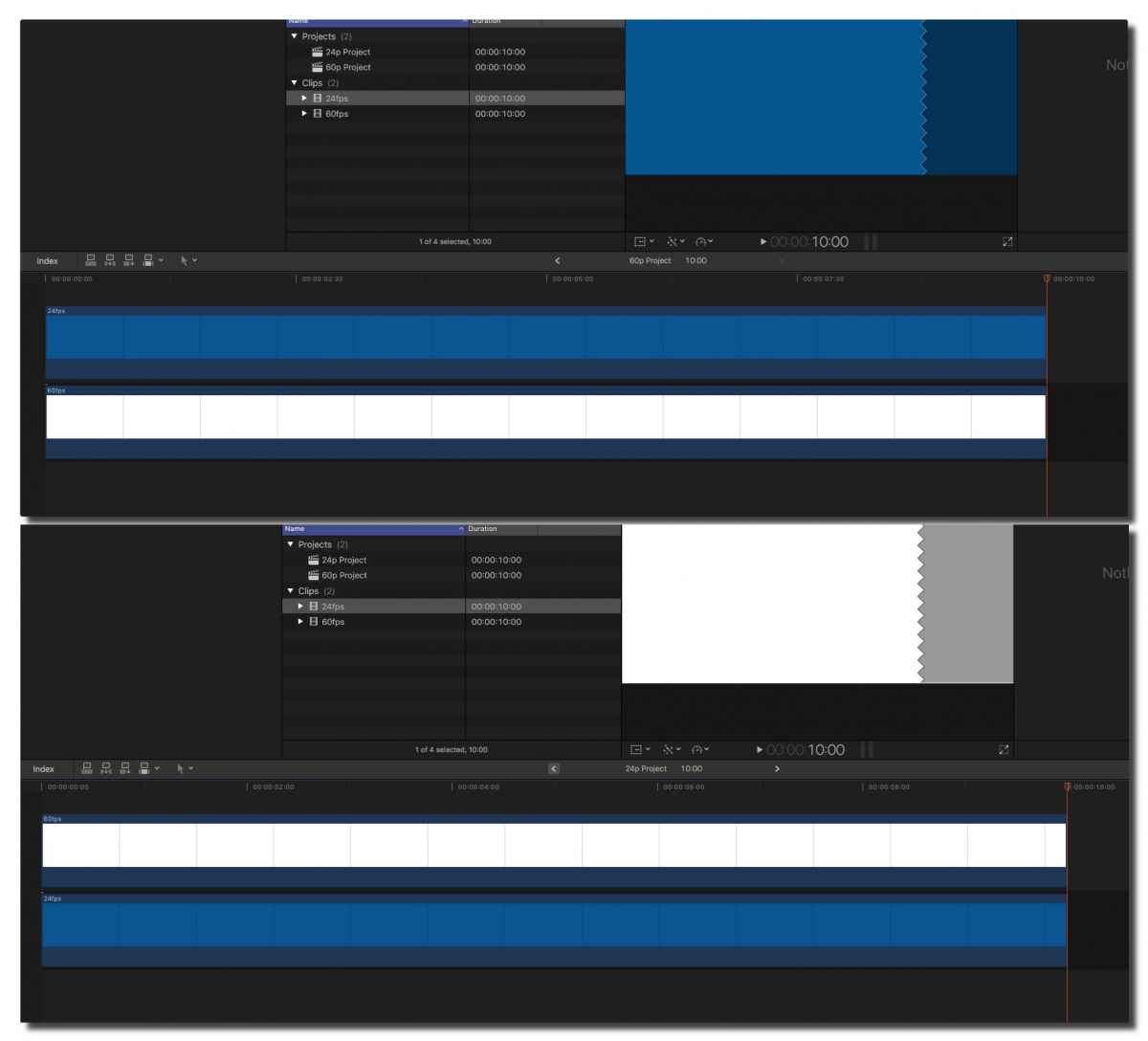
I've no clue why it would act differently than this, since I do this daily, have for years, never seen anything but durations be the same as original.
Here's two clips, both 10 seconds long, one 24fps and one 60fps.
Here's two timelines, one 24fps and one 60fps.
I dropped both clips into both timelines, didn't touch anything, and both clips play at the same duration, 10 seconds. I do this daily for broadcast television with individual clips recorded on different cameras at different frame rates, interlaced and progressive all mixed together, and with mixed multicams, never had an issue.
I've no clue why it would act differently than this, since I do this daily, have for years, never seen anything but durations be the same as original.
Last edit: 07 Sep 2017 02:50 by JoeEditor.
Please Log in to join the conversation.
07 Sep 2017 07:44 #90345
by joenca
Replied by joenca on topic Bringing a 25p compound clip into a 23.98fps project - HELP
Mixing 24 fps with 60 fps footage is NOT the same as mixing 24 fps and 25 fps, so your example is not applicable to this thread. FCPX behaves differently with different frame rate combos as summarized by the
Alex4D post
linked above.
Redo your test with 24 and 25 fps material to get a better understanding of how FCPX works in this case. The take-away is that your assertion that clips in FCPX always play back at original duration is not true. It DOES depend on the frame rate of the clip and timeline.
Redo your test with 24 and 25 fps material to get a better understanding of how FCPX works in this case. The take-away is that your assertion that clips in FCPX always play back at original duration is not true. It DOES depend on the frame rate of the clip and timeline.
Please Log in to join the conversation.
07 Sep 2017 12:05 #90348
by JoeEditor
Replied by JoeEditor on topic Bringing a 25p compound clip into a 23.98fps project - HELP
Ah, 24 & 25 specifically. I've never worked with 25fps before. I see that now. That's a bug. Feedback page...
Please Log in to join the conversation.
07 Sep 2017 12:38 - 07 Sep 2017 12:46 #90351
by joenca
Replied by joenca on topic Bringing a 25p compound clip into a 23.98fps project - HELP
Nope, not a bug. That's just how FCPX deals with frame rates that are close to each other and therefore cannot cleanly be played back. Keeping the same duration would either require dropping frames (one frame every single second), or some sort of rerendering of every single frame to get smooth playback (something that would definitely cause visual artifacts).
This is not a FCPX specific thing, speeding up playback by 4% is in fact the way that 24 fps has been converted to 25 fps for television and DVD since basically forever, and it is still the method used for feature films on television in PAL countries. So it is something one has to keep an eye on when mixing frame rates, and Apple could probably make what's going on in FCPX a bit clearer, but it is not a bug.
This is not a FCPX specific thing, speeding up playback by 4% is in fact the way that 24 fps has been converted to 25 fps for television and DVD since basically forever, and it is still the method used for feature films on television in PAL countries. So it is something one has to keep an eye on when mixing frame rates, and Apple could probably make what's going on in FCPX a bit clearer, but it is not a bug.
Last edit: 07 Sep 2017 12:46 by joenca.
Please Log in to join the conversation.
