



- Posts: 272
- Thank you received: 2
3 Post Moderation Rule for New Boarders (25 Jan 2021)
New boarders will have their posts moderated - Don't worry if you cannot see your post immediately.
Where is the tool for FEATHER for MASK in FCPX 10.3? / Soft edged "wipes"
29 Aug 2017 06:35 - 29 Aug 2017 06:38 #90126
by Slaughter
Hi all,
I conducted a title search for the word "Feather", found nothing, so here goes:
I have been trying to work out how to apply feathering to simple masking - what I want to do is swipe a simple black mask from one side to another, but feather the vertical mask edge.
In prev FCPX versions, this was quite simple:
In case the link doesn't work: search youtube for "Cropping With Feather In Final Cut Pro X"
Now, post 10.3 - what the? It's gone. At least , it looks gone.
Can anyone please advise how to do what is being done in the youtube clip above, but in 10.3+.
Presumably 10.3 is *more* functional than previous versions, so I am assuming that this functionality has not been removed as that would of course be silly.
Similarly, I'd like to know if there's a better plugin out there than the diabolically clumsy Graduated Mask tool - this thing is all over the shop. It seems to require 15 minutes of tampering before - well, before the user just goes "arrrrggghh GIVE ME A SIMPLE VERTICAL FEATHER YOU SOD" and gives up.
Basically - I like simple left to right or right to left wipes ala Kurosawa. To date I can't find a simple tool within FCPX to soften the vertical edge of what is being wiped. Any help would be appreciated
I conducted a title search for the word "Feather", found nothing, so here goes:
I have been trying to work out how to apply feathering to simple masking - what I want to do is swipe a simple black mask from one side to another, but feather the vertical mask edge.
In prev FCPX versions, this was quite simple:
In case the link doesn't work: search youtube for "Cropping With Feather In Final Cut Pro X"
Now, post 10.3 - what the? It's gone. At least , it looks gone.
Can anyone please advise how to do what is being done in the youtube clip above, but in 10.3+.
Presumably 10.3 is *more* functional than previous versions, so I am assuming that this functionality has not been removed as that would of course be silly.
Similarly, I'd like to know if there's a better plugin out there than the diabolically clumsy Graduated Mask tool - this thing is all over the shop. It seems to require 15 minutes of tampering before - well, before the user just goes "arrrrggghh GIVE ME A SIMPLE VERTICAL FEATHER YOU SOD" and gives up.
Basically - I like simple left to right or right to left wipes ala Kurosawa. To date I can't find a simple tool within FCPX to soften the vertical edge of what is being wiped. Any help would be appreciated
Last edit: 29 Aug 2017 06:38 by Slaughter.
Please Log in to join the conversation.
- ronny courtens
-

- Offline
- Moderator
-

Less
More
- Posts: 4455
- Thank you received: 962
29 Aug 2017 07:24 #90128
by ronny courtens
Replied by ronny courtens on topic Where is the tool for FEATHER for MASK in FCPX 10.3? / Soft edged "wipes"
Hi Matthew,
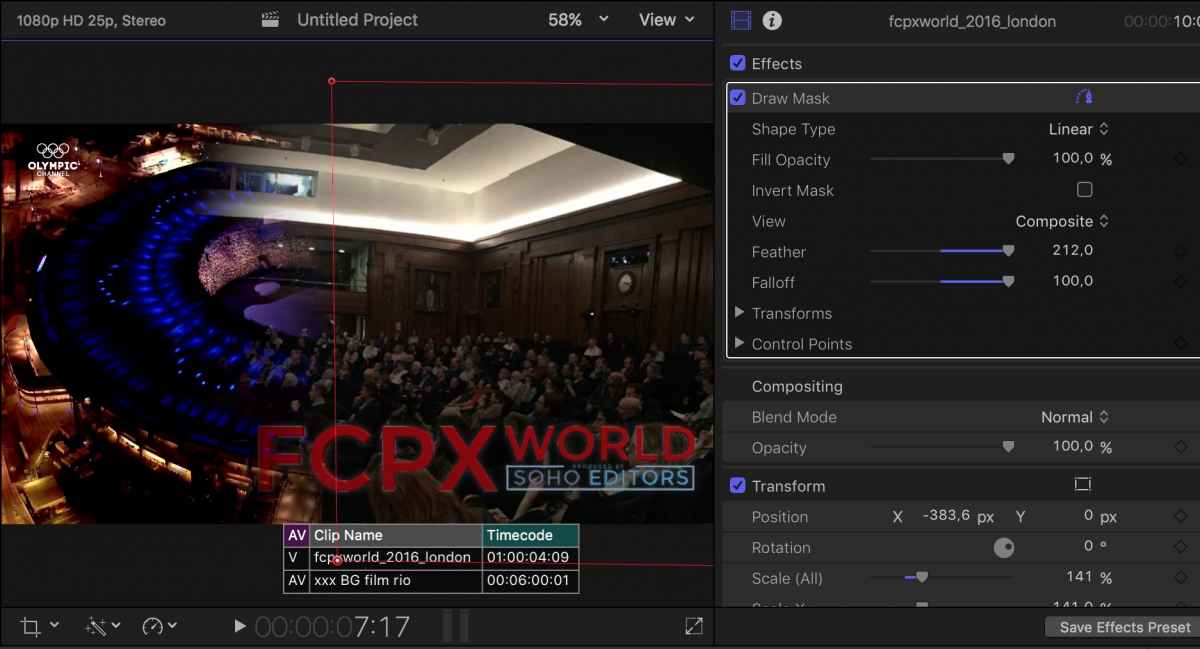
If you want a mask with feathered edges, use the Draw Mask filter:
If you just want a vertical wipe with feathered edges, use the Wipe transition:

- Ronny
If you want a mask with feathered edges, use the Draw Mask filter:
If you just want a vertical wipe with feathered edges, use the Wipe transition:
- Ronny
Please Log in to join the conversation.
