


- Posts: 868
- Thank you received: 85
3 Post Moderation Rule for New Boarders (25 Jan 2021)
New boarders will have their posts moderated - Don't worry if you cannot see your post immediately.
Chromatic Luma clamping with no processing added
18 Aug 2017 17:39 #89976
by cseeman
Chromatic Luma clamping with no processing added was created by cseeman
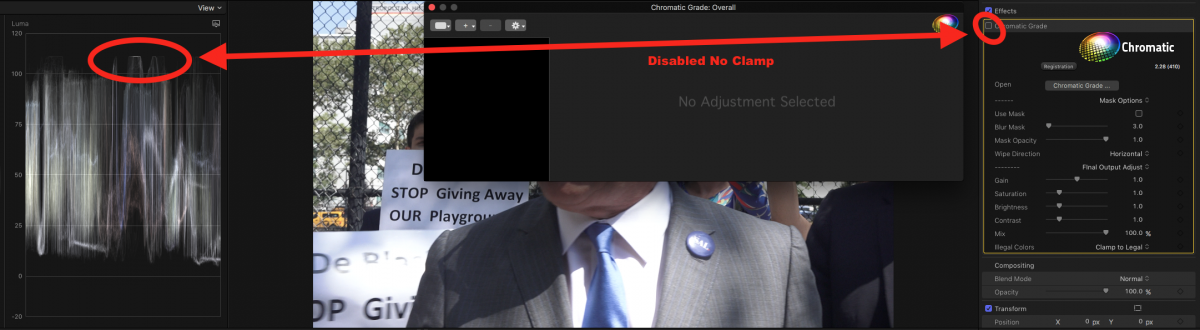
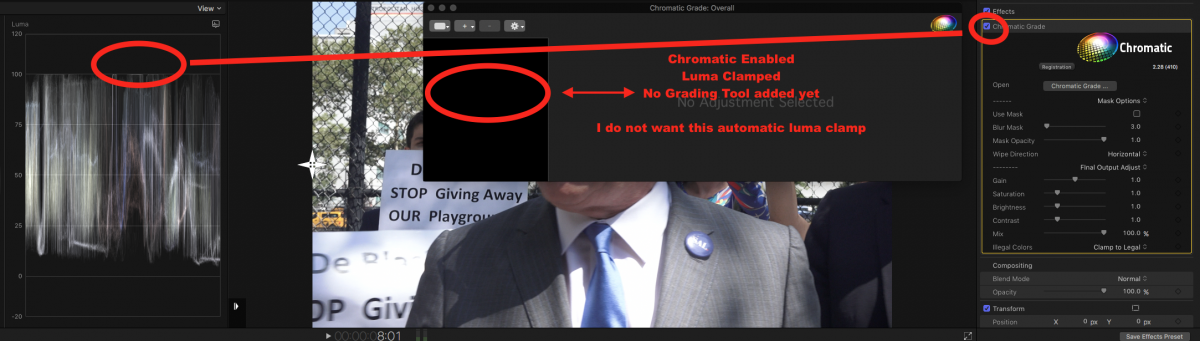
Seems there's a bug in Chromatic (already reported to Coremelt) where Luma is clamped as soon as Chromatic is applied even though there's not processing added yet.
Late 2013 MacPro 6 Core, dual AMD A500.
macOS 10.12.6
FCPX 10.3.4.
Source file has luma going to to 109 IRE.
Add Chromatic
Lum is hard clamped to 100 ire.
Anyone else seeing this?
Chromatic Disabled No luma clamp
Chromatic Enabled Lum clamped but no processing effects have been added.
Late 2013 MacPro 6 Core, dual AMD A500.
macOS 10.12.6
FCPX 10.3.4.
Source file has luma going to to 109 IRE.
Add Chromatic
Lum is hard clamped to 100 ire.
Anyone else seeing this?
Chromatic Disabled No luma clamp
Chromatic Enabled Lum clamped but no processing effects have been added.
Please Log in to join the conversation.

18 Aug 2017 20:00 #89980
by JoeEditor
Replied by JoeEditor on topic Chromatic Luma clamping with no processing added
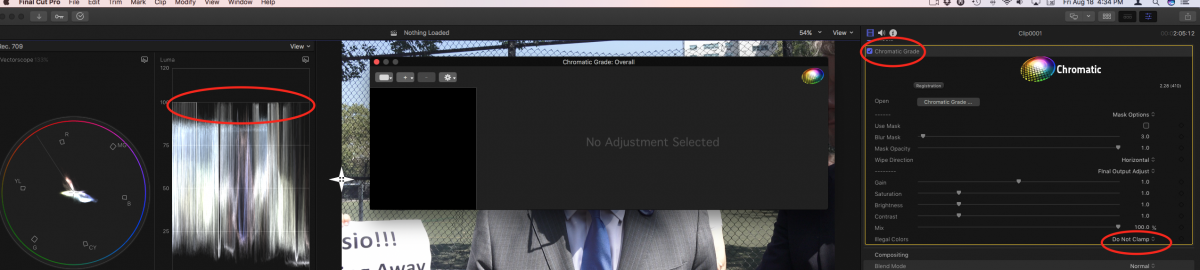
Not a bug! Look at the very last setting at the bottom of the Chromatic section of the Inspector, "Legal Colors" setting. You have it set to do that. Simply change that setting.
Please Log in to join the conversation.
18 Aug 2017 20:30 #89983
by cseeman
Replied by cseeman on topic Chromatic Luma clamping with no processing added
That has no impact.on Luma. It certainly changes chroma as expected.
I'll provide screenshot as proof.
I'll provide screenshot as proof.
Please Log in to join the conversation.

18 Aug 2017 22:09 #89985
by Redifer
Replied by Redifer on topic Chromatic Luma clamping with no processing added
There are a few filters that behave in a similar fashion. For example Alex's Unsharp Mask A4D does this, but with the blacks instead of the brights, even if you make no adjustments. Not really a big deal in my opinion but as long as you're aware of it you can work around it.
Please Log in to join the conversation.
18 Aug 2017 23:14 - 18 Aug 2017 23:25 #89986
by JoeEditor
Replied by JoeEditor on topic Chromatic Luma clamping with no processing added
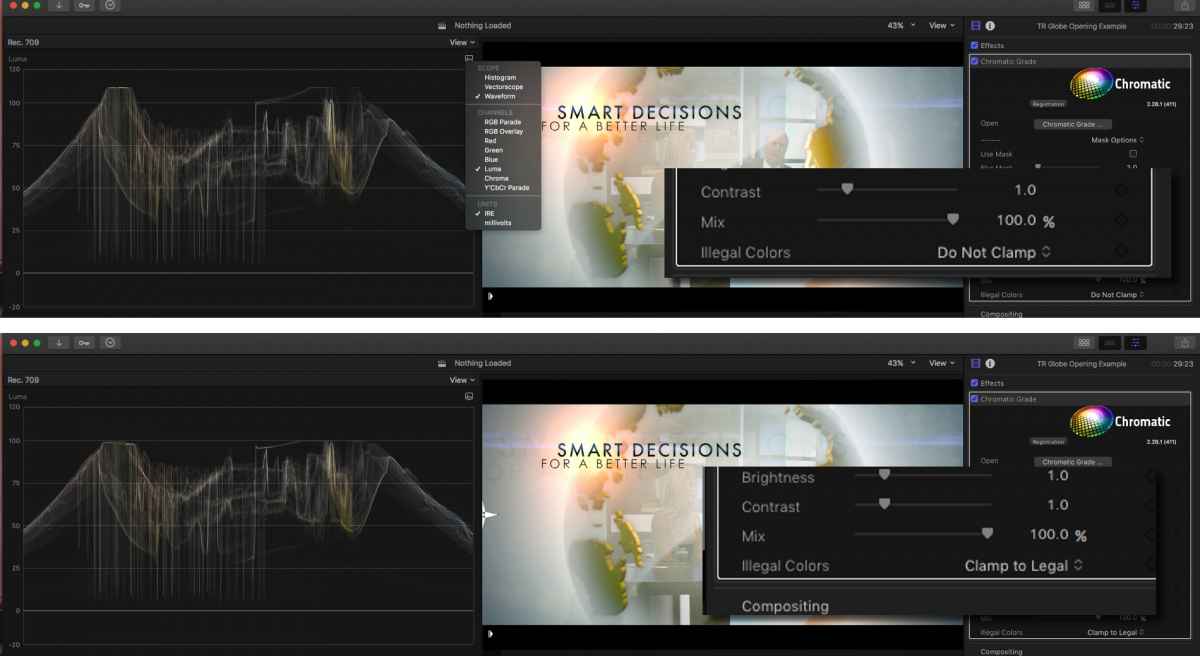
I'm doing this on my system, and yes, it is affecting luma, as you can see. I turn it off and everything is fine. It is not chroma only on my system. I will email Roger and have him look into this thread.
Last edit: 18 Aug 2017 23:25 by JoeEditor.
Please Log in to join the conversation.
19 Aug 2017 00:28 - 19 Aug 2017 00:28 #89987
by cseeman
Replied by cseeman on topic Chromatic Luma clamping with no processing added
In my chroma clamping on/off makes no discernible difference. Even when chroma clamping is off, the luma clamp is severe. Coremelt support did get back to me and currently they suspect it may be related to the GPU.
In may case it's the Dual FirePro 500 so someone with a Late 2013 Mac Pro may want to check this.
In may case it's the Dual FirePro 500 so someone with a Late 2013 Mac Pro may want to check this.
Last edit: 19 Aug 2017 00:28 by cseeman.
Please Log in to join the conversation.
19 Aug 2017 02:25 - 19 Aug 2017 02:25 #89989
by JoeEditor
Replied by JoeEditor on topic Chromatic Luma clamping with no processing added
Yes, the late 2013 Mac Pro's GPUs have issues. I have the dual D700s and I have a different issue, speed in processing the effect. They've have a bug fix soon. They're very good at that.
Last edit: 19 Aug 2017 02:25 by JoeEditor.
Please Log in to join the conversation.


20 Aug 2017 23:14 #90021
by frandu
Replied by frandu on topic Chromatic Luma clamping with no processing added
A little bit off-topic, but how's your experience with Chromatic? Thinking about buying it, but can't make my mind. I'm not sure if it's worth 99 or if I should purchase Color Finale. Thanks!
Please Log in to join the conversation.
20 Aug 2017 23:47 - 20 Aug 2017 23:54 #90022
by cseeman
Replied by cseeman on topic Chromatic Luma clamping with no processing added
At this point I'd prefer it over Color Finale if I could actually use it. Ben Balser has a good review (FCPX.guru above). Like many I have both because I bought and used Color Finale since its release.
But currently I can't use Chromatic due to the hard luma clamp. The problem might be limited to certain Mac Pro AMD FirePro GPUs.
But currently I can't use Chromatic due to the hard luma clamp. The problem might be limited to certain Mac Pro AMD FirePro GPUs.
Last edit: 20 Aug 2017 23:54 by cseeman.
Please Log in to join the conversation.
21 Aug 2017 01:18 #90023
by JoeEditor
Replied by JoeEditor on topic Chromatic Luma clamping with no processing added
Yes, it is limited to the D500. The D700 GPUs have a different bug. But there is a programing issue with the late 2013 Mac Pro dual GPUs. Coremelt is working on a fix.
Please Log in to join the conversation.


21 Aug 2017 15:54 - 21 Aug 2017 15:55 #90035
by Francois
Replied by Francois on topic Chromatic Luma clamping with no processing added
Some clamping or influence on the signal also with an imac using AMD Radeon HD 6970M 2048 MB and to a lighter strength on a macbook pro using NVIDIA GeForce GT 750M 2048 MB. This is quite a disappointment, but for many simple situation I still use chromatic since I can get so much more out of this wonderful plugin. I find many of the on screen interactions very useful. I am confident that this problem will be resolved quickly since such a plugin should be transparent and I am also dreaming of a good BMD mIcro panel support in a near version.
Anyhow I usually do all major color grading using the power of Davinci Resolve
Anyhow I usually do all major color grading using the power of Davinci Resolve
Last edit: 21 Aug 2017 15:55 by Francois.
Please Log in to join the conversation.

21 Aug 2017 22:21 #90039
by Cinexa
Replied by Cinexa on topic Chromatic Luma clamping with no processing added
I have the same issue on a hackintosh using GTX 980Ti..They sent me another version that fixes it somewhat. I still had a few white flashes affecting the render.
Please Log in to join the conversation.
22 Aug 2017 14:08 #90050
by cseeman
Replied by cseeman on topic Chromatic Luma clamping with no processing added
Coremelt sent me a build which fixes the issue.
"Do Not Clamp" now turns off the luma clamp as well.
Their recommended workflow is to apply the Chromatic Log Grade filter, turn off "Clamp To Legal" then use Pre Exposure to remap to legal. To be used even if one isn't using Luts.
"Do Not Clamp" now turns off the luma clamp as well.
Their recommended workflow is to apply the Chromatic Log Grade filter, turn off "Clamp To Legal" then use Pre Exposure to remap to legal. To be used even if one isn't using Luts.
Please Log in to join the conversation.
