


- Posts: 228
- Thank you received: 16
3 Post Moderation Rule for New Boarders (25 Jan 2021)
New boarders will have their posts moderated - Don't worry if you cannot see your post immediately.
Beginner questions 1) cut a clip 2) favourites for transitions
17 Aug 2017 15:46 #89953
by Schnurr
hi,
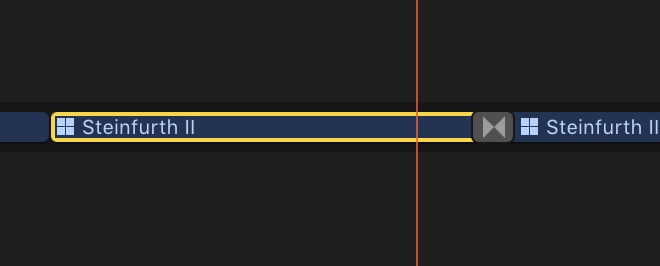
I know a beginner question but struggling. After I included a transition is there an easy way to adjust the left&right side of a clip without having to open the "cut editor" ? So just to move the right yellow part a bit more to the left to adjust the length ?
Second any chance to create some favourites for transitions or effects without having to copy & past the elements into a favourite folder...any plug-in that offers that?
TX
Tobias
I know a beginner question but struggling. After I included a transition is there an easy way to adjust the left&right side of a clip without having to open the "cut editor" ? So just to move the right yellow part a bit more to the left to adjust the length ?
Second any chance to create some favourites for transitions or effects without having to copy & past the elements into a favourite folder...any plug-in that offers that?
TX
Tobias
Please Log in to join the conversation.
- Tom Wolsky
-

- Offline
- Moderator
-

17 Aug 2017 15:51 - 17 Aug 2017 15:51 #89954
by Tom Wolsky
Replied by Tom Wolsky on topic Beginner questions 1) cut a clip 2) favourites for transitions
If you zoom into the transition and enlarge the track height, you'll see tabs that let you roll or ripple the clips underneath the transition.
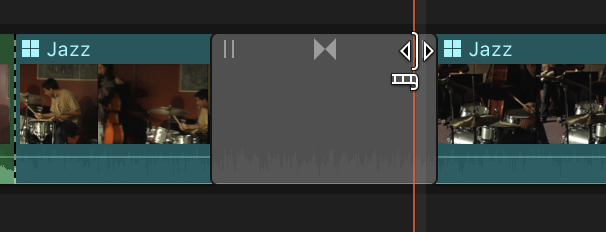
The tabs at the beginning and end will ripple the clip, the one in the middle will roll the edit. Of course if you ripple a multicam clip you will lose sync continuity in the project.
The tabs at the beginning and end will ripple the clip, the one in the middle will roll the edit. Of course if you ripple a multicam clip you will lose sync continuity in the project.
Last edit: 17 Aug 2017 15:51 by Tom Wolsky.
Please Log in to join the conversation.


17 Aug 2017 17:38 #89958
by JoeEditor
Replied by JoeEditor on topic Beginner questions 1) cut a clip 2) favourites for transitions
There's a brief guide to making favorites here. They're called "Defaults".
www.finalcutprox.guru/support-main/FinalCutQuickies/
www.finalcutprox.guru/support-main/FinalCutQuickies/
Please Log in to join the conversation.
17 Aug 2017 19:37 #89962
by Schnurr
Replied by Schnurr on topic Beginner questions 1) cut a clip 2) favourites for transitions
Thanks Tom. Worked!
I see that there is as well a shortcut Option Ü to cut it on the right side to the skimmer or however this red line is called
At Ben, no no I was thinking to put my lets see 10 favourites in one folder to have a quicker access but seems that this feature is yet missing in FCPX 12
I see that there is as well a shortcut Option Ü to cut it on the right side to the skimmer or however this red line is called
At Ben, no no I was thinking to put my lets see 10 favourites in one folder to have a quicker access but seems that this feature is yet missing in FCPX 12
Please Log in to join the conversation.
17 Aug 2017 22:40 #89963
by JoeEditor
Replied by JoeEditor on topic Beginner questions 1) cut a clip 2) favourites for transitions
We had Themes when FCPX first was released. I used Themes Browser all the time. They took it away, don't know why.
Please Log in to join the conversation.
- Karsten Schlüter
-

- Offline
- Moderator
-
Less
More
- Posts: 3790
- Thank you received: 718
18 Aug 2017 03:35 #89964
by Karsten Schlüter
hu? Don't think, just do:
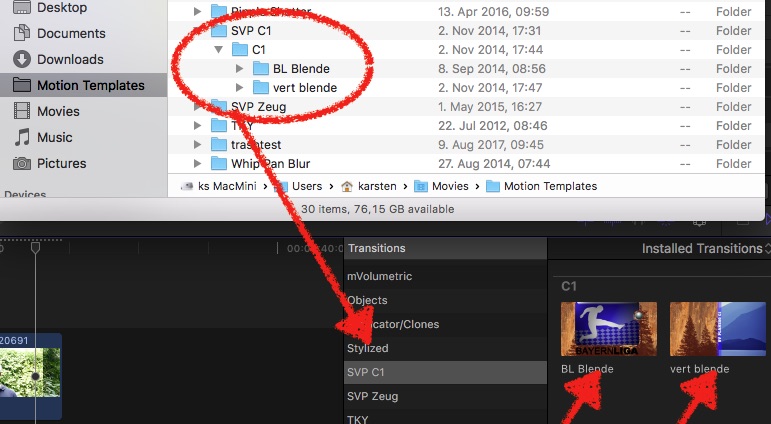
In Finder, go into your /Movies/Motion Templates/Transitions folder, create a New Folder and drag your 10 most-wanted into it => ……
Replied by Karsten Schlüter on topic Beginner questions 1) cut a clip 2) favourites for transitions
Schnurr wrote: … was thinking to put my lets see 10 favourites in one folder to have a quicker access but seems that this feature is yet missing in FCPX 12
hu? Don't think, just do:
In Finder, go into your /Movies/Motion Templates/Transitions folder, create a New Folder and drag your 10 most-wanted into it => ……
Please Log in to join the conversation.
18 Aug 2017 11:22 #89968
by JoeEditor
Replied by JoeEditor on topic Beginner questions 1) cut a clip 2) favourites for transitions
Not the same as Themes, which is sorely missed. But that's how you have to do it.
Please Log in to join the conversation.
