


- Posts: 3
- Thank you received: 0
3 Post Moderation Rule for New Boarders (25 Jan 2021)
New boarders will have their posts moderated - Don't worry if you cannot see your post immediately.
4K video in a 1080 timeline export in 4K
14 Aug 2017 00:39 #89880
by AZDane
4K video in a 1080 timeline export in 4K was created by AZDane
So I am editing 4K footage in a 1080 Timeline (Changed the project to 1080P) and so far have been exporting to 1080 end product.
But now I want the end product to be 4K, but if I select Up to 4K in compressor it still comes out as 1080P. I didn't think it mattered what the timeline was.
Do I just need to change the project to 4K before sending the movie to Compressor. Will the original 4K files be used or have these been converted to 1080P files and now I am getting an upsampled version?
When importing media I checked to leave the files in place, but when I check the projects file in the Movies folder it is pretty large (60G) so not sure if that is actually happing. I have not selected proxy.
But now I want the end product to be 4K, but if I select Up to 4K in compressor it still comes out as 1080P. I didn't think it mattered what the timeline was.
Do I just need to change the project to 4K before sending the movie to Compressor. Will the original 4K files be used or have these been converted to 1080P files and now I am getting an upsampled version?
When importing media I checked to leave the files in place, but when I check the projects file in the Movies folder it is pretty large (60G) so not sure if that is actually happing. I have not selected proxy.
Please Log in to join the conversation.
- Tom Wolsky
-

- Offline
- Moderator
-

14 Aug 2017 05:37 #89883
by Tom Wolsky
Replied by Tom Wolsky on topic 4K video in a 1080 timeline export in 4K
You need to use a 4K project and put the 4K media in it. The 60G might the render files, or the 4K files if they can’t be left in place.
Please Log in to join the conversation.
14 Aug 2017 06:06 #89884
by AZDane
Replied by AZDane on topic 4K video in a 1080 timeline export in 4K
Ok, but does it matter that I initially created the project as a 1080P Project and then changed it to a 4K project before sending it to Compressor? Will the media come from the original 4K files or will it come from files optimized to 1080P?
Please Log in to join the conversation.


14 Aug 2017 10:04 #89886
by joema
If you create a 4k project then copy/paste your 1080p timeline into the blank 4k timeline, all edits and effects will be preserved and it can be exported as 4k.
Alternatively you can just change the project characteristics to 4k but out of caution I'd recommend making a duplicate of the project beforehand.
The original 4k content will be used, even IF the project is 1080p. IOW if you edit original 4k media in a 1080p project, then crop/zoom into a 1080p frame, then export that as 1080p, the underlying 4k content will be used to support the crop/zoom.
The render files will be the resolution of the project -- IOW a 1080p project will use 1080p render files and 4k project will use 4k. So there can be a modest performance advantage to editing 4k material in a 1080p timeline. However it's less advantage than just using proxy, so in general I'd recommend using proxy for H264 4k, not optimized media.
Even though FCPX does "smart rendering" (on export will use existing render files if available rather than re-render the timeline), it is smart enough to not use 1080p render files if you are exporting 4k.
Also there is no such thing as 1080p optimized media for 4k content. The optimized media is built based on the original source files, not whatever project you're using. If you transcoded to optimized media then edited in a 1080p project, the source media is always 4k.
Replied by joema on topic 4K video in a 1080 timeline export in 4K
AZDane wrote: Ok, but does it matter that I initially created the project as a 1080P Project and then changed it to a 4K project before sending it to Compressor? Will the media come from the original 4K files or will it come from files optimized to 1080P?
If you create a 4k project then copy/paste your 1080p timeline into the blank 4k timeline, all edits and effects will be preserved and it can be exported as 4k.
Alternatively you can just change the project characteristics to 4k but out of caution I'd recommend making a duplicate of the project beforehand.
The original 4k content will be used, even IF the project is 1080p. IOW if you edit original 4k media in a 1080p project, then crop/zoom into a 1080p frame, then export that as 1080p, the underlying 4k content will be used to support the crop/zoom.
The render files will be the resolution of the project -- IOW a 1080p project will use 1080p render files and 4k project will use 4k. So there can be a modest performance advantage to editing 4k material in a 1080p timeline. However it's less advantage than just using proxy, so in general I'd recommend using proxy for H264 4k, not optimized media.
Even though FCPX does "smart rendering" (on export will use existing render files if available rather than re-render the timeline), it is smart enough to not use 1080p render files if you are exporting 4k.
Also there is no such thing as 1080p optimized media for 4k content. The optimized media is built based on the original source files, not whatever project you're using. If you transcoded to optimized media then edited in a 1080p project, the source media is always 4k.
Please Log in to join the conversation.
- Tom Wolsky
-
- Offline
- Moderator
-
14 Aug 2017 11:20 #89889
by Tom Wolsky
Replied by Tom Wolsky on topic 4K video in a 1080 timeline export in 4K
Thank you joema. I probably would have said No 
Please Log in to join the conversation.
14 Aug 2017 15:39 #89892
by AZDane
Replied by AZDane on topic 4K video in a 1080 timeline export in 4K
Thank you very much! A lot of helpful information.
So what could potentially get messed up in the process?
joema wrote: Alternatively you can just change the project characteristics to 4k but out of caution I'd recommend making a duplicate of the project beforehand.
So what could potentially get messed up in the process?
Please Log in to join the conversation.
- simon.a.billington
-

- Offline
- Elite Member
-

Less
More
- Posts: 179
- Thank you received: 10
17 Aug 2017 10:49 #89943
by simon.a.billington
It shouldn't, although, if does come out in lower res, asides from bringing it all into a new project, you could try deleting the cached and/or transcoded media.
Replied by simon.a.billington on topic 4K video in a 1080 timeline export in 4K
AZDane wrote: Ok, but does it matter that I initially created the project as a 1080P Project and then changed it to a 4K project before sending it to Compressor? Will the media come from the original 4K files or will it come from files optimized to 1080P?
It shouldn't, although, if does come out in lower res, asides from bringing it all into a new project, you could try deleting the cached and/or transcoded media.
Please Log in to join the conversation.
17 Aug 2017 11:03 #89946
by joema
Nothing should ever get messed up, it's just prudent to make a project snapshot backup before you make a major change in the project.
That's not limited to when you change the project characteristics, but anytime you make a major content change, addition, or deletion, or before you try some new plugin you've never used before. Likewise before loading an event or library XML it often makes sense to duplicate the library at the Finder level to back it up. That provides an easy roll back if the XML does something unexpected.
Replied by joema on topic 4K video in a 1080 timeline export in 4K
AZDane wrote:
So what could potentially get messed up in the process?
Nothing should ever get messed up, it's just prudent to make a project snapshot backup before you make a major change in the project.
That's not limited to when you change the project characteristics, but anytime you make a major content change, addition, or deletion, or before you try some new plugin you've never used before. Likewise before loading an event or library XML it often makes sense to duplicate the library at the Finder level to back it up. That provides an easy roll back if the XML does something unexpected.
Please Log in to join the conversation.
- simon.a.billington
-
- Offline
- Elite Member
-
Less
More
- Posts: 179
- Thank you received: 10
17 Aug 2017 11:04 #89947
by simon.a.billington
Snapshot... of course, now why didn't I think of that!!
Replied by simon.a.billington on topic 4K video in a 1080 timeline export in 4K
joema wrote:
AZDane wrote:
So what could potentially get messed up in the process?
Nothing should ever get messed up, it's just prudent to make a project snapshot backup before you make a major change in the project.
That's not limited to when you change the project characteristics, but anytime you make a major content change, addition, or deletion, or before you try some new plugin you've never used before. Likewise before loading an event or library XML it often makes sense to duplicate the library at the Finder level to back it up. That provides an easy roll back if the XML does something unexpected.
Snapshot... of course, now why didn't I think of that!!
Please Log in to join the conversation.
08 Dec 2020 07:40 #111323
by Hristov
Replied by Hristov on topic 4K video in a 1080 timeline export in 4K
Hello there,
I have similar question...
I have footage from a drone in 4K and a footage from a Sony A7iii in 1080p.
Im uploading in YouTube and because of YouTube favouring the 4K footage I prefer to export in 4K.
If I make 4k timeline, make the edit with the footage from the both cameras and export in 4k, there is a visible sharpness between the drone and the Sonys camera.
If I work in 1080p timeline then I can't export in 4k to YouTube.
The only work around I see is in to compress the 4k footage from the drone and imported in Final Cut as 1080p. Then I use this clips in 4k timeline and export to 4k.
In premiere pro that wasn't necessary. You can work in 1080p timeline and export in 8k if you want to.
Is there are better way in Final Cut?
Thank you
I have similar question...
I have footage from a drone in 4K and a footage from a Sony A7iii in 1080p.
Im uploading in YouTube and because of YouTube favouring the 4K footage I prefer to export in 4K.
If I make 4k timeline, make the edit with the footage from the both cameras and export in 4k, there is a visible sharpness between the drone and the Sonys camera.
If I work in 1080p timeline then I can't export in 4k to YouTube.
The only work around I see is in to compress the 4k footage from the drone and imported in Final Cut as 1080p. Then I use this clips in 4k timeline and export to 4k.
In premiere pro that wasn't necessary. You can work in 1080p timeline and export in 8k if you want to.
Is there are better way in Final Cut?
Thank you
Please Log in to join the conversation.
08 Dec 2020 12:06 #111328
by joema
This is mostly because the original drone footage was in 4k and the A7III was in 1080p. You can't up-scale 1080p footage and expect it to look like 4k.
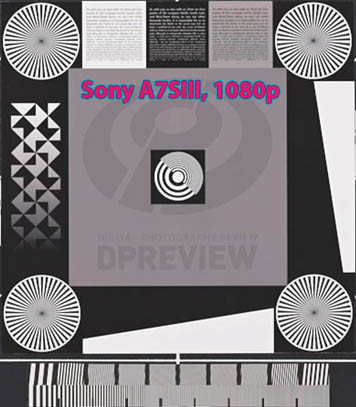
A second reason is many newer mirrorless cameras (including the A7III) do not produce good-quality 1080p material. The design is optimized for 4k. Ironically some older 1080p-only cameras produce better quality 1080p material. A few 4k-capable cameras can produce good-quality 1080p material, such as the Sony A7SIII. See attached. Other 4k video cameras such as the Blackmagic Ursa can produce excellent quality 1080p.
This also has nothing to do with FCP vs Premiere. In FCP you can easily duplicate the project and change resolution to whatever you want -- 4k, 8k, etc, then export at that resolution. Right-click on the project icon in the Event Browser, select "Duplicate As..." and select the resolution. However this will not magically improve low-quality 1080p footage so it looks equal to original 4k footage.
Replied by joema on topic 4K video in a 1080 timeline export in 4K
Hristov wrote: ...I have footage from a drone in 4K and a footage from a Sony A7iii in 1080p...If I make 4k timeline, make the edit with the footage from the both cameras and export in 4k, there is a visible sharpness between the drone and the Sonys camera...
This is mostly because the original drone footage was in 4k and the A7III was in 1080p. You can't up-scale 1080p footage and expect it to look like 4k.
A second reason is many newer mirrorless cameras (including the A7III) do not produce good-quality 1080p material. The design is optimized for 4k. Ironically some older 1080p-only cameras produce better quality 1080p material. A few 4k-capable cameras can produce good-quality 1080p material, such as the Sony A7SIII. See attached. Other 4k video cameras such as the Blackmagic Ursa can produce excellent quality 1080p.
This also has nothing to do with FCP vs Premiere. In FCP you can easily duplicate the project and change resolution to whatever you want -- 4k, 8k, etc, then export at that resolution. Right-click on the project icon in the Event Browser, select "Duplicate As..." and select the resolution. However this will not magically improve low-quality 1080p footage so it looks equal to original 4k footage.

Please Log in to join the conversation.
- Tom Wolsky
-
- Offline
- Moderator
-
08 Dec 2020 12:14 #111329
by Tom Wolsky
Replied by Tom Wolsky on topic 4K video in a 1080 timeline export in 4K
Or sent the 1080 to Compressor and use a 4K setting. It's of course not going to improve the resolution of the scaled up 1080 media.
Please Log in to join the conversation.
- Reflex Films
-
- Offline
- Junior Member
-

Less
More
- Posts: 31
- Thank you received: 2
11 Dec 2020 01:07 #111405
by Reflex Films
Replied by Reflex Films on topic 4K video in a 1080 timeline export in 4K
Upscaling hd to 4k is a useful trick to fool youtube's encoding to throw more data at your video - resulting in crisper video for those watching with a nice fast connection. Most pro youtubers use this trick - or just film/ edit supply 4k native.
One thing that WILL get messed up is if you have done any spatial conforms of 4k on the 1080 p timeline (very common to punch into the 4k for reframing on interviews or dynamic zooms with 4k drone and gimbal footage) - when you copy and paste footage into a 4k timeline this will be problematic and need fixing.
I hope
that helps.
One thing that WILL get messed up is if you have done any spatial conforms of 4k on the 1080 p timeline (very common to punch into the 4k for reframing on interviews or dynamic zooms with 4k drone and gimbal footage) - when you copy and paste footage into a 4k timeline this will be problematic and need fixing.
I hope
that helps.
Please Log in to join the conversation.
