


- Posts: 76
- Thank you received: 1
3 Post Moderation Rule for New Boarders (25 Jan 2021)
New boarders will have their posts moderated - Don't worry if you cannot see your post immediately.
Duck a different section of music no matter where I move a clip to in the timeline?
- coffee_king
-
 Topic Author
- Offline
- Senior Member
-

Less
More
02 Aug 2017 17:32 #89680
by coffee_king
Duck a different section of music no matter where I move a clip to in the timeline? was created by coffee_king
Hi Guys
Is there any way to have FCPX duck a different section of music no matter where I move a clip to in the timeline?
So if I move my highlighted clip around my timeline below it will duck the green audio in the appropriate place.
Thanks in advance
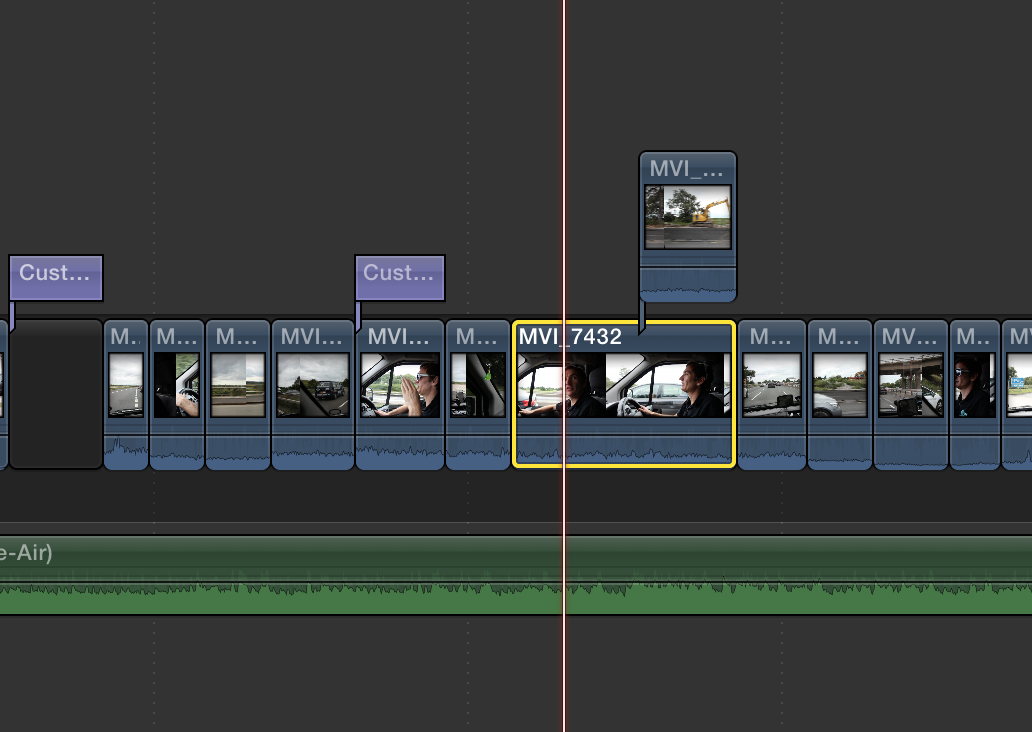
Is there any way to have FCPX duck a different section of music no matter where I move a clip to in the timeline?
So if I move my highlighted clip around my timeline below it will duck the green audio in the appropriate place.
Thanks in advance
Please Log in to join the conversation.
- Tom Wolsky
-

- Offline
- Moderator
-

02 Aug 2017 18:07 #89681
by Tom Wolsky
Replied by Tom Wolsky on topic Duck a different section of music no matter where I move a clip to in the timeline?
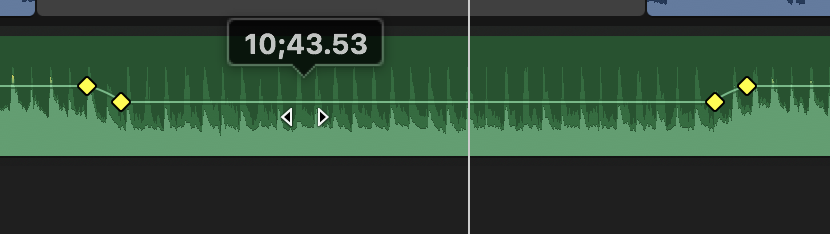
THEre is no automatic ducking in FCP. You can use keyframes to reduce the audio under the clip. If you move the clip you can select the keyframes and slide them along the timeline to keep them under the clip.
Please Log in to join the conversation.
- coffee_king
-
Topic Author
- Offline
- Senior Member
-
Less
More
- Posts: 76
- Thank you received: 1
02 Aug 2017 20:22 #89684
by coffee_king
Replied by coffee_king on topic Duck a different section of music no matter where I move a clip to in the timeline?
Cheers. I bet there must be some kind of other work around though.
Is this something thats possible in other editing suits?
Is this something thats possible in other editing suits?
Please Log in to join the conversation.
- Tom Wolsky
-
- Offline
- Moderator
-
02 Aug 2017 20:48 #89685
by Tom Wolsky
Replied by Tom Wolsky on topic Duck a different section of music no matter where I move a clip to in the timeline?
iMovie has automatic ducking.
Please Log in to join the conversation.


03 Aug 2017 02:42 - 03 Aug 2017 02:43 #89689
by JoeEditor
Replied by JoeEditor on topic Duck a different section of music no matter where I move a clip to in the timeline?
R for Range tool.
Click-drag to select the audio range to lower.
Grab he audio level line and lower it.
Keyframes made automatically.
iMovie is always beta for FCPX.
The feature in iMovie has a few issues, and is overly simplistic for FCPX work, IMHO. Does it duck for 3-4 person interviews, where each person has their own mic/clip?
Click-drag to select the audio range to lower.
Grab he audio level line and lower it.
Keyframes made automatically.
iMovie is always beta for FCPX.
The feature in iMovie has a few issues, and is overly simplistic for FCPX work, IMHO. Does it duck for 3-4 person interviews, where each person has their own mic/clip?
Last edit: 03 Aug 2017 02:43 by JoeEditor.
Please Log in to join the conversation.
- Karsten Schlüter
-

- Offline
- Moderator
-
Less
More
- Posts: 3790
- Thank you received: 718
03 Aug 2017 06:27 #89695
by Karsten Schlüter
sorry for my ignorance, Tom, but can you elaborate on that? I'm lost …
Replied by Karsten Schlüter on topic Duck a different section of music no matter where I move a clip to in the timeline?
Tom Wolsky wrote: … If you move the clip you can select the keyframes and slide them along the timeline to keep them under the clip.
sorry for my ignorance, Tom, but can you elaborate on that? I'm lost …
Please Log in to join the conversation.
- Tom Wolsky
-
- Offline
- Moderator
-
03 Aug 2017 06:43 #89696
by Tom Wolsky
Replied by Tom Wolsky on topic Duck a different section of music no matter where I move a clip to in the timeline?
Let's say I've created the four keyframes as Ben describes above. Later I can use the range selection tool to stroke through the same area to select the four keyframe again. I can then drag the selected keyframes as a group horizontally in the timeline.
Please Log in to join the conversation.
- Karsten Schlüter
-
- Offline
- Moderator
-
Less
More
- Posts: 3790
- Thank you received: 718
03 Aug 2017 07:51 #89697
by Karsten Schlüter
ahaaa…
but those keyframes are not 'attached' to the clip; nor can I select all 4 keyframes AND the corresponding video clip/selection to move both, video and ducked audio?
Replied by Karsten Schlüter on topic Duck a different section of music no matter where I move a clip to in the timeline?
Tom Wolsky wrote: … can then drag the selected keyframes as a group horizontally in the timeline.
ahaaa…
but those keyframes are not 'attached' to the clip; nor can I select all 4 keyframes AND the corresponding video clip/selection to move both, video and ducked audio?
Please Log in to join the conversation.
- simon.a.billington
-
- Offline
- Elite Member
-

Less
More
- Posts: 179
- Thank you received: 10
03 Aug 2017 09:54 #89698
by simon.a.billington
Replied by simon.a.billington on topic Duck a different section of music no matter where I move a clip to in the timeline?
In a DAW you would be able to insert a compressor plugin over the track you want to duck, then have that compressor triggered by another audio track that you route to the "sidechain". If set up properly it wouldn't matter where you dragged that trigger signal, the compressor will still duck accordingly.
However, it would seem that FCPX lacks a sidechain capability.
Perhaps if and when the introduces a Roles Mixer that this might be one of the added features. We could only hope.
However, it would seem that FCPX lacks a sidechain capability.
Perhaps if and when the introduces a Roles Mixer that this might be one of the added features. We could only hope.
Please Log in to join the conversation.
