




- Posts: 5
- Thank you received: 0
3 Post Moderation Rule for New Boarders (25 Jan 2021)
New boarders will have their posts moderated - Don't worry if you cannot see your post immediately.
Connected clips
25 Jul 2017 02:24 #89551
by mb260570
Connected clips was created by mb260570
How can I disable "Connected clips"? I want to put videosegments above eachother, with transitions, but without the annoying "connected clips - bubble" around it. I know that I cab choose "break apart clip items", but for complex video edits it is a waste of your time to solve it that way.
Please Log in to join the conversation.
- Karsten Schlüter
-

- Offline
- Moderator
-

Less
More
- Posts: 3790
- Thank you received: 718
25 Jul 2017 08:42 #89553
by Karsten Schlüter
Why??
Replied by Karsten Schlüter on topic Connected clips
mb260570 wrote: … want to put videosegments above eachother, ….
Why??
Please Log in to join the conversation.
- Tom Wolsky
-

- Offline
- Moderator
-
25 Jul 2017 09:44 #89554
by Tom Wolsky
Replied by Tom Wolsky on topic Connected clips
You mean the secondary storyline? You can’t if you apply a transition to a connected clip. The transition and the clip have to be in a storyline to link them. It doesn’t stop you from putting other clips vertically if you want to. Not sure what the problem is.
Please Log in to join the conversation.

25 Jul 2017 10:58 - 25 Jul 2017 11:02 #89556
by Axel
As Tom wrote, you seem to mix up terms. Please try not to.
It's a secondary storyline then, but it's also connected, like a clip would be. And to the primary storyline, it actually now is just that: a connected clip. The storyline-rules count only within that bubble.
I have a few questions for you myself, please take a minute to consider and answer them:
1. Why do those two clips need to stay connected in the first place? Are they titles? If not, and if you're convinced they belong just there, why don't you pull them down to the primary storyline (alt cmd down).
That way you can apply transitions without bubbles.
2. What exactly bothers you about a secondary storyline?
3. If those two connected clips are not titles, why do you want a transition (a cross-dissolve, right?)? Is it for one of those reasons? Or is it because of laziness or fear of cutting?
Another editor will see the wrong reason at once, and everybody else, with no video background whatsoever, will sense it subconsciously nonetheless.
4. So assumed you had a good reason to make that transition: are you happy with the default? The length, the curve? Wouldn't this be something you'd better adjust manually?
That would mean the second clip should be connected over the first one (in storyline) and gradually faded in with opacity keyframes. No annoying bubbles, no need to tear apart any items ...
Replied by Axel on topic Connected clips
mb260570 wrote: How can I disable "Connected clips"?
As Tom wrote, you seem to mix up terms. Please try not to.
mb260570 wrote: I want to put videosegments above eachother, with transitions, but without the annoying "connected clips - bubble" around it.
It's a secondary storyline then, but it's also connected, like a clip would be. And to the primary storyline, it actually now is just that: a connected clip. The storyline-rules count only within that bubble.
I have a few questions for you myself, please take a minute to consider and answer them:
1. Why do those two clips need to stay connected in the first place? Are they titles? If not, and if you're convinced they belong just there, why don't you pull them down to the primary storyline (alt cmd down).
That way you can apply transitions without bubbles.
2. What exactly bothers you about a secondary storyline?
3. If those two connected clips are not titles, why do you want a transition (a cross-dissolve, right?)? Is it for one of those reasons? Or is it because of laziness or fear of cutting?
Another editor will see the wrong reason at once, and everybody else, with no video background whatsoever, will sense it subconsciously nonetheless.
4. So assumed you had a good reason to make that transition: are you happy with the default? The length, the curve? Wouldn't this be something you'd better adjust manually?
That would mean the second clip should be connected over the first one (in storyline) and gradually faded in with opacity keyframes. No annoying bubbles, no need to tear apart any items ...
Last edit: 25 Jul 2017 11:02 by Axel.
Please Log in to join the conversation.
- Jonathan Levin
-

- Offline
- Platinum Member
-

Less
More
- Posts: 786
- Thank you received: 21
25 Jul 2017 15:08 #89559
by Jonathan Levin
Replied by Jonathan Levin on topic Connected clips
This is a really interesting thread and something that I too would like to learn more about. I am really happy with the way everything works with X but you can always teach an old dog....me.
I almost always place my titles, photos b-roll above the storyline. I've been doing it this way since FCP6 & 7 days. My logic for this is that it is easy for me to move, replace, or remove those items. Visually looking, at my project as I edit, sort of helps me see how and when something will come and go during playback. Just a preference though. An issue I have with the secondary is if I have one photo with a cross-disolve or other effect, there isn't an easy way to decide to add a second or third image once those effects are in place, unless you delete them, add image(s) then re-add transitions.
Maybe this is old school. Again, FCPX is working great for me, but if you can shed anymore light on this, that would be great. I am intrigued with the ALT CMD Down idea. What is this called in the Menu? I've attached a screen shot of a typical project for you to critique.
I look forward to your comments.
Be gentle.
Jonathan
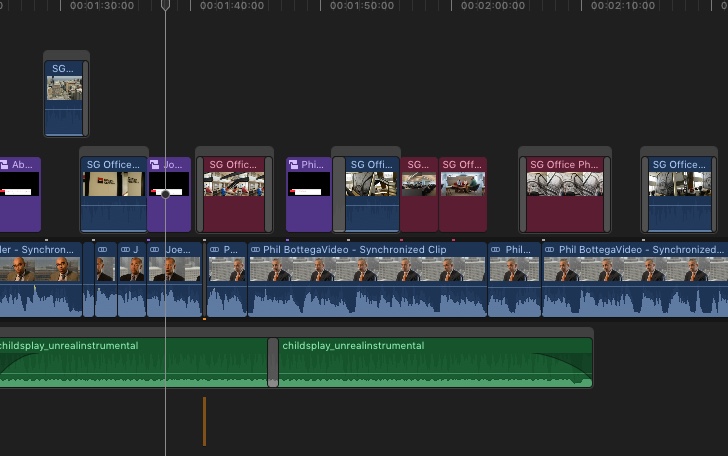
I almost always place my titles, photos b-roll above the storyline. I've been doing it this way since FCP6 & 7 days. My logic for this is that it is easy for me to move, replace, or remove those items. Visually looking, at my project as I edit, sort of helps me see how and when something will come and go during playback. Just a preference though. An issue I have with the secondary is if I have one photo with a cross-disolve or other effect, there isn't an easy way to decide to add a second or third image once those effects are in place, unless you delete them, add image(s) then re-add transitions.
Maybe this is old school. Again, FCPX is working great for me, but if you can shed anymore light on this, that would be great. I am intrigued with the ALT CMD Down idea. What is this called in the Menu? I've attached a screen shot of a typical project for you to critique.
I look forward to your comments.
Be gentle.
Jonathan
Please Log in to join the conversation.
- Tom Wolsky
-
- Offline
- Moderator
-
25 Jul 2017 15:19 #89561
by Tom Wolsky
Replied by Tom Wolsky on topic Connected clips
Not sure what the scale here is, but I would probably string all those connected clips together as a single secondary storyline.
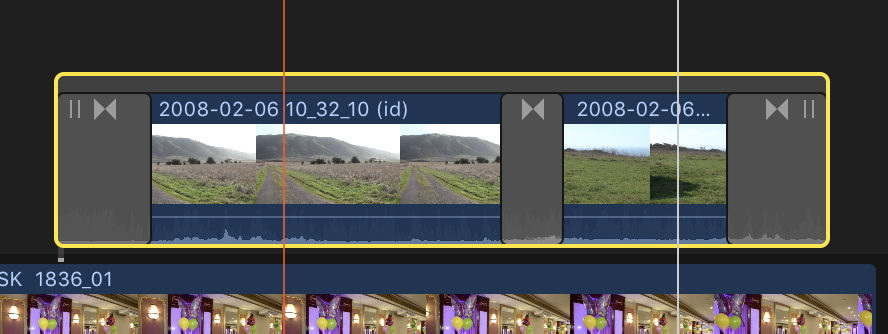
When they are in line like that you can edit clips into the secondary by selecting the shelf on top. You can insert and append. You can edit in a gap clip which is transparent and allows you to see the underlying clips on the primary.
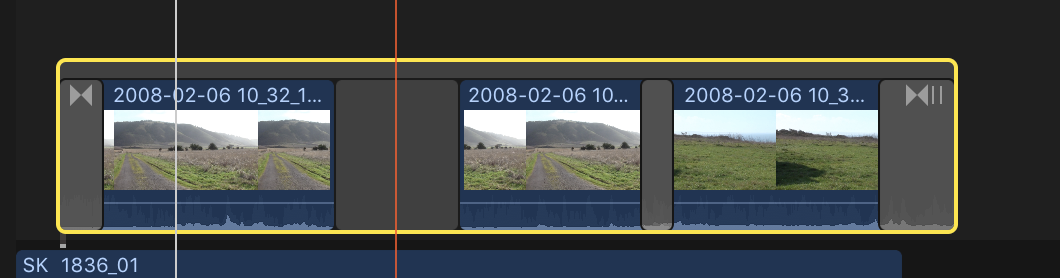
When they are in line like that you can edit clips into the secondary by selecting the shelf on top. You can insert and append. You can edit in a gap clip which is transparent and allows you to see the underlying clips on the primary.
Please Log in to join the conversation.
- Karsten Schlüter
-
- Offline
- Moderator
-
Less
More
- Posts: 3790
- Thank you received: 718
25 Jul 2017 15:34 #89562
by Karsten Schlüter
Replied by Karsten Schlüter on topic Connected clips
I dare to say, Maikel's initial quote
strongly indicates, he thinks in TRACKS… And before we explain secondaries, compounds, lanes and whatnot, he should explain, why stapling clips anyhow …
just an educated guess… :woohoo:
I want to put videosegments above eachother
strongly indicates, he thinks in TRACKS… And before we explain secondaries, compounds, lanes and whatnot, he should explain, why stapling clips anyhow …
just an educated guess… :woohoo:
Please Log in to join the conversation.
25 Jul 2017 19:04 - 25 Jul 2017 19:07 #89563
by Axel
Replied by Axel on topic Connected clips
@Jonathan
As I see it, you use connected clips in just the right way, the way you explained: to be able to easier recognize and freely move B-roll. Tom showed you that there is no reason to avoid secondary storylines. You can create one just for the sake of cross-fading connected clips. I don't do that except for titles. This is all personal preference. If a sequence of connected clips grows too long, it feels like having a second track. In your screenshot there are talking heads with external audio comments in the primary. It's fully justified to see them as the content that everything else is related to. I again ask if all those fades really serve a purpose, if they are part of your language. Do they mean time passes? Are they match dissolves to compare two different motifs of adjacent clips? Are they more like superimposed associations? If not, they are expendable. Delete them. You can still have a secondary, but you don't need it to have transitions.
>Final Cut Pro >Edit >Overwrite to Primary Storyline.
If you think your connected clips are there to stay, you can clean up your timeline with this command. (alt + cmd + up lifts the clip from primary and they become connected clips). But then again: you don't need to. In your example, I think I wouldn't.
What about the important audio in your primary. Is it being deleted by that? Try.
As I see it, you use connected clips in just the right way, the way you explained: to be able to easier recognize and freely move B-roll. Tom showed you that there is no reason to avoid secondary storylines. You can create one just for the sake of cross-fading connected clips. I don't do that except for titles. This is all personal preference. If a sequence of connected clips grows too long, it feels like having a second track. In your screenshot there are talking heads with external audio comments in the primary. It's fully justified to see them as the content that everything else is related to. I again ask if all those fades really serve a purpose, if they are part of your language. Do they mean time passes? Are they match dissolves to compare two different motifs of adjacent clips? Are they more like superimposed associations? If not, they are expendable. Delete them. You can still have a secondary, but you don't need it to have transitions.
Jonathan Levin wrote: I am intrigued with the ALT CMD Down idea. What is this called in the Menu?
>Final Cut Pro >Edit >Overwrite to Primary Storyline.
If you think your connected clips are there to stay, you can clean up your timeline with this command. (alt + cmd + up lifts the clip from primary and they become connected clips). But then again: you don't need to. In your example, I think I wouldn't.
What about the important audio in your primary. Is it being deleted by that? Try.
Last edit: 25 Jul 2017 19:07 by Axel.
Please Log in to join the conversation.
- Jonathan Levin
-
- Offline
- Platinum Member
-
Less
More
- Posts: 786
- Thank you received: 21
26 Jul 2017 16:20 - 26 Jul 2017 16:21 #89571
by Jonathan Levin
Replied by Jonathan Levin on topic Connected clips
Thanks for that Axel and Tom.
I think that fades dissolves et al are pretty subjective. Kind of like when and when not to use motion control over a graphic. I would agree that any of the above can get old quickly if over used. When I edit, I always think in terms of music: dynamics, pauses, fast/slow and so on. How it flows.
I have to try the Overwrite Primary. Not sure how that will work in my case since the storyline audio is a scratch track that I use to sync externally recorded audio and then disable that, thus the reason for the synced clips.Actually, sync clips automatically disables the storyline audio. Might screw those up but I'll play with that.
Thanks again.
Jonathan
I think that fades dissolves et al are pretty subjective. Kind of like when and when not to use motion control over a graphic. I would agree that any of the above can get old quickly if over used. When I edit, I always think in terms of music: dynamics, pauses, fast/slow and so on. How it flows.
I have to try the Overwrite Primary. Not sure how that will work in my case since the storyline audio is a scratch track that I use to sync externally recorded audio and then disable that, thus the reason for the synced clips.Actually, sync clips automatically disables the storyline audio. Might screw those up but I'll play with that.
Thanks again.
Jonathan
Last edit: 26 Jul 2017 16:21 by Jonathan Levin.
Please Log in to join the conversation.
27 Jul 2017 02:45 #89578
by mb260570
Replied by mb260570 on topic Connected clips
Thanks you for all your response. I understand that I 've not been completely clear by using the wrong terms. Sorry for that... I will try to translate on my best from Dutch to English.
I 've put an attachment to this reply to explain my problem. For example I'm creating videoproductions of live performances of singers. Mostly recorded by 1 camera. In the montage I want to mix the live-performance with recorded video's of the final rehearsals, and with recorded audiostreams in studio. So I put the live-recording on the storyline, and all other stuff above and under it.
To get it all sync this is working fine, because I can move audio and videosegments independently, without cutting and sliding into the storyline. That is the reason why I'm doing it this way. On the screenshot you can see by marker A, that it is no problem to place another video above the storyline. But when I put a transition to it (for example see marker B ), then there comes the bubble, which can removed by "Break apart clip items", but then the transition is gone. And working in that "bubble" is not convenient. So my question is: How do I get rid of those grey bubbles?
I 've put an attachment to this reply to explain my problem. For example I'm creating videoproductions of live performances of singers. Mostly recorded by 1 camera. In the montage I want to mix the live-performance with recorded video's of the final rehearsals, and with recorded audiostreams in studio. So I put the live-recording on the storyline, and all other stuff above and under it.
To get it all sync this is working fine, because I can move audio and videosegments independently, without cutting and sliding into the storyline. That is the reason why I'm doing it this way. On the screenshot you can see by marker A, that it is no problem to place another video above the storyline. But when I put a transition to it (for example see marker B ), then there comes the bubble, which can removed by "Break apart clip items", but then the transition is gone. And working in that "bubble" is not convenient. So my question is: How do I get rid of those grey bubbles?
Please Log in to join the conversation.
- Karsten Schlüter
-
- Offline
- Moderator
-
Less
More
- Posts: 3790
- Thank you received: 718
27 Jul 2017 04:14 #89580
by Karsten Schlüter
sounds so …'final'
after dropping it into Storyline, the Trim-tool allows to adjust the edit points and 'shifting' the content inside the clip … esp. the last seems to be another 'hidden' feature of FCPX, very handy when editing to music …
Replied by Karsten Schlüter on topic Connected clips
Axel wrote: …>Final Cut Pro >Edit >Overwrite to Primary Storyline.
If you think your connected clips are there to stay, you can clean up your timeline with this command. ….
sounds so …'final'
after dropping it into Storyline, the Trim-tool allows to adjust the edit points and 'shifting' the content inside the clip … esp. the last seems to be another 'hidden' feature of FCPX, very handy when editing to music …
Please Log in to join the conversation.

27 Jul 2017 10:36 #89587
by FvH
Replied by FvH on topic Connected clips
Using the primary storyline as a container for audio scratch clips appears to to be a waste of useful space to me. Why don't you create a 1-frame gap clip at the beginning of the primary and connect your audio clips to that? Then you'd have the primary storyline free for editing around.
Please Log in to join the conversation.

27 Jul 2017 11:48 #89589
by JoeEditor
Replied by JoeEditor on topic Connected clips
I do the occasional music video and work that is all based on the main sound track. Dropping audio into the Primary Storyline is the best way to proceed in my experience. The Primary Storyline is the spinal cord of your story. If the audio tells the story, then it goes there. It isn't a waste of space, it's an efficient workflow. I do it weekly.
Please Log in to join the conversation.
28 Jul 2017 11:38 #89609
by JoeEditor
Replied by JoeEditor on topic Connected clips
"And working in that "bubble" is not convenient. So my question is: How do I get rid of those grey bubbles?"
That "bubble" is a Connected Storyline. Transitions can only exist in a Storyline. So if you want a Transition, you have to have the Storyline (bubble).
What makes it not convenient? It acts the same ways, gives you more options. If you want to move it, drag by the Storyline bar on top. Nothing really inconvenient about it, really. So, if you could explain what you find "not convenient" specifically, that would help a great deal.
Also, if you don't understand Connected Storylines, that shows you lack a lot of basic understanding of how FCPX works, and you're trying to make it work like track based NLEs, which won't work. Highly recommend some basic training from either macProVideo.com or RippleTraining.com.
Bot to your OP, when it comes to Connected Clips, they MUST be in a Connected Storyline to have a Transition.
help.apple.com/finalcutpro/mac/10.3/#/ver8e3f1748
That "bubble" is a Connected Storyline. Transitions can only exist in a Storyline. So if you want a Transition, you have to have the Storyline (bubble).
What makes it not convenient? It acts the same ways, gives you more options. If you want to move it, drag by the Storyline bar on top. Nothing really inconvenient about it, really. So, if you could explain what you find "not convenient" specifically, that would help a great deal.
Also, if you don't understand Connected Storylines, that shows you lack a lot of basic understanding of how FCPX works, and you're trying to make it work like track based NLEs, which won't work. Highly recommend some basic training from either macProVideo.com or RippleTraining.com.
Bot to your OP, when it comes to Connected Clips, they MUST be in a Connected Storyline to have a Transition.
help.apple.com/finalcutpro/mac/10.3/#/ver8e3f1748
Please Log in to join the conversation.
29 Jul 2017 02:10 #89631
by mb260570
Replied by mb260570 on topic Connected clips
Thank you FCPX.guru, your answer is clear and helping me. I see that the attachment of my last post not is added tot this topic, so I'll try it again at this post. I really want to show my way of working. I'll understand the info about the connected storyline.
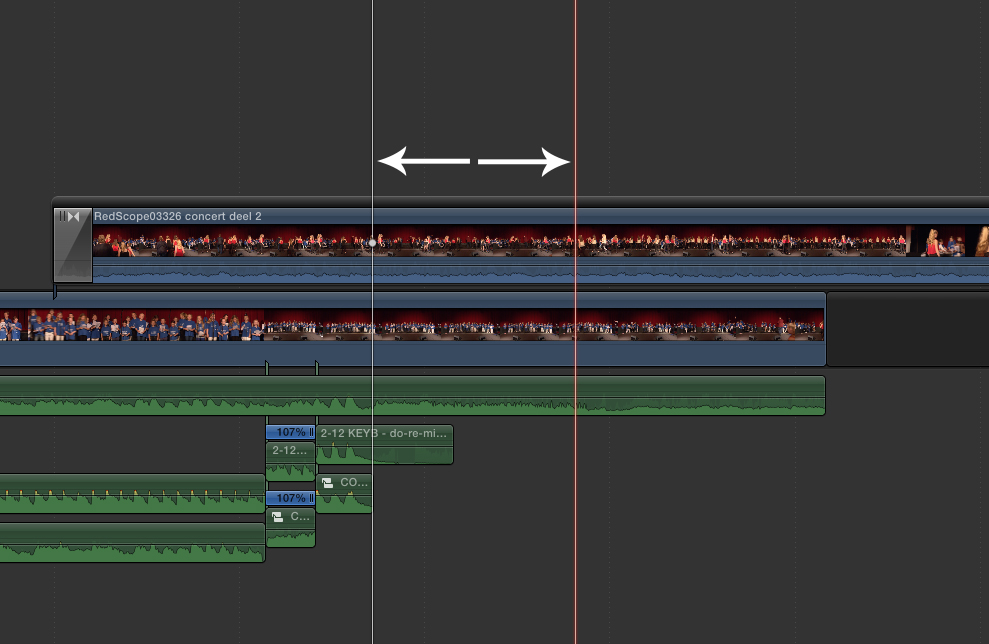
I shall try to explain what my problem is of working with connected storylines. See picture 2 (hopefully added). For example I want to cut out a part of the movie between the white arrows. Then the part of the movie on the right side slides to the left to fill the gap. And now my movie in the connected storyline isn't sync anymore. Thats my problem. I know that I can choose by deleting that part "replace with gap", but I'm not happy with it, because the different video parts in the connected storyline are still literally connected to each other, but I want each part having free to move for the possibility to sync each part individually with other audio streams.
Hopefully I 've explained a little bit my resistance against working with connected storylines. More advices and tips are welcome!
I shall try to explain what my problem is of working with connected storylines. See picture 2 (hopefully added). For example I want to cut out a part of the movie between the white arrows. Then the part of the movie on the right side slides to the left to fill the gap. And now my movie in the connected storyline isn't sync anymore. Thats my problem. I know that I can choose by deleting that part "replace with gap", but I'm not happy with it, because the different video parts in the connected storyline are still literally connected to each other, but I want each part having free to move for the possibility to sync each part individually with other audio streams.
Hopefully I 've explained a little bit my resistance against working with connected storylines. More advices and tips are welcome!
Please Log in to join the conversation.
- ronny courtens
-

- Offline
- Moderator
-
Less
More
- Posts: 4455
- Thank you received: 962
29 Jul 2017 10:51 - 29 Jul 2017 10:53 #89641
by ronny courtens
Replied by ronny courtens on topic Connected clips
If you want to cut out part of a secondary storyline but you want to "keep each part free to move for the possibility to sync each part individually with other audio streams":
Select the storyline and blade the part you want to cut out (CMD +B ):
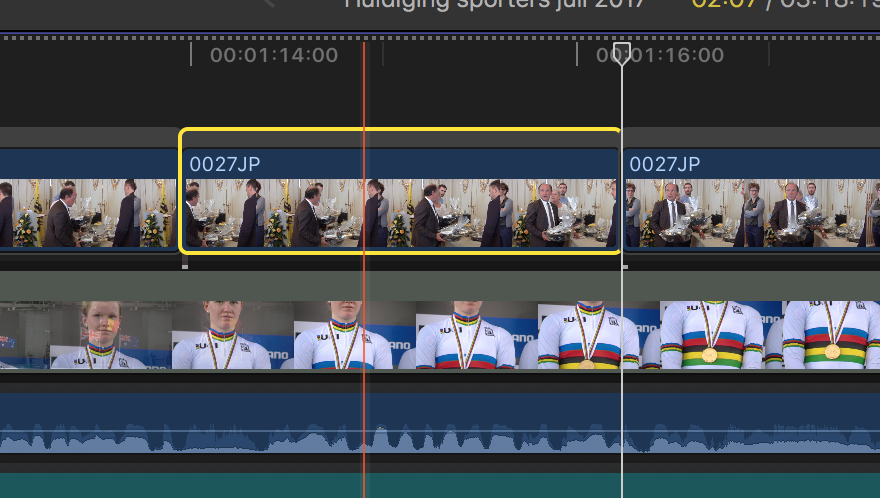
Then delete the bladed portion. You will get two separate secondary storylines that you can move freely:
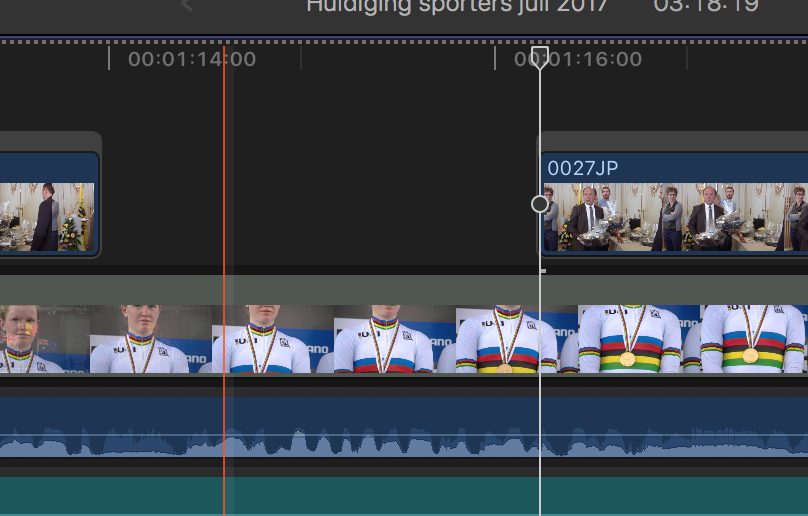
Actually this is exactly how you would do this in any other NLE.
- Ronny
Select the storyline and blade the part you want to cut out (CMD +B ):
Then delete the bladed portion. You will get two separate secondary storylines that you can move freely:
Actually this is exactly how you would do this in any other NLE.
- Ronny
Last edit: 29 Jul 2017 10:53 by ronny courtens.
Please Log in to join the conversation.
29 Jul 2017 14:36 - 30 Jul 2017 00:46 #89645
by JoeEditor
Replied by JoeEditor on topic Connected clips
Good one, Ronny! I'd add, just as an FYI, that if you select the the Storyline (bar running along top of Storyline), you blade the Storyline as Ronny explains. But is you select the clip itself, inside the Storyline, you'll blade the clip only.
Last edit: 30 Jul 2017 00:46 by JoeEditor.
Please Log in to join the conversation.
- Tom Wolsky
-
- Offline
- Moderator
-
29 Jul 2017 15:10 #89647
by Tom Wolsky
Replied by Tom Wolsky on topic Connectned clips
Got to love that predictive typing. It’s so much fun.
Please Log in to join the conversation.
29 Jul 2017 21:01 - 29 Jul 2017 21:11 #89649
by mb260570
Replied by mb260570 on topic Connected clips SOLVED
Thank you so much for your solution Ronny Courtens!! That's exactly solving my problem. All other users thanks for all the replies you gave. My problem is solved! 
Last edit: 29 Jul 2017 21:11 by mb260570.
Please Log in to join the conversation.
- Jonathan Levin
-
- Offline
- Platinum Member
-
Less
More
- Posts: 786
- Thank you received: 21
31 Jul 2017 20:04 #89668
by Jonathan Levin
Replied by Jonathan Levin on topic Connected clips
Great informative thread! This helps tons when working with the storyline. Thank you all.
Please Log in to join the conversation.
