


- Posts: 3
- Thank you received: 0
3 Post Moderation Rule for New Boarders (25 Jan 2021)
New boarders will have their posts moderated - Don't worry if you cannot see your post immediately.
Movie and a dynamic graph together
13 Jul 2017 23:51 #89383
by gjoshi
Movie and a dynamic graph together was created by gjoshi
Hi everyone,
I have a movie of cells (the one that you have in your body) doing a process which can seen by changes in fluorescence. I have quantified that change in fluorescence which now gives me a scatter plot graph. I would like to sync the appearance of the lines on graph with each frame on my movie.
An example of this is in the link below starting from 42 seconds onwards
Any help on doing this in FCP X or combining it with motion and doing it will be appreciated.
Thanks much,
Gaurav.
I have a movie of cells (the one that you have in your body) doing a process which can seen by changes in fluorescence. I have quantified that change in fluorescence which now gives me a scatter plot graph. I would like to sync the appearance of the lines on graph with each frame on my movie.
An example of this is in the link below starting from 42 seconds onwards
Any help on doing this in FCP X or combining it with motion and doing it will be appreciated.
Thanks much,
Gaurav.
Please Log in to join the conversation.
- Karsten Schlüter
-

- Offline
- Moderator
-

Less
More
- Posts: 3790
- Thank you received: 718
14 Jul 2017 10:50 #89388
by Karsten Schlüter
Replied by Karsten Schlüter on topic Movie and a dynamic graph together
Welcome Joshi to fcp.co 
yep, you could create a complex, intricated, auto-running animation in Motion.
But your example shows:
some Livevideo
a 'counter'
and the graph - which can be simply masked:
You 'paint' it in any graphic app (Pixelmator, Photoshop, or an Excel export) and put some masks over it. The according to video, you uncover the line by simple setting keyframes.
yep, you could create a complex, intricated, auto-running animation in Motion.
But your example shows:
some Livevideo
a 'counter'
and the graph - which can be simply masked:
You 'paint' it in any graphic app (Pixelmator, Photoshop, or an Excel export) and put some masks over it. The according to video, you uncover the line by simple setting keyframes.
Please Log in to join the conversation.


14 Jul 2017 11:46 #89392
by JoeEditor
Replied by JoeEditor on topic Movie and a dynamic graph together
How familiar are you with Motion?
Please Log in to join the conversation.
14 Jul 2017 15:00 #89403
by gjoshi
Replied by gjoshi on topic Movie and a dynamic graph together
Not much but this will give me a chance to learn something new. If there is an alternate way to what Karsten Schlüter mentioned please do let me know.
Thanks,
G.
Thanks,
G.
Please Log in to join the conversation.
14 Jul 2017 15:02 #89404
by gjoshi
Replied by gjoshi on topic Movie and a dynamic graph together
Thanks Karsten.
That's a good suggestion. I have not well versed with motion but this gives me a chance to dive in to it.
G.
That's a good suggestion. I have not well versed with motion but this gives me a chance to dive in to it.
G.
Please Log in to join the conversation.

Less
More
- Posts: 971
- Thank you received: 46
15 Jul 2017 09:23 #89415
by MsJustine
Replied by MsJustine on topic Movie and a dynamic graph together
I would post an email to ripple training, Mark or Steve, one of the ripple twins is a motion genius, and this would really be something he could sink his teeth into....To ben honest they forget more than most users will ever learn... They are brilliant 
Please Log in to join the conversation.
- Karsten Schlüter
-
- Offline
- Moderator
-
Less
More
- Posts: 3790
- Thank you received: 718
16 Jul 2017 08:19 - 16 Jul 2017 08:28 #89425
by Karsten Schlüter
Replied by Karsten Schlüter on topic Movie and a dynamic graph together
Again - no need for Motion (and I'm a fan of Motion!!), just a few easy steps in FCPX and in one 'Paint.app' (here: Pixelmator)
Step #1
create chart, make it two layers, the soon-growing graph and the rest:
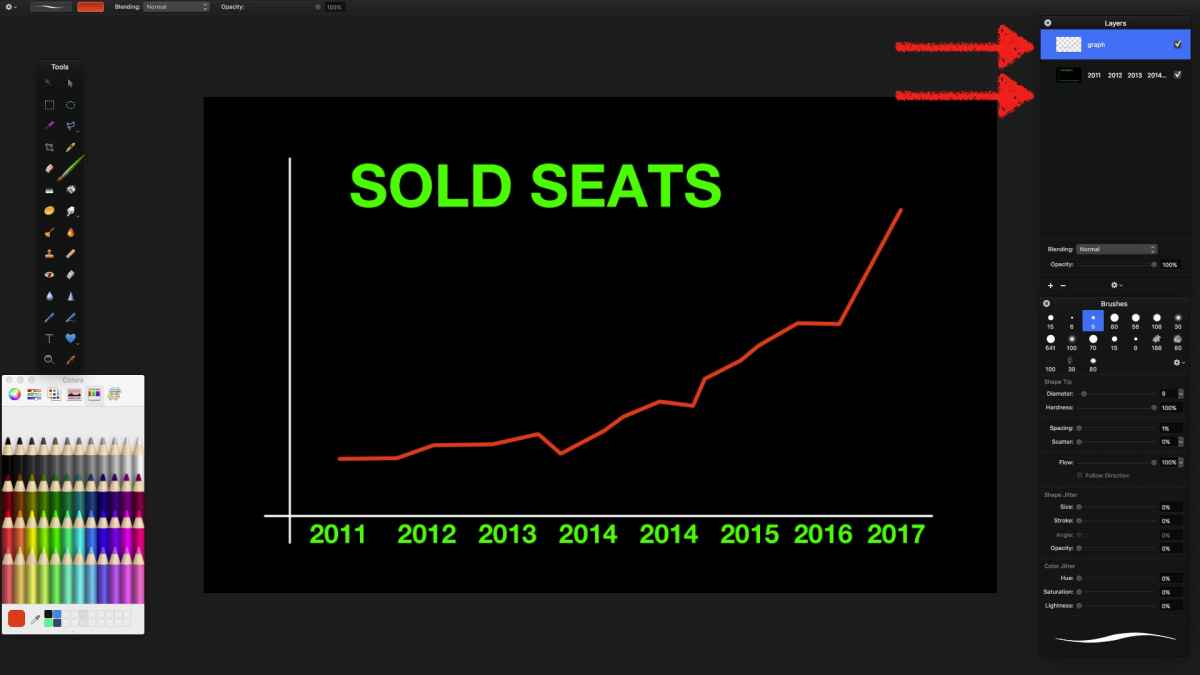
Export as .psd (Photoshop file) to keep the two layers…
Step #2
Animate graph: drag psd to your project = FCPX will notify it at as 'Compound Clip'; open that CC, and apply to the graph a MASK (Effects Tab); animate Mask with two keyframes to unveil the red line…
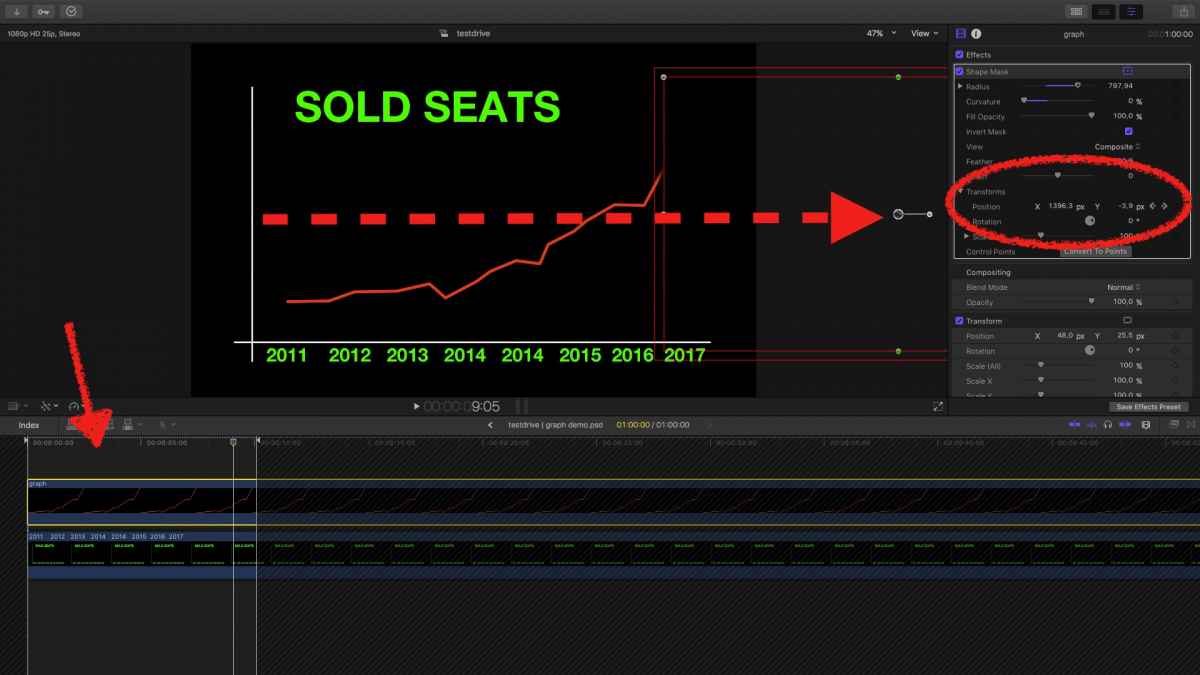
Step #3
Add a 'NUMBERS' generator (Generators Tab), I added some brownish bg to mirror your example; make it a CC too.
Add your video (here: any generator) , crop it and distort to your needs
Staple all elements over each other, use the DISTORT tool to arrange, and give it some 3D-ish 'depth'.
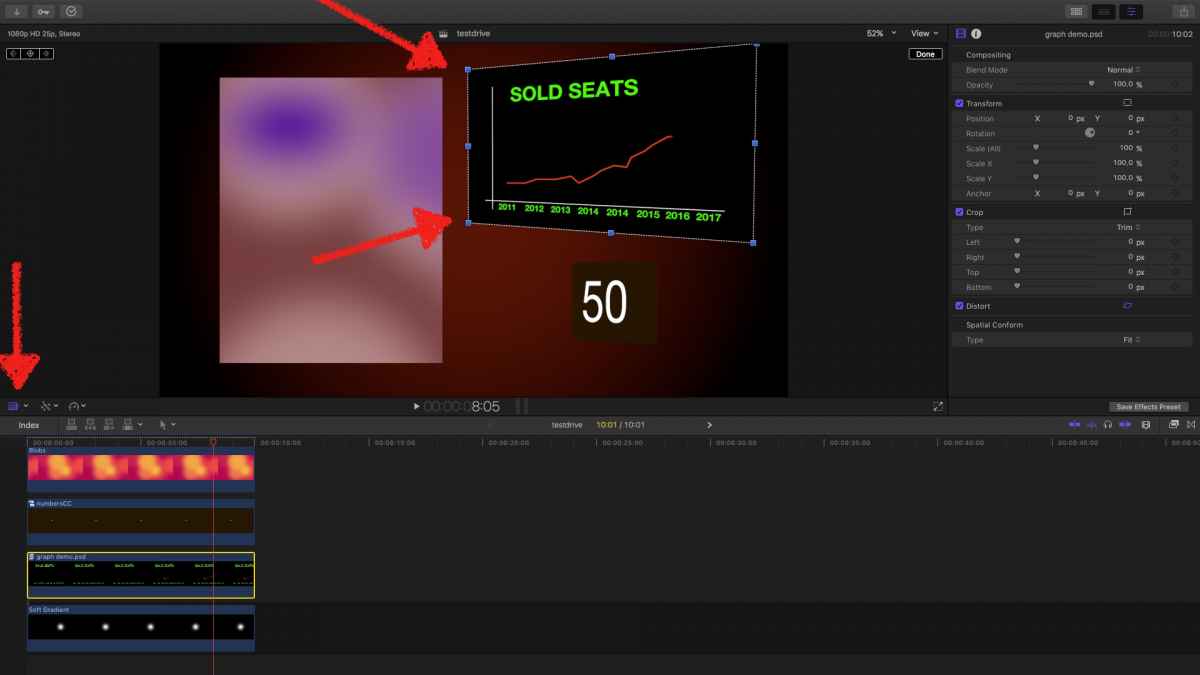
That's it.
… no need to call the cavalry …
(attached the demo video …)
Step #1
create chart, make it two layers, the soon-growing graph and the rest:
Export as .psd (Photoshop file) to keep the two layers…
Step #2
Animate graph: drag psd to your project = FCPX will notify it at as 'Compound Clip'; open that CC, and apply to the graph a MASK (Effects Tab); animate Mask with two keyframes to unveil the red line…
Step #3
Add a 'NUMBERS' generator (Generators Tab), I added some brownish bg to mirror your example; make it a CC too.
Add your video (here: any generator) , crop it and distort to your needs
Staple all elements over each other, use the DISTORT tool to arrange, and give it some 3D-ish 'depth'.
That's it.
… no need to call the cavalry …
(attached the demo video …)
Last edit: 16 Jul 2017 08:28 by Karsten Schlüter.
Please Log in to join the conversation.
