


- Posts: 38
- Thank you received: 3
3 Post Moderation Rule for New Boarders (25 Jan 2021)
New boarders will have their posts moderated - Don't worry if you cannot see your post immediately.
Sharing Presets between desktop and laptop FCP X
10 Jul 2017 12:33 #89296
by LesWilson
Sharing Presets between desktop and laptop FCP X was created by LesWilson
I have the same version of FCP X on a MacPro (El Capitan) and Macbook Air 13 (Sierra). But when I transfer a preset from the desktop to the Macbook, the only presets that work are those that were a single effect. If the preset used multiple effects, it shows up on the Macbook as a big red icon with yellow warning tag.
Any ideas?
Any ideas?
Please Log in to join the conversation.


10 Jul 2017 15:07 #89298
by JoeEditor
Replied by JoeEditor on topic Sharing Presets between desktop and laptop FCP X
That indicates the the preset uses an effect that you have installed on one Mac but not the other. The preset file is only a text file indicating what FCPX should do. It does not include the effects themselves.
Please Log in to join the conversation.
10 Jul 2017 16:27 #89301
by LesWilson
Replied by LesWilson on topic Sharing Presets between desktop and laptop FCP X
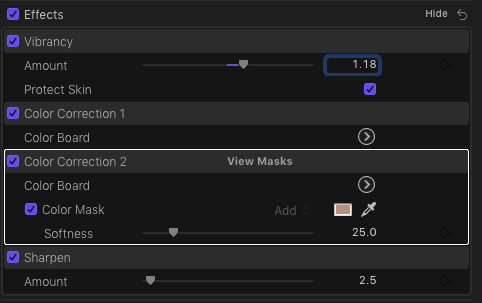
I'm just using a standard installation of FCP X on both machines. The preset uses Vibrancy, Sharpen and two ColorBoards
Please Log in to join the conversation.
10 Jul 2017 22:34 #89316
by JoeEditor
Replied by JoeEditor on topic Sharing Presets between desktop and laptop FCP X
Launch FCPX with both the Option and Command keys held down, then in the resulting window, delete the preference files, see if that helps.
Please Log in to join the conversation.
