


- Posts: 3
- Thank you received: 0
3 Post Moderation Rule for New Boarders (25 Jan 2021)
New boarders will have their posts moderated - Don't worry if you cannot see your post immediately.
Zooming Clips - Avoiding Resampling and Blur
30 Jun 2017 20:31 #89137
by Flint_6
Zooming Clips - Avoiding Resampling and Blur was created by Flint_6
Hi all
I'm stuck. I'm in the middle of a project where I captured my screen in high resolution (2880x1800) for a software learning course (think Lynda.com). I'm working in a 1080p timeline. To show some things in more detail, I wanted to zoom in on the image. As I have a more complicated composite with backgrounds and masks, I use effects to zoom in and rotate the image in 3D to make it more dynamic (kind of like this: vimeo.com/211351786 )
Since I don't use the scale control from the source clip but I zoom in a whole composite of several layers, I get in blur trouble. FCPX doesn't intelligently scale the images, it seems to render an image buffer and zoom it. When I zoom a lot, the image gets blurry even though I have plenty of resolution in my source clip. A simple test is if I scale a clip to 5% and add an additional effect on top that allows me to zoom in again. When I zoom, the scaled down image is zoomed and as a result, is super blurry.
Same problem with more complicated composites that I put in Compound Clips. Now my question:
What's the best practice for this?
I tried doing a 4K project, but when I render to 1080p, it's also blurry. It's only sharp in 4K resolution. When I work in a 1080p timeline, I cannot really benefit from the higher resolution of my source clips as they are scaled down and rasterized. What would be the best way forward from here?
I guess 4K would still be the better way to go. It's a bit blurry but it's better having hi-res images scaled down than "low-res" images zoomed in. Or what would you suggest?
Apart from that: Is there any way of telling FCPX to scale images without resampling / interpolating them, but to zoom in nearest neighbour to have the pixel edges sharp?
Thanks in advance
Flint_6
I'm stuck. I'm in the middle of a project where I captured my screen in high resolution (2880x1800) for a software learning course (think Lynda.com). I'm working in a 1080p timeline. To show some things in more detail, I wanted to zoom in on the image. As I have a more complicated composite with backgrounds and masks, I use effects to zoom in and rotate the image in 3D to make it more dynamic (kind of like this: vimeo.com/211351786 )
Since I don't use the scale control from the source clip but I zoom in a whole composite of several layers, I get in blur trouble. FCPX doesn't intelligently scale the images, it seems to render an image buffer and zoom it. When I zoom a lot, the image gets blurry even though I have plenty of resolution in my source clip. A simple test is if I scale a clip to 5% and add an additional effect on top that allows me to zoom in again. When I zoom, the scaled down image is zoomed and as a result, is super blurry.
Same problem with more complicated composites that I put in Compound Clips. Now my question:
What's the best practice for this?
I tried doing a 4K project, but when I render to 1080p, it's also blurry. It's only sharp in 4K resolution. When I work in a 1080p timeline, I cannot really benefit from the higher resolution of my source clips as they are scaled down and rasterized. What would be the best way forward from here?
I guess 4K would still be the better way to go. It's a bit blurry but it's better having hi-res images scaled down than "low-res" images zoomed in. Or what would you suggest?
Apart from that: Is there any way of telling FCPX to scale images without resampling / interpolating them, but to zoom in nearest neighbour to have the pixel edges sharp?
Thanks in advance
Flint_6
Please Log in to join the conversation.
- MarkNelsonMovies
-

- Offline
- Elite Member
-

Less
More
- Posts: 256
- Thank you received: 48
01 Jul 2017 01:28 #89145
by MarkNelsonMovies
Replied by MarkNelsonMovies on topic Zooming Clips - Avoiding Resampling and Blur
I don't have a direct answer, but here are a few things that may help you out.
First, you may want to consider using Motion5 for some of what you want to do, as that has more options for grouping and scaling composited items.
As far as I know there is no 'nearest neighbor' resampling in FCPX, which is unfortunate as that is a feature I would use now and again. FCPX does NOT automatically rasterize hi-res clips when added to a lower-res timeline, but some effects will cause rasterization. (try changing the spatial conform setting to 'none' and then use the scale slider to adjust the zoom.) I believe that compound clips are fixed to the resolution of the timeline, but I'd have to check to make sure. A way to avoid using them would be to copy and past the position and scale attributes to the different items.
Hopefully this is helpful, and maybe some of the other members will weigh in with more info
-Mark
First, you may want to consider using Motion5 for some of what you want to do, as that has more options for grouping and scaling composited items.
As far as I know there is no 'nearest neighbor' resampling in FCPX, which is unfortunate as that is a feature I would use now and again. FCPX does NOT automatically rasterize hi-res clips when added to a lower-res timeline, but some effects will cause rasterization. (try changing the spatial conform setting to 'none' and then use the scale slider to adjust the zoom.) I believe that compound clips are fixed to the resolution of the timeline, but I'd have to check to make sure. A way to avoid using them would be to copy and past the position and scale attributes to the different items.
Hopefully this is helpful, and maybe some of the other members will weigh in with more info
-Mark
Please Log in to join the conversation.


01 Jul 2017 04:09 #89147
by JoeEditor
Replied by JoeEditor on topic Zooming Clips - Avoiding Resampling and Blur
To record and edit screen movies for a software training course, you should be using ScreenFlow from Telestream. About all of us who have been doing this for years use it. It was made for that. Zooms, call-outs, so much it does, and it will solve all your issues. Plus make things go faster and easier. Regular screen captures being edited in FCPX is really a horrible way to do this. ScreenFlow is a must for getting professional software training results. Best $99 a trainer could ever spend.
Please Log in to join the conversation.
01 Jul 2017 08:28 - 01 Jul 2017 13:02 #89154
by Flint_6
Replied by Flint_6 on topic Zooming Clips - Avoiding Resampling and Blur
Thanks both so far.
Thanks for the tip FCPX guru. I am using Screenflow to record the screen and do somebasic stuff, but I never thought about really doing the complete project in it. Now that I think of it it's quite clear that it's the better solution. However, the project's all done and cut and it's only some movement that I wanted to add, it's too late to go back and do everything again. Besides, FCPX has some nice visual effects plugins I like to spice up the production. But I definitely need to do more of the editing and movement in ScreenFlow and THEN transfer high res footage to FCPX for final touches. Thanks for opening my eyes:)
I seem to have found a solution though. And it involved almost no effort. I thought I had to redo the whole timeline in 4K, but I just adjusted the project's properties from 1080p to 4K. Although the compound clips and everything still seems to be 1080p, FCPX does intelligent scaling it seems and scales all images before "rasterizing" them. I didn't do anything else but to adjust project settings, and see what the difference is! I attached 2 images. One is the 1080p project, rendered in 1080p. The other is the 4K project rendered in 1080p. It's a huge difference.
This seems to be the solution for me this time! It looks like magic to me and I'm glad the FCPX team has done such an intelligent upscaling when you change project properties. PHEW!
Thanks for the tip FCPX guru. I am using Screenflow to record the screen and do somebasic stuff, but I never thought about really doing the complete project in it. Now that I think of it it's quite clear that it's the better solution. However, the project's all done and cut and it's only some movement that I wanted to add, it's too late to go back and do everything again. Besides, FCPX has some nice visual effects plugins I like to spice up the production. But I definitely need to do more of the editing and movement in ScreenFlow and THEN transfer high res footage to FCPX for final touches. Thanks for opening my eyes:)
I seem to have found a solution though. And it involved almost no effort. I thought I had to redo the whole timeline in 4K, but I just adjusted the project's properties from 1080p to 4K. Although the compound clips and everything still seems to be 1080p, FCPX does intelligent scaling it seems and scales all images before "rasterizing" them. I didn't do anything else but to adjust project settings, and see what the difference is! I attached 2 images. One is the 1080p project, rendered in 1080p. The other is the 4K project rendered in 1080p. It's a huge difference.
This seems to be the solution for me this time! It looks like magic to me and I'm glad the FCPX team has done such an intelligent upscaling when you change project properties. PHEW!
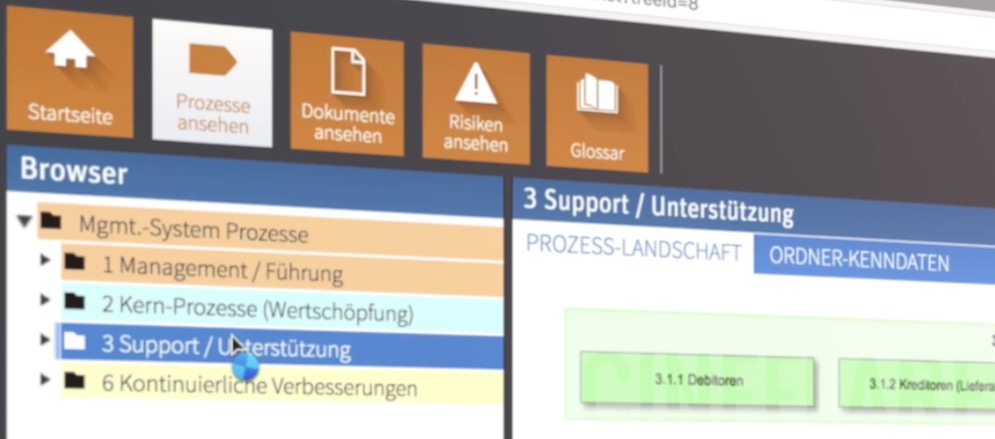
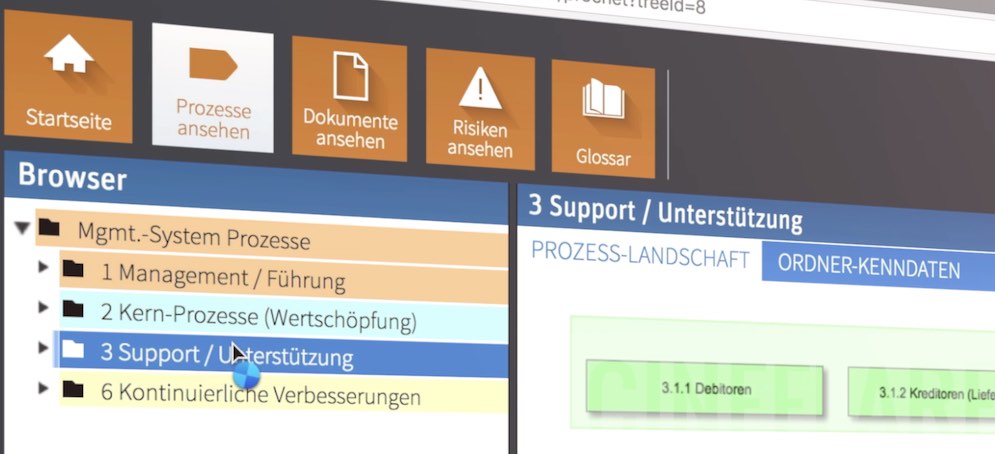
Last edit: 01 Jul 2017 13:02 by Flint_6.
Please Log in to join the conversation.
- Karsten Schlüter
-

- Offline
- Moderator
-

Less
More
- Posts: 3790
- Thank you received: 718
01 Jul 2017 11:23 - 01 Jul 2017 11:26 #89158
by Karsten Schlüter
… but not FinalCut is the culprit - probably the 'effects' you're using do use the wrong parameter to 'scale':
Your test, redone:
a 1080 project, clip in timeline 1080, clip on 2nd lane 4k, but shrunk to 5%
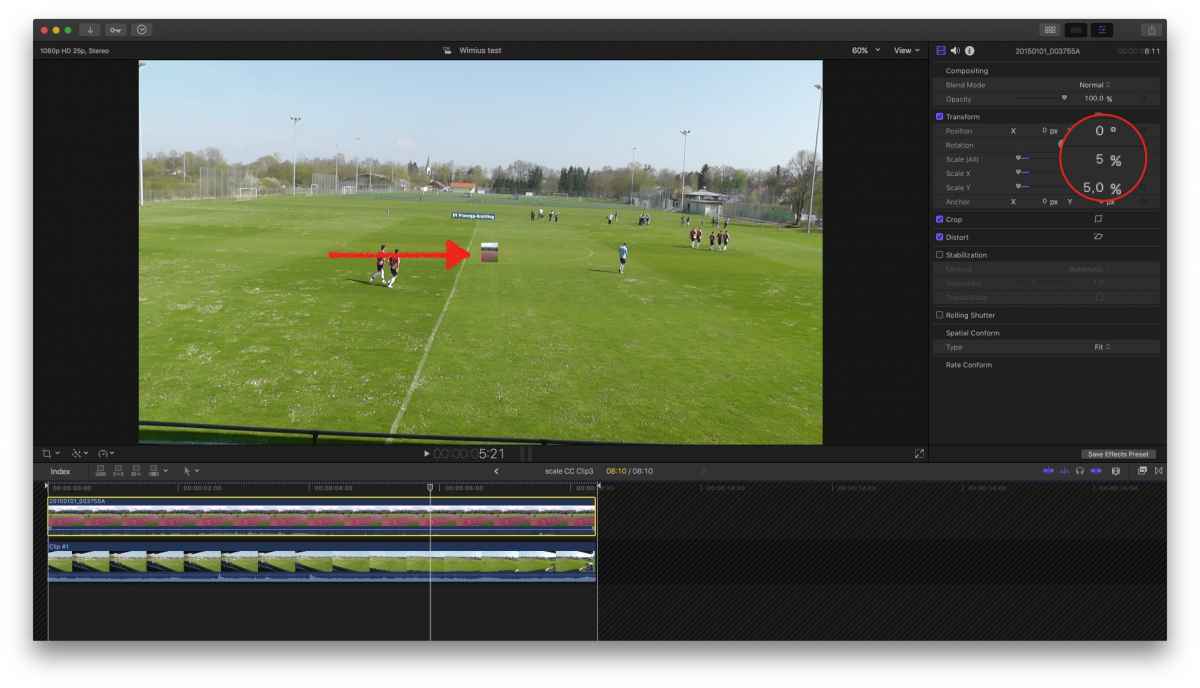
making it a compound, scale that by 2000% = the 1080 stuff crap, the 4k crystal clear!
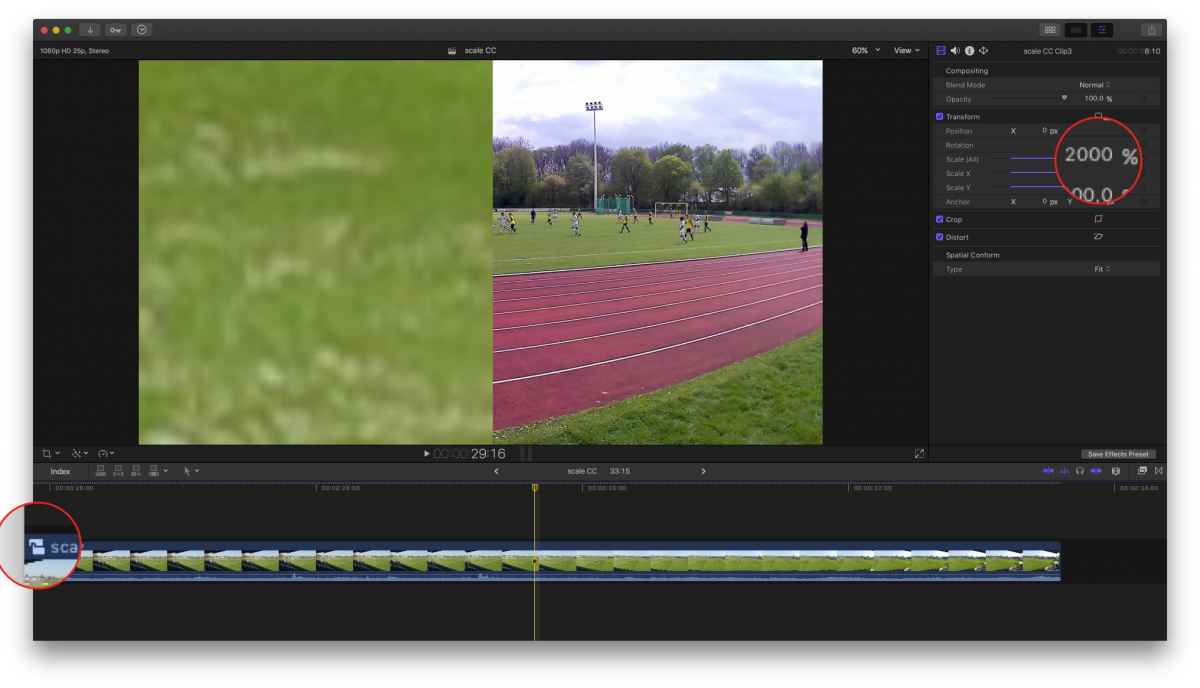
Sooo, if this is what you want - works in my set-up.
BUT…
being a plug-in maker, I do know, it can get 'tricky' when using Dropzones in Motion + scaling! Because, when you 'scale' the wrong parameter, you don't scale the clip but a new 'instance' = 'wrapper'. Which means, not the hidden 4000pixles get zoomed but the tiny 200pix (or whatever size the dropzone has natively) … = pixelmud.
Aside all that:
Screenflow!
Uncompared best tool for any screen recordings.
Some parts of the 'screen'-recordings are not pixel-based (e.g. the mousepointer), so much better scaling in post …
and for those on a budget 'Screenium' …
Replied by Karsten Schlüter on topic Zooming Clips - Avoiding Resampling and Blur
Flint_6 wrote: … I use effects to zoom in … A simple test is if I scale a clip to 5% and add an additional effect on top that allows me to zoom in again. When I zoom, the scaled down image is zoomed and as a result, is super blurry.…
… but not FinalCut is the culprit - probably the 'effects' you're using do use the wrong parameter to 'scale':
Your test, redone:
a 1080 project, clip in timeline 1080, clip on 2nd lane 4k, but shrunk to 5%
making it a compound, scale that by 2000% = the 1080 stuff crap, the 4k crystal clear!
Sooo, if this is what you want - works in my set-up.
BUT…
being a plug-in maker, I do know, it can get 'tricky' when using Dropzones in Motion + scaling! Because, when you 'scale' the wrong parameter, you don't scale the clip but a new 'instance' = 'wrapper'. Which means, not the hidden 4000pixles get zoomed but the tiny 200pix (or whatever size the dropzone has natively) … = pixelmud.
Aside all that:
Screenflow!
Uncompared best tool for any screen recordings.
Some parts of the 'screen'-recordings are not pixel-based (e.g. the mousepointer), so much better scaling in post …
and for those on a budget 'Screenium' …
Last edit: 01 Jul 2017 11:26 by Karsten Schlüter.
Please Log in to join the conversation.
01 Jul 2017 13:22 #89161
by Flint_6
Replied by Flint_6 on topic Zooming Clips - Avoiding Resampling and Blur
I see, Karsten. Thanks for some more tech background. I tried to dig in a bit. It seems the built-in scaling works fine, as you pointed out. The plugins I use to add some movement are text layers, and I think they probably work on the screen buffer below the effect. No matter what I do, it's always blurry.
I also tried adding the effect to the master compound clip on the top layer. But there, too, zooming gets blurry. Whereas the standard scaling in the transform section produces a nice and sharp image.
I guess everything "plugin" will not work. But as you may have read above, I solved my problem by simply changing project properties from 1080p to 4K. That was good luck. But next time, I'll use ScreenFlow!
I also tried adding the effect to the master compound clip on the top layer. But there, too, zooming gets blurry. Whereas the standard scaling in the transform section produces a nice and sharp image.
I guess everything "plugin" will not work. But as you may have read above, I solved my problem by simply changing project properties from 1080p to 4K. That was good luck. But next time, I'll use ScreenFlow!
Please Log in to join the conversation.
