


- Posts: 44
- Thank you received: 0
3 Post Moderation Rule for New Boarders (25 Jan 2021)
New boarders will have their posts moderated - Don't worry if you cannot see your post immediately.
Key frames not moving control points set on Draw Mask
- kindomalay
-
 Topic Author
- Offline
- Senior Member
-

Less
More
28 Jun 2017 02:45 - 28 Jun 2017 08:33 #89041
by kindomalay
Hi,
I'm getting frustrated, largely, I'll favour, through ignorance.
I've watched this video from Ripple Training - which does what I want.
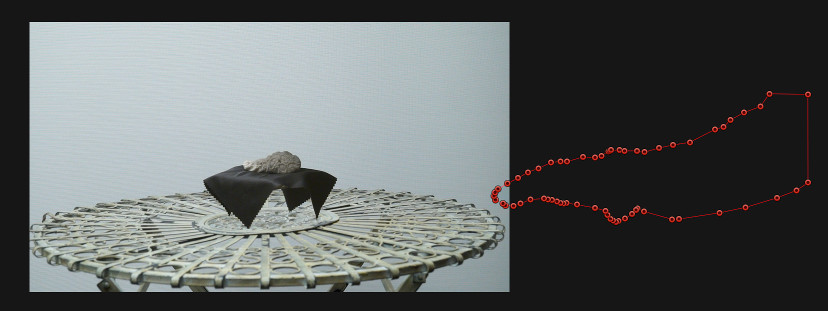
I have a hand that appears and then disappears in my scene but it's revealed through a draw mask. When the most of the hand is in shot, I put control points around it. I inserted a key frame. I moved it back second by second and moved some control points to auto insert a keyframe at each second with a view that I'd tidy it up afterward. At the point where the hand disappears altogether I move all the control points so they are out of shot and inserted a keyframe. Once it's there, I can drag the playhead across the frames and while I see a few individual points moving, the ones that were in the frame at that initial midpoint to reveal the hand don't move back there at all. The whole thing sits outside.
I have attached a screen shot. As you can see I have 63 control points so I'm trying to circumvent any unnecessary work. I have worked out how to select multiple control points at once and also drag the whole mask, although that needs a manual add keyframe, whereas moving one or more individually generates one automatically.
Many thanks for any thoughts. I am clearly missing something here.
Cheers
Colin
Key frames not moving control points set on Draw Mask was created by kindomalay
Hi,
I'm getting frustrated, largely, I'll favour, through ignorance.
I've watched this video from Ripple Training - which does what I want.
I have a hand that appears and then disappears in my scene but it's revealed through a draw mask. When the most of the hand is in shot, I put control points around it. I inserted a key frame. I moved it back second by second and moved some control points to auto insert a keyframe at each second with a view that I'd tidy it up afterward. At the point where the hand disappears altogether I move all the control points so they are out of shot and inserted a keyframe. Once it's there, I can drag the playhead across the frames and while I see a few individual points moving, the ones that were in the frame at that initial midpoint to reveal the hand don't move back there at all. The whole thing sits outside.
I have attached a screen shot. As you can see I have 63 control points so I'm trying to circumvent any unnecessary work. I have worked out how to select multiple control points at once and also drag the whole mask, although that needs a manual add keyframe, whereas moving one or more individually generates one automatically.
Many thanks for any thoughts. I am clearly missing something here.
Cheers
Colin
Last edit: 28 Jun 2017 08:33 by kindomalay.
Please Log in to join the conversation.
- kindomalay
-
Topic Author
- Offline
- Senior Member
-
Less
More
- Posts: 44
- Thank you received: 0
28 Jun 2017 03:03 - 28 Jun 2017 03:13 #89042
by kindomalay
Replied by kindomalay on topic Key frames not moving control points set on Draw Mask
Hmmm, I don't see the screen shot I thought I attached, only the link to the tutorial.
I clicked Add File - and selected the screen shot.
I then clicked insert and it appeared in this box, but doesn't show a paper clip as some of the other posts do.
Is it because attachments have to be more stringently moderated?
I clicked Add File - and selected the screen shot.
I then clicked insert and it appeared in this box, but doesn't show a paper clip as some of the other posts do.
Is it because attachments have to be more stringently moderated?
Last edit: 28 Jun 2017 03:13 by kindomalay.
Please Log in to join the conversation.

28 Jun 2017 08:25 #89046
by lichinho
Replied by lichinho on topic Key frames not moving control points set on Draw Mask
Maybe the image is too big, which is probably the case if it is a full screenshot of a retina mac.
Try opening it in Preview and change the size, then post again.
Try opening it in Preview and change the size, then post again.
Please Log in to join the conversation.
- kindomalay
-
Topic Author
- Offline
- Senior Member
-
Less
More
- Posts: 44
- Thank you received: 0
28 Jun 2017 08:34 - 28 Jun 2017 08:34 #89048
by kindomalay
Replied by kindomalay on topic Key frames not moving control points set on Draw Mask
That is exactly why. Thank you. See above.
Last edit: 28 Jun 2017 08:34 by kindomalay.
Please Log in to join the conversation.
28 Jun 2017 09:46 #89050
by lichinho
Replied by lichinho on topic Key frames not moving control points set on Draw Mask
I tried a quick test, and it does seem that some of the keyframes are being "forgotten" or lost.
It seems to help if I manually click the + button to add each keyframe (even though that should not be necessary after the first one).
It seems to help if I manually click the + button to add each keyframe (even though that should not be necessary after the first one).
Please Log in to join the conversation.
- kindomalay
-
Topic Author
- Offline
- Senior Member
-
Less
More
- Posts: 44
- Thank you received: 0
28 Jun 2017 09:56 #89051
by kindomalay
Replied by kindomalay on topic Key frames not moving control points set on Draw Mask
I tried a quick test also with only a handful and it seemed to work. Is there a limit to how many control points one can have?
When I was developing software, even after over 20 years, my colleague and friend would say, 'you manage to break things in a way that I could never have imagined.' Hmmmm.
Thanks for taking the time to have a play around with it for me.
When I was developing software, even after over 20 years, my colleague and friend would say, 'you manage to break things in a way that I could never have imagined.' Hmmmm.
Thanks for taking the time to have a play around with it for me.
Please Log in to join the conversation.
- kindomalay
-
Topic Author
- Offline
- Senior Member
-
Less
More
- Posts: 44
- Thank you received: 0
28 Jun 2017 10:13 #89052
by kindomalay
Replied by kindomalay on topic Key frames not moving control points set on Draw Mask
I did a search and found this from just over a year ago. It seems like it's a bug in FCPX.
Rotoscoping and keyframes 31 May 2016 20:01
The general consensus there seems to be to buy SliceX, and they let you download a trial, so I'm going to give that a go as it could save heaps of time!
Rotoscoping and keyframes 31 May 2016 20:01
The general consensus there seems to be to buy SliceX, and they let you download a trial, so I'm going to give that a go as it could save heaps of time!
Please Log in to join the conversation.
28 Jun 2017 10:17 #89053
by lichinho
Replied by lichinho on topic Key frames not moving control points set on Draw Mask
SliceX is great. It is very powerful and easier than doing all the keyframes by hand.
Please Log in to join the conversation.
- kindomalay
-
Topic Author
- Offline
- Senior Member
-
Less
More
- Posts: 44
- Thank you received: 0
29 Jun 2017 00:11 #89087
by kindomalay
Replied by kindomalay on topic Key frames not moving control points set on Draw Mask
SliceX does exactly what I want.
Thank you to all who took the time to read the topic.
Cheers
Thank you to all who took the time to read the topic.
Cheers
Please Log in to join the conversation.
