


3 Post Moderation Rule for New Boarders (25 Jan 2021)
New boarders will have their posts moderated - Don't worry if you cannot see your post immediately.
HTTP Live Streaming


22 Dec 2011 22:37 #2760
by dgwvideo
Creating history....one edit at a time !
HTTP Live Streaming was created by dgwvideo
I have been sharing from FCPX using the http live streaming for MP4 distribution on the web. The documentation sort of implies this is for Apple devices, but it appears that most PC's are capable of viewing videos streamed this way. I have tested this on Windows XP and Vista, as well as Mac OSX Tiger and Lion.
Is this how you all are providing streaming media for web use or are you using other encoding options?
Is this how you all are providing streaming media for web use or are you using other encoding options?
Creating history....one edit at a time !
Please Log in to join the conversation.


23 Dec 2011 20:53 #2786
by BenB
Replied by BenB on topic Re: HTTP Live Streaming
It'll only work if the server is configured to do HTTP streaming. I never touch it unless a client's IT people justify it. Especially since very little of what you see on the web is actually streamed. Any time you see anything having to buffer, it's progressive download, it can only play what's been buffered to your hard drive, then it deletes it after playback is finished.
No, this is not what Apple iOS devices use. The preset for them does something a bit different, and they don't stream. Use the Apple device presets for this purpose.
I use H.264 flat out. I've never had problems, and it's an Internet standard now. Even Flash Player (which is in transition to HTML5) reads it as a standard now. If you have to re-size it, my trick is to export full rez (Cmd+E), open that in QTPlayer 7, grab the bottom right of the window and re-size as desired, then Export again. In the settings there, set size to Current, set frame rate to current, rate stuff both to Auto, and the Quality slider to right smack in the middle. Audio to AC3, you can lower the rate to 40 or 30 something. Audio is not a huge deal. But this will get you a small file size with great quality up on the web.
No, this is not what Apple iOS devices use. The preset for them does something a bit different, and they don't stream. Use the Apple device presets for this purpose.
I use H.264 flat out. I've never had problems, and it's an Internet standard now. Even Flash Player (which is in transition to HTML5) reads it as a standard now. If you have to re-size it, my trick is to export full rez (Cmd+E), open that in QTPlayer 7, grab the bottom right of the window and re-size as desired, then Export again. In the settings there, set size to Current, set frame rate to current, rate stuff both to Auto, and the Quality slider to right smack in the middle. Audio to AC3, you can lower the rate to 40 or 30 something. Audio is not a huge deal. But this will get you a small file size with great quality up on the web.
Please Log in to join the conversation.
23 Dec 2011 21:14 #2788
by dgwvideo
Creating history....one edit at a time !
Replied by dgwvideo on topic Re: HTTP Live Streaming
Thanks, Ben. I'll give your method a shot.
Creating history....one edit at a time !
Please Log in to join the conversation.
27 Dec 2011 22:09 #2825
by dgwvideo
Creating history....one edit at a time !
Replied by dgwvideo on topic Re: HTTP Live Streaming
to Ben...
your suggestions work perfectly. Thanks.
your suggestions work perfectly. Thanks.
Creating history....one edit at a time !
Please Log in to join the conversation.
27 Dec 2011 22:27 #2826
by BenB
Replied by BenB on topic Re: HTTP Live Streaming
I know. Um, I mean, you're welcome.
Please Log in to join the conversation.
02 Jan 2012 22:00 #2922
by dgwvideo
Creating history....one edit at a time !
Replied by dgwvideo on topic Re: HTTP Live Streaming
@BenB
Happy New Year !
I could still use a few points of clarification on your streaming post. The videos I encoded did turn out well, although after re-reading your post, I am not sure I followed your directions exactly. I used Quicktime 7.6.6, resized as you suggested but there are other options you did not mention so I would like to run these by you and get your thoughts.
It sounds like you were suggesting streaming is not common on the web, although you don't recommend download. Is this correct?
Here is what I've done (if you can supply feedback):
Opened in QT7 and sized as needed.
Export a quicktime movie using current settings and H.264 compression.
Select optimize for download.
Exported and then changed the extension from .mov to .mp4.
Quality per above was great. When accessing online from a PC without quicktime, the video had to entirely load prior to playback (which is not really what I want).
Next encode, did same as above only this time selected optimize for streaming, then selected fast start (no hints) under streaming. Got same good quality and now on PC it seems to play well.
Just want to be sure I am doing this correctly. Also, I tried this with and without frame re-ordering. Do you have a suggestion on that?
Happy New Year !
I could still use a few points of clarification on your streaming post. The videos I encoded did turn out well, although after re-reading your post, I am not sure I followed your directions exactly. I used Quicktime 7.6.6, resized as you suggested but there are other options you did not mention so I would like to run these by you and get your thoughts.
It sounds like you were suggesting streaming is not common on the web, although you don't recommend download. Is this correct?
Here is what I've done (if you can supply feedback):
Opened in QT7 and sized as needed.
Export a quicktime movie using current settings and H.264 compression.
Select optimize for download.
Exported and then changed the extension from .mov to .mp4.
Quality per above was great. When accessing online from a PC without quicktime, the video had to entirely load prior to playback (which is not really what I want).
Next encode, did same as above only this time selected optimize for streaming, then selected fast start (no hints) under streaming. Got same good quality and now on PC it seems to play well.
Just want to be sure I am doing this correctly. Also, I tried this with and without frame re-ordering. Do you have a suggestion on that?
Creating history....one edit at a time !
Please Log in to join the conversation.
02 Jan 2012 22:28 - 02 Jan 2012 22:36 #2924
by BenB
Replied by BenB on topic Re: HTTP Live Streaming
I do not in any way "not recommend" progressive download, in fact most of the time it's your only option, and most of the time uses have no clue how to format for streaming (you have to get info from your ISP, etc).
When you Export from inside QTPro Player, "Movie To QuickTime Movie", click "Options", "Settings", current frame rate, Key Frames and Data rate "Automatic", Quality "Medium". For Size, "Current".
For Internet Streaming, "Fast Start" default. There is almost never a need to go any deeper into those settings, and you can actually in fact make things play worse if you're not careful. These are QT Streaming Server settings. Most web servers have it installed. HTTP Live Streaming again needs the streaming server service installed on the web server. All streaming media needs it's service installed and configured on the server hosting it, and if you get into the details, you'll have to collaborate with the ISP or Sys Admin about what format and settings your videos need to use. It's a royal PITA. So "Fast Start" takes care of things really easily for end users.
I personally never change the suffix, and tell PC users that they simply need to install QT, period. It takes all of 30 seconds an is free. Flash Player will read .mov H.264 files, any PC user without QT on their machine is just lazy or ignorant.
Since H.264 is a Long-GOP format, I always turn on Frame Reordering to insure best results. You won't visually see any difference, as it doesn't effect image quality. It simply reorders the I, B and P group structure (GOP) for the most efficient playback. Otherwise it uses the GOP structure whatever software you used created. Just leave it on.
Where are you seeing "Optimized For Download"?
Finally, if you note all of your settings, go into Compressor 4, create a customized preset with those specific settings, you can access that preset from inside FCP X's Share menu, and save time.
When you Export from inside QTPro Player, "Movie To QuickTime Movie", click "Options", "Settings", current frame rate, Key Frames and Data rate "Automatic", Quality "Medium". For Size, "Current".
For Internet Streaming, "Fast Start" default. There is almost never a need to go any deeper into those settings, and you can actually in fact make things play worse if you're not careful. These are QT Streaming Server settings. Most web servers have it installed. HTTP Live Streaming again needs the streaming server service installed on the web server. All streaming media needs it's service installed and configured on the server hosting it, and if you get into the details, you'll have to collaborate with the ISP or Sys Admin about what format and settings your videos need to use. It's a royal PITA. So "Fast Start" takes care of things really easily for end users.
I personally never change the suffix, and tell PC users that they simply need to install QT, period. It takes all of 30 seconds an is free. Flash Player will read .mov H.264 files, any PC user without QT on their machine is just lazy or ignorant.
Since H.264 is a Long-GOP format, I always turn on Frame Reordering to insure best results. You won't visually see any difference, as it doesn't effect image quality. It simply reorders the I, B and P group structure (GOP) for the most efficient playback. Otherwise it uses the GOP structure whatever software you used created. Just leave it on.
Where are you seeing "Optimized For Download"?
Finally, if you note all of your settings, go into Compressor 4, create a customized preset with those specific settings, you can access that preset from inside FCP X's Share menu, and save time.
Last edit: 02 Jan 2012 22:36 by BenB.
Please Log in to join the conversation.
- Tom Wolsky
-

- Offline
- Moderator
-

02 Jan 2012 22:39 #2925
by Tom Wolsky
Replied by Tom Wolsky on topic Re: HTTP Live Streaming
The whole point of HTTP Live Streaming is that ISPs don't have to be configured. You don't need a streaming server, any server can be used to stream. The problem is that not all browsers support it. Safari does, and probably more will in the future, probably by the middle of the year I'm guessing.
Please Log in to join the conversation.
02 Jan 2012 22:48 - 02 Jan 2012 22:50 #2926
by dgwvideo
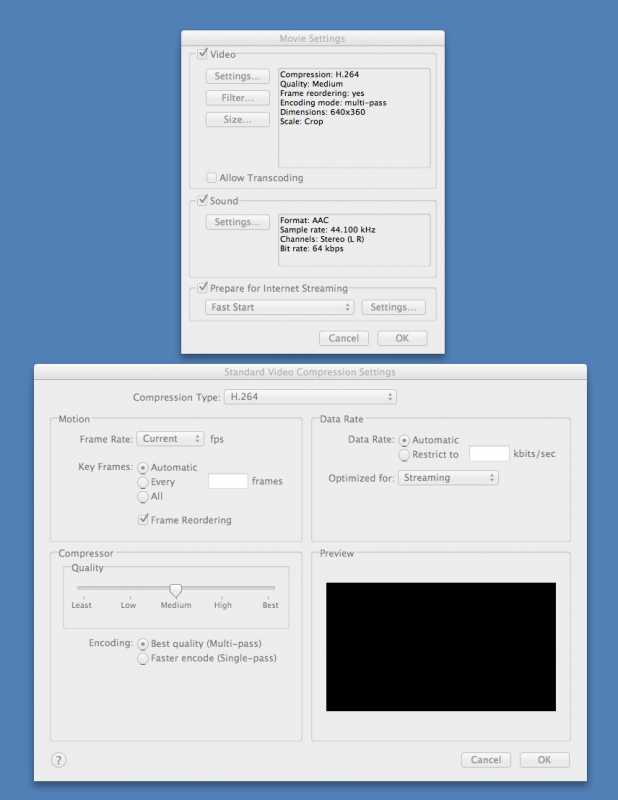
Here is a screenshot. It defaults to download and is ghosted out, but if you select the data rate field as "restrict to", then it becomes un-ghosted and you can change it to streaming (as shown in the screenshot). Then you can go back to automatic and it will stay defaulted to streaming.
When I tried to just leave it at download, I believe it had to load prior to playback because I also did not select "prepare for Internet Streaming". So you are suggesting leave it at download but also select prepare for streaming, fast start and nothing further?
Creating history....one edit at a time !
Replied by dgwvideo on topic Re: HTTP Live Streaming
BenB wrote:
Where are you seeing "Optimized For Download"?
Here is a screenshot. It defaults to download and is ghosted out, but if you select the data rate field as "restrict to", then it becomes un-ghosted and you can change it to streaming (as shown in the screenshot). Then you can go back to automatic and it will stay defaulted to streaming.
When I tried to just leave it at download, I believe it had to load prior to playback because I also did not select "prepare for Internet Streaming". So you are suggesting leave it at download but also select prepare for streaming, fast start and nothing further?
Creating history....one edit at a time !
Last edit: 02 Jan 2012 22:50 by dgwvideo. Reason: wrong picture format of attachment
Please Log in to join the conversation.
02 Jan 2012 23:06 #2927
by BenB
Replied by BenB on topic Re: HTTP Live Streaming
Select "Automatic" and leave the rest of that section at it's defaults. But there's nothing wrong with setting it to Streaming. I've never found it to make a huge difference. Streaming actually reduces the data rate, thus potentially image quality. But which ever works for you. Experiment with various stuff and see.
"HTTP Live Streaming" is actually an Apple proprietary implementation based on the HTTP specs, and actually does need to be configured on the server sending out the "HTTP Live Streaming" data packages.
"HTTP Live Streaming" is actually an Apple proprietary implementation based on the HTTP specs, and actually does need to be configured on the server sending out the "HTTP Live Streaming" data packages.
Please Log in to join the conversation.
02 Jan 2012 23:21 #2928
by dgwvideo
Creating history....one edit at a time !
Replied by dgwvideo on topic Re: HTTP Live Streaming
Yeah, I didn't really notice a difference but just wanted your opinion. Thank you. Now for a day full of re-encoding....
Creating history....one edit at a time !
Please Log in to join the conversation.
