


- Posts: 1
- Thank you received: 0
3 Post Moderation Rule for New Boarders (25 Jan 2021)
New boarders will have their posts moderated - Don't worry if you cannot see your post immediately.
Color correction FCP 10.3.4. Change a single color from pink to red.
- rookeydooks
-
 Topic Author
- Offline
- New Member
-

Less
More
20 Jun 2017 11:57 #88888
by rookeydooks
I have a video loop with yellow, blue and pink squares.
I need the pink squares to be red spares but keep the yellow and blue as they are.
Is there an easy way of doing this with color correction ? I found a couple of tutorials with an eye dropper tool but cant seem to find that on m=y FCPX 10.3.4.
I've attached an image of the colored squares.
Many thanks for your time.
I need the pink squares to be red spares but keep the yellow and blue as they are.
Is there an easy way of doing this with color correction ? I found a couple of tutorials with an eye dropper tool but cant seem to find that on m=y FCPX 10.3.4.
I've attached an image of the colored squares.
Many thanks for your time.

Please Log in to join the conversation.
- Tom Wolsky
-

- Offline
- Moderator
-

20 Jun 2017 15:34 #88903
by Tom Wolsky
Replied by Tom Wolsky on topic Color correction FCP 10.3.4. Change a single color from pink to red.
Are you using the color mask in the Color Correction effect?
Please Log in to join the conversation.
- Karsten Schlüter
-

- Offline
- Moderator
-
Less
More
- Posts: 3790
- Thank you received: 718
20 Jun 2017 15:39 - 20 Jun 2017 15:41 #88904
by Karsten Schlüter
Replied by Karsten Schlüter on topic Color correction FCP 10.3.4. Change a single color from pink to red.
Welcome Ian to fcp.co 
Apply a Color Correction to your clip:

Then, in the Inspector, hover with your mouse aside 'Color correction', click the appearing icon and …
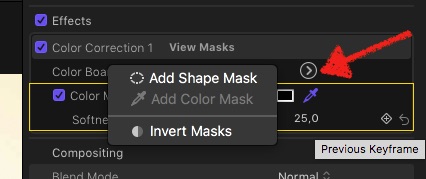
… select Color Mask. The picker is already selected, click and hold in the pink, drag to adjust 'width'…
Then correct selected areas to any color…

(your screenshot/material is very compressed, so a clean [strike]coal[/strike] selection is a bit … tricky.)
Apply a Color Correction to your clip:
Then, in the Inspector, hover with your mouse aside 'Color correction', click the appearing icon and …
… select Color Mask. The picker is already selected, click and hold in the pink, drag to adjust 'width'…
Then correct selected areas to any color…
(your screenshot/material is very compressed, so a clean [strike]coal[/strike] selection is a bit … tricky.)
Last edit: 20 Jun 2017 15:41 by Karsten Schlüter.
Please Log in to join the conversation.
