


- Posts: 786
- Thank you received: 21
3 Post Moderation Rule for New Boarders (25 Jan 2021)
New boarders will have their posts moderated - Don't worry if you cannot see your post immediately.
Playback issues...Time to convert to Proxy?
- Jonathan Levin
-
 Topic Author
- Offline
- Platinum Member
-

Less
More
19 Jun 2017 16:00 #88863
by Jonathan Levin
Playback issues...Time to convert to Proxy? was created by Jonathan Levin
Hi all.
I am working on a video that was shot 1080p 30fps ProRes 422.
I imported files but when I playback some of the video in my project, video drops out for a time turning viewer black, but then continues after several seconds. Sometimes the audio keeps playing, but with a black viewer screen. I have my View settings set to Better Performance when this happens.
I'm guessing that I should work with Proxy, however I did not create those on initial import. I know there is a command for creating already imported video, just can't seem to find it. Am I thinking the right way?
Also, if you forget to switch back to Original/Optimized BEFORE creating a master file, does that just create a Proxy master file, or is master file default to full res version.
Thanks.
JL
I am working on a video that was shot 1080p 30fps ProRes 422.
I imported files but when I playback some of the video in my project, video drops out for a time turning viewer black, but then continues after several seconds. Sometimes the audio keeps playing, but with a black viewer screen. I have my View settings set to Better Performance when this happens.
I'm guessing that I should work with Proxy, however I did not create those on initial import. I know there is a command for creating already imported video, just can't seem to find it. Am I thinking the right way?
Also, if you forget to switch back to Original/Optimized BEFORE creating a master file, does that just create a Proxy master file, or is master file default to full res version.
Thanks.
JL
Please Log in to join the conversation.
- Jonathan Levin
-
Topic Author
- Offline
- Platinum Member
-
Less
More
- Posts: 786
- Thank you received: 21
19 Jun 2017 16:03 #88864
by Jonathan Levin
Replied by Jonathan Levin on topic Playback issues...Time to convert to Proxy?
I forgot to add, the clips that I'm have the issues with are Synchronized , if that helps.
Please Log in to join the conversation.
- Tom Wolsky
-

- Offline
- Moderator
-

19 Jun 2017 16:11 #88865
by Tom Wolsky
Replied by Tom Wolsky on topic Playback issues...Time to convert to Proxy?
Select the clips in the browser. Right-click and choose transcode media. Switch viewer to proxy playback.
Please Log in to join the conversation.
- Jonathan Levin
-
Topic Author
- Offline
- Platinum Member
-
Less
More
- Posts: 786
- Thank you received: 21
19 Jun 2017 16:37 #88866
by Jonathan Levin
Replied by Jonathan Levin on topic Playback issues...Time to convert to Proxy?
Thanks Tom!
Do I select the Synchronized Clips, Pre-Synced clips, or does it not matter?
Also, I notice that you can't Transcode from Project, which is fine, so I assume all Transcode is done from the Browser?
Do I select the Synchronized Clips, Pre-Synced clips, or does it not matter?
Also, I notice that you can't Transcode from Project, which is fine, so I assume all Transcode is done from the Browser?
Please Log in to join the conversation.

19 Jun 2017 20:22 #88867
by JoeEditor
Replied by JoeEditor on topic Playback issues...Time to convert to Proxy?
Transcode in Browser, the original clips, not the sync clips.
Yes, if set to edit with Proxy, you export Proxy.
Yes, if set to edit with Proxy, you export Proxy.
Please Log in to join the conversation.
- Jonathan Levin
-
Topic Author
- Offline
- Platinum Member
-
Less
More
- Posts: 786
- Thank you received: 21
19 Jun 2017 20:53 #88871
by Jonathan Levin
Replied by Jonathan Levin on topic Playback issues...Time to convert to Proxy?
Oh, thanks for that FCPX.guru!
One last question: If I transcode the Original clips in browser, do I need to re-create my synced clips to access the proxy? Hopefully not :dry:
JL
One last question: If I transcode the Original clips in browser, do I need to re-create my synced clips to access the proxy? Hopefully not :dry:
JL
Please Log in to join the conversation.
20 Jun 2017 00:58 #88874
by JoeEditor
Replied by JoeEditor on topic Playback issues...Time to convert to Proxy?
You shouldn't need to, no. Just switch the Viewer menu setting to Proxy.
Please Log in to join the conversation.
- Karsten Schlüter
-

- Offline
- Moderator
-
Less
More
- Posts: 3790
- Thank you received: 718
20 Jun 2017 09:01 #88882
by Karsten Schlüter
Replied by Karsten Schlüter on topic Playback issues...Time to convert to Proxy?
keep in mind, any 'stacked' portions of your project, compounds, multicams, synched, comps, ask your drive(s) in use to deliver simultaneously all those streams.
So, it is widely recommended, to use external media storage - your internal platter should be busy with other tasks) … and fast storage. (I'm fine with usb3/SSDs)
… this advice is only valid, if none of those internal über-SSDs in the new MBp or iMacs is in use …
So, it is widely recommended, to use external media storage - your internal platter should be busy with other tasks) … and fast storage. (I'm fine with usb3/SSDs)
… this advice is only valid, if none of those internal über-SSDs in the new MBp or iMacs is in use …
Please Log in to join the conversation.
- Jonathan Levin
-
Topic Author
- Offline
- Platinum Member
-
Less
More
- Posts: 786
- Thank you received: 21
20 Jun 2017 15:02 #88897
by Jonathan Levin
Replied by Jonathan Levin on topic Playback issues...Time to convert to Proxy?
Hey Karsten,
Yes, I have all my media on a seperate drive (7200rpm) Like me, I think my whole set up is getting old and grumpy around the edges. Working with 204GHz Mac Pro 2010 version 5.1 with 8GB memory.
FCPX.guru- going to try the proxy thing right now.
Jonathan
Yes, I have all my media on a seperate drive (7200rpm) Like me, I think my whole set up is getting old and grumpy around the edges. Working with 204GHz Mac Pro 2010 version 5.1 with 8GB memory.
FCPX.guru- going to try the proxy thing right now.
Jonathan
Please Log in to join the conversation.
- yogi_kenobi
-

- Offline
- New Member
-

Less
More
- Posts: 3
- Thank you received: 0
20 Jun 2017 19:54 #88913
by yogi_kenobi
Quick clarification that FCPX always create the exports from the original imported media and the viewer original/proxy setting does not affect that. That setting only affects what is used in editing viewer.
Cheers,
jokke
Replied by yogi_kenobi on topic Playback issues...Time to convert to Proxy?
FCPX.guru wrote: Yes, if set to edit with Proxy, you export Proxy.
Quick clarification that FCPX always create the exports from the original imported media and the viewer original/proxy setting does not affect that. That setting only affects what is used in editing viewer.
Cheers,
jokke
Please Log in to join the conversation.
- Tom Wolsky
-
- Offline
- Moderator
-
20 Jun 2017 23:50 #88917
by Tom Wolsky
Replied by Tom Wolsky on topic Playback issues...Time to convert to Proxy?
This is incorrect. When you export set to proxy playback you are exporting prpxy files. You can tell this by transcoding only some of your project to proxy and then exporting. You will get a missing media warning, and you will see the missy proxy indicator in your exported file.
Please Log in to join the conversation.
- yogi_kenobi
-
- Offline
- New Member
-
Less
More
- Posts: 3
- Thank you received: 0
21 Jun 2017 07:39 #88923
by yogi_kenobi
Replied by yogi_kenobi on topic Playback issues...Time to convert to Proxy?
I stand corrected, but I wonder if this has changed at some point to this behaviour? IMHO it makes more sense that the viewer setting affects only the viewer and if for some reason there's a need to use proxy media the choice is something to be made on export dialogs. Well, maybe it's time to do little feedback 
Please Log in to join the conversation.
21 Jun 2017 10:04 #88924
by JoeEditor
Replied by JoeEditor on topic Playback issues...Time to convert to Proxy?
Was always this way. 1- If it stays this way, we need something on-screen to remind us we are in Proxy mode, 2- it really should "always" export full rez, IMHO. But it doesn't.
Please Log in to join the conversation.
- yogi_kenobi
-
- Offline
- New Member
-
Less
More
- Posts: 3
- Thank you received: 0
21 Jun 2017 10:14 #88927
by yogi_kenobi
Replied by yogi_kenobi on topic Playback issues...Time to convert to Proxy?
I must have at some point programmed my brain the way I'd like it to be. I whole heartedly agree with your point 2. and encourage anyone to leave feedback here
www.apple.com/feedback/finalcutpro.html
, I did.
Please Log in to join the conversation.
- Jonathan Levin
-
Topic Author
- Offline
- Platinum Member
-
Less
More
- Posts: 786
- Thank you received: 21
21 Jun 2017 15:19 #88930
by Jonathan Levin
Replied by Jonathan Levin on topic Playback issues...Time to convert to Proxy?
Yeah. This could be a disaster in the making making a Master File in Proxy! So yes there should be a dialog when creating a master file "Are you sure you want to create a Proxy Master File?" or something to that affect.
Please Log in to join the conversation.
21 Jun 2017 15:25 #88932
by JoeEditor
Replied by JoeEditor on topic Playback issues...Time to convert to Proxy?
I think a symbol in the tool bar would be good. Shows if you're in one state or the other.
Please Log in to join the conversation.
- Karsten Schlüter
-
- Offline
- Moderator
-
Less
More
- Posts: 3790
- Thank you received: 718
21 Jun 2017 15:56 #88935
by Karsten Schlüter
luckily, 'Proxy' is in any language 'Proxy'…
so, keep it simple:
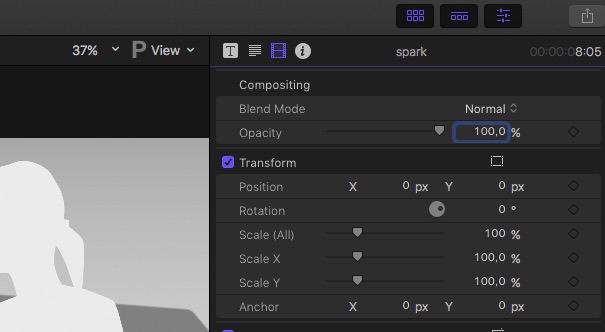
Replied by Karsten Schlüter on topic Playback issues...Time to convert to Proxy?
FCPX.guru wrote: I think a symbol in the tool bar would be good. ….
luckily, 'Proxy' is in any language 'Proxy'…
so, keep it simple:
Please Log in to join the conversation.
21 Jun 2017 19:44 #88936
by JoeEditor
Replied by JoeEditor on topic Playback issues...Time to convert to Proxy?
Not every language, "agisdisgi". But yeah, a P or something like that would work just fine.
Please Log in to join the conversation.
